Customer Ratings & Reviews


- Model:
- RAXE290-100NAS
- SKU:
- 6515295
Rating by feature
- Setup
Rating 4.3 out of 5 stars
- Range
Rating 4.6 out of 5 stars
- Signal Strength
Rating 4.6 out of 5 stars
Customers are saying
Customers value the Nighthawk AXE7300 Tri-Band Wi-Fi Router for its impressive range, ease of setup, and strong signal, leading to great performance for streaming and general internet use. Many appreciate the user-friendly app and the included security features. While some find the router large, the overwhelmingly positive feedback highlights its ability to provide extensive coverage and reliable connectivity. A subscription is needed to unlock the full potential of parental controls.
This summary was generated by AI based on customer reviews.
Nothing "pro" about this 400 dollar product
||Posted . Owned for 2 weeks when reviewed.This reviewer received promo considerations or sweepstakes entry for writing a review.The user has ZERO ability to do any sort of traffic monitoring on their network through this product. The only feature that somewhat approaches "monitoring" is seeing what devices are connected to your network. Whatever. If you're thinking about spending 400 dollars on a router just buy a pfsense box and save your sanity.
No, I would not recommend this to a friend- Pros mentioned:Range

Staying ahead of the class
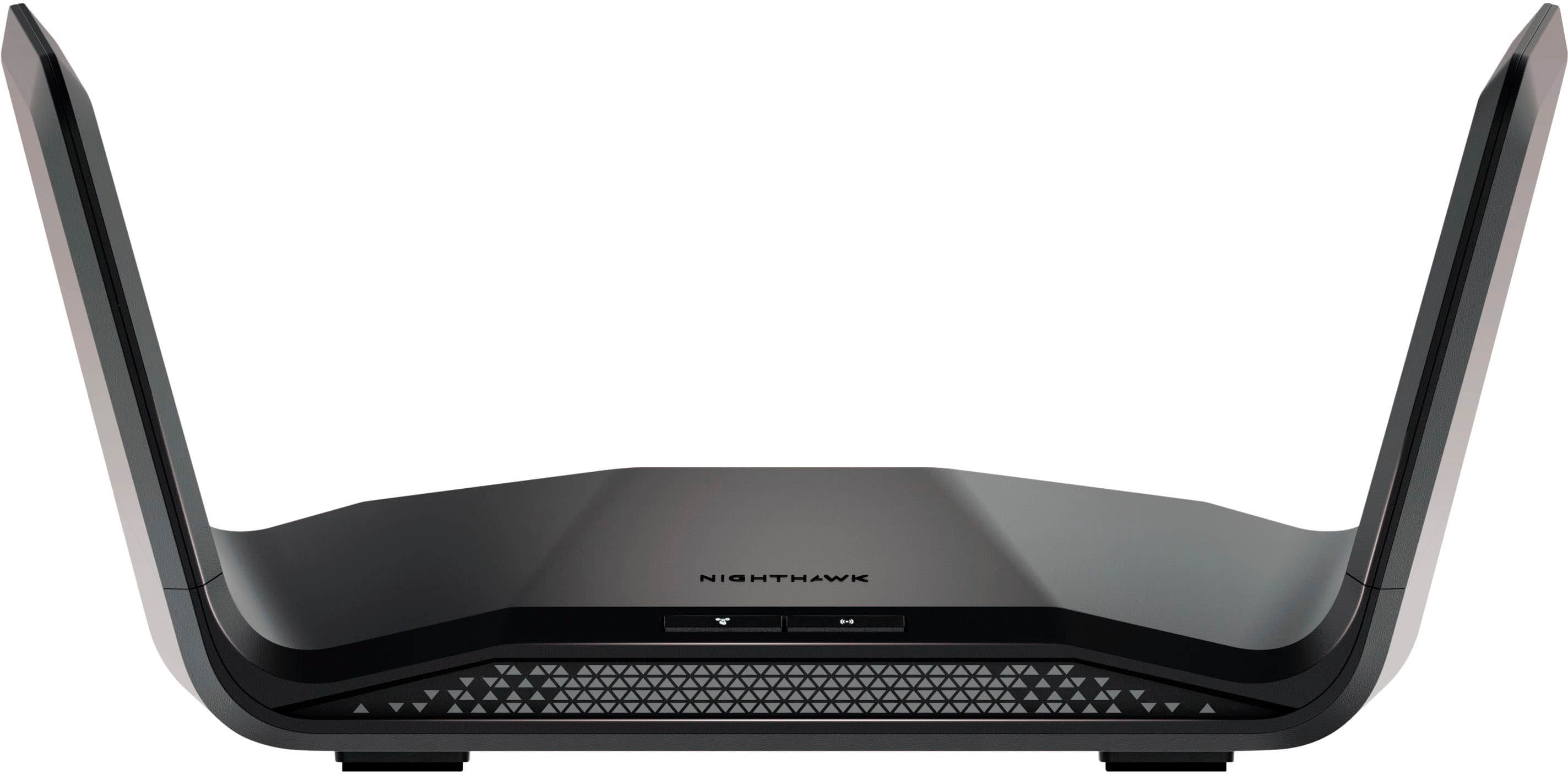
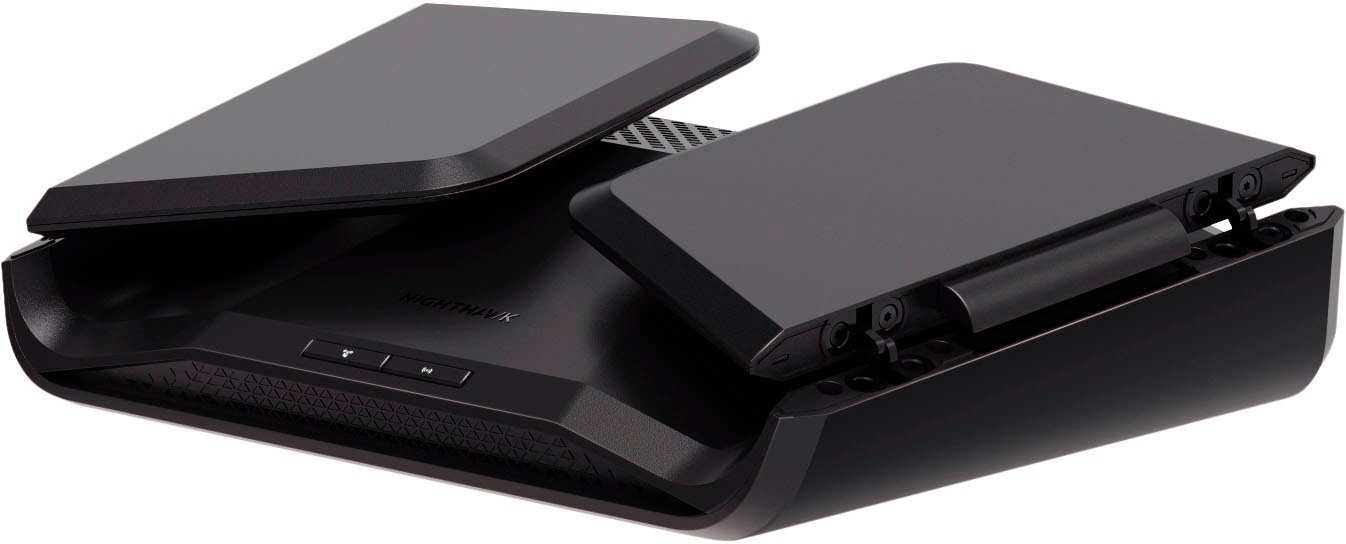
|Posted .This reviewer received promo considerations or sweepstakes entry for writing a review.Netgear routinely releases routers that are some of the best in the market, whether it's a mesh system or single router solution like this one, you're in good hands when selecting one of their products at appropriate speed, capability and coverage for your environment. The Netgear Nighthawk AXE7300 is equally one of those options. To start, it's packaged in the same blue and black liveried box that most Netgear equipment comes in. I'm a particular fan of this new shape of router that looks like batwings when opened up. Moving away from the spider-esque design of so many antennas is a welcome thing as I think most people try to hide away their devices from being seen because they are eyesores. Unfortunately that usually means putting them in cabinets or behind furniture, which greatly reduces the capability of the device, particularly in the higher frequencies which is much more attenuated by materials that it has to pass through. In setup, the Nighthawk AXE7300 is much like the majority of routers of this era, with a web interface that walks you through basic setup, or the option to use an app on your phone. I've not been a particular fan of any of the apps that manage the routers, but I will say that this generation has seen an improvement in that regard. As for use, it's nice to see the WiFi 6E devices becoming commonplace and affordable. My new WiFi 6E capable motherboard connects easily and quickly to the router on the 6GHz band and performs well, I've not had any concerns of connectivity or performance. My existing AX and older devices also have no issues. Throughput is good, coverage is good, although as expected, when putting more doors, walls and floors between myself and the router, the range starts to drop a lot. The one thing that I'd like to see Netgear do more is the add-on mesh capability that many of the other manufacturers offer, the ability to turn multiple similar era devices into an ad-hoc mesh system rather than having to buy a mesh-specific system. Netgear has some of the best mesh units in the business, but no capability to do it without buying a mesh-specific system. All in all, this is a great router with decent range and excellent throughput. If the area you are intending to cover is within the capabilities of this device, I heartily recommend it.
I would recommend this to a friend Wack, don't do it.
||Posted . Owned for 2 weeks when reviewed.This reviewer received promo considerations or sweepstakes entry for writing a review.Dookie performance for the dollar spent. Slow and stressful.
No, I would not recommend this to a friendBrand response from Netgear Support
Posted .Hi D4DM1N,
Thank you for your review, we appreciate your feedback and we want you to know that your experience is important to us. We are sorry to hear that you had a difficult experience with your product. We recommend checking out these troubleshooting resources for your wireless network and device: https://kb.netgear.com/1110/How-do-I-troubleshoot-my-wireless-network, and also: https://kb.netgear.com/000061716/How-can-I-troubleshoot-my-NETGEAR-router?language=en_US.
We also recommend ensuring your device is on the latest firmware, v1.0.7.62, released as recently as 10-10-22 if you have not done so already: https://kb.netgear.com/000065221/RAXE290-Firmware-Version-1-0-7-62.
If you need further assistance, you can contact NETGEAR Support by going to: https://my.netgear.com/support/contact.aspx and follow the onscreen instructions. Once you’ve registered your product you will be given the options of contacting Support through Phone, Chat, or email.
Regards,
NETGEAR Team
Same Junk
||Posted . Owned for 2 weeks when reviewed.This reviewer received promo considerations or sweepstakes entry for writing a review.I have never been a fan of Netgear but I figured I would try again. Same things as years past. This router drops wifi signal a lot. Go with TP-Link instead!
No, I would not recommend this to a friendBrand response from Netgear Support
Posted .Hi floridasound,
Thank you for your review, we appreciate your feedback and we want you to know that your experience is important to us. We are sorry to hear that you had a difficult experience with your product. When experiencing WiFi dropping, we recommend checking out these troubleshooting resources: https://kb.netgear.com/1110/How-do-I-troubleshoot-my-wireless-network, and also for your device: https://kb.netgear.com/000061716/How-can-I-troubleshoot-my-NETGEAR-router?language=en_US.
We also recommend ensuring your RAXE290 is on the latest firmware v1.0.7.62, released as recently as 10-10-22 if you have not done so already as one of the enhancements to the firmware is to Improve Stability: https://kb.netgear.com/000065221/RAXE290-Firmware-Version-1-0-7-62.
If you need further assistance, you can contact NETGEAR Support by going to: https://my.netgear.com/support/contact.aspx and follow the onscreen instructions. Once you’ve registered your product you will be given the options of contacting Support through Phone, Chat, or email.
Regards,
NETGEAR Team
Unreliable
||Posted . Owned for 2 months when reviewed.This reviewer received promo considerations or sweepstakes entry for writing a review.anytime there is an internet outage this router will not re-connect without a complete factory reset. Way too expensive for the quality of performance
No, I would not recommend this to a friendBrand response from Netgear Support
Posted .Hi MichaelC,
Thank you for your review, we appreciate your feedback and we want you to know that your experience is important to us. We are sorry to hear that you had a difficult experience with your product. This resource should help you troubleshoot your device: https://kb.netgear.com/000061716/How-can-I-troubleshoot-my-NETGEAR-router?language=en_US.
We also recommend ensuring your device is on the latest firmware, v1.0.7.62, if you have not done so already: https://kb.netgear.com/000065221/RAXE290-Firmware-Version-1-0-7-62.
If you need further assistance, you can contact NETGEAR Support by going to: https://my.netgear.com/support/contact.aspx and follow the onscreen instructions. Once you’ve registered your product you will be given the options of contacting Support through Phone, Chat, or email.
Regards,
NETGEAR Team
Netgear Hawk WIFI
||Posted .This reviewer received promo considerations or sweepstakes entry for writing a review.I would NOT recommend this product to anyone. It does not work properly with other Netgear devices.
No, I would not recommend this to a friendBrand response from Netgear Support
Posted .Hi MarilynP,
Thank you for your review, we appreciate your feedback and we want you to know that your experience is important to us. We are sorry to hear that you had a difficult experience with your product. This resource should help you troubleshoot your device: https://kb.netgear.com/000061716/How-can-I-troubleshoot-my-NETGEAR-router?language=en_US.
If you need further assistance, you can contact NETGEAR Support by going to: https://my.netgear.com/support/contact.aspx and follow the onscreen instructions. Once you’ve registered your product you will be given the options of contacting Support through Phone, Chat, or email.
Regards,
NETGEAR Team
Didn’t like it
||Posted .This reviewer received promo considerations or sweepstakes entry for writing a review.Not an upgrade it worked slower than my 5 year old router. I returned it
No, I would not recommend this to a friendBrand response from Netgear Support
Posted .Hi Stretch,
Thank you for your review, we appreciate your feedback and we want you to know that your experience is important to us. We're sorry to hear that you had problems with your RAXE290 and have already returned it. When experiencing slow speeds with your device, we recommend checking out these troubleshooting resources: https://kb.netgear.com/1110/How-do-I-troubleshoot-my-wireless-network, and also: https://kb.netgear.com/000064366/How-do-I-troubleshoot-slow-Internet-connections-when-I-m-connected-to-my-NETGEAR-router?language=en_US.
If you decide to repurchase the router or any other NETGEAR product and have any issues, NETGEAR Support will be happy to help you. You can contact NETGEAR Support by going to: https://my.netgear.com/support/contact.aspx and follow the onscreen instructions. Once you’ve registered your product you will be given the options of contacting Support through Phone, Chat, or email.
Regards,
NETGEAR Team
Disconnecting constantly
||Posted . Owned for 3 weeks when reviewed.This reviewer received promo considerations or sweepstakes entry for writing a review.Returned it as it keeps disconnecting from 2G network all the time
No, I would not recommend this to a friendBrand response from Netgear Support
Posted .Hi Radziot,
Thank you for your review, we appreciate your feedback and we want you to know that your experience is important to us. We're sorry to hear that you had problems with your RAXE290 and have already returned it. When experiencing disconnections, we recommend checking out these troubleshooting resources: https://kb.netgear.com/1110/How-do-I-troubleshoot-my-wireless-network, and also: https://kb.netgear.com/000061716/How-can-I-troubleshoot-my-NETGEAR-router?language=en_US.
If you decide to repurchase the router or any other NETGEAR product and have any issues, NETGEAR Support will be happy to help you. You can contact NETGEAR Support by going to: https://my.netgear.com/support/contact.aspx and follow the onscreen instructions. Once you’ve registered your product you will be given the options of contacting Support through Phone, Chat, or email.
Regards,
NETGEAR Team
Is that a stealth fighter jet?
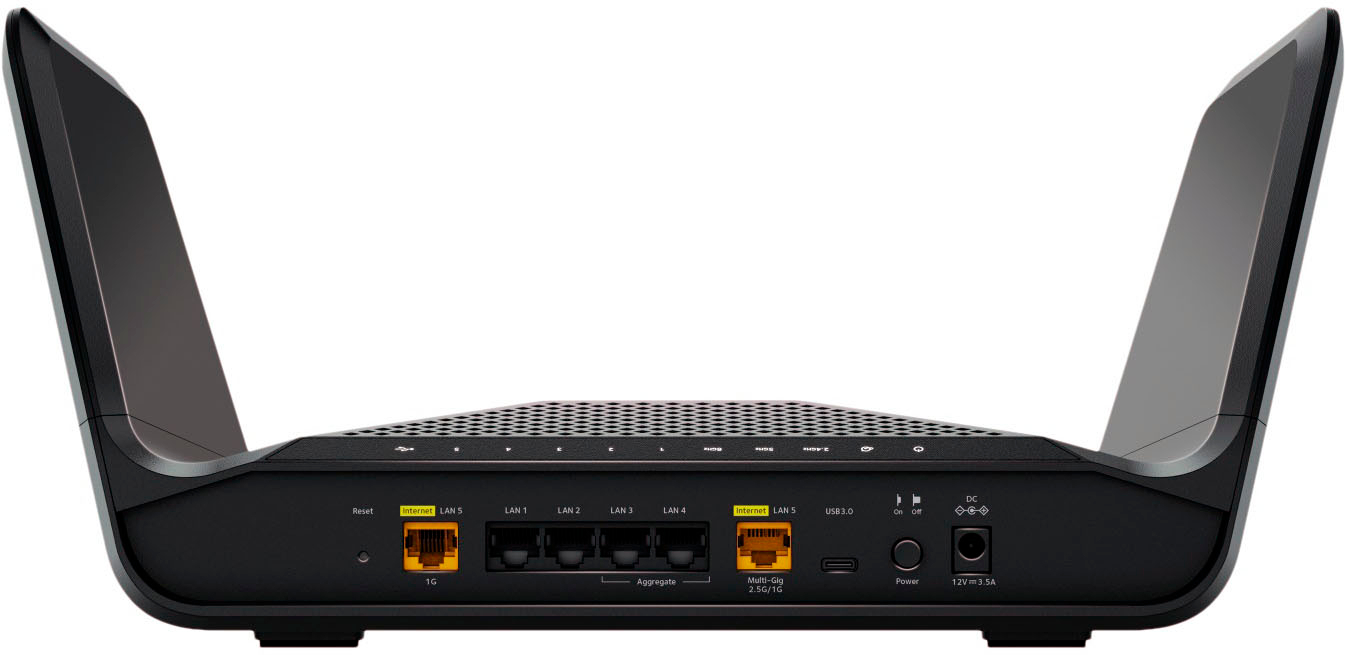
|Posted .This reviewer received promo considerations or sweepstakes entry for writing a review.Is that a stealth fighter jet on your desk? OF COURSE IT ISN'T! It is the latest and greatest in internet technology - the NETGEAR - Nighthawk AXE7300 Tri-Band Wi-Fi Router. I love all things futuristic. and let me tell you, the design of the Nighthawk is all that and a bag of chips! But of course we aren't here to hear someone describe what you can see in pictures. But, rather in what is so special with the NETGEAR - Nighthawk AXE7300 Tri-Band Wi-Fi Router compared to the rest of the routers on the market. First off. this is the first time I've see a 6e band router. Maybe I've been under a rock for a while. But the Tri-band is a major selling point as it is future proof, and also works with devices using 2.4 and 5 ghz bands. Setup was simple once I rebooted my original modem (make sure to do this) and then it was literally off to the races! Previously using a nest system, this router claims to cover 2500sq ft which is right around what the house is. I was skeptical at first. Yes, skeptical. That a signal could go from my upstairs office where my modem is, reach my sunroom where me and my tablets/laptops hang out during downtime, and most importantly to the master bedroom where my wife has her streaming devices/laptop/tablet setup. The NETGEAR - Nighthawk AXE7300 Tri-Band Wi-Fi Router quickly erased any skepticism I had. It reached every nook and cranny of my house with no issue with full speed. Something that my nest system *barely* did when all devices were running at once. Now, something that I think is a wonderful touch is the addition of the USB-C port. This basically turns any usb-c storage device into a wireless storage device - vis - your nighthawk into a NAS! I Just have to find my USB A ---> C adapter and see if my 12 port USB thing-a-ma-bobber will let me connect a BUNCH of storage to it *EVIL LAUGH*. All craziness aside, if you want to future-proof your internet and Wifi you can't go wrong with the NETGEAR - Nighthawk AXE7300 Tri-Band Wi-Fi Router. Plus it looks like a Stealth Fighter Jet. And that's pretty darn cool in my book.
I would recommend this to a friend- Pros mentioned:Coverage, Speed
Netgear router
Posted .This reviewer received promo considerations or sweepstakes entry for writing a review.Awesome coverage and speed. Easy install with exceptional range.
I would recommend this to a friend Great router with blazing speeds
|Posted .This reviewer received promo considerations or sweepstakes entry for writing a review.The NETGEAR - Nighthawk AXE7300 Tri-Band Wi-Fi Router is one of the fastest routers I’ve used so far. I have several Wi-Fi mesh routers from various manufacturers. They all work well with no issues. This is a single router, therefore I wasn’t sure if it could reach all areas of our home. I was surprised in how it was able to provide a solid connection and speed to all of my devices. The router has Tri-Band technology with the 5gHz and 6gHz band being the fastest. I was definitely able to tell a difference in speed between the 6gHz speed of this single router compared to the 5gHz speed of my mesh network routers from a different brand. The speed I was able to obtain from this router was definitely better. Setting up the router was extremely easy and straightforward. I had no issues setting up the router, setting up the account, and getting it connected to my devices. This would definitely make it easy for those who wish to purchase this router for its speed, but are not tech savvy. This router is ideal for those who need a router that will take advantage of their Gigabit Internet. Overall, I’m enjoying this router and hope to get great service from it.
I would recommend this to a friend- Pros mentioned:Range, Speed
Improved range and speed, easy to install
Posted .This reviewer received promo considerations or sweepstakes entry for writing a review.I bought this new Nighthawk router to replace a Netgear router that was nearing a decade old. Our ISP is delivering about 950 Mbps output from our cable modem. We were getting about 200 to 250 Mbps via wi-fi around the three levels of a 2500 sq ft, open plan house, with an ‘extender’ on the second floor. Setup of the new router is a snap using the Nighthawk app. The range is much improved — I no longer use an extender, which eliminates issues we had with devices caught betwixt the main router on the ground floor and the extender. Speeds are typically twice what they were before — about 400 Mbps and as high as 575 Mbps via wi-fi. I bought on sale — and at that, this was a steal! Recommended!
I would recommend this to a friend - Pros mentioned:Ease of use, Speed
this thing is wicked fast!!!
Posted .This reviewer received promo considerations or sweepstakes entry for writing a review.very easy to setup, i have bitdefender total security installed which flaged it as dangerous site and asked if i wanted to continue. once past that i had it up and running in 5 minutes. the install process is real smooth and easy to follow. speed wise this thing is wicked fast and well worth the money. would highly recommend it.
I would recommend this to a friend - Pros mentioned:Speed
No WiFi 7, no need for temporary WiFi 6e support
Posted .This reviewer received promo considerations or sweepstakes entry for writing a review.Bought this router on the Early Black Friday sale and am keeping it only because, at that price, it costs the same as older WiFi 6-only routers. This WiFi 6e router doesn’t support WiFi 7 though, so it’s not very “future proof” and there are only a handful of consumer devices on the market that can connect using its novel 6GHz frequency band. If I had Alexa or FireTV devices already, I would likely just go with an Amazon-subsidized “eeros 6e” router (which is less expensive because Amazon can monitor you to improve their profit from other services). As far as Netgear’s Terms of Service and Privacy Policy go, I think they are trash, but it seems, for now at least, that the router itself does not turn out to be as locked down as the Terms would imply (at least until they push a mandatory firmware upgrade to it some day). The Setup app they supply for iPhone is also trash (especially the tricks it resorts to in order to get you to take their AppArmor/BitDefender, ProSupport and ExtendedWarranty *subscriptions*). As far as the device itself goes, there is no user manual included and there is a lot of ambiguity in the labeling of the ports and indicator lights —cannot recommend this for beginners. The user interface is also primitive compared to ASUS but appears to be as functional. I did not like many of the default settings chosen by Netgear for this device. Once you get it setup (which is a real pain), on a gigabit Internet connection, you might see your laptop or phone report something like 760Mbps over a 1200Mbps WiFi channel, whereas the router’s built-in speed test might report 989Mbps over its 1Gb wired Internet connection.
No, I would not recommend this to a friendBrand response from Netgear Support
Posted .Hi ActualExpert,
Thank you for your review, we appreciate your feedback and we want you to know that your experience is important to us. We are sorry to hear that you had a difficult experience with your product. These resources should help you: https://kb.netgear.com/1110/How-do-I-troubleshoot-my-wireless-network, and for additional troubleshooting for your device: https://kb.netgear.com/000061716/How-can-I-troubleshoot-my-NETGEAR-router?language=en_US. For the RAXE290 User Manual, please visit: https://www.downloads.netgear.com/files/GDC/RAXE290/RAXE290_UM_EN.pdf.
We also recommend ensuring your device is on the latest firmware, v1.0.7.62, released as recently as 10-10-22, if you have not done so already: https://kb.netgear.com/000065221/RAXE290-Firmware-Version-1-0-7-62.
If you need further assistance, you can contact NETGEAR Support by going to: https://my.netgear.com/support/contact.aspx and follow the onscreen instructions. Once you’ve registered your product you will be given the options of contacting Support through Phone, Chat, or email. If you have any additional feedback, we also recommend visiting our Community Forum Idea Exchange Page: https://community.netgear.com/t5/Idea-Exchange-For-Home/idb-p/idea-exchange-for-home.
Regards,
NETGEAR Team
- Cons mentioned:Connectivity
Don’t buy
Posted .This reviewer received promo considerations or sweepstakes entry for writing a review.Worked for a couple days then it wouldn’t work after. I upgraded to a ASUS and have much better connection.
No, I would not recommend this to a friendBrand response from Netgear Support
Posted .Hi Timoky,
Thank you for your review, we appreciate your feedback and we want you to know that your experience is important to us. We're sorry to hear that you had problems with your RAXE290 and have already replaced it. When experiencing an issue with your device, we recommend checking out this troubleshooting resource: https://kb.netgear.com/000061716/How-can-I-troubleshoot-my-NETGEAR-router?language=en_US.
If you decide to repurchase the router or any other NETGEAR product and have any issues, NETGEAR Support will be happy to help you. You can contact NETGEAR Support by going to: https://my.netgear.com/support/contact.aspx and follow the onscreen instructions. Once you’ve registered your product you will be given the options of contacting Support through Phone, Chat, or email.
Regards,
NETGEAR Team
Nighthawk
Posted .This reviewer received promo considerations or sweepstakes entry for writing a review.I had the 2015 version ( nighthawk) that stop working and i bought this one to replace it and its not and better.
No, I would not recommend this to a friendBrand response from Netgear Support
Posted .Hi user154582,
Thank you for your review, we appreciate your feedback and we want you to know that your experience is important to us. We are sorry to hear that you had a difficult experience with your product. This resource should help you troubleshoot your device for any issues you may experience: https://kb.netgear.com/000061716/How-can-I-troubleshoot-my-NETGEAR-router?language=en_US.
If you need further assistance, you can contact NETGEAR Support by going to: https://my.netgear.com/support/contact.aspx and follow the onscreen instructions. Once you’ve registered your product you will be given the options of contacting Support through Phone, Chat, or email.
Regards,
NETGEAR Team