Customer Ratings & Reviews

- Model:
- EX8000-100NAS
- |
- SKU:
- 6105904
Customer reviews
Rating 4.2 out of 5 stars with 946 reviews
(946 customer reviews)Rating by feature
- Value3.9
Rating 3.9 out of 5 stars
- Quality4.2
Rating 4.2 out of 5 stars
- Ease of Use4.1
Rating 4.1 out of 5 stars
Customers are saying
Customers commend the Nighthawk Mesh X6S Tri-Band WiFi Mesh Extender for its impressive range, ease of use, and strong signal, resulting in significantly improved WiFi coverage and streaming capabilities. Many found setup quick and easy, leading to better performance than anticipated. However, some users experienced connection drops, and a few cited the price as a drawback. While most reported positive experiences with reduced lag, some still encountered issues.
This summary was generated by AI based on customer reviews.
Rated 1 out of 5 stars
WiFi connection is very poor!
||Posted . Owned for 1 month when reviewed.This reviewer received promo considerations or sweepstakes entry for writing a review.It needs to disconnect and refresh to work good....
No, I would not recommend this to a friendRated 1 out of 5 stars
Disappointed.
||Posted .This reviewer received promo considerations or sweepstakes entry for writing a review.Did not do as advertised. Very limited range. I took it back.
No, I would not recommend this to a friend- Pros mentioned:Ease of use, Speed
Rated 5 out of 5 stars
Great addition to my home network!
Posted .This reviewer received promo considerations or sweepstakes entry for writing a review.I've used this EX8000 Netgear router for almost two weeks and its been a dream come true. I used to have a few early generation wifi extenders that were slow and hard to setup, however the EX8000 fixes all of my problems. I've compiled a few items that are worth highlighting in my experience: - Easy setup using Netgear Genie - Simple design so I can stash it next to my TV - Speed, speed and more speed (if you pair this with a tri band router, this extender truly gets the job done with little to no noticable drop in speeds!) - cost is right in line or better with similar options out there cons: - mabe a smaller profile would be nice, or different colors! Note that I received this device from Netgear F&F for free in connection with my review. This is my experience with the device, so I hope it's helpful!
I would recommend this to a friend - Pros mentioned:Ease of use, Range
Rated 5 out of 5 stars
One WiFi Name great feature
Posted .This reviewer received promo considerations or sweepstakes entry for writing a review.This is a review of the NETGEAR Nighthawk X6S Tri-Band WiFi Range Extender Model EX8000. Setup right out of the box is a breeze, as long as you know basic terminology (extender, WiFi router, WPS). I used the Quick Start guide and followed the clear instructions for connecting with the NETGEAR Installation Assistant. My iPad quickly connected with the installation assistant whose prompts were simple to understand. The assistant notified me of a firmware update, so I proceeded with the update which hung up after showing it was 100% completed. Reconnecting with the Installation Assistant got me back on track; I next selected the WiFi network that I wanted to extend. The coolest feature that I loved is the One WiFi Name feature that enables the Extender to use the same WiFi network name instead of having to create another name, thereby eliminating any confusion with multiple network names. My WiFi Router is located upstairs, so I placed the Extender downstairs to strengthen the signal that my 4K TV is receiving. It's only been a couple of days, but it appears that I'll be able to stream 4K content without any issues. I received this product free as part of the NETGEAR First Look Review Program.
I would recommend this to a friend - Pros mentioned:Range
Rated 5 out of 5 stars
Solid WiFi Extender
Posted .This reviewer received promo considerations or sweepstakes entry for writing a review.NETGEAR continues to hit it out of the park. Having reviewed a number of NETGEAR devices through their Friends and Family program (this device included), I am impressed on how easy they have made administration of their entire line and this is no exception. Its literally a single button push to set it up and it just integrates seamlessly into your SSID namespace. It provides a remote wired connection and due its multiple radios allows data to be passed to and from your router with no loss due to overhead. Behind the scenes though, it gives a level of control that starts to rival DD-WRT. Firmware updates come on a fairly regular basis and in addition to bug fixes, provide true functionality upgrades as well. Please keep it up NETGEAR. This is a device that I would be comfortable sending to my parents to set up on their own, yet it provides a lot of technical control as well. The only con is its size, but its got a lot going on inisde and can be hidden easily.
I would recommend this to a friend - Pros mentioned:Speed
Rated 4 out of 5 stars
Aside from rough set up, like the speeds
Posted .This reviewer received promo considerations or sweepstakes entry for writing a review.Liking the speeds of my computer is now gaining, using this thing in access point mode. I had intended to use this to be upstairs to gain more signal strength but might leave it in access point mode for now. The setup with non Netgear routers and modems can and will be problematic. I spent tons of hours trying to get it to work as access mode with the MI424WR-GEN3I Router since it has less than desirable signal strength. First: Plug an ethernet cable into one port of the Nighthawk X6S AC3000 Tri-Band Wi-Fi Range Extender. Then Plug the power cable into the outlet. On a computer, tablet or your phone, logon the router by using the assigned ip address that your MI424WR router is given (normally it might be 192.168.1.1) from there type in your login credentials then do the following: 1 Click on the My Network icon at the top (just after the Wireless Settings button). 2 Click Network Connections from the menu on the left. 3 Click Broadband Connection 4 Click Edit (look for Broadband Connection under the column titled Name, the column next to it is labeled Status and the last column is Action that is where you will find the Edit settings button for Broadband Connection) 5 Scroll down and click Settings 6 Scroll down until you see DHCP Lease: and Renew (19th option or so) and Release (click Release) 7 Disconnect the router immediately to prevent it from re-requesting a DHCP lease. Alternatively, at step three click on Detect Broadband Connection and the the modem and the Extender will have conflicting ip address. From there go to your router/modem and press the recessed rest button and go back and login again to see what IP address your extender was given. You can proceed with the set up of range extender or access point mode by following the
I would recommend this to a friend - Pros mentioned:Range
Rated 5 out of 5 stars
Fantastic product and easy to set up!
Posted .This reviewer received promo considerations or sweepstakes entry for writing a review.I wanted to extend the range on my nighthawk X10 router. This was absolutely perfect. It took about 5 minutes to connect and was as simple as pushing the WPS button on the extender first followed by the WPS button on the router. That was it. It connected both my 2.4G and 5G networks to it with in a minute or so. I won't go in to setup details but so far it's a great product. Also don't forget to update the firmware when you get it. I highly recommend it to anyone wanting to extend the range of their router.
I would recommend this to a friend - Pros mentioned:Coverage
Rated 5 out of 5 stars
Excellent coverage
Posted .This reviewer received promo considerations or sweepstakes entry for writing a review.This product was straightforward and easy to install. I had weaker coverage on my back porch and now that is not a problem. I really enjoyed the one wifi network so I wont have to jump between the 5g band and 2.4g band.
I would recommend this to a friend - Pros mentioned:SpeedCons mentioned:Connection
Rated 3 out of 5 stars
Amazing product but flawed
Posted .This reviewer received promo considerations or sweepstakes entry for writing a review.I have 200Mbps with Spectrum but my router would only output 21 its the Netgear nighthawk X6 which i found weird. Thinking it was just cause its in a select corner of my house I bought the extender. Speeds Jumped to 150 and I was truly excited but noticed it would disconnect the internet every few days. I'd have to turn it off and turn it back on to get the connection back. So it's flawed and yes I update everything in my house lol.
I would recommend this to a friend - Pros mentioned:Speed
Rated 5 out of 5 stars
Extended my WiFi upstairs
Posted .This reviewer received promo considerations or sweepstakes entry for writing a review.I currently own Nighthawk 1900AC router, which helped increase my internet speed to what I pay for through Comcast, but upstairs was spotty. After buying cheaper extenders and continuing to have issue after issue, I finally decided to pair this WiFi extender with my router. I live in a 2-story 2,300 sq ft house. After install, I was amazed by the internet speeds I was getting upstairs. Prior to install I was lucky to get 2-3 Mbps upstairs, now I'm getting 50-90 Mbps. Downstairs from the router I get 170 Mbps as a reference. This will eventually make my wife happy (after we recover from the price tag), but it was well worth it.
I would recommend this to a friend Rated 5 out of 5 stars
Was able to cover some dead wifi spots.
Posted .This reviewer received promo considerations or sweepstakes entry for writing a review.Disclaimer: I received this extender from Netgear for free as part of their First Look Program. The extender was surprisingly easy to setup through the WPS process. I had a few spots in my house where the wifi would not reach. And I specifically did not want to add one of those extenders where I have to have a separate wifi connection (...EXT). So this product was perfect for that because it piggy backed on the same wifi name and I didnt have to change my wifi connection every time i walked around the house. Would definitely recommend to others!
I would recommend this to a friendRated 5 out of 5 stars
It works
Posted .This reviewer received promo considerations or sweepstakes entry for writing a review.I am not tech savy but I like fast internet. This one costs more then the cheap one but reviewers seemed to feel it has less problems and was a better unit, which I really didn't want to deal with any issues. I followed the directions, and netgear software did the connection work. My house and garage has the same speed all over and I am happy with it. You get what you pay for.
I would recommend this to a friendRated 5 out of 5 stars
Fast Internet Connection
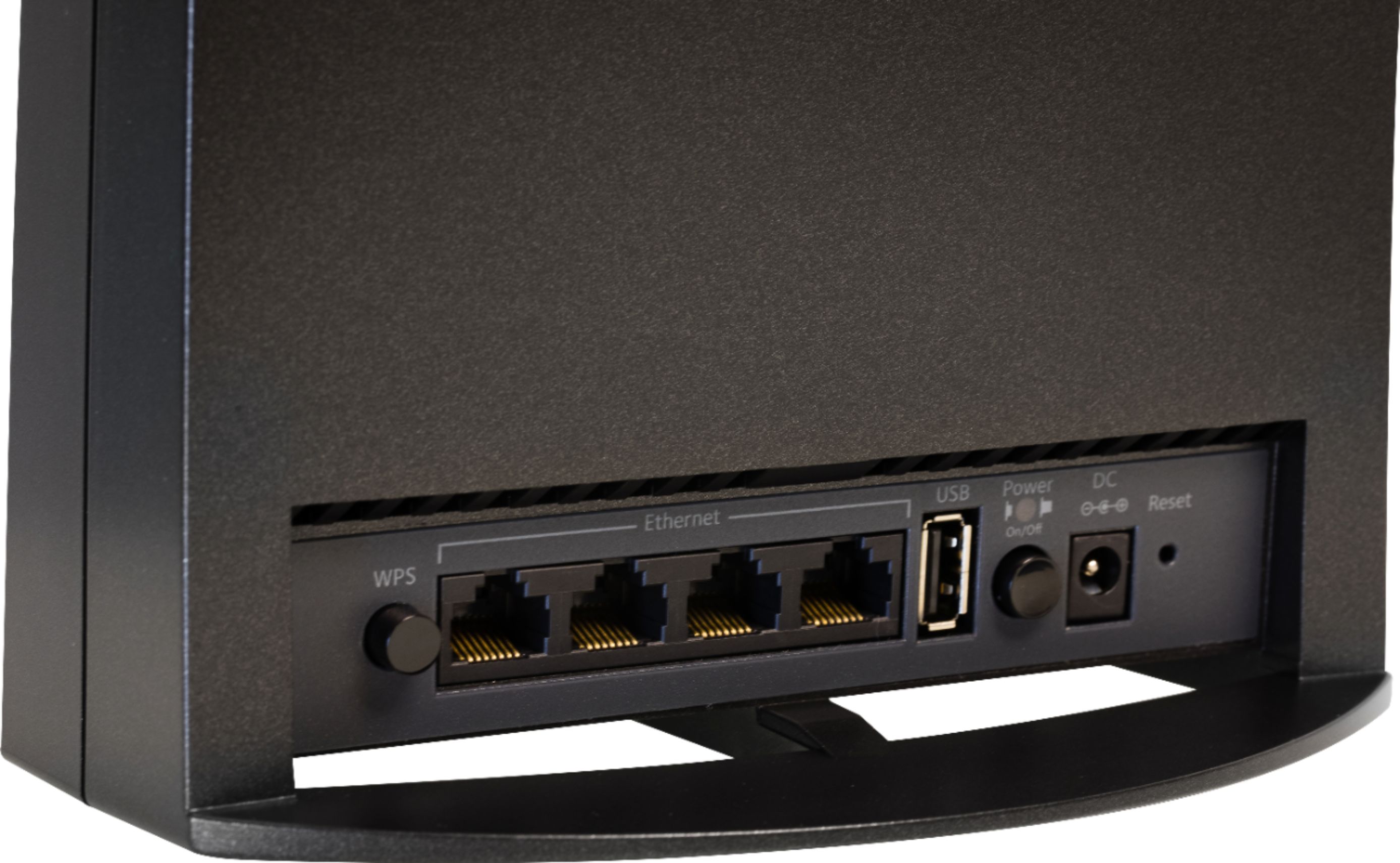
Posted .This reviewer received promo considerations or sweepstakes entry for writing a review.Im using this wifi extender to improve the coverage of my wifi signal on the first floor of my house and on my back porch. I had weak spots that needed better coverage and this range extender did the trick. Setup was fairly easy with the connect with WPS feature. It took two tries to connect through this feature (first try I was impatient and didn't wait long enough for it to connect) but once connected the coverage improvements are very noticeable. This is also the first time I have actually used any device with the push to connect system and have actually had it work. Overall it took about 5-10 mins to have it setup. I connected this device to the netgear orbi system. Once connected the range extender brodcast a seamless network name(SSID) through out the house. I can move from upstairs to downstairs or out on the patio and not have to switch wifi networks. It also has multiple gigabit ethernet ports for use if you want to directly connect a tv, game console or other device directly to the extender. The extender also identifies signal strength to the router for optimal placement. Once I placed the extender I ran multiple speed checks on had impressive speed gains in previously weak areas of coverage. Overall I would recommend this to anyone who wants to have seamless wifi coverage throughout their house. As a note I did receive this product from netgear free as a part of product review and test program.
I would recommend this to a friendRated 5 out of 5 stars
Very good product
Posted .This reviewer received promo considerations or sweepstakes entry for writing a review.The new extender setup was very easy. about 15 minutes. I have had three previous extenders and this one just blow them away. don't waste your money on any other ones. and I have this hooked up with my new Netgear Nighthawk X10 router.
I would recommend this to a friendRated 5 out of 5 stars
Will only extend one 5ghz band width
Posted .This reviewer received promo considerations or sweepstakes entry for writing a review.this extender will extend your 2.4 GHz bandwidth and one 5 GHz band VERY WELL. it also uses the third bandwidth for back door traffic. so if you are going to buy this with expectations as in extending two 5 GHz band width it will not work. i paired this extender with my night hawk ac 3200 router they work together very well. unfortunately i am going to buy another one to extend my other 5 GHz bandwidth further
I would recommend this to a friend- Pros mentioned:Coverage
Rated 1 out of 5 stars
Doesn't Work As Access Point, Bad Support
Posted .This reviewer received promo considerations or sweepstakes entry for writing a review.I bought this to wire into my network on the other side of my house to provide broader WiFi coverage in my house. I configured it myself and the 5G radio didn't broadcast (and why is there 5G-1 and 5G-2?). I called tech support. Tech support does not diagnose or troubleshoot anything. They just tell you to do a factory reset, and then they verbally tell you what is in the manual. If one step doesn't respond as they expect, they don't know what to do and just RMA the unit. The unit does work to grab WiFi signals from the air, and repeat those in my house. But it's not going to be as good as wiring it into the router (another really expensive NetGear), and broadcasting the same SSID to extend my network. Summary: Works in extender mode, does not work in AP mode, poor support
No, I would not recommend this to a friend Rated 5 out of 5 stars
Good kine
Posted .This reviewer received promo considerations or sweepstakes entry for writing a review.It’s really great to product. Product is really great. I bought it.
I would recommend this to a friendRated 1 out of 5 stars
Died after 3 months
Posted .This reviewer received promo considerations or sweepstakes entry for writing a review.Died just over 3 months after purchasing, right after my free support ended. Front lights flashing white, power light flashing red. Tried resetting numerous times as well as it having been unplugged and plugged back in. Router won't pick up it's signal. Of course, power light needs to be green to show it's ready to pick up signal and it only stays green about 3 seconds. Product support so far not helpful. Awaiting further call from them. Just under $200 is too much to drop for equipment that lasted about 3 months. Upon searching online for a solution, it appears to be a common issue and nothing on their site or user manual addresses this specific issue.
No, I would not recommend this to a friendRated 5 out of 5 stars
What’s with some bad reviews
Posted .This reviewer received promo considerations or sweepstakes entry for writing a review.Don’t know why I see bad reviews about 5g it works
I would recommend this to a friend- Cons mentioned:Connection
Rated 1 out of 5 stars
Doesnt work
Posted .This reviewer received promo considerations or sweepstakes entry for writing a review.I've tried setting this up and reseting it a few times. Right now its actually making my connection worse. I'm no more than 12 feet away from it. Tech support in India said to not WPS connect it via 5g because that may not work well all the time. I'm over this thing. ready to return it
No, I would not recommend this to a friend