Customer Ratings & Reviews
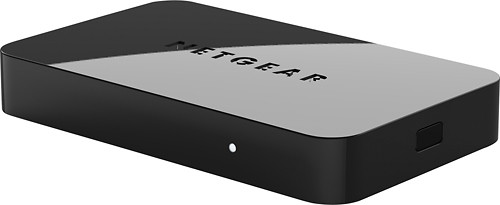
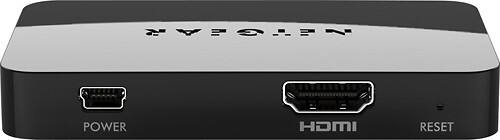
- Model:
- PTV3000-100NAS
- |
- SKU:
- 6510137
Customer reviews
Rating 3.3 out of 5 stars with 220 reviews
(220 customer reviews)Rating by feature
- Ease of Use3.1
Rating 3.1 out of 5 stars
Customers are saying
Customers are enthusiastic about the ease of use, picture quality, and setup of the product, with many praising its compact size and ability to stream content. However, some users experienced connectivity issues and compatibility problems, while others found the firmware update process challenging and reported performance lags. The HDMI functionality was frequently mentioned in positive reviews. Despite some negative feedback regarding connectivity and performance, many users found the device to be a valuable tool for displaying content from various devices on their TVs.
This summary was generated by AI based on customer reviews.
Rated 5 out of 5 stars
New form factor.
Posted .This reviewer received promo considerations or sweepstakes entry for writing a review.So far so good. Works with my Windows 7 laptop without any issues. I use it to stream movies regularly and it works for me without any disconnects or lag. Will likely get one more for my other room so I do not have to move the one I have back and forth between the rooms. The size is the best part of the adapter, it''s really small. So far I am satisfied.
I would recommend this to a friend- Pros mentioned:Hdmi
Rated 5 out of 5 stars
great Device
Posted .This reviewer received promo considerations or sweepstakes entry for writing a review.I recently bought a Samsung Ultrabook 7, I bought this WiDi unit to watch movies on the Living room TV while Im surfing on the couch. Plug in the HDMI cable, Plug in the power - comes w a USB cable that can be plugged into the TVs USB port -or- a 2 prong power adapter that also comes with the unit. Once thats done launch the Intel WIDI software that came with your Ultrabook - it will scan and find the receiver. Type in the code the unit provides on your TV screen and thats it.... your connected .and good to go. Works like a charm! No firmware upgrades needed. (I am running Win 8 on the Ultrabook.
I would recommend this to a friend - Cons mentioned:Firmware update
Rated 3 out of 5 stars
Windows 8 Users Read Directions
Posted .This reviewer received promo considerations or sweepstakes entry for writing a review.Once you get past having to update the firmware before even trying to connect to Windows 8 machine it works just fine.
I would recommend this to a friend - Cons mentioned:Compatibility
Rated 1 out of 5 stars
not ready for prime time
Posted .This reviewer received promo considerations or sweepstakes entry for writing a review.Wow Android copied something from Apple; Pseudo Airplay on Android phones, tablets and Windows Laptops. Let me preface this by stating that it works on 'some' of these devices as the listed compatible device list is very small. I have two Android devices that are supposedly supported, but didn't work at all. After purchasing the 'tiny' device and connecting to power and an HDMI cable #Not included# the device displayed on the TV properly but would not connect to either of my devices; Nexus 4 and Galaxy Tab 10.1 So I went to the Netgear.com/stream site and downloaded the newest firmware and followed the tedious instructions, having to hold the button on the unit down for over 5 seconds while the unit loaded the firmware upgrading utility. Then I had to disconnect the Ethernet cable from my laptop and turn on wireless and log into an IP address 192.168.3.1, which didn't work until I disconnected the Ethernet cable, something they didn't mention in the instructions. I then selected the file that I downloaded, the unit did its thing, erasing, writing and verifying, and then rebooted itself. All seemed well.... but still could not connect to the unit. I contacted live chat through Netgear and the person walked me through the whole process over again, taking 5 times as long to complete sine I assume that he was helping others at the same time. PS it took 48 minutes to get someone to chat with, then another hour to complete what took me a few minutes prior to contacting support. HOW FRUSTRATING! the tech support guy eventually disconnected the chat before I was finished asking questions. I was so disgusted by they unit not being ready for public release that I just took it back, warning the store manager of the issues I faced, he also agreed that others all seemed to have problems with the units. what a waste of my time. You were warned, beware... PTV3000
No, I would not recommend this to a friend Rated 4 out of 5 stars
Once you have the right drivers and software great
Posted .This reviewer received promo considerations or sweepstakes entry for writing a review.I thought this device was going to flop, but when using Internet explorer to update the device firmware you must click the compatibility button for the browser or the update will not occur, took over an hours to work this out, and Netgear support did not know this. Then you need to make sure you have the right graphic and wireless drivers installed before you can install the Widi software app. After that it works very well, and also connects to my Samsung Galaxy S3. Netgear should beef up there installation instructions, and then this product would be well received.
I would recommend this to a friend- Cons mentioned:Connectivity
Rated 1 out of 5 stars
Doesn't work as advertised; NETGEAR support is BAD
Posted .This reviewer received promo considerations or sweepstakes entry for writing a review.After one week of trying to get the PTV3000 to get set up and trying to call NETGEAR support and using online chat, I am going to give up and return this junk. The first night, I called telephone support and after being on hold for about 1/2 an hour, I was dumped to voice mail. I left a message but they never called me back. The next night I tried online chat. After waiting for them to chat with me for 1/2 an hour, I quit. I have waited one week (had everything bundled to return), but decided to try one more time. This time, the NETGEAR support site had a link to upgrade the Intel WiDi on my brand new (less than a month) HP ENVY notebook. I did that and I was able to get to the settings mode on the PTV3000 and connect to it with a wireless connection and upload the sbin firmware upgrade file to it. (I couldn't even do that before!). So everything seemed to be working now except WiDi wouldn't connect to it. Oh it would see it and when I clicked Connect the PTV3000 would respond with a security code. When I entered the security code into WiDi, it started to connect and the PTV display said it was connecting, but after about 5 minutes, both sides reported failure. WiDi had me remove the device a couple times, but still wouldn't complete the connection. I tried online chat and waited 15 minutes for someone to start chatting with me. The person was a complete idiot. After about 1/2 an hour on the chat line and after multiple questions back and forth just to understand what they were trying to tell me, I gave up and disconnected. The person's communication skills are very, very, poor. So, back goes the PTV3000. It really is bad and NETGEAR support only makes matters worse.
No, I would not recommend this to a friend Rated 5 out of 5 stars
What's the negative fuss all about??
Posted .This reviewer received promo considerations or sweepstakes entry for writing a review.Got a year-old Dell Vostro laptop running Win 7. Came with the Intel WiDi adapter or whatever inside. I had to update the driver last night since I'd never used the WiDi adapter and it wouldn't load. That process was a piece of cake. Then I buy this adapter. I'm no tech guru but I'm tech savvy enough to have been my own IT guy for my small business for the past 20 years. Tech doesn't scare me, but I don't understand the arcane stuff. Anyway, my tech status is probably irrelevant because this device is so simple to install that if you can read directions, you can install it, even if you've never laid eyes on a computer. And I mean that literally. Step one: connect adapter to HDMI port on tv Step two: connect adapter to wall power source Step three: wait for solid LED light Step four: turn on TV and select the correct input source Step five: launch Intel WiDi software on computer (dbl-clk icon) Step six: double-click on the Push2TV adapter found by software Step seven: enter security code shown on TV screen Step eight: there is no step 8. You can now see your computer screen on the TV. The entire process took less than 5 minutes and was done with zero errors or problems or glitches. It was among the simplest, easiest, and least problematic technology installations I've ever encountered.
I would recommend this to a friendRated 5 out of 5 stars
Great once it works
Posted .This reviewer received promo considerations or sweepstakes entry for writing a review.I bought this even after reading reviews here and on other sites. After I installed it I could. see the adapter in the WiDi scan screen and I could enter the netgear security # and it was accepted. I then clicked on connect and both the laptop and tv stated "connecting" but after a few minutes it would time out. After going to HP (my laptop brand), netgear, intel websites searching for answers I found that my firewall was blocking the connect without letting me know. I disabled the firewall(Comodo, as windows firewall does not work with my system) and the ptv3000 connected right away and I re-enabled the firewall right away. It was a simple solution, but hard to find. I will work on setting up permissions in the firewall to allow connection w/o disabling, but that can wait. The product was exactly what I was looking for and works perfectly now that I figured how to connect. For me there was absolutely no lag time from laptop screen to tv and the pointer worked fine on both
I would recommend this to a friend- Cons mentioned:Performance
Rated 1 out of 5 stars
netgear sucks
Posted .This reviewer received promo considerations or sweepstakes entry for writing a review.Cannot update using a mobile device even though it says u can. Skips all the time. Worst product anda horrible company. Worst money I ever spent.
No, I would not recommend this to a friend - Cons mentioned:Connectivity
Rated 1 out of 5 stars
If you have the time to waste ...
Posted .This reviewer received promo considerations or sweepstakes entry for writing a review.Installation process was short and sweet. The rest of the evening was spent on trying to get my laptop to recognize the adapter. Even when I sat next to the adapter, no luck. The next afternoon, I was able to connect on the first attempt. Unfortunately, I should have never disconnected because I was never able to connect again. After multiple attempts that evening and the next morning, no luck. Included with the paperwork was a critical firmware update from Netgear. Once I was on their website, I was pointed to a page that doesn't exist. That was all the motivation I needed to politely return the item to Best Buy.
No, I would not recommend this to a friend Rated 3 out of 5 stars
Netgear PTV3000 doesn't work with Windows 8
Posted .This reviewer received promo considerations or sweepstakes entry for writing a review.I fault the store clerk because I asked specifically if this device would work with Windows 8 and he said yes. They gotta stay up on this stuff. Now I have to return it because Intel has been in the process of developing this Windows 8 link for a few months now. Not gonna wait around.
I would recommend this to a friendRated 1 out of 5 stars
does not work
Posted .This reviewer received promo considerations or sweepstakes entry for writing a review.Worst item I have ever purchased from Best Buy. I could not get my computer to connect to it. I took them both to Geek Squad at Best Buy, they were also unsuccesful in getting it to work. They recommended contacting Geek Squad online. I contacted Geek Squad online who attempted to make it work by remotely controlling my computer. They were also unsuccessful. The offered to send a Geek Squad to my home to try to fix this but want to charge me in addition to the Geek Squad protection I already pay for every year. They want me to pay extra to fix a inoperable device they sold me. They recommended I do a software update to the PTV300. I cannot get my computer to connect to it so updating is not possible. I then contacted the manufacturer, Netgear, who made several suggestions on things to try. All of these suggestions had already been tried numerous times but finally also recomended a software upgrade to the PTV3000. The upgrade is downloaded onto my computer but since the computer does not connect to the PTV3000 there is no way to install the upgrade. Afterwards I again attempted to connect to it the PTV3000 stopped my computer from connecting to the WIFI in my home and at that time the PTV300 froze up and locked my computer in the no WIFI mode. I was forced to do a refresh on my computer and lost my antivirus and other apps I had installed. Being able to use this PTV3000 was a big reason I decided to upgrade to this new laptop. I have run out of sources to help with this device now I must take the laptop back to Best Buy, Geek Squad to attempt to reinstall my anti virus. I still hope to have it work someday but I am afraid to try any more for fear of harming my computer further than it already is. And since Geek Squad wants to charge me to repair the faulty PTV3000 best buy sold me it is a useless device with apparently no warranty and no tech support that can diagnose it or get it to work.
No, I would not recommend this to a friend- Cons mentioned:Compatibility
Rated 1 out of 5 stars
Product Poorly Launched
Posted .This reviewer received promo considerations or sweepstakes entry for writing a review.I wish I read the reviews before buying this at Christmas time and waiting months to install. Avoid and save yourself hours of frustration. Enough said. I tried to follow the information on the web to install updated drivers but I could not get this to work. Best Buy's Geek squad is sending someone to my house for another $50 but I am going to cancel that and just wait since I am not sure who to blame. Netgear, Intel (WIDI) or Best Buy for not explaining that it is VERY difficult to get this to work in windows 8 environment.
No, I would not recommend this to a friend - Cons mentioned:Connectivity
Rated 1 out of 5 stars
Disappointed
Posted .This reviewer received promo considerations or sweepstakes entry for writing a review.I have a Netgear ptv2000 that worked good with my old laptop that has windows 7 OS. I bought a new laptop and sadly my ptv2000 doesn't work with my new laptop that runs in windows 8.1. I was advised by the netgear customer support that I need to buy the ptv3000 if I want it to work with windows 8.1. Customer service was ok. I had problems with the picture size being to small for may wide screen tv. They helped me work it out and adjusted it to how it's supposed to be. Then after it started working on the picture size issue, it started disconnecting and won't stay connected for more than 5 minutes. I don't know if the unit I got was just defective but I've had enough of it. I took it back to best buy.
No, I would not recommend this to a friend Rated 3 out of 5 stars
Only works sometimes
Posted .This reviewer received promo considerations or sweepstakes entry for writing a review.Our P2TV is set up immediately next to our router. Even in such close range, it only works sometimes. We love it because we don't pay for cable, yet we still enjoy all of the shows we would like to watch through netflix, hulu and hbo go. But, it's inconsistent and that makes it annoying.
No, I would not recommend this to a friendRated 1 out of 5 stars
I don't usually write reviews, but...
Posted .This reviewer received promo considerations or sweepstakes entry for writing a review.From the beginning: I have Apple TV. Apple TV was simple to set up and works flawlessly every time I use it. I bought Push2TV so that my wife and daughter could wirelessly display their two new Toshiba ultrabooks on the big screen. My wife received her ultrabook first and we upgraded it to Win8 before we every tried Push2TV. My daughter's ultrabook is still Win7. Neither ultrabook can successfully connect and display to the remote monitor. Not once over three days of trying different things have I been able to accomplish with this device what Netgear says it is built to do. Both ultrabooks have Intel WIDI. Both will only sometimes locate the P2TV device with scans. My daughter's Win7 platform is the only one that has rarely reported successful connection to the device, but has never once displayed anything but blackness on the remote monitor. As yet Netgear has provided no firmware update. The device is very slow to boot up and is my only HDMI device as yet that does not get along with my Rocketfish HDMI port modulator. I can't say enough bad about this useless device without resorting to cusses. Netgear needs to pull their heads out of their USB ports and provide working solutions on this miserable product. Ease of installation gets a '3' because the power cable was too short to locate the device next to my functioning Apple TV.
No, I would not recommend this to a friend- Cons mentioned:Connectivity
Rated 1 out of 5 stars
Barely Works
Posted .This reviewer received promo considerations or sweepstakes entry for writing a review.Updated all the drivers on my Sony Vaio SA laptop, updated the firmware on the device, tried it with my laptop and it still would not work. The device gets stuck on establishing connection, tries to connect, then times out. Tried it with my nexus 4 cell phone which barely worked. Opening up different apps, trying to watch youtube videos will crash the connection and you'll have to reconnect again which takes about 30 seconds each time. After about 10 minutes of trying to use the thing with about 10 disconnects I've had enough.
No, I would not recommend this to a friend Rated 4 out of 5 stars
Great Miracast Device in my classroom
Posted .This reviewer received promo considerations or sweepstakes entry for writing a review.Good solution for streaming our Surface Pro 3's video to our LCD projectors. Add the power of OneNote (desktop version# and we have found a great tool for teaching from anywhere in our classrooms. This product allows you to use Extended desktop mode so that you can run PowerPoint in full presenter view on the tablet with full screen presentation on our projectors. Wifi Direct has simplified setup #no need to ensure that both the receiver and device are authenticated on the same network.) This is a huge advantage over other devices.
I would recommend this to a friend- Cons mentioned:Performance
Rated 1 out of 5 stars
IT DOES NOT WORK
Posted .This reviewer received promo considerations or sweepstakes entry for writing a review.The only thing nice about this device is its size and weight. That is it. You can use it for a few minutes before freezing, disconnecting, or slowing down. It is useless. will not buy Netgear products anymore.
No, I would not recommend this to a friend - Cons mentioned:Compatibility
Rated 1 out of 5 stars
Doesn´t work with windows 8
Posted .This reviewer received promo considerations or sweepstakes entry for writing a review.It seems hard to believe that Windows 8 has been released in october last year and after 3 months there is no news about this device getting updated to work with it. Neither Intel´s or Netgear´s customer service could help to figure this out and non of them have any information wether there is going to be an update or even an estimated time. Very dissapointed.
No, I would not recommend this to a friend