Customer Ratings & Reviews

- Model:
- NBDVR622GW
- SKU:
- 6412920
Rating by feature
- Value
Rating 3.7 out of 5 stars
- Quality
Rating 4.0 out of 5 stars
- Ease of Use
Rating 4.0 out of 5 stars
Customers are saying
Customers are enthusiastic about the 622GW 4K Dash Cam's video quality, ease of use, and GPS capabilities. Many appreciate the straightforward installation process, high resolution, and effective parking mode. Some customers have expressed concerns regarding battery life, the app, and initial firmware updates.
This summary was generated by AI based on customer reviews.
Uploads
||Posted . Owned for 3 months when reviewed.This reviewer received promo considerations or sweepstakes entry for writing a review.It is really bad none of videos have uploaded on my phone
No, I would not recommend this to a friendBrand response from Nextbase
Posted .Hello Pablo,
Thank you for your review. I am very sorry to hear that you are having an issue with downloading footage to your phone. Please be aware that footage is not downloaded automatically and must be manually downloaded via the MyNextbase Connect app. We have some connection videos on YouTube which show how to link to an Android or Apple device. If you need any further help, please contact our Support Team at support@nextbase.com.
- Pros mentioned:Video quality

High Quality, Reliable, Dash Cam with Peace of Min
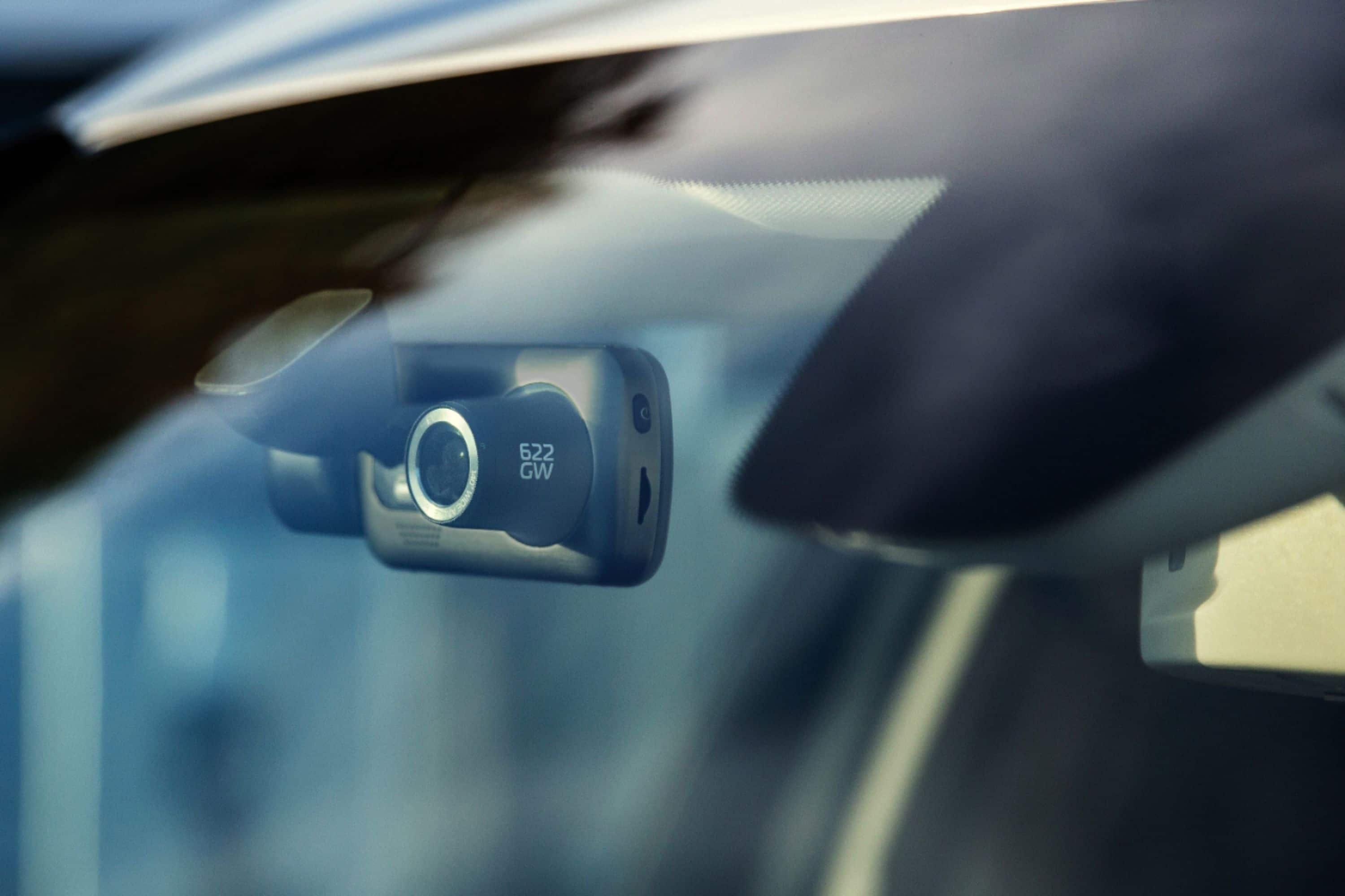
|Posted .This reviewer received promo considerations or sweepstakes entry for writing a review.After having this dashcam for about a week I have been able to run it through its paces. First off lets start off with the good. The quality of the camera lens and sensor is unmatched to any competing product that I have tried/used. They include a secondary lens... more so a diffraction filter, over the lens to allow you to fine tune eliminating dashboard reflections to focus on the video outside the windshield, not be distracted by things on your dashboard. Second, the touch screen is large and responsive and menu navigation is quite easy along with pairing to the Nextbase app on iOS. The quality of the 4K/30 and auto exposure is pretty impressive day and night. I can still read license plates and hear clearly what is going on within my car whether that be music or speech. The one drawback that I wish nextbase though of was their wiring. It was clever to integrate the mini-usb connection directly into the mount which makes wiring clean but the cable provided is hardwired to a 5V (output) cigarette plug. I would have liked to see them either just include a long USB-A to USB-Mini cable and I provide a USB cigarette plug where I can use another port on the USB for my phone charging. Unfortunately, due to this design I now don't have a place to plug my phone in to charge. It isn't a deal breaker but certainly a convenience item that should be factored in next time. I probably will just buy a USB-A to USB-Mini online and replace the provided cable as my USB charger provides the same 5V output that is demanded by the 522GW camera.
I would recommend this to a friend - Pros mentioned:Video quality
Great Image Stabilization with One Flaw
|Posted .This reviewer received promo considerations or sweepstakes entry for writing a review.The Nextbase 622GW is a nice upgrade to the 522GW. The most impressive feature on the 622GW is its 4K video combined with Enhance Image Stabilization (EIS). 4K with EIS by itself makes it worth the upgrade. PROs • Enhanced Image Stabilization (EIS). I was not expecting much from the image stabilization but it works really well. Footage is far smoother and less bumpy. It does a remarkable job keeping license plates and other text sharp. One tradeoff to EIS is max native resolution drops from 3840x2160 (4K) to 2704x1520, which is then upscaled back to 4K. Unless you’re trying to capture every original detail of a scenic drive, I would leave EIS turned on as it makes it easier to read plates in motion. • Faster response with the iPhone Nextbase app. The 522GW was lethargic connecting to the app compared to the 622GW • Fits seamlessly into the same mount as the 522GW. This meant that I did not have to install new wiring. CONs • The biggest con is the image has a red cast on it. The red cast is especially strong when facing the sun. I’ve been told by tech support that a future firmware update will fix this issue. Fortunately the cast only affects the overall color and not sharpness or other characteristics. • A bit pricey relative to other brands Bottom line is the clarity of the image stabilization should put this dash cam on your shortlist.
I would recommend this to a friend - Pros mentioned:Gps, Video quality
Almost 5 Stars!
|Posted .This reviewer received promo considerations or sweepstakes entry for writing a review.Aside from two things, this is a great product. Lets get that out of the way first.... The charging/data port is the old style USB mini not micro or USBC. This is a small issue as you probably wont want to plug this into your computer but I now need to keep track of another cord if I am traveling etc. Along with this the cable provided to wire it into your car has a charging port (cigarette lighter) adapter. I wish this plugged in to the adapter with a USBA so I could use that source for power. There are two untethered port covers one for the cordless power mount and one for the optional rear view camera. Though once in use it would be rare to need them, I would be happier if there was built in storage or a "stuff bag" to keep accessories from wandering away. Now that that is over on to the good stuff. This has great image quality. This is due to several features such as image stabilization, polarized lens filter and other image enhancements make the picture clear to read license plates and other details that may be interesting or critical depending on the use of the captured content. The feel is that of a quality device. Most of the exterior seems to be metal which should lead to a durable product. Safety features such as built in GPS that does not require a data connection will help you get help on the way in the event of an emergency. Built in Bluetooth and WIFI to connect with your phone for fast access to onboard videos. Also compatible with an optional rear camera for a complete picture of what is going on. Finally it comes with a variety of mounting options that are easy to use. There is even a tool to help sluff the power cord behind the ceiling liner and trim to get it out of the way for safety and appearance. All in all this is a great product. Stay safe out there and enjoy the piece of mind a dash cam can bring.
I would recommend this to a friend - Pros mentioned:Video quality
So Close...
|Posted .This reviewer received promo considerations or sweepstakes entry for writing a review.There's loads of dashcams on the market at this point, but this really stands out in terms of features Being a 4K dashcam is still less common these days than most other features and the primary reason to have a dashcam is to capture issues that might happen while you're driving. A 4K dashcam gives you the ability to capture a greater amount of detail, such as license plate numbers, in the event you require them for police or insurance reports. Setup for this camera is very easy. You can connect it to your computer for firmware or to download videos, but connecting to the power in your car is straightforward. It ships with a long power cord which connects to the accessory outlet. I do feel like there was a big miss that it does not include a pig tail for using power from a powered or smart mirror. For controlling it, the app is very straightforward and easy to use, although i feel like the included Alexa functionality in the camera itself is extraneous. Finally, the image quality is superb, however bearing in mind that it is 4k it will consume free space on your memory card at a greater rate. Bottom line is that they got really close with this camera the quality is great, but the missing pigtail power cord and extraneous Alexa feature detracts from the overall capabilities, as well as the lack of general accessories from the manufacturer like a rear view mirror mount prevent it from being great.
- Pros mentioned:Ease of use, Video quality
dashcam with crisp clean images
|Posted .This reviewer received promo considerations or sweepstakes entry for writing a review.The Nextbase 622GW 4K Dash Cam is a pretty decent dashcamera. It was relatively easy to charge and set it up out of the box. The screen is pretty sharp and color accurate for how small it is, and I like that the screen will shut off while driving so my eyes aren't distracted. Super easy to setup and pair with the app, and you can access the high quality images instantly through it which is awesome. I like that you can do quick screenshots on the camera itself by double tapping the screen to take a picture. Setting up the camera in the car I found the base kept falling off the window, so I had to stick it to the little black dots at the top of the windshield to get some more grip and it has held on tight ever since. The base magnet is super strong and holds up the camera great, and since the charge goes through the base you can just pull off the dashcam and store it somewhere safe like in a glovebox or take it with you in your bag or purse when you leave your car in case you're worried about it getting stolen. Overall I'm very pleased with this dashcam, and would recommend picking it up if you can catch it on sale.
I would recommend this to a friend - Pros mentioned:Ease of use, Video quality
Great Quality, But Pricey
|Posted .This reviewer received promo considerations or sweepstakes entry for writing a review.This is a great quality dashcam. It was easy to set up and has great video quality. I travel a lot for work, and having the dashcam gives me peace of mind in the case of accidents. What3words is available for this device, which is also great for safety if you're in a situation where you need to communicate your location. It came with all the tools needed to mount the cam and get the cords tucked out of the way. Operation was easy, but you will need an SD card to record and store your videos. At this price point, additional onboard storage would have been nice. This replaced a cheaper unit, and it's definitely a better built camera and has much improved image quality. The one drawback is the charger. My last dashcam had the car charger, but it included a USB slot on the charger so that I could charge my phone while still using the dashcam. I had to by a car charger splitter to be able to use this cam and my phone charger at the same time. Given the cost of this device, having to by an SD card and a charger spiltter adds insult to injury when you're dropping this amount of money.
I would recommend this to a friend - Pros mentioned:Video quality
Fantastic Dash Cam quality
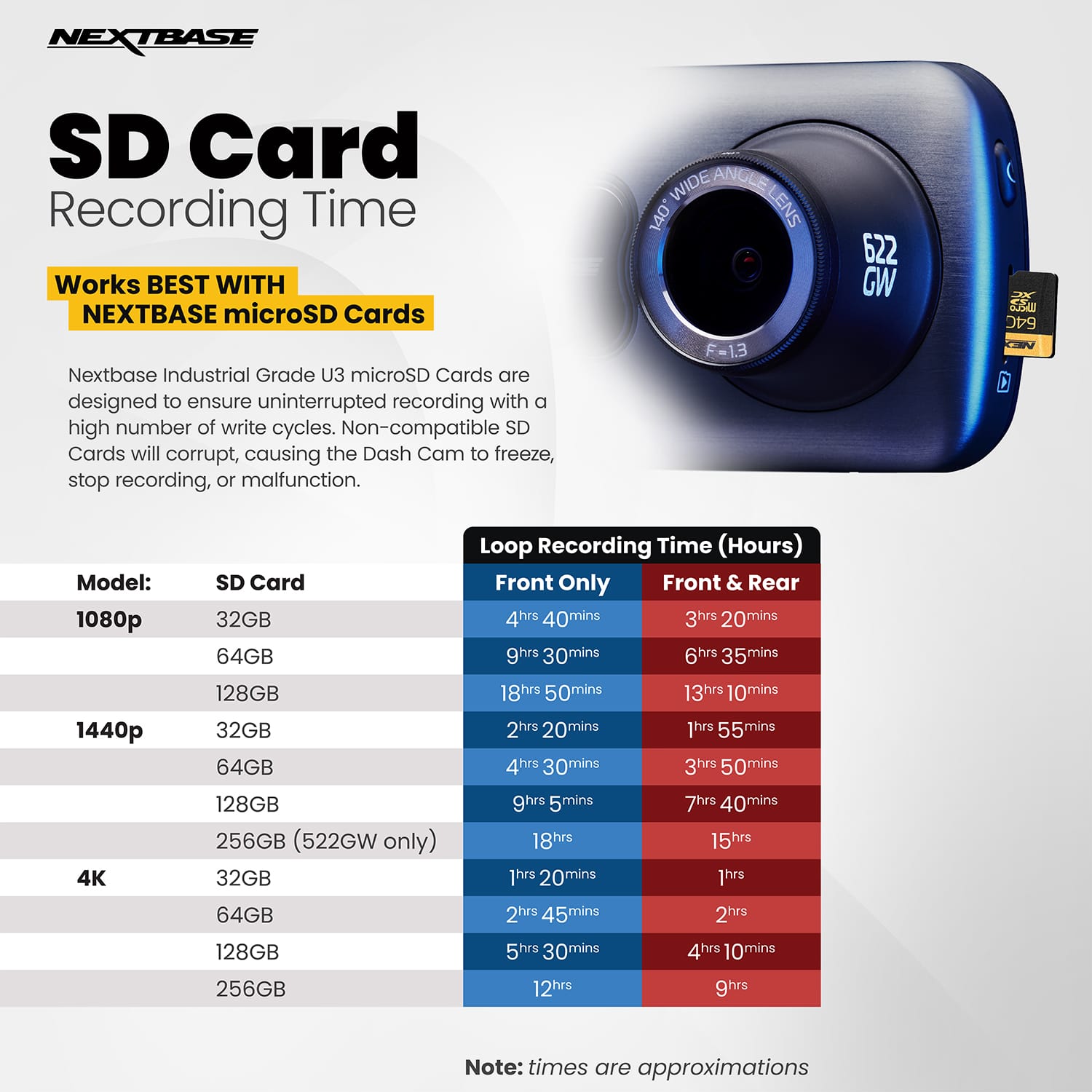
|Posted .This reviewer received promo considerations or sweepstakes entry for writing a review.I have 2 other dash cams that I have been using for a little more than a year and was overall, very happy with them. However, now that I have the Nextbase 622GW, I don't think I will go back to either one of my old cameras. The 622 comes with a number of bells and whistles, enough to keep any tech junky happy for days. But, what really makes this camera stand out to me is the quality of the video and the still shots it can produce. Especially at night or in any low light situation. The camera has various video quality settings but I just leave mine on 4K 30 FPS and see no reason to make any changes. If you want, you can go all the way down to 1080 at 120 frames which would allow some really great slow motion video I suppose, but I just like the clear pictures I get from 4K. This camera has video stabilization that none of my other cameras have or even come close to. I took my truck onto a gravel drive that was uneven. You can watch the hood of the truck in the 3 inch touch screen move from side to side while the video stays perfectly straight and focused. I was moving slow, but it was still impressive to watch. This unit has what 3 words built in, an SOS feature (1 year free subscription included) and Alexa. All of these features seem to work well once they are set up with your phone. There are a number of commands that you can use with Alexa to control the dash cam, those of you who use alexa will certainly be excited. I use Alexa, but it is not something I see myself using with this dash cam, however, it is there and it does work. There are 2 mounts included, an adhesive mount and a suction mount. I am using the suction mount and it stays on the windshield without issues. There are 2 things I feel I need to point out. One, the camera does not come with a micro sd card. You will need to purchase a U3 high endurance card to use with this camera. The box says the camera can handle up to 128 gig cards. The other thing I need to mention is that I have had the camera freeze on me twice since I have been using it. I don't know if it is an issue when it connects to my phone or a software issue in the driver, but it has happened. There is a small reset button on the bottom of the unit that you can push which restarts the camera and so far everything works fine after that. This was not enough of an issue for me to drop a star, because I believe it can be fixed with a software update if it becomes a problem. If you want the best dash cam on the market, I believe the Nextbase 622GW is the one to have. Great video and pictures, easy setup, very nice 3 inch touch screen and Alexa, what 3 word and SOS on board. I'm not sure what more a person could want in a dash cam. Give it a try. I received my Nextbase 622GW as part of the Best Buy tech insider network in exchange for my honest review of the item.
I would recommend this to a friend - Pros mentioned:Video qualityCons mentioned:Battery life
Great image with fantastic stability.
|Posted .This reviewer received promo considerations or sweepstakes entry for writing a review.Fantastic image, no glare and steady image. The image stabilization is really truly rock steady. The weight of the camera is solid and feels like quality. The two mounting options are solid options and both feel super secure. The one big issue is the use of cigarette lighter charging cord which i did not use as it would mean losing some of my usb charging options…not sure why not make it usb both ends. I also do not utilize the camera with the engine off as it does not seem to go to sleep and do not want to come back to a weak car battery in cold months. Minor quibble and have contacted tech support with the sleep mode, awaiting a reply. I try my best to remember to unplug the camera when I exit the car. The sos functions seem useful if I ever need, I hope not. The quality build, picture quality and image stability make the product a go to for a dashcam but the price is a bit steep…try to get it on sale.
I would recommend this to a friend - Pros mentioned:Video quality
Great potential, not incredibly user friendly
|Posted .This reviewer received promo considerations or sweepstakes entry for writing a review.I am highly appreciative of this dashcam and the quality of both the footage and the dashcam itself. This is pricey, but I feel like the list of features and the available add-ons and upgrades to this camera make it worth it. For example, the rear camera add-on is not all that much more money and adds great utility to your set up with relatively easy set up based on the instructions. The module that allows for a driver compartment interior camera to easily snap on to the inside is awesome and would provide a lot of utility I feel for those in the ride share industry or who provide transportation to others where liability or risk might be involved. The initial set up of the camera was straightforward and was the only part of the install that the included pamphlet instructions were any good for. I acquired a 128GB NextBase micro-SD card as they recommended (quite the expensive add-on) and I inserted it into the camera while charging the camera for 2 hours with the included mini-USB cable. I then followed the prompts and installed the app to get the camera fully updated with new firmware and synced up to my phone. Altogether, a very streamlined process and as of March of 2022, it was not the difficult process some other past reviewers have described. The installation of this camera was pretty simple. The YouTube video is what I used to get an idea of how to install this as I felt the little instruction pamphlet included was convoluted and practically useless in its lack of detail for this part of the install. They include a cigarette lighter plug adapter as a power source in this package, but they have a hardwire kit that allows you to tap your fuse box for power, this is what I will be going for someday. In the meantime, I was able to route the power cable in a clean manner around and under my headliner, down my passenger A pillar, through my weather molding, and under my seat to get to the plug in a clean manner. As for the all-important footage itself, I am still on the fence about it and that is while I am going to give this product 4 stars. I can definitely tell from the review of my videos I download over the wifi connection with the camera that the frame rate of the 4K 30FPS setting is smooth and isn’t dropping any frames. However, with this download-over-wifi connection with the camera, I feel like the quality of the videos is moderate at best. I can pick out numbers and letters on license plates of vehicles within 25 feet of my front bumper, but after that, there seems to be enough fuzziness and artifacts that characters on license plates get difficult to decipher. As for the opposing lanes of traffic, I cannot get a read on the license plates at all with this simplest video download method from the camera. At this price, I would expect better and simpler ways to get quality footage. I know some reviewers have detailed how they use the micro-SD card to plug directly into their tablet or laptop to download better quality footage and yada yada yada, but I feel like this should be simpler and more user friendly than that. The average dashcam purchaser is not going to have professional photo editing skills or even have a desire to have to do so many steps to gain better quality footage unless the necessity of a court case or an insurance claim called for it. Thus, representing the average dash cam owner, I am going to say that with everything above I have mentioned, this is a camera I would recommend only to those who are expecting to need to add on more modules for rear and interior cameras and who are willing to get technical if they want to attain usable dashcam footage off it. Thanks for reading and I hope my perspective helps somewhat!
I would recommend this to a friendBrand response from Nextbase
Posted .Hello,
Thank you for taking the time to leave your detailed review.
Your 522GW will record both low and high resolution files if Dual Files is turned on (on by default). If you are viewing the low resolution files via the MyNextbase Connect mobile app, this would explain why the footage you are seeing is of a lower quality. You can identify the High or Low files by the end of the footage title- High res files end in FH (front high) and low res files end in FL. To view the higher resolution files, please view the FH files.
You can connect your Dash Cam to your computer using the provided USB cable.
1) Plug your Dash Cam in. Ensure the cable is plugged directly into the dash cam and NOT via the mount.
2) On the dash cam's screen you'll see a menu of 3 options. Please select 'Access Files' on the Dash Cam's screen.
3) Then the Dash Cam will be visible as a removable drive on your computer. Open the drive and inside these folders are your photos and footage.
4) You can copy the files onto your PC to save, view them using your computer's media player, or view the files using the Nextbase computer app- MyNextbase Player. The MyNextbase Player is free of charge and can be downloaded from the 522GW Support Page.
If you have any further questions, please contact the Nextbase Support Team at support@nextbase.com and they can help further.
- Pros mentioned:Parking mode, Video quality
Excellent Quality Dash Cam With Great Features
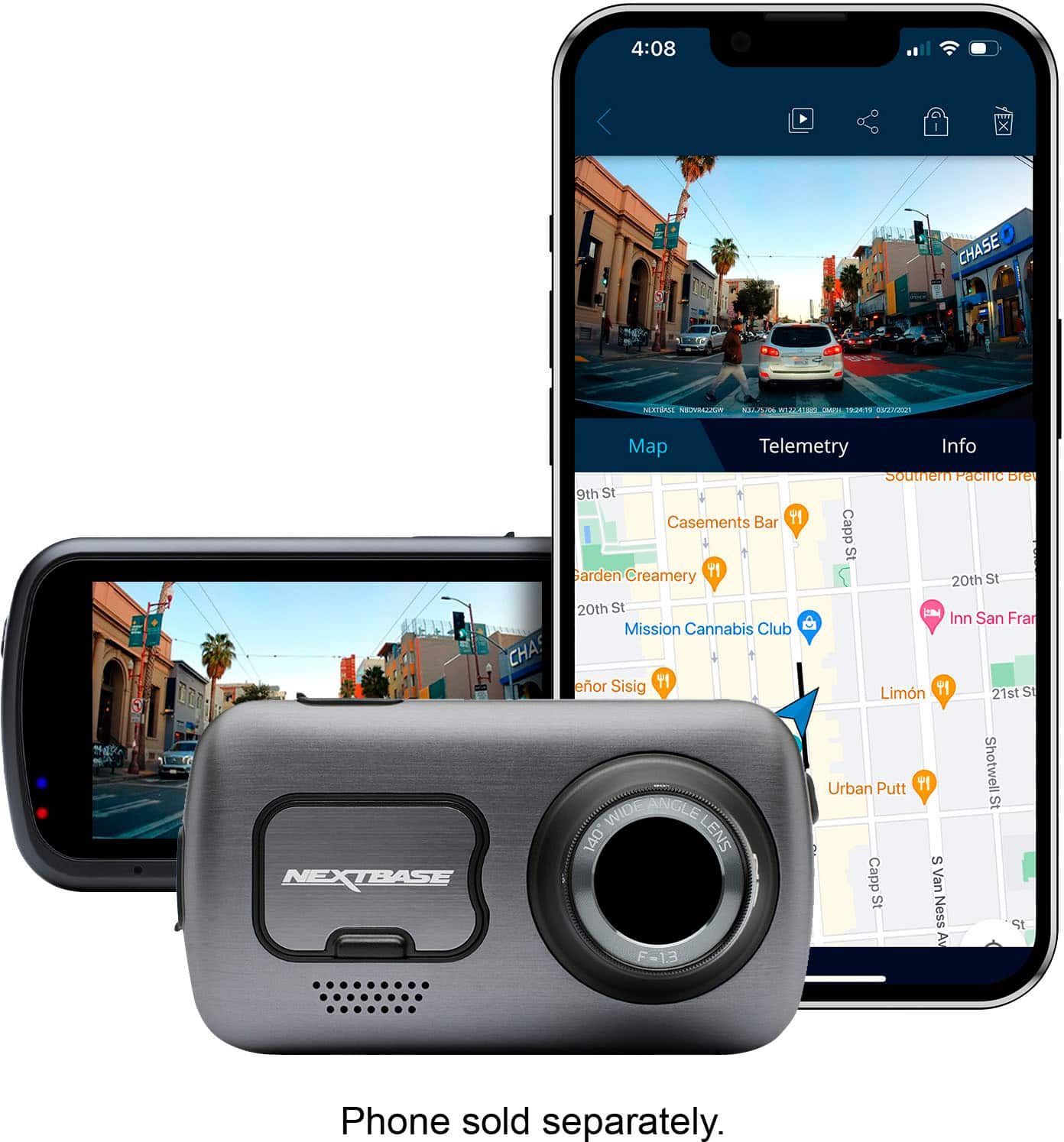
|Posted .This reviewer received promo considerations or sweepstakes entry for writing a review.The Nextbase 622GW 4K Dash Cam - Silver arrived in perfect condition and within a few minutes I was downloading the Nextbase application for my smartphone, checking for updated firmware, installing a 64 gb U3 micro SD card (note the Nextbase 622GW will not record on anything but a U3 rated micro SD card and the dash cam will accept a card capacity of up to 256 gb) then connecting the dash cam to my Amazon Alexa smartphone application for voice commands and ready to install the unit on the front windshield of my car. The sticky tape the windshield mount came with does not appear to be very strong and will likely need to be replaced before next summer's heat arrives. I mounted the dash cam high up on the windshield centered beneath the rear view mirror. A rear camera is also available for purchase from Nextbase. The 622 GW dash cam has a small battery inside it that allows it to continue to video once the vehicle is stopped and power from the vehicle is off. This should overcome the issue of new vehicles that turn off the vehicle's engine when it comes to a stop at a red light or other reasons causing dash cams to stop recording. The 622 GW Nextbase will continue recording during these events, a very nice and well thought out feature. As for the video quality, it is top-of-the-line! The Nextbase dash cam will record up to 4k quality! The images are ultra clear, are stabilized by the cam's digital image stabilization system, can record in super slow or extreme weather mode, has Alexa build in, is Bluetooth equipped and has an emergency SOS response system in the event of an accident or other emergency event; a nice package of features to be sure! It also has a three word precise global location capability called "What3Words" that can be critical in the event of an accident, guiding emergency services to your precise location. This works even when you are offline. Fog can be a major cause of accidents and built-in algorithms allow the Nextbase 622GW Dash Cam to enhance images in misty/foggy conditions and record the clearest images possible. With its Bluetooth connection to Amazon's Alexa, you can ask to play music, place calls, get directions, find parking, plus control the dash cam. You can ask Alexa to send dash cam videos to your smarphone, start/stop recording, and protect a file all while keeping your eyes on the road and hands on the steering wheel. An intelligent parking mode automatically records when motion is detected so that your vehicle is protected against damage and theft all the time. No longer are images wobbly, license plates blurred or unclear.
I would recommend this to a friend - Pros mentioned:Ease of use, Video quality
Outstanding Dash cam!!
|Posted .This reviewer received promo considerations or sweepstakes entry for writing a review.This is my first dash cam. I was always a little intimidated by them. Thinking they had to be hardwired or I would have to have wires hanging down from the mirror. But out of the box, I had this setup and running in less than 30 minutes. (not including the 2 hour charge of course). It was so easy. The cord is long enough to tuck into the headliner, run down the A pillar and under the dash to the cigarette lighter. I don’t smoke so I have no other use for the socket. Although I may get the hardwire kit eventually. It even comes with a little plastic tool to push the wire in, along the headliner and pillars. Been using it for 4 days. Have not had a single lock up or issue. I’ve driven about 700 miles in those 4 days so have had plenty opportunity for that. The only issue was my own stupidity when for the first day, there was a blue tint in all the videos that was a little annoying but it turned out that I never peeled off the blue lens protector LOL. I’ll tell you those videos got so much better without that but they were even good with that on it – oops. Many of the videos get “protected” for some reason but it’s pretty easy to unprotect them in the app. You can’t delete a video that’s protected but once I learned you can unprotect them quickly and easily, it stopped mattering to me. I’m assuming some typ of G force like a pot hole is triggering it to auto protect. Still trying to figure that out. It’s really cool that when you download some videos and play them back on your phone when you are connected to wifi, it even shows you a little moving map showing exactly where you were. I’ve got the new Samsung fold phone so there’s a lot of room for both the video and the map on the screen. Or you can just tap the video and make it fullscreen. The videos show you your MPH, your long and lat and the time stamp on the bottom of each video. You can turn all that off though in the settings. Would be nice if you could pinch and enlarge the videos but I don’t see that working yet unless I’m missing something. I also couldn’t find the downloaded videos in my phone’s “file manager” to be able watch them on a different viewer. They must be hidden so I’ll have to figure that out another time. I’ve got it set to record 2 minute videos at a time. Only cool thing I’ve recorded so far is turning into a dirt road where I was looking to take photographs of birds in the area and there were 9 deer feasting in the field. Looking forward to getting some other random cool things. I really love this thing. The quality of the videos in 4K both night and day are spectacular. I’ve heard I should set it at 60fps but I’ve left it on the default 30fps for now. Overall, this dash cam is quite awesome. So happy to finally have one and have one, if not the, best one on the market. Great job Nextbase
I would recommend this to a friend Invaluable tool for daily driving
|Posted .This reviewer received promo considerations or sweepstakes entry for writing a review.As someone who travels a lot by car this thing is invaluable. You always hope you don't actually need to review footage but its kind of fun to do so after the fact once you get used to save protecting the files. Resolution being 4k the footage looks great, even in poor weather conditions which is nice you never have to worry about it after your initial setup. In my case my car dash is lighter color so it reflects from sunlight during the day. This isn't a problem because the camera has a polarized lens you simple turn and it cuts the reflection right off which i was kind of surprised about considering it was a massive problem at first. You can turn this to 1440p and do 60fps or even 1080p; and do 120fps making the footage extremely smooth and even be able to watch slow motion. I honestly think 4k is overkill and use the 1440p at 60 as its the perfect inbetween. There is image stabilization but i honestly can't tell a difference with it on or off there both smooth in playback. It has a battery built in that you cant take out but it only uses that when your car is off if you turn on the security mode or you crash and it loses power etc the battery takes over. Otherwise it goes to the cigarette lighter adapter and comes with a little tool that lets you run the wires. Its got wifi 5ghz and bluetooth 5.0 so you can connect your phone no matter what it is. The app is fairly basic but does the job. The thing i really dislike is if you don't enable the dual files option on the camera itself it doesnt let you watch the videos on your phone on the spot. It will only let you watch the low res (dual mode means it creates a lower res version) on your phone wirelessly. I went with a 64gb sd card also from nextbase and had no issues at all there. Goes in and out smooth and the card can save up to around 40mins of footage total. If you haven't used one of these before you basically "protect" files you need to save which can be in 1, 2, or 3 min blocks of time, otherwise it simply goes back and rewrites that memory repeatedly to make sure you don't run out of space. That being said if you think your going to want to save a ton and not take your card out to transfer files from it then i would suggest getting higher memory then i did as this is essentially 40 events and depending on how much you drive would fill quickly. It has alexa and some sos emergency response features however I opted not to use those in the settings but they seem super nice if you are into that automation. You can add additional cabin and rear view cameras to this according to the manual super easy which i saw in options when setting up also to make a complete package. I feel like it's a tragedy that more people don't use dash cams generally speaking in America vs places like European countries where almost everyone does. It gives you a nice piece of mind just knowing you will be recording in case something happens being able to review that might be the difference in your car insurance or not.
I would recommend this to a friend- Pros mentioned:Video qualityCons mentioned:Battery life
The Dash Cam I never knew I needed!
|Posted .This reviewer received promo considerations or sweepstakes entry for writing a review.All I can say, is WOW! This is the cadillac of dash cams. The 622GW is packed with features and capabilities that are too numerous to describe. This is my first dash cam and I am blown away by the technology packed into this little thing. Out of the box, it looked like an old digital camera that I used to carry around before my smartphone. Ha! Maybe this was the next evolution of the old hand held camera.The camera comes with a "click and go" mount, a 10-12' charging cable that plugs into the mount (not the camera), a usb cable to download videos to computer, and a tool for tucking the power cable into the lining of your car. The instructions recommend that you charge the camera in your home before mounting so as not to draw too much charge from your battery. The camera utilizes an app that you can download to your Apple or Android device. It allows you to wirelessly download videos to your device and is very handy. After charging fully, putting in the sd card, and installing on the windscreen behind the rear view mirror I was ready to begin setup. It was super easy, just turn it on and there is a "first time use" menu that walks you through the steps and even supplies a qr-code for you to download the app and get connected. Once everything is installed and connected, the live viewscreen appears and you are ready to go. The camera records in 4k ultra hd and is crystal clear! I was seriously impressed. It records continuously and you can disconnect it from your windshield super easily if you want to take it inside to charge or lock in your glovebox. The camera has all kinds of other features like crash detection that will notify emergency services in the case of an accident. Fortunately, I did not get a chance to try this feature out, but setup for it is easy enough through the app. Better safe than sorry! The camera also has features that prevent it from draining your battery and the settings are fully customizable (and over my head, lol). I was really surprised by this camera and have no problem giving it a full 5 stars. Highly recommend!
I would recommend this to a friend - Pros mentioned:Video quality
Exceptional 4K dash cam
|Posted .This reviewer received promo considerations or sweepstakes entry for writing a review.The Nextbase 622GW is the upgraded version of the 522GW, with 4K video capabilities. The 622GW can do 4K video at 30 fps, while the 522GW was only capable of 1440p at 30 fps. Installation was a little tricky for me to hide the wires, but they did provide the tool and instructions as to how to do it. I felt like the mount was secure, and the dash cam clicked right into the mount easily with a pretty powerful magnet. A port of the side of the camera allows you to attach a separate reverse camera or cabin camera. The app is easy to use, and it was easy to add the dash cam to the app, sync to my iPhone, and update the firmware. The user interface on the dash cam is intuitive as well. The videos sync straight to the app and older videos are automatically overwritten so you don’t have to worry about your SD card getting full and having to deal with clearing it out/formatting, however, the instructions do recommend formatting the SD card “fortnightly.” Clips can be locked in the app so they aren’t overwritten. The 622GW has a pretty nice feature called enhanced image stabilization which seemed to really help provide additional clarity when in motion. Another cool feature is called super slow motion, which allows you to play video clips in slow motion, but only when the resolution is set to 1080p at 120 fps, and only when enhanced image stabilization is turned off. There’s a date and time stamp included on the videos with longitude and latitude coordinates, heading, and speed. I could see this being helpful in the event of a collision, or even if you’re just trying to document a road trip. The app allows you to setup an emergency SOS feature to automatically notify first responders when the dashcam detects an accident, and the incident aware feature within the app allows you to quickly upload videos to your insurance company (or any other individual) with your insurance policy information. You can also add your medical history and information, personal info, emergency contact info, make, model, and plate number of your car, etc., to be shared as well. Overall, a fantastic dash camera with a couple minor limitations/issues.
I would recommend this to a friend - Pros mentioned:Video quality
Dashcam with many features
|Posted .This reviewer received promo considerations or sweepstakes entry for writing a review.This is my first dashcam, I have always been curious about using one. Out of the box, the camera itself feels solid, I like the options for the suction cup mount and the permanent stick mount, I chose the suction cup method. I didn’t realize that this dashcam would require the cord to be attached to the dashcam while using it. A “cable tidy tool” is included, so you can tuck the cable under your car roof lining or what have you. On to the camera: The video quality is AMAZING. When I reviewed the video at home, it was like watching a movie or a police show on a mini TV. The stabilization must really work, I didn’t notice any distracting movement. The night time footage looks like night time on TV, not like in a military night-vision raid, and the day time footage looks typical as well. I am undecided as to whether I like having the volume on or off, I don’t necessarily like hearing everything in my car; music, talking to myself, but if there is a true need for this footage, I think I would like to have the audio. I don’t have Alexa, I don’t know how to use it, but if you have it, you can use it with this dashcam. Seems that it would be useful. I tried to do some research to find out how to use Alexa if I don’t use it anywhere else, and I didn’t come up with anything. There is a small quick start pamphlet included in the box, but I went to the Nextbase website to download a real user manual, I recommend that. There’s a lot more information in this 51 page manual. I’ve only had this installed in my car this week, so I’m learning more and more about it, but I like it a lot!
I would recommend this to a friend - Pros mentioned:Video quality
More settings than you can imagine
|Posted .This reviewer received promo considerations or sweepstakes entry for writing a review.RATIONALE: Let me start with the motivation for getting a dash cam. I went out to run a few errands, and on my way almost got into two separate accidents with two different drivers. What are the odds of that? Nowadays, it seems par for the course. People are more distracted than ever and many are very self-centered, aggressive drivers. Rather than convincing yourself to get a dash cam, you have to ask yourself if it is safe to drive without one? UNBOXING: The 522GW comes with the magnetic car mount, power cable fitting tool, adhesive pad (if move mount to another vehicle), USB cable to connect to your PC, car power cable. FEATURES: Like so many tech devices, there is an app to connect to your phone. What attracted me to this model is the Intelligent parking feature that starts recording when there is a jolt to the car. My son lives in NYC and had his catalytic converter stolen. He is afraid to replace as he is sure it will only happen again. I have the same type of car, so I am worried about the same thing happening to me. The built-in Alexa voice technology conveniently lets you control features of the dash cam. The picture quality (1440p 2K resolution) is incredible, and makes for a very detailed video. This is great if you need to catch a license in an accident. Living in the northeast with bright sun in the summer and snow in the winter, the polarizing filter really helps to reduce glare from the elements. The GPS tracking is really nice as well. DOWNSIDE: I have to be honest when I say this dash cam will be challenging for a non-techie. There are a bunch of different settings giving you lots of control which is great for people that have a specialized drive that requires advances setting. But it gets a little overwhelming to figure out what to turn on. I had to watch a video (https://www.nextbase.com/en-us/setup-install-guide/) on hiding the power cable so I didn’t get stuck with the cable dangling in my way. Now I have two bulky things on the windshield – EZPass and the dash cam. The Emergency SOS feature could be lifesaving, but you only get a one-year free trial. After that, you will have to pay to keep the subscription. UPSIDE: The price is much more reasonable than the 622GW while still sharing many of the same features. This is a front camera. Cabin and rear view cams (available as additional purchases) can be connected to the dash cam.
- Pros mentioned:Video quality
The Almost Perfect Trip Companion
|Posted .This reviewer received promo considerations or sweepstakes entry for writing a review.I haven't owned any dash cams in the past, so this was a totally new experience for me from the install to the operating of this camera and I'm glad to say that I'm pleased with the product. Firstly, if you're timid about installing a dash cam, don't be. This camera came with everything you need, from an easy suction cup grip to a tool to pry and push the wires into your car's lining and crevices. Everything you need is here and if you watch a video or 2 on how and where to install the camera, anyone should be fully capable of doing this in most vehicles. I chose the suction cup mount as my car is a lease and I don't want to have to scrape off adhesive before trading it in later. The suction cup mount seems to stay on very well and I don't foresee it coming off any any point in the future. I used the tidy tool they provided to help guide the 12v car adapter/mini usb cable around the top of the windshield and up and underneath the dashboard of the car until reaching the 12v plugin in my center console. I left all settings as default and tested a few recordings. The camera seems to capture motion very well at 4k/30fps. I haven't tested the 1440p or 1080p modes at higher FPS, although I may want to do that to be able to capture more data and use the slow motion feature. I'm knocking a point off for the iPhone application. It's very dated and although it works, it's just not up to snuff in terms of ease of use. I charged the camera before installing it as recommended and there was a firmware update available, so I went ahead and updated the camera with that. That all went off without a hitch, but app itself seems outdated and sluggish on my iPhone 8 Plus. Again, the application works, but for such a premium camera, I expected the the app to be more polished. Setup and install went fine, the only other issue I have is how long the power for the camera seems to stay on after my vehicle is shut off. I looked this up and I believe my vehicle keeps accessory power to the 12v on for up to 10 minutes after the vehicle is off, but be sure to to double check and make sure the camera does shut off eventually, as this might drain your car's battery if it doesn't shut off. Again, I believe this to be a car feature and not a camera issue. Overall I'm really enjoying the camera and here's a quick pros and cons: Pros: Good build quality 2 options for mounting Long USB wire for routing around bigger vehicles Smartphone application for adjusting settings, etc. Cons: Gets a bit warm to the touch when recording, this is normal based on the FAQ Smartphone app is dated and lacks polish 12v adapter is quite large and I wish it was a little smaller
I would recommend this to a friend - Pros mentioned:Video quality
Pleased with camera and video results
Posted .This reviewer received promo considerations or sweepstakes entry for writing a review.This camera does a good job of taking and recording videos when using the Nextbase 128 GB micro SD card. The image quality is good and the camera seems to handle flare well even when the Sun is close to the center of the field of view. At the 4K setting, off center resolution of nearby objects in the field of view is reduced due to motion blur when there are significant speed differences between the car and the object. The effect is less noticeable at the 1440 setting. For my purposes, the benefits of the wireless connect software do not justify the extra complexity involved. It is easy to disconnect the camera from the mount if you pull it off with a straight motion rather than twisting. Once off, it is easy to review and edit the video clips on a PC using the NextBase Player software. Using this software you can view the camera video image simultaneously with car speed and acceleration. The car position is also displayed on a map showing the overall car route for the clip being viewed. Cons: The camera seems to run a little hot compared to the ambient temperature but so far this has not caused any problems. The magnetic connection between the camera and the mount invalidates the car compass readings displayed in the rearview the mirror but does not affect GPS readings. I could not find any description of the accelerometer readings displayed by the Nextbase Player software.
I would recommend this to a friend - Pros mentioned:Ease of use, Video quality
Nice camera
|Posted .This reviewer received promo considerations or sweepstakes entry for writing a review.Really decent dash cam. For a point of reference, I have never used or owned a dashcam before so I have no point of reference for how this one stacks up vs others. Records video is crisp 4k 30fps, or can also record at 1080p 120fps. Has image stabilization that seems to work really well. Also has the ability to reduce glare from the dashboard. Requires a micro-SD card to function, they recommend their own but any reputable vendor would work fine. Setup is really easy through the app. I charged it up inside the house, powered it on and was able to update the device quickly, without any issues. As far as setup in the car, it was a bit more a pain and would definitely recommend first-time installers have a garage or do so in the summer. While the camera can work wirelessly, I'd definitely recommend plugging it in so it powers on and records automatically. For what this is, it works really well and was pretty easy to set up and use. They also sell a host of accessories like a rear camera and a cabin camera that can hook up to this one.
I would recommend this to a friend