Customer Ratings & Reviews
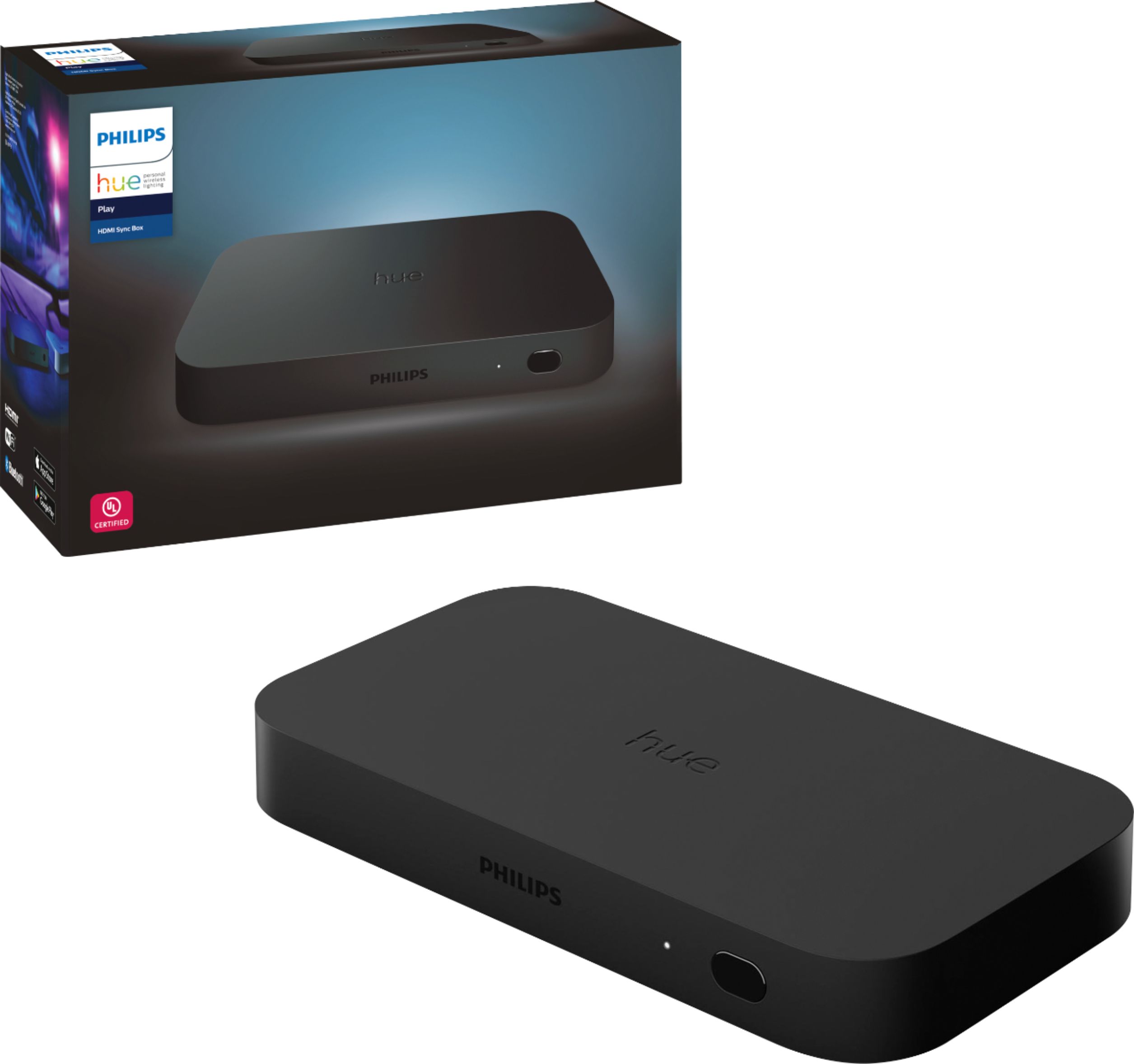






- Model:
- 555227
- SKU:
- 6371722
Rating by feature
- Value
Rating 3.5 out of 5 stars
- Quality
Rating 4.3 out of 5 stars
- Ease of Use
Rating 4.0 out of 5 stars
Customers are saying
Customers enjoy the immersive experience and ease of use of the Hue Play HDMI Sync Box, praising its color accuracy and the generally smooth setup process. However, some customers find the price to be high and have reported compatibility and connectivity issues. A few users also mentioned occasional lag.
This summary was generated by AI based on customer reviews.
- Pros mentioned:Hdmi sync, Immersive experience, Setup
Great... For some people
||Posted . Owned for 2 weeks when reviewed.This reviewer received promo considerations or sweepstakes entry for writing a review.I bought this on sale for $200, with an additional $50 gift card from Best Buy. I've been a fan of Philips Hue lights for a while now and getting the lights to react to the pictures on the TV is something I've wanted since day one. This device does just that. The Good I have three Hue lights in my living room, a light strip behind the TV and two lamps. I love how the lights react to certain zones on the TV. The light strip changes according to the colors on the middle of the TV, and the lamps react to the colors on the their respective lower corners of the TV (left lamp is tied to bottom left corner of TV) I'm waiting for a sale to add additional lights to the room. Light changes are quick and with the app you can adjust the brightness and intensity of the effect. You can also set it to react to sound so that the lights change color based on the sounds. Initial setup is pretty quick and straightforward. Playing games on the PS4 Pro is awesome. It really adds to the immersion. You can forget that the lights are on, but then something happens on screen, an explosion or a flash of light, and your whole room lights up and it's really cool. The Bad The Hue Play seems to be extremely picky about which HDMI cords it likes. When I initially setup the device, I used the short HDMI cable included to connect the Hue Play to my Roku Ultra and the image kept cutting out and flickering. I changed the HDMI and didn't have any problems. When I tried my PS4 Pro, the signal would drop randomly, the screen would go black and it would take a few seconds before the picture came back. Didn't have any issues with my Sony 4k disc player. I changed the HDMI I was using with the Roku to my PS4 and didn't have any problems with the signal dropping on the PS4, but when I went back to the Roku, random signal losses. I tried about 4 or 5 HDMI cables I had, and I even bought a brand new one, and only found one that would work, and it wasn't even the new one. I exchanged the Hue Play thinking, hoping, I got a dud, but the issues were the same with the new unit. So for now, I have three devices connected and I have three HDMI cables it likes. I hope by the time I want to add a 4th device there's and update that addresses this issue, or at least I'm lucky enough to find another HDMI that works with it. With my Sony 4k disc player I do get Dolby Vision and Dolby Atmos pass through, but the color effect doesn't work right. It does change a little but the colors aren't accurate and usually stayed white, only changing in brightness. When I watch a 4k movie I'm not too concerned with adding the Hue color changing effects so I'm fine with it not working. I'd rather have Dolby Vision. As far as watching movies with the Hue Play, for me, having the lights in the room react when watching regular movies and TV shows didn't add a lot of wow factor. The colors are usually more muted and didn't impress much. Animated movies, however, look great. The vivid colors on screen look awesome when you have the same colors around the room. The same goes for playing video games. So I usually only enable the Hue Play when watching animated movies and playing games. I did watch the Taylor Swift concert on Netflix and the light effects were really cool there too, probably the most impressive, immersive experience yet. I'm using a sound bar along with this setup and I go back and forth between turning it on and off. If we're just watching something on OTA TV, it's usually off, and on when playing games or using Roku. This causes some issues with not getting sound when I switch the sound bar on sometimes and sometimes I have to turn everything off and on again to get it working. Not a huge problem, but worth noting. Conclusion All in all, it will impress you. I mainly use it when playing video games and with the occasional movie. I don't know if it's worth the regular price of $230, especially with the issues I've had and the fact that I don't use it daily. But, it does add to certain viewing experiences greatly and for $150, I'm mostly happy with it.
I would recommend this to a friend - Pros mentioned:Hdmi sync, Immersive experienceCons mentioned:Compatibility, Price
Enhance your viewing experience
||Posted . Owned for 2 months when reviewed.This reviewer received promo considerations or sweepstakes entry for writing a review.A nice addition to your Hue lights if you have one for your tv or monitor. Gaming and movies have another level of immersion. A little on the expensive side. Requires an external source of audio/video to go through the device and then a connection to the TV. 1 HDMI cable is provided . Will not work if you are using the built in tv apps.
I would recommend this to a friend 
New Experience
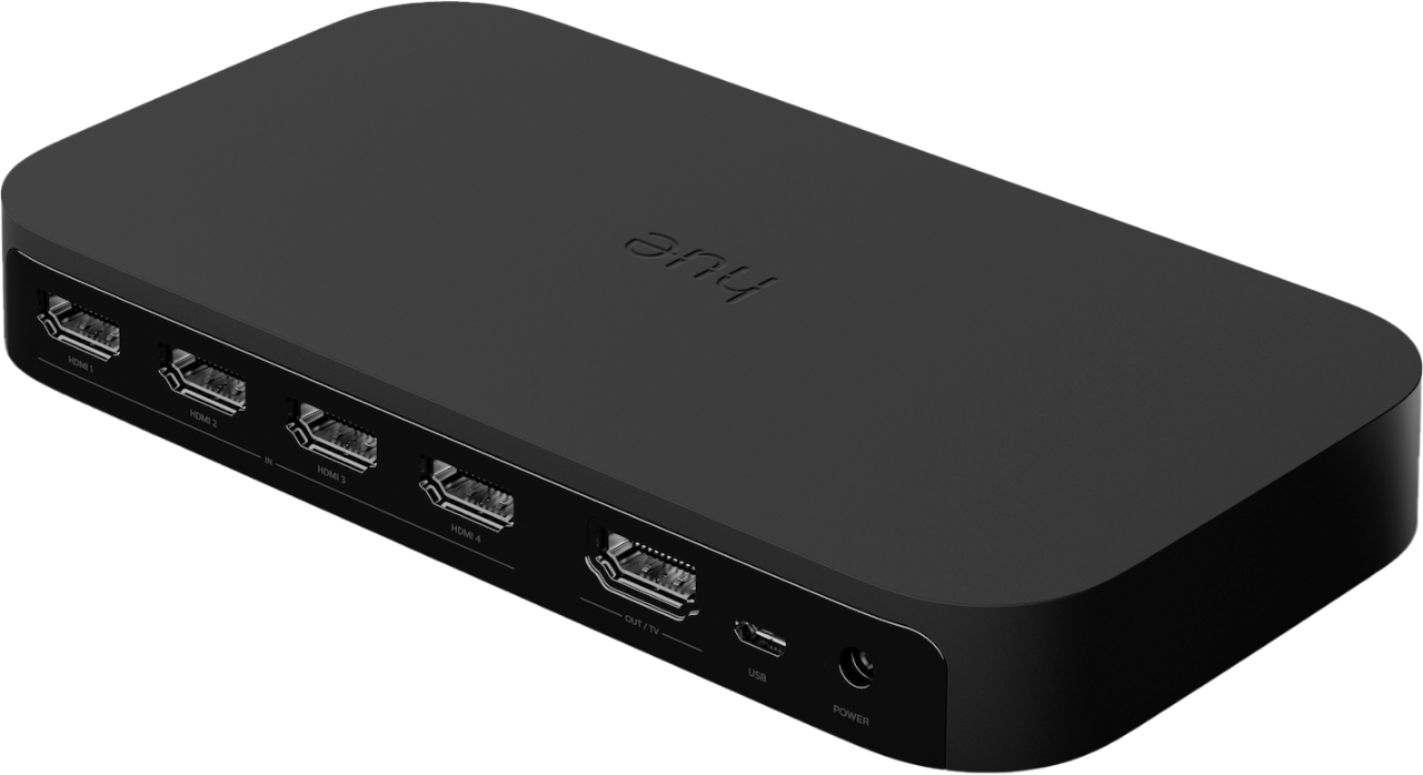
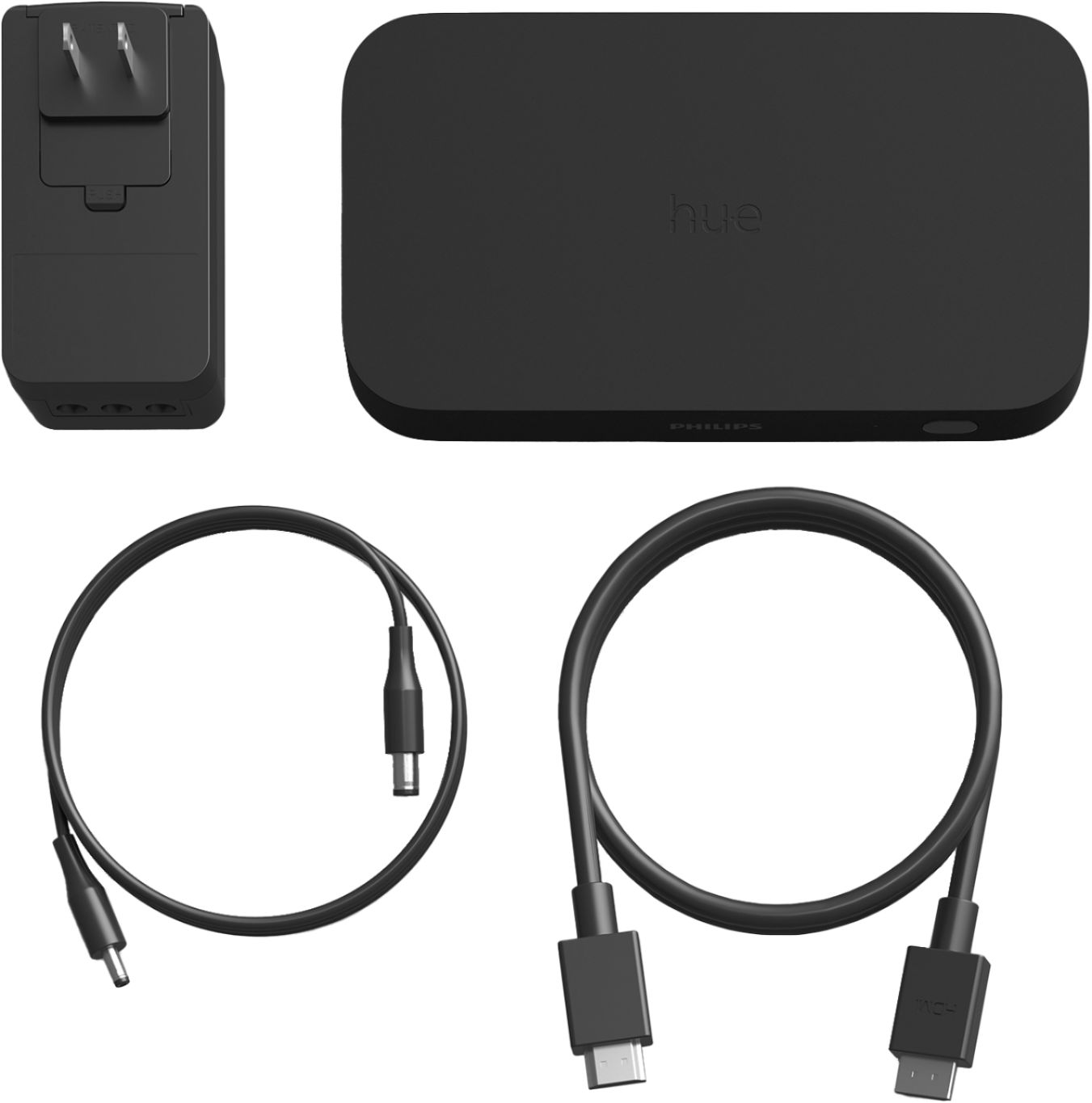
|Posted .This reviewer received promo considerations or sweepstakes entry for writing a review.About Philips Hue Play HDMI Sync Box The Philips Hue Play HDMI Sync Box provides a way to connect your movies, video games, and music to your Philips Hue lights. It is an HDMI pass through device that takes signal from HDMI inputs and then recreates the color with your Philips Hue lights. Think of it as an extension of color from your TV. Whatever is on your TV now fills your room, illuminates your wall, etc. Imagine you are looking at an image of a horizon on your TV. The lights above your TV become the color of the sky. Lights to the left and right are the colors of the focal points. Lighting below the TV are the colors of the earth or water. It’s designed to extend the visual image and create an immersive experience for you to enjoy. What It Came With The products in the box are very simple. You have a Sync Box, power cord, power adapter, and a HDMI cord. The Sync Box looks similar to a HDMI splitter. There are 4 HDMI inputs and 1 output. The power cord plugs into the back of the Sync Box and the other end to the power adapter. Note, the cord for the power is kind of short. The HDMI cord is also short at roughly 3 feet. The App If you already Philips Hue lights you are probably using the Philips Hue app. This is not the app that controls the Sync Box. There is a separate app called Philips Hue Sync that you have to download to use the device. I’m not sure why Philips made a separate app, but my guess is that they wanted to keep the initial app as its own thing. Maybe they’ll integrate these two as the Sync Box gains popularity. The app itself has settings for Sync Mode, Intensity, and Brightness. The app also turns the box on/off and starts/stops the sync feature with the lights. For the Sync Mode setting you can choose whether you have a movie, video game, or music. This will affect how the lights sync. The intensity mode seems to control how quick or responsive the lights are. There are 4 settings for this. The brightness is what it sounds like. You control how bright the lights are as a group. The Initial Set-up Setting up the device really isn’t that difficult unless your entertainment setup is difficult to reach like mine. You plug the input device HDMIs into the four inputs and one HDMI cord out to the TV. Then connect the power. Download the app and complete the steps in the app. It does require a Philips Hue Hub. Something that I didn’t expect is that the box uses Bluetooth to speak with your phone, so you’ll need to be able to sync Bluetooth to set up. I did have a hang up with the Bluetooth not wanting to connect during the set-up, but a power cycle of the box fixed this issue. Connecting the lights is the next step. You set up an entertainment zone that activates when the sync feature is initiated. This is a group of lights that you position in the app by telling it where they are in relation to the TV. There’s a fake home theater set-up shown on the app screen. You move the lights to where they reside in a plan view. Then you press the light icon to set the elevation of each light. For elevation you have a choice of ground, TV level, or ceiling. This gives the box an idea of where each light is as it casts the color outward from the display. Lights My arrangement had several types of Phillips Hue lights. I had two floods, 3 Play Bars, and an extended strip light. It was neat to see the Sync Box throw different colors to each one. If you are just starting, the Play Bar 2-pack may be a great entry point. You could position one on each side of the TV and get a left- right effect immediately. From there, you can add on accordingly. I also recommend having light above the display. It has a pretty substantial effect. (Note: When arranging your lights try to bounce the light off the walls. 2 feet away from the wall usually allows it to cast more evenly. If the lights are up too close you get “hot spots” of intense light.) Results The Philips Hue HDMI Sync Box does what it advertises; extend the light of the display into the room. How the lights are perceived will depend on the individual. For some it may create an immersive experience, and for others the lights may be distracting. Luckily, Philips has added several settings for an individual to scale back or intensify the lighting. I’ll admit, it wasn’t perfect as there were some lights that would “get stuck” for a short period, but the next big light change on the screen would reactivate the light. Also, this Sync Box updates, so Philips can provide new features or fixes as they wish. Here is a quick list of Pros and Cons for the Philips Hue HDMI Sync Box. Pros *New Experience - I haven’t seen another product like it *Lots of control - several in-app adjustments *Allows for quite a bit of expansion – More lights! *Supports 4K *Sync Box can update to improve Cons *Having a 2nd app – Not integrated into Philips Hue app *Lights can sometimes lag or feel jumpy *Short power and HDMI cords I’m giving the Philips Hue Play HDMI Sync Box 4 stars. I’ve never seen a product like it, and it takes my entertainment center up another level. While it’s not perfect, it is fun to play with, and the product has a chance to update as needed to improve. Being able to add and customize the lights and zones is nice because not everyone has the same display arrangement. Overall, this is a fun product.
I would recommend this to a friend- Pros mentioned:Ease of useCons mentioned:Compatibility, Price
Great addition to HUE ecosystem with HUE price tag
||Posted . Owned for 1 month when reviewed.This reviewer received promo considerations or sweepstakes entry for writing a review.For those of us who are suckers for smart home lighting and appreciate what ambient lighting adds to your entertainment experience, this is almost a must have. I have a wide variety of HUE lights including strips and blooms which are perfect for use with the sync box. It was easy to setup, worked as expected, had a few bells and whistles I wasn't aware of going in, and looked great with both movies and games. It is also being supported by Philips with firmware updates to add voice activation, etc. Some reviews have pointed to a potential future issue with certain video formats that it may not be compatible with but I wasn't too concerned with that myself. The biggest problem with it (and reason for only 4 stars) is the price. Philips puts a premium price on all their HUE products and this is no different. At $150 it would be a no brainer, even $199 would be expected by those of us fully invested in HUE, but $230 with no sales up to this point since release is harsh. Plus most people will need to purchase multiple additional lights as your current overhead lights or lamps are not ideally positioned for use with this. That's a significant investment but if you're the kind of person who understands what this device will do for you time in front of the TV, you'll get over it, just like I did.
I would recommend this to a friend - Pros mentioned:Color, Hdmi syncCons mentioned:Price
A Must Have for Hue Owners, Even with Some Bugs
||Posted . Owned for 7 months when reviewed.This reviewer received promo considerations or sweepstakes entry for writing a review.If you already have a Philips Hue setup, this feels like a necessary purchase. Ever since I started collecting Hue products, this was the the dream, a device that could automatically adjust lights based on what I was viewing on my TV. Other attempts at this feature were not overly successful with apps that used a phone's camera to view a screen and reacted or the short-lived SyFy Sync app that identified where you were in a supported SyFy TV series and ran a pre-programmed display. The solution to creating a truly synchronized experience, the creation of a device that uses HDMI signals passing through it, is pretty clever and produces a fairly seamless synchronization. Hue Play Sync doesn't lend itself to every program and not every movie or show is created equal, but by adjusting the brightness and intensity of the sync, almost anything you watch can be enhanced by this system. Pixar films look especially nice and it's difficult to put into words the delight I experienced watching some of the lightsaber battles from the recent Star Wars films while blues and reds flashed across my wall. Plus, with app and firmware updates, Philips pretty regularly improves the experience, including adding support for Dolby Vision by the time I purchased this. I particularly appreciate the ability to program unused buttons on remote controls to swap outputs on the box. I currently have the Hue Play White & Color bars and they do a great job of responding with vivid colors, but I'm saving up for the newer gradient light strip, which appears to take the experience to a whole other level. The experience is not without a few issues that feel worth mentioning. Because the system requires an HDMI input passing through, you're limited to sources with an HDMI output. That includes almost anything you can imagine, but it means that if you like to use apps built into your smart television and that TV doesn't have an HDMI output, you'll either have to switch to using those apps from an external device or not utilize the Sync. I have also had a number of issues with the signal from the box dropping out, which can be extremely frustrating when it happens while you're playing a video game and the screen suddenly goes blank at a key moment. Sometimes, the automatic switching of inputs doesn't behave properly, with the box not sensing a signal from devices that are turned on and broadcasting one. These issues have improved recently and with the addition of being able to program remotes to change inputs, it's no longer a major concern. My only other gripe is with the price, but that tends to be the case with most Hue products. Once you've added in the cost of the bridge and lights, there's a significant barrier to entry. These are the best smart lights on the market, however, and I've continued to add to my Hue collection since I started buying the products, so it seems Philips has found a price point that enough people are willing to accept, myself included. With all of those issues, it's still an excellent purchase that I can confidently award a perfect score. When it works, and it almost always does, it adds another level to the home viewing experience and especially with recent events making going to a theatre unsafe, that's well worth the expense and having to deal with a few bugs.
I would recommend this to a friend - Pros mentioned:Hdmi sync, SetupCons mentioned:Price
Take Your Smart Lights To A New Level, At A Cost
||Posted . Owned for 4 months when reviewed.This reviewer received promo considerations or sweepstakes entry for writing a review.This device is a great way to take your smart lighting setup to the next level. I paired it with two play bars placed vertically on my TV stand. It matches the colors at the edges of the picture very well, and I don’t notice any visual lag between the lights keeping up with the picture changes. With that said, it’s a fairly high price to pay for what ultimately amounts to just a wow factor. Hue makes setting up new devices easy, and the sync box holds true there. Controlling your light sync session is simple using the separate Hue Sync app, and integrations with Siri Shortcuts have been a nice addition as well. I did have some trouble at first where the picture would turn to grey digital static after a few minutes, or immediately after turning on the box. A well-timed firmware update and/or an HDMI cable swap resolved the issue after a few days of light troubleshooting. Overall, I would recommend this as a fun splurge or impulse buy.
I would recommend this to a friend - Pros mentioned:Color, Hdmi syncCons mentioned:Connectivity
nice effect addon
||Posted . Owned for 3 weeks when reviewed.This reviewer received promo considerations or sweepstakes entry for writing a review.i am using this on a 85 inch tv i have 6 lights that it controls. i have it connected to my dish box a firetv and a andriold box all running thru the box . i didn't do my blu ray player because i didn't want any 4KUHD video loss to my tv. using hi quantity cables also. i love the effect it add to the room sometime there is a little lag but most of the time its right on i watched wheel of fourtune and the price is right it was spot on on the color some scene where off on movies but overall keep up with the video switching . the grand kids loved it. cons i had trouble getting it to connect because of a mistake i made getting it on my network ( add it to your main not guest guest i had to reset it twice!) no issue with it dropping off or anything like that very stable.
I would recommend this to a friend - Pros mentioned:Hdmi sync, SetupCons mentioned:Connectivity, Price
Works as advertised...Most of the time
||Posted . Owned for 1 month when reviewed.This reviewer received promo considerations or sweepstakes entry for writing a review.Overall, this does what it’s supposed to do. Allows you to sync your hue lights with the tv. It seems to work best with play bars. Setup is easy, I don’t like that you have to have the app to turn the device on and off and to switch between your hdmi inputs. I’ve had issue where it occasionally stops working and can’t connect, which I’m able to resolve by disconnecting power and rebooting. Still annoying. Hopefully they get the bugs worked out with some updates. Price could be a bit better.
I would recommend this to a friend Good for gaming, so-so for TV and movies
|Posted .This reviewer received promo considerations or sweepstakes entry for writing a review.The Philips Sync Box is a product I have been looking forward to for a long time, but I’m having some struggles with the final product. ## Setup Prior to the Sync Box, my setup was fairly simple. I have a Samsung TV to which I connect an Apple TV 4K, a BluRay player, and a Nintendo Switch. I use a Harmony Hub to control all of the devices and it works great, so I didn’t want to add the complication of the HDMI switcher on the Sync Box since I was already happy with my setup. Even if I wanted to use the Harmony Hub with the Sync Box, I’m not sure how I would. There is an IR receiver on the front of the Sync Box, but no remote included in the box, so I can’t use the Harmony Hub’s learning feature to learn the IR blasts for the Sync Box. Also, the Harmony Hub does not have the Sync Box in its database at this time (November 2019). Therefore, I only connected the Apple TV 4K to the Sync Box, then connected the Sync Box to the TV. Setting up the Sync Box requires the download of a separate app (grrrr) called “Hue Sync”. The app guided me through connecting the Sync Box to WiFi and performing an oddly long firmware update (took about 15 minutes to complete). When I powered up the Sync Box and set my TV to HDMI 1, all I saw was a flashing screen. I took the Sync Box out and connected the Apple TV directly to the TV, and everything was fine. I tested the Sync Box with several HDMI cables and different devices, and found the following: you must use the HDMI cable included in the box between the Sync Box and the TV. Why would that not explicitly state this somewhere in the app on in the instructions in the box? Sadly, the included HDMI cable is very short, so I had to do a lot of rearrangement of my cable management to get the Sync Box in a suitable position. ## Performance OK, everything was finally connected properly and I setup the Sync Box to work with a 1st-gen Hue Lightstrip (which the app complained would not be “vivid” enough) on top of the TV, and to Play Bars on either side of the TV. I streamed some shows on the Apple TV and was, sadly, disappointed. The delay between what happens on screen and when the lights change seems just a tad too long. Sure, it takes less than a second, but when watching a show where there is some back-and-forth scene changes (which is basically every show), the lights become more of a distraction than they should. It’s like seeing something out of the corner of your eye and looking to see what it is. In some cases, it works really well. For example, when viewing a scene with a smooth pan across a landscape, the lights really help complement the scene. However, any fast changing colors on screen become too distracting. The system’s setup is the reason for the delay: the Philips Sync Box must connect via WiFi to your router, which then sends a signal to the Philips Hub, which then sends a wireless signal to your lights. Obviously, this would be prone to a small delay and I don’t believe this is something that can be fixed in a future firmware update. Later, I moved the Sync Box to my Nintendo Switch and actually liked the experience more. I found the lights to be less of a distraction when playing and helped add to the gaming atmosphere. Therefore, I plan to use the Sync Box for gaming instead of movie and TV watching. ## Things to Know Before Buying - The Sync Box only works with an external HDMI device, such as an Roku, Apple TV, Fire TV, Chromecast, cable box, Bluray player, etc. - The Sync Box will not work with your TV’s built-in apps since they play directly on your TV (not via HDMI) - The Sync Box will not work with channels you receive from an antenna since they play directly on your TV - The HDMI cord included with the Sync Box must connect between the Sync Box and the TV There is an IR receiver on the front of the Sync Box, but as far as I know, it is not usable (as of November 2019). That means no integration with Harmony nor other universal remotes.
I would recommend this to a friend- Pros mentioned:Ease of use, Hdmi sync
Neat little device. Has a few bugs for the price.
||Posted . Owned for 3 months when reviewed.This reviewer received promo considerations or sweepstakes entry for writing a review.Got this a couple months ago on sale. The tl/dr is it's a pretty neat thing, especially with games, but it has some flaws that stand out, especially for the price. My setup- The Sync with two playbar lights and a light strip, behind the TV. Using with an Nvidia Shield, Xbox, and a basic 4k TV. So on the 'good side'- The lighting works, and it works pretty decently. It's nice to have one box that controls all inputs (except the TV/app video. It will only sync inputted video.) Generally it works pretty well. It's pretty easy to set up. Plug in, connect to the bridge, update the firmware, and good to go. It's kind of nice for me to have all only one output going from the Sync to the TV. My Tv only has one high end/4k port so I don't have to worry about losing fidelity on other devices; everything uses 'the good port'. The customer support guys on Facebook are friendly and responsive. Now for the bad- Every time I use the TV, I have to use the app on my phone to turn the Sync on, and switch inputs if my input has changed. The 'power on' features don't work well. It works well with the Nvidia Shield, if I've been using the Shield a lot recently. It doesn't work with an Xbox. (So, if I used the Shield yesterday and the day before, and turn on the TV, the TV will turn on the Shield which will turn on the Sync. And if I turn on the Shield, the Shield will turn on the Sync. But, if I used the Xbox yesterday, and then turn on the Shield, the Shield will not turn on the Sync. When I turn on the Xbox, the Sync will never turn on and I always have to turn it on manually.) I'll add that the TV turns on and off exactly when it should. So- 1. The sync is correctly passing the signal through, so at least that part works, and 2. Since the TV is turning on and off correctly I know it's not the settings of my devices. I've spoken to Support about this and they're aware of the issue. The input switcher is also a little buggy. If I used the Shield last, then turn on the Xbox today, I have to manually turn on the Sync. Also, I have to then switch the input from Shield to Xbox. All this is done in the app. This doesn't happen all the time. It also seems to prefer the Shield. Eg- It will recognize and switch inputs from Xbox to Shield, but not the other way around. Sync is slow to turn on. When it does power up automatically, it can take a full minute to turn on, and another 15-20 seconds to switch inputs, if the input switch is working. There was a bug I noticed in the lighting. It was working, but I did seem to notice that there were split seconds when the color seemed off. Very minor, just barely noticeable. I did a 'color test' using a youtube video. I had it paused on a single color (red), and then manually adjusted the brightness from high to low. And the color went from bright red to a less bright, more pink color. As I approached the lowest brightness, the color changed from pink to white, and then went back to pink as I hit the lowest brightness settings. I talked with support about this. They were able to recreate it and said a fix would be rolled out with an upcoming update. I haven't had a chance to check if it has been fixed yet. I haven't noticed it in daily use, though. There isn't much by way of instructions for the device. I found myself often having to reach out to Reddit or Facebook to get questions answered. And since not too many people have this device, answers can be hard to come by. For example- There's three modes- Game, Video and Music. What's the difference between the three, functionally? Nobody knows. Not even Support. Also, there are 4 intensity settings (subtle, moderate, high and extreme). I can see some difference, but, no one was able to tell me exactly what the different settings mean. What specifically changes with those settings. I also don't know how it's choosing what color to display. Average? Zone? Very occasionally one of the 3 lamps starts to operate independently of the three. Usually when I'm operating some of my other (non Sync) hue lights. This doesn't happen often. Some general features I'd love to see in the future- I'd love to be able to choose how it chooses the colors.- ie- To set zones, or choose between zone/average or even 'dominant' color. Summary- So, that's a lot of negatives. Honestly, I've gotten used to them, and they're all 'manageable'. But the thing is, for a $230 device, it seems like all of these things should be fixed. I got it on sale over the holidays. Even then it seems kinda high. But- I enjoy not having to use 3rd party apps to do the same thing. (Apps work well, but involve running games through a PC or managing apps on the TV's interface. Finally, I'll say that after these couple months, some of the 'coolness' of the lights was worn off. BUT- I definitely notice when they're not on. I don't actively notice them when they're on (except for certain games and movies), but I would definitely miss them if they were gone.
I would recommend this to a friend - Pros mentioned:Immersive experience, SetupCons mentioned:Lag
Excellent addition to Hue Family!
||Posted . Owned for 3 weeks when reviewed.This reviewer received promo considerations or sweepstakes entry for writing a review.Another excellent product from Philips. This HDMI box is easy to setup and truly creates a new use and experience using your existing hue lights. Create a truly immersive experience by surrounding your entertainment area with hue lights and letting the new Hue Play HDMI box do the work when you play your favorite movie, tv show, game or even stream live tv. The only reason I’ve provided 4 stars as I’ve seen slight lag at different times, but think this can be solved some simple software updates. Definitely recommend if you are a hue user!
I would recommend this to a friend - Pros mentioned:Hdmi sync
Amazing results with some minor flaws
||Posted . Owned for 1 week when reviewed.This reviewer received promo considerations or sweepstakes entry for writing a review.This is an amazing product that creates an experience that is truly awe-inspiring. It's amazing that it can do this with a 4k 60fps signal and not introduce any delay in the signal. For me, I like it most when the end result is subtle and it's not reacting to every thing on screen. It seems to accomplish this best with HDR signals where I can configure it to only react to the brightest moments like explosions or flashes of light. It can create a truly immersive experience if setup correctly and not overdone. It's not perfect though. There are some major problems which I hope get resolved with future software updates. 1. There is currently no way that I can find to switch the inputs using infrared which is a must for me. The capability to automatically detect doesn't work super well no matter which setting I choose. I also need to run my XBOX One X in power saver mode for the sync box to detect the input when powered on. Not a huge deal, but annoying none the less. 2. The box should allow for different brightness settings depending on input and signal type (HDR vs SDR). While SDR images have less dynamic range, they tend to be overall brighter images, so the Sync Box is very sensitive to those images, where HDR tends to be darker with super bright moments. So switching from SDR to HDR content provides a very different experience. 3. Signals that have black bars at the top and bottom aren't picked very well when lights are positioned to be on the ceiling and floor. If your content is a full 16:9, then there is no problem, but most movies are 21:9 leaving black bars at the top and bottom of the screen. To get around this, I set the lights at the top and bottom of my screen to sync with the center of the picture. Works, but means the top and bottom lights are always the same color. I've reached out to support, but they generally don't seem to know what I am asking for. It's frustrating to not have good support and some clearly obvious flaws on what is an otherwise amazing device.
I would recommend this to a friend - Pros mentioned:Color, Hdmi sync
An Entertaining Film and Gaming Experience!
||Posted . Owned for 1 year when reviewed.This reviewer received promo considerations or sweepstakes entry for writing a review.As a disclaimer, I'll preface this review with noting that I have been using Philips Hue smart light bulbs for a few years now, and in having bought and using them in several rooms it does certainly enhance the experience. However, if you are new to smart lighting, the bulbs and how many it takes to light up a house can get pretty expensive and there are other alternatives people have gone with for smart lighting. That said, I have about a set of six lights in my living room, plus a set of Philips LED bar lights behind my TV, and while they are very impressive on their own, adding a HDMI sync box adds several new layers to one's viewing experience! In conjunction with the Hue mobile app, it allows me to select several lights (up to ten, if I'm not mistaken) to create a "zone", and the Sync Box allows up to four devices --- such as an Xbox, Playstation, Nintendo, or DVD / Blu-Ray / 4K disc player --- to be connected, with the main output HDMI connected to the TV. This enables the viewer to sync the lights to 'reflect' what is playing on the connected device, such as the various colors of an animated movie being reflected with the smart lighting in your selected zone! The same light reflections also have a separate setting for gaming, where the graphics of a game set a unique atmosphere for the gamer! The last setting, and definitely one of my favorites, is a music setting. I have my Xbox synced with my Apple Music account, and the light colors are randomized but the luminosity 'dances' with the beat of the music! When I have guests over, I can set up a playlist of background music, tune the overall brightness to a certain level (so that way the entire room isn't going dark in between songs; more like it's just noticeable to the people who notice the light 'moving' to the beat), and it makes a great party environment! Overall, if you are invested in Philips Hue smart lighting or already have a few bulbs to sync an HDMI Sync Box with, I absolutely recommend buying this product! In case you are starting out with smart lighting, this product can be great but it will take some investing. This is actually my second Sync Box since it is just such a fun and entertaining experience for viewing, listening, or being a part of the atmosphere!
I would recommend this to a friend - Pros mentioned:Color, Hdmi syncCons mentioned:Lag
Amazing TV experience!!
||Posted . Owned for 2 weeks when reviewed.This reviewer received promo considerations or sweepstakes entry for writing a review.The hue HDMI sync box is amazing! I have it hooked up to my LG OLED 77” via play gradient lights from nVIDIA shield pro, the effect brings so much to viewing and makes the screen seem bigger. The key to the sync working correctly is to have a strong 2.4ghz wifi and other hue (zigbee) lights in close proximity to the system. If you watch the show or movie on the TV and not distract yourself by looking at the light coming from around the edges it’s an amazing effect with zero lag, the lightning effect from things like lightning and explosions are really cool and Marvel movies or anything with bright colors is especially awesome. Ensure you enable Dolby Vision from within the hue sync app to get a proper sync and color. Make sure you update the the latest firmware.
I would recommend this to a friend - Pros mentioned:Hdmi sync
Great Product with Room to Grow
Posted .This reviewer received promo considerations or sweepstakes entry for writing a review.I had some initial issues getting the device set up but since then it’s been amazing. I just wish it would also work with the smart apps on the tv itself.
I would recommend this to a friend - Cons mentioned:Price
Much better than when originally released
||Posted . Owned for more than 2 years when reviewed.This reviewer received promo considerations or sweepstakes entry for writing a review.I had originally bought this a few years ago and then returned it because I felt like it was too buggy. Decided to give it another chance knowing it gets pretty consistent firmware updates. This does really well. It’s pretty snappy with keeping up with games and live sports. It’s able to change inputs as needed without having to go into the app if you have it set up correctly. However, I’ve got a wife and kids that want to use this TV on multiple inputs and getting them to figure out how to change the inputs on the Sync Box was never going to happen. So if you’re in the similar situation, I ended up getting some HDMI splitters off of Amazon and I have them between the source and the TV but then I split off a lower quality signal to the Sync Box. I don’t care about what it’s passing through, I just wanted to be able to get something to be able to accurately represent color around the TV. I only have my game systems running directly to it because I’m the only one that uses those. For the price, between the box, the light strips, the other lights around it, it was definitely a splurge. But it’s something that now is a part of the TV and when it’s not being used, it’s noticeable…even to my wife and kids. Seriously, Bluey with the lightstrips? Life changing. Also, do yourself a favor and follow r/Hue on Reddit. There are a lot of people that have unique set ups with this and some pretty great solutions for everyone.
I would recommend this to a friend - Pros mentioned:Color, Immersive experience, Setup
One step down from a Holodeck
||Posted . Owned for 7 months when reviewed.This reviewer received promo considerations or sweepstakes entry for writing a review.Really brings you into the action. Movies or games are made more engaging, so much so that I bought a second one. With the app you can adjust the brightness so it’s not overly distracting while watching. You are also able to change the sensitivity of how quickly the lights keep up with changing to what’s on screen, from very subtle to extreme. I run all my devices through a receiver, that then goes to the Hue play box then on to the tv. Setup is easy. Just download the app, Create a entertainment area (up to 10 lights) sync it up with the box by holding a button. You will be enjoying this immersive experience in no time.
I would recommend this to a friend - Pros mentioned:ColorCons mentioned:Price
Awesome
||Posted . Owned for 1 week when reviewed.This reviewer received promo considerations or sweepstakes entry for writing a review.I’ve really wanted to buy this for a while but I was reluctant after reading some reviews. I said screw it and got it anyway because I wanted to judge for myself. The setup was incredibly simple. Literally just turn it on and follow the instructions on the app. Took me about 6 minutes from taking it out of the box to being able to use it. I use my Apple TV, PS4, Xbox, and (don’t judge) PS3. My tv only has two hdmi inputs so I would constantly plug and unplug when I wanted to use a different device so the fact that I don’t have to do that anymore AND I still have one input left on the tv itself is fan-freaking-tastic! Based on what everyone was saying it seemed most of the issues were coming from the app but I have yet to encounter any of those issues (and if in the future I do, I’ll update this review). Up to this point it’s been incredibly easy to use. Also I love the amount of controls and settings. You’re able to program your tv remote turn on the box, manually select an input, or even hace it where the box recognizes a device is being turned on and switch to that input automatically. I have yet to try voice control with my google home though. The lights. I have I think six bulbs connected to my “entertainment area” and a light strip behind the tv which is also connected. You can control the brightness which is convenient for different types of movies. There’s also the intensity (the degree to which the lights reflect the screen). I.E. low intensity=light subtle flickers and colors change more transitionally vs. high intensity=flashes of light that are more noticeable and accurate to what’s on the screen (better for action). I’ve played on all three consoles on game mode and in all honesty I’m not sure I see a difference in game mode as opposed to video mode. It still looks really good though. Music mode is really cool and I can’t wait to have friends over after this COVID person has left the chat. The brightness strongly reflects the volume of what is being played so a chorus might look some what random but still noticeably in sync but a drop/bass heavy part will clearly brighten the lights. It’s really cool. The ONE complaint I would say I have is the price. Don’t get me wrong I love having it and don’t regret getting it, but while it’s a powerful little device, I don’t know that’s its worth $230. I’d be a little more inclined to tell my friends with hue lights that this is a must have if it were closer to the $100-$150 range. That’s not exactly something you can control so it’s whatever but still... Overall, it’s a great little device. I use it just about everyday and I still love it!
I would recommend this to a friend - Pros mentioned:Ease of use, Hdmi sync, Setup
Surrounds the home theater with synchronized light
||Posted . Owned for 3 weeks when reviewed.This reviewer received promo considerations or sweepstakes entry for writing a review.Easy to setup. Simple to use. Adds to a great home theater experience. We already have a HUE bridge. We already have 8 HUE lights in our TV room setup in an entertainment area. Just needed to add the HUE sync app to complete the setup of the HUE play box. Our entertainment area is relatively simple with internet into an Apple TV box and HDMI out to the HUE Sync Box and then HDMI out to an LG OLED WebOS TV. Sound goes out from the TV via Optical to a Bose sound bar. Sync box allows for up to 4 inputs from games consoles, DVD players etc.
I would recommend this to a friend - Pros mentioned:Color, Immersive experience, Setup
More Hue Magic!
||Posted . Owned for 1 month when reviewed.This reviewer received promo considerations or sweepstakes entry for writing a review.When paired with the Hue Play Smart Bar Lights, it magically enhances anything you're watching on tv to a more immersive experience. Just like surround sound expands the experience, the Sync Box does the same with light. A must-have for any tv enthusiast or gamer! Intuitive settings in the app control intensity and brightness to customize the exact mood you're looking for depending on what you're watching. Looking forward to the Hue Play Gradient Lightstrip to be back in stock to further enhance my setup.
I would recommend this to a friend