Customer Ratings & Reviews








- Model:
- 471986
- SKU:
- 5802006
Rating by feature
- Value
Rating 4.4 out of 5 stars
- Quality
Rating 4.8 out of 5 stars
- Ease of Use
Rating 4.6 out of 5 stars
Customers are saying
Customers consistently note the ease of use and brightness control offered by the Hue White Ambiance A19 LED Starter Kit, with many praising the user-friendly app and straightforward setup. Positive feedback also highlights the system's compatibility with other smart home devices and its automation capabilities. However, some customers find the price to be a significant drawback.
This summary was generated by AI based on customer reviews.
- Pros mentioned:Compatibility, Ease of use

Excellent lights for home automation
|Posted .This reviewer received promo considerations or sweepstakes entry for writing a review.If you are into home automation, these lights are perfect. Also very easy and simple for beginners looking to get into home automation. Open the box, connect the bridge to your network using the included ethernet cable (needs to use this cable, cannot use wifi), plug in the bulbs, download and update the app, and your good to go. This set is very compatible with a multitude of things like google home, Amazon Alexa, NeST, smart things, etc. Overall this is an excellent set which is why i gave it 5 stars. But in reality, it comes down to if you really consider yourself lazy enough to open your phone to turn on or off your lights, rather than simply getting up and flipping a switch. I still prefer a switch.
I would recommend this to a friend - Pros mentioned:Brightness, Ease of use
AWESOME HOME LIGHTING!
|Posted .This reviewer received promo considerations or sweepstakes entry for writing a review.These lights are simply amazing! I’d HIGHLY recommend them to anyone and especially those that see them and think of all the reasons that they may not work (like that it might be difficult to setup or even use) but want the functionality/control over lighting that these offer. Setup/Installation: Right out of the box, setup is VERY EASY! Basically, plug the bulbs in where you want them and plug in the Hue Bridge to your router via an Ethernet port and power. Then simply install the Hue app on your phone/tablet. Run the app, then tap a button on the Hue to pair it to the app, it’ll guide you through setup to setup your first room or rooms and lights. After that and some updates (which only took a couple minutes) they’re recognized and ready to go. It’s THAT easy! I added some additional bulbs which is just as easy, and can be done any time after the initial setup of the starter kit. Basic Use: I have bulbs in lamps downstairs and upstairs and the Bridge sees all of them just fine being located upstairs near a router I have in an office. Controlling the bulbs via the app is simple, and quick – no passwords, pins or sign-in info to worry about once the initial pairing is done on the device. They are responsive and there’s almost no lag at all – very impressed. Other household members can use them as well, just install the App and pair just like you did on the first device and it’s all set! Do keep in mind that others setup this way can control them and doing so at the same time may yield odd behavior or commands getting cancelled as did in my testing. The only thing that I wish Philips offered was a basic on/off switch that controls specific light(s) wirelessly for those in my household that don’t have the app or for visitors, etc. otherwise those that don’t just turn them off with the old school switch and then of course the Bridge can no longer control them. Yes, I’m aware there is a fancy dimmer switch which is great but I think simplicity is key with some lights. Apps: The App and the Bridge by default have the ability to follow “routines” (Home and Away, Wake-up Times, Sleep Times, Other Routines, and timers) which is really all you need for basic use. You can setup a Philips account for Apps on the Hue Bridge like IFTTT, Apple HomeKit, Google Home, Alexa, etc. to enhance the use further so you can enable voice control of your lighting or customize the setup further with other apps like IFTTT. This could “potentially” save a tiny bit of money too, especially if you are the type that accidentally leaves your lights on (and haven’t upgraded them to LED) in the day. You guessed it, you can setup when you’re home and away so they all get shut off or turned on too. The Light!: WOW and WOW – it’s simply amazing to have the ambiance bulbs as you can control the feel of the light so that it’s warm or cool based on what you’re doing or what you want to see – whether it’s trying to relax, read a book, watch TV, go to sleep or more. Waking up to a simulated “sunrise” is a nice and welcome change from an alarm clock (and honestly one of the big reasons I’d recommend these) and going to sleep to a simulated “sunset” is great too! This kit of course doesn’t have the full color bulbs but you can add those without buying the Bridge and gain even more control over your light. All in all, I’d highly recommend these to anyone that’s been curious or on the fence about them. The flexibility and power or automation is great and the ability to modify the color is amazing.
I would recommend this to a friend Light bulbs
||Posted . Owned for 11 months when reviewed.This reviewer received promo considerations or sweepstakes entry for writing a review.Lights work great with Alexa and Google however you do need the Base (in the starter kit) to guarantee it functions properly
I would recommend this to a friend- Pros mentioned:Brightness, Ease of use
Easiest Start to Smart Home Integration
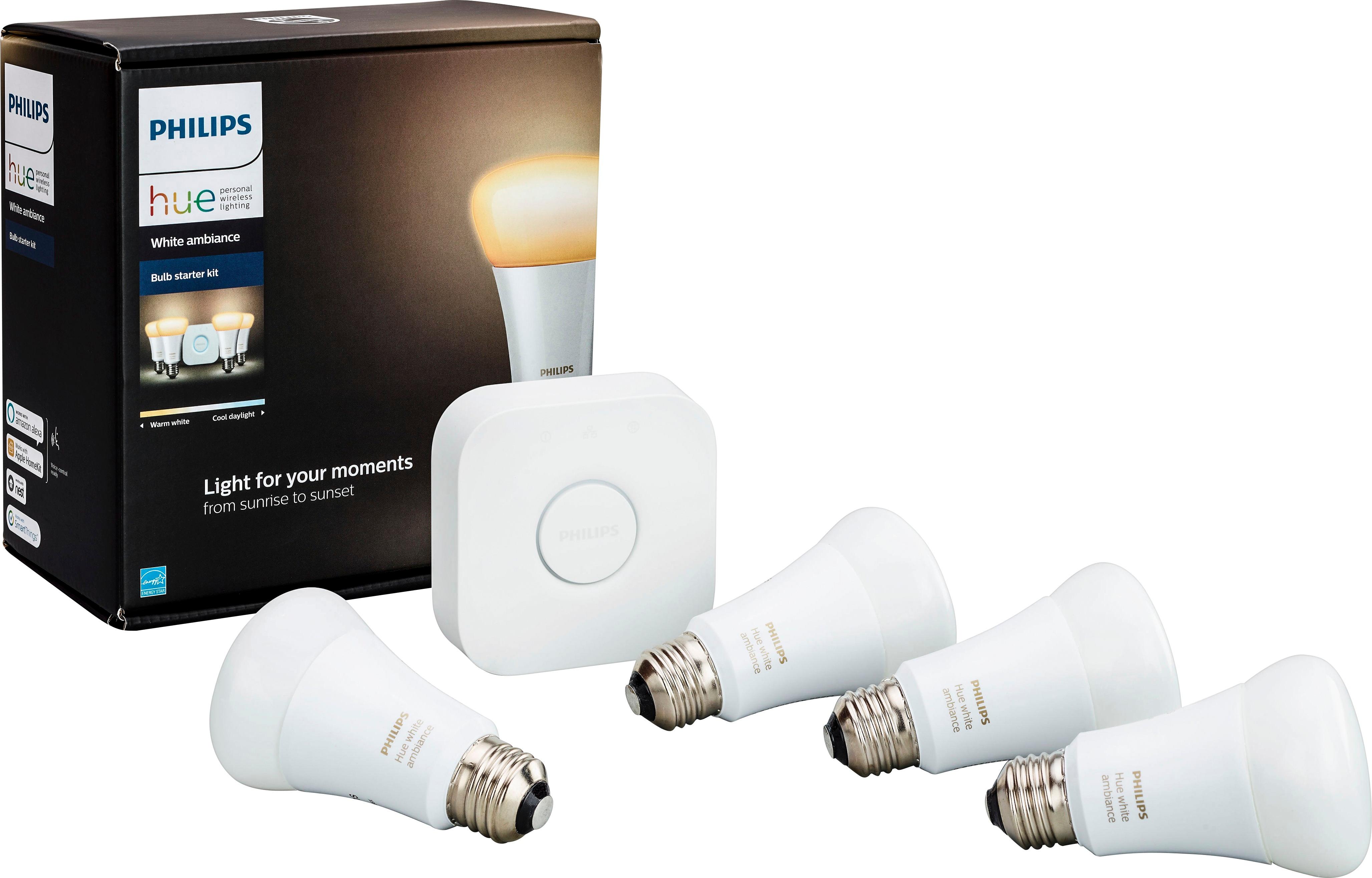
|Posted .This reviewer received promo considerations or sweepstakes entry for writing a review.This is probably as easy a way as any to get started with home automation. The kit includes a hub and four (warm white to blue white) LED lightbulbs. The setup is simple: download the app, connect the hub to an Ethernet port on your router (yes, no wifi, the hub needs a wired connection), and power the hub up. Screw the bulbs into the light sockets you want to use, turn them on, and start up the app. Follow the instructions in the app setup and a couple minutes later you're ready to go. The app will automagically connect to the hub and discover the lightbulbs. If you're old school, you can create an account at my.meethue.com and use a webbrowser for control, which is really handy. The one gotcha is that there really isn't anything identifying each individual lightbulb so you'll need to spend an extra minute or two turning them on and off and naming them appropriately. You can not only turn the lights on, off, and dim, but you can change the color 'temperature' from a yellow-orange (like regular incandescent bulbs) to slightly bluer than normal daylight. Philips has done a really good job integrating with Amazon Alexa and Google Home. Haven't tried Homekit, but it's also been reported to work well. IFTTT also works very well, and you can turn on lights based on time of day, sunrise-sunset, and various trigger events, such as doors opening, etc. The hub is necessary because Hue uses Zigbee to communicate with devices. While this requires a separate hub(unlike wifi lightbulbs), it has the major advantages that it doesn't chew up your WiFi bandwidth and your router's DHCP address space. For routers with a limited DHCP address range, this can prevent a major problem. It also eliminates all the WiFi compatibility issues. Philips seems to be actively developing for this platform and updated software is available every few weeks. The hub now plays nicely with not only Hue products, but many other Zigbee/Zwave products. Any security issues discovered seem to get patched very quickly. All in all, this kit is an easy way to get into home lighting automation without having to spend a fortune, and on sale it's not much more than the regular dimmable LED bulbs. This is a highly recommended good first step.
I would recommend this to a friend Smart lights
||Posted . Owned for 2 months when reviewed.This reviewer received promo considerations or sweepstakes entry for writing a review.Brightness wasn’t great. Difficult app. I would use these if I didn’t fall in love with the brightness from the LIFX bulbs
No, I would not recommend this to a friendLights
||Posted .This reviewer received promo considerations or sweepstakes entry for writing a review.It couldn't get it to work the way I expect it to work, I bought it so I can turn on the lights at a specific time while I was away but it didn't...
No, I would not recommend this to a friendWorks as expected
||Posted . Owned for 1 month when reviewed.This reviewer received promo considerations or sweepstakes entry for writing a review.Works as expected. App is okay, but could use some improvement. I will buy more bulbs as traditional ones burn out.
I would recommend this to a friend- Cons mentioned:Hub
Not required for smart home
||Posted .This reviewer received promo considerations or sweepstakes entry for writing a review.The hub isn't required if you have most smart home hubs if you only care about on/off and dim.
No, I would not recommend this to a friend More lights
||Posted . Owned for 8 months when reviewed.This reviewer received promo considerations or sweepstakes entry for writing a review.Bought this because gen1 bridge stopped working. .. guess I needed hue in the bathroom too.
I would recommend this to a friend- Pros mentioned:Brightness, Ease of use
Great way to kickstart a smart home
|Posted .This reviewer received promo considerations or sweepstakes entry for writing a review.The Philips Hue White Ambiance starter kit is a great way to kickstart a smart lighted home for those who are just venturing into the connected smart home arena. Although more expensive to implement than smart switches that control the existing “dumb” bulbs you may already own, the Philips Hue lineup gives you more flexibility and endless options to customize your lighting experience beyond the normal on, off, and dimmed options. And it’s as easy as replacing a bulb to install, no wiring required. Setup with the Hue Bridge was not as seamless as I would have hoped. In fact, I still haven’t gotten the bridge to recognize the bulbs successfully, but also have not attempted to troubleshoot as I use an Echo Plus as my smart hub. I will say that setup through the Alexa app was effortless. Each bulb is marked with a serial number that you enter into the Alexa app, and then ask Alexa to find available connected devices. She did so with ease. Once you have all bulbs synced to the bridge or smart hub, customization is up to you from there. You can group sets of bulbs to be controlled together, or control them individually, both by voice with an Echo or manually in either the Alexa or Philips Hue apps. The quality of light itself is very good. I tend to keep my bulbs on the warmer side of things, as the white “cooler” tones are very bright and feel eery and unnatural. There are very few instances where you will need the cooler option in your home. Overall, I expect to exclusively use Philips Hue light bulbs in my home from here on, as they are super easy to connect and control and seem to have a higher quality to the light they give off than cheaper alternatives.
I would recommend this to a friend They work with our smart phone but not with Alexa.
||Posted . Owned for 1 month when reviewed.This reviewer received promo considerations or sweepstakes entry for writing a review.They do not work with Alexa. Our grandson says it is because our internet provider's IP address (HughesNet) is not static and therefore the signal to Alexa keeps changing and she cannot respond and turn the lights on and off. If this is something that the experts at Best Buy can tell me how to correct, I would be delighted to know.
No, I would not recommend this to a friend- Pros mentioned:Setup
Wonderful
|Posted .This reviewer received promo considerations or sweepstakes entry for writing a review.The Philips Hue Starter Kit is easy to install and has some neat functionality. Getting setup is simple. First, download the Philips Hue app. Next, install the bulbs in appropriate lamps or light sockets. Then, you connect the hub to your router with an ethernet cable. I thought there surely must be a way to connect via Wi-Fi, but no; it's cable-only. Once the hub has powered up, use the app to connect your phone or tablet to the hub. The hub will likely want to update, which can take a long time. You can still use the system, though, right off the bat. Once you have it up and running, you can name the bulbs. I'd suggest doing this by location. You can also assign them to specific rooms. You can adjust the type of light, from bright white to soft yellow. There are four presets or you can just set a custom level on the color spectrum. Using the app, you can turn of individual lights or all lights. If you have a smart home assistant, like Alexa or Google Home, you can control the lights by voice. This includes dimming them, and turning individual lights or groups of lights on and off. We use Google Home, and I can report the lights work very well with Home, but I had to rename the lights in the Home app, too. Regardless, it's still pretty magical to use your voice to dim lights and turn them off and on. The Hue system works perfectly well. Just know the bulbs are not the brightest in the world (only 10 watts at 800 lumens), but I have no complaints. Within the Hue app, you can set routines, which allows you to have recurring patterns. You can even set the lights to come on when you get home (basically, your phone's GPS knows when you get home and alerts the system). There are lots of fun ways to use the smart bulbs once they are up and running.
I would recommend this to a friend Don't bother
||Posted .This reviewer received promo considerations or sweepstakes entry for writing a review.Don't waste your money on these. They worked great for a month then they would go on at different times of the day or night. Called for help and set back to default reinstalled and the same thing kept happening. Defected and now I'm stuck with a product that does not work.
No, I would not recommend this to a friendLighting
||Posted .This reviewer received promo considerations or sweepstakes entry for writing a review.Love the idea but can’t seem to get it to work. Instructions not good for a beginner.
I would recommend this to a friendHub with lights to automate our home
||Posted . Owned for 1 month when reviewed.This reviewer received promo considerations or sweepstakes entry for writing a review.Has proven difficult to link up with Google...makes it harder to use
No, I would not recommend this to a friendNice
||Posted .This reviewer received promo considerations or sweepstakes entry for writing a review.I rather have the color ones but this one came with the google speaker n I love it
I would recommend this to a friendHue
||Posted .This reviewer received promo considerations or sweepstakes entry for writing a review.Not bad I want to try the Signe by Hue out, looks better
I would recommend this to a friendHue lights
||Posted .This reviewer received promo considerations or sweepstakes entry for writing a review.The lights are ok but there alot of trouble fixing the light to a certain area.
No, I would not recommend this to a friendDoes not work
||Posted . Owned for less than 1 week when reviewed.This reviewer received promo considerations or sweepstakes entry for writing a review.Worked perfect the first day. They don’t have an online chat for technical support and was on hold for a while. Agents are not friendly and not helpful when they finally answer. Taking this back to store.
No, I would not recommend this to a friendGreat product
||Posted .This reviewer received promo considerations or sweepstakes entry for writing a review.Works great although I wish I could control it outside of my network.
I would recommend this to a friend