Customer Ratings & Reviews
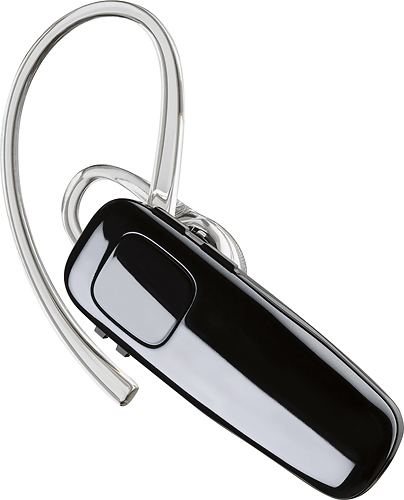

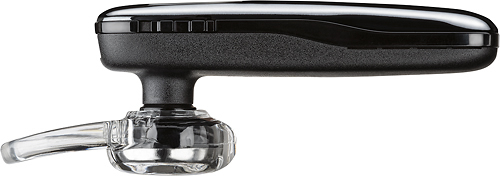
- Model:
- 200749-63
- SKU:
- 5709005
Rating by feature
- Sound Quality
Rating 4.2 out of 5 stars
- Battery Life
Rating 4.5 out of 5 stars
- Connectivity
Rating 4.5 out of 5 stars
Customers are saying
Customers praise the M95 Bluetooth Headset's sound quality, battery life, and ease of use. Many also appreciate its comfortable fit and the long talk time it provides. While some users found the maximum volume insufficient, and occasional connection issues were reported, the positive feedback on other features outweighs these concerns. The headset is also frequently cited as lightweight and affordable.
This summary was generated by AI based on customer reviews.
Works on my end
||Posted . Owned for 1 month when reviewed.This reviewer received promo considerations or sweepstakes entry for writing a review.People complain about an echo and they complain about it only when I'm using it. I can't hear it on my end.
No, I would not recommend this to a friendBrand response from PlantronicsRepresentative
Posted .Hi and thank you for sharing your honest feedback on our M95; However, we're sorry to hear you've had trouble with your unit. There are a couple of things you could try that should fix audio issues related to the microphone. First, reset the Bluetooth connection between your cell phone and earpiece. To do so: https://bit.ly/2OOMfnw. Reset the Network settings on your phone as well to rule out any wireless interference. Lastly, testing the earpiece with a different cell phone would be ideal to determine the cause of the issue and see if it is related to your cell phone's Bluetooth chip. If you get the same issue, even after performing the previous steps, then most likely the unit has an actual problem related to hardware and it is best to replace it. This model counts with a one-year limited warranty. We will surely forward your comments to our team for review and consideration. If you require further assistance, please don't hesitate to contact our Customer Care Team at: 1-855-765-7878.

To many returns
||Posted .This reviewer received promo considerations or sweepstakes entry for writing a review.bad connection, voices from incoming calls was echoing too much, not worth refurbish items
No, I would not recommend this to a friendBrand response from PlantronicsRepresentative
Posted .Hello and thank you for your honest review on our M95. We're truly sorry to hear you've had this experience. To troubleshoot it, please reset the BT connection. To do so: Delete the headset from your cell phone’s list of paired devices. Once deleted, power your phone completely off, then power it back on. This resets the Bluetooth stack in the Bluetooth software on the phone. Lastly, re-pair the unit with your phone. Reset the Network settings on your phone and lastly, test the earpiece with a different cell phone model while it is paired with a single Bluetooth device, as it would be ideal to isolate the cause of the issue. Please note, since we do not sell refurbished units, no manufacturer's warranty applies to them. We will surely forward your comments to our team for review and consideration. If you require further assistance, please don't hesitate to contact our Customer Care Team at: 1 888 248 4143 or 1 916 928 7561
Should Have opt for a more expensive one
||Posted .This reviewer received promo considerations or sweepstakes entry for writing a review.Im on the road all day and most of the time im on a call the other caller cant hear me that well. Should have purchased one that was a little more expensive
No, I would not recommend this to a friendhave to be close to your phone
||Posted . Owned for 1 week when reviewed.This reviewer received promo considerations or sweepstakes entry for writing a review.this is poor quality as far as how close you have to be for it to stay connected... returned to the store
No, I would not recommend this to a friendBrand response from PlantronicsRepresentative
Posted .Thank you for your honest feedback; However, we're sorry to hear you've had trouble with your M95. This model features up to 33ft of wireless range within a clear line of sight. To troubleshoot the unit we always recommend to reset the connection between the phone and the earpiece. To do so: Delete the headset from your cell phone’s list of paired devices. Once deleted, power your phone completely off, then power it back on. This resets the Bluetooth stack in the Bluetooth software on the phone. Lastly, re-pair the unit with your phone. Lastly, testing the earpiece with a different phone is also ideal to isolate the cause of the issue. Your feedback has been shared with our team for review and consideration. If you have any questions, pease don't hesitate to contact our Customer Care Team at: 1-888-363-0726
Was ok
||Posted .This reviewer received promo considerations or sweepstakes entry for writing a review.It was an ok product. Wish I could be farther away from my phone for it to use. Doesn't stay in my ear very well for the price I paid
No, I would not recommend this to a friendBad distorted sounds
||Posted .This reviewer received promo considerations or sweepstakes entry for writing a review.Very disappointed. I got this as a gift for someone. When i talk to them while using headset, i hear bad Intermittent static/distort sounds in the background when the person's not talking. Its so annoying to a point where I have to tell them to stop using it. There is no interference objects and the person is in a quiet room with no other background noise. I don't understand and it's frustrating. Waste of money.
No, I would not recommend this to a friendBrand response from PlantronicsRepresentative
Posted .Thank you for your honest review on our M95, we are sorry to hear you experienced trouble with your unit.
You might want to try resetting the Bluetooth connection between your phone and headset to see if that helps the issue. To do so:
1. Delete the headset from your cell phone's list of paired devices.
2. Once deleted, power your phone completely off, then power it back on. This resets the Bluetooth stack in the Bluetooth software on the phone.
3. Re-pair the headset with your phone.
If this does not fix your issue, we suggest pairing the headset to another cell phone as a test. If the issue is not present on the second phone, then the problem may be with the first phone, rather than the headset. If the issue exists on the second phone as well, you will need to replace the headset.
Please don't hesitate to contact our customer care group at wwww.plantronics.com/support if you require assistance!
Not powerful enough
||Posted .This reviewer received promo considerations or sweepstakes entry for writing a review.Everyone I have spoken with on this bluetooth has complained to me about bad reception. Next time I will buy the more expensive one,
No, I would not recommend this to a friendBrand response from PlantronicsRepresentative
Posted .Thank you for your honest review on our M95, we are sorry to hear you're experiencing trouble with your unit.
In order to troubleshoot connectivity or audio issues you might want to try resetting the Bluetooth connection between your phone and headset to see if that helps the issue. To do so:
1. Delete the headset from your cell phone's list of paired devices.
2. Once deleted, power your phone completely off, then power it back on. This resets the Bluetooth stack in the Bluetooth software on the phone.
3. Re-pair the headset with your phone. If this does not fix your issue, we suggest pairing the headset to another cell phone as a test.
If the issue is not present on the second phone, then the problem may be with the first phone, rather than the headset. If the issue exists on the second phone as well, you will need to replace the headset. Please don't hesitate to contact our customer care group at www.plantronics.com/support if you require assistance.
Great sound, low quality
||Posted .This reviewer received promo considerations or sweepstakes entry for writing a review.I was highly satisfied with my Bluetooth Headset up until it stopped working approximately 60 days after I bought it. I used it paired with my cell phone to listen to music while I exercised; suddenly, I received a message on my headset informing me that no phone was connected. That was the end of my Bluetooth Headset. It had power and it charges, it just won't connect with my cell phone anymore.
No, I would not recommend this to a friendBrand response from PlantronicsRepresentative
Posted .Hi! Thank you for your honest review. We're sorry to hear this. If your headset got disconnected from your phone, you can re-pair it by setting your earpiece in pairing mode. To do so: Power on your earpiece and then press and hold the call button for 6 or 8 seconds until the LED flashes red and blue repeatedly. Go to settings>Bluetooth on your phone and you should see the PLT_M95 listed as an available device. You might also want to try resetting the Bluetooth connection. To do so: https://goo.gl/zyBWqM. Please note this unit does have a one-year warranty from date of purchase in case you get the same results. Please don't hesitate to contact our Customer Care team at: https://www.plantronics.com/us/en/support/contact if you require further assistance!
awfull
||Posted .This reviewer received promo considerations or sweepstakes entry for writing a review.I got sucked into buying this while I was in store purchasing a new Samsung Galaxy S7. Sales person said it was a great unit. Every time I speak with someone they have problems hearing me. They can hear everything around me so loud they refuse to carry on a conversation while I am using the Plantronics headset. I had a Jawbone Icon HD prior to this and at least while it did work the sound was great.Try it before you Buy it.
No, I would not recommend this to a friendBrand response from PlantronicsRepresentative
Posted .That may be an issue with the headset or with the connection between the headset and phone. You might want to try resetting the Bluetooth connection between your phone and headset to see if that helps the issue.
To do so:
1. Delete the headset from your cell phone's list of paired devices.
2. Once deleted, power your phone completely off, then power it back on. This resets the Bluetooth stack in the Bluetooth software on the phone.
3. Re-pair the headset with your phone and test.
If the issue is the same we recommend testing the device with another phone to determine if it's on the phone or headset. If the issue persists even on a different phone we can replace that device, it comes with a 1 year warranty. Please don't hesitate to contact us at www.plantronics.com/support if you require assistance.
Not worth what you pay
||Posted .This reviewer received promo considerations or sweepstakes entry for writing a review.Works well from my end by people have a hard time hearing me. Too much feedback or muffled sound. Told I sound like a chipmunk!
No, I would not recommend this to a friendBrand response from PlantronicsRepresentative
Posted .Thank you for your honest review on our M95, we are sorry to hear you're experiencing trouble with your unit.
In order to troubleshoot connectivity or audio issues you might want to try resetting the Bluetooth connection between your phone and headset to see if that helps the issue. To do so:
1. Delete the headset from your cell phone's list of paired devices.
2. Once deleted, power your phone completely off, then power it back on. This resets the Bluetooth stack in the Bluetooth software on the phone.
3. Re-pair the headset with your phone. If this does not fix your issue, we suggest pairing the headset to another cell phone as a test.
If the issue is not present on the second phone, then the problem may be with the first phone, rather than the headset. If the issue exists on the second phone as well, you will need to replace the headset. Please don't hesitate to contact our customer care group at www.plantronics.com/support if you require assistance!
Rattles in your ear
||Posted . Owned for 1 week when reviewed.This reviewer received promo considerations or sweepstakes entry for writing a review.Great headset comfortable, and not to big in your ear; however, the unit rattles in your ear.
No, I would not recommend this to a friendBrand response from PlantronicsRepresentative
Posted .Thank you for sharing your honest feedback on our M95 Headset. We're happy to hear you've found your headset comfortable to wear; However, we're sorry to hear the unit rattles in your ear. To troubleshoot it, please try resetting the Bluetooth connection between your phone and earpiece. To do so: https://goo.gl/emzUTA. Testing your headset with a different phone is also ideal to isolate the cause of the issue. If you still get the same results, even after performing the previous steps, then most likely the unit has a problem and it is best to replace it. This model counts with a one-year warranty from date of purchase. We thank you for bringing this to our attention. If you require further assistance, please don't hesitate to contact our Customer Care Team at: 1-888-363-0726.
Poor Quality.
||Posted . Owned for 1 month when reviewed.This reviewer received promo considerations or sweepstakes entry for writing a review.Everyone complains they hear an echo of themselves whenever I used this bluetooth so I returned it. I tried turning it off and on, resetting my phone, and resetting the bluetooth button. Nothing worked. I never use to have so many problems but lately the quality has been less than ideal. I'm on a third model same brand.
No, I would not recommend this to a friendBrand response from PlantronicsRepresentative
Posted .Hi! Thank you for your review of our M95, however, we are sorry to hear about your experience. We intend to provide the highest quality products to our customers and we thank you for bringing this to our attention. If you are experiencing echo with your headset, we recommend lowering the volume, in some cases, if the headset volume is too high, the microphone might pick up the sound from the speaker creating an echo on the far end. We also recommend testing the headset with a different mobile phone to see where the issue is coming from. If for some reason the issue persists, then it could be an actual problem with the headset and it will be best to replace it. We will forward your comments to our Product Development Team, as we appreciate feedback based on customer use to create the best possible products. Please don't hesitate to contact our Customer Care Team at 1-888-363-0726 if you require assistance.
Dont use with iPhone
||Posted .This reviewer received promo considerations or sweepstakes entry for writing a review.This headset locks up my iPhone 6. It has locked my phone so I have to turn both headset and phone off. When the call comes in it repeats, answering call but never answers and it does not tell you the number calling you. The noise cancellation, while good on your end, the person your talking to hears everything! It will randomly disconnect and reconnect while you are sitting still. Very disappointed
No, I would not recommend this to a friendBrand response from PlantronicsRepresentative
Posted .Thank you for your honest review on our M95 Bluetooth headset. A Bluetooth device shouldn't have the ability of locking or freezing your phone, if this is happening we recommend that you ensure your phone's firmware is up to date and we also recommend that you test your headset with a different phone (different brand and model) in order to determine if the issue is on your phone or headset. Please don't hesitate to contact us at www.plantronics.com/support if you require assistance.
Won’t stay connected
||Posted . Owned for 1 month when reviewed.This reviewer received promo considerations or sweepstakes entry for writing a review.This ear piece won’t stay connected to my phone, it keeps saying no phone is connected.
No, I would not recommend this to a friendBrand response from PlantronicsRepresentative
Posted .Hello Walker and thank you for sharing your honest feedback on our M95 Earpiece; However, we're deeply sorry to hear about your experience. In order to troubleshoot connectivity issues, please try to reset the connection between your phone and earpiece. To do so: https://goo.gl/emzUTA. To set the earpiece in pairing mode, press and hold the call button for 6 or 8 seconds until the indicator light flashes red and blue repeatedly. Testing the headset with a different phone, for example if you're using iPhone, you may try test it with an android phone as this is ideal to isolate the cause of the issue. If you still get the same result on different phones then the earpiece might have an actual problem and it is best o replace it. This model has a one-year limited warranty. Thank you for your comments. We will forward your feedback to our team. If you have any questions, feel free to contact our Customer Care Team at: 1-888-363-0726.
Where's the M95?
||Posted .This reviewer received promo considerations or sweepstakes entry for writing a review.The earpiece in the box labeled M95 is an M90. Therefor I can not review an M95. Not sure whose to blame here. Plantronics or Best Buy. I say both. Make me weary of future purchases of anything Plantronics and products from Best Buy.
No, I would not recommend this to a friendBrand response from PlantronicsRepresentative
Posted .Hello! Thank you for reviewing our M95. This headset model is the Best Buy version of the M90, it's the same headset and it has the same features, the only difference is the model number. Please don't hesitate to contact our Customer Care Team at 1-888-363-0726 if you require assistance.
Not comfortable
||Posted .This reviewer received promo considerations or sweepstakes entry for writing a review.My husband wanted this item for the new phone. He said it hurts his ear. Looking to get something else
No, I would not recommend this to a friendBrand response from PlantronicsRepresentative
Posted .Hello and thank you for your honest review! We are sorry to hear about your experience with the M90 headset, while we thrive for our headsets to fit most of our customers, we understand that one size doesn't fit all. We carry the eartips in different sizes, please don't hesitate to contact Plantronics Customer Care at 800-985-9815 so we can help you out!
Plantronics M95
||Posted . Owned for 1 month when reviewed.This reviewer received promo considerations or sweepstakes entry for writing a review.I usually buy the Plantronics ear pieces so I bought the M95 but I was told by folks that called me while I was using it that there was a high pitched sound and I had to get off the earpiece to talk??? What's the point in having an earpieces if you can't talk on it. Disappointed in this one!
No, I would not recommend this to a friendBrand response from PlantronicsRepresentative
Posted .Thank you for your honest review; However, we're sorry to hear you've had this experience. Please rest assured that we take the quality of our products very seriously, and scenarios like these are very unlikely. To troubleshoot audio issues, please reset the BT connection. To do so: https://bit.ly/2OOMfnw. Also, please reset the Network settings on your phone. Lastly, testing the earpiece with a different cell phone and while it is paired with a single Bluetooth device is ideal to determine the cause of the issue. This means, making sure the issue is not related to the phone's Bluetooth chip. In any case we will forward your comments to our team for review and consideration. If the issue persists, please note this model comes with a one-year manufacturer's warranty. If you require further assistance, feel free to contact our Customer Care Team at: 1-855-765-7878
Fair
||Posted .This reviewer received promo considerations or sweepstakes entry for writing a review.This bluetooth would not stay on my ear. There is no way for your to tighten up the ear part.
No, I would not recommend this to a friendBrand response from PlantronicsRepresentative
Posted .Thank you for your honest review on our M95 Headset. We're sorry to hear you were not able to find a comfortable fit. Please try using other sizes of ear gels (Part number: 201777-03) or the optional ear loop for a more secure and comfortable fit. These headsets are designed to fit the vast majority of ear shapes and sizes; however, we do know that one size may not fit all. Thank you for your comments. We will forward them to our team for review and consideration when developing new products. Feel free to contact our Customer Care Team at: https://www.plantronics.com/us/en/support/contact if you have other questions!
Too much static
||Posted .This reviewer received promo considerations or sweepstakes entry for writing a review.This Bluetooth has amazing battery life and that’s about it . It has no type of noise cancelling .
No, I would not recommend this to a friendBrand response from PlantronicsRepresentative
Posted .Thank you for your honest review on our M95 Bluetooth headset! We will forward your comments and feedback to our team for future consideration when developing new products, please don't hesitate to contact us at www.plantronics.com/support if you require assistance.
does what i need .
||Posted .This reviewer received promo considerations or sweepstakes entry for writing a review.not ease to put in ear. tiny sound. she wanted something small. not much of a choice at the store.
No, I would not recommend this to a friendBrand response from PlantronicsRepresentative
Posted .Thank you for your honest review on our M95 Bluetooth headset, we will forward your comments and feedback to our team for future consideration when developing new products and accessories. Please don't hesitate to contact our customer care group at www.plantronics.com/support if you require assistance!