Customer Ratings & Reviews
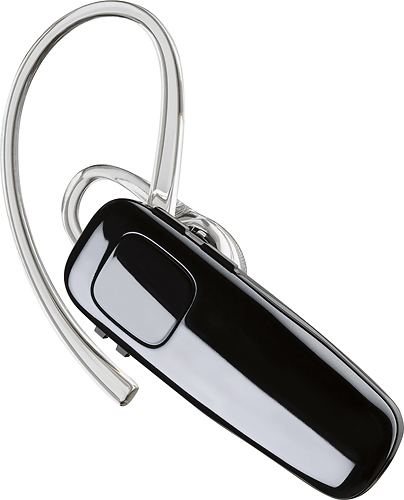

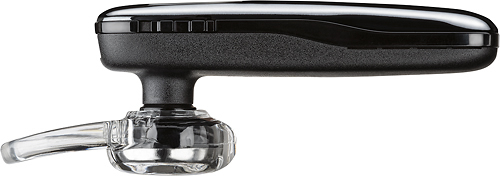
- Model:
- 200749-63
- SKU:
- 5709005
Rating by feature
- Sound Quality
Rating 4.2 out of 5 stars
- Battery Life
Rating 4.5 out of 5 stars
- Connectivity
Rating 4.5 out of 5 stars
Customers are saying
Customers praise the M95 Bluetooth Headset's sound quality, battery life, and ease of use. Many also appreciate its comfortable fit and the long talk time it provides. While some users found the maximum volume insufficient, and occasional connection issues were reported, the positive feedback on other features outweighs these concerns. The headset is also frequently cited as lightweight and affordable.
This summary was generated by AI based on customer reviews.
Meh...
||Posted . Owned for 3 weeks when reviewed.This reviewer received promo considerations or sweepstakes entry for writing a review.It’s great when it works. Constantly connecting and disconnecting with my IPhone.
No, I would not recommend this to a friendBrand response from PlantronicsRepresentative
Posted .Hi! Thank you for your review on our M95 headset, however, we are sorry to hear about your experience. If you are having some connectivity issues with the headset, you may want to try resetting the Bluetooth connection with your mobile. To do so: 1) Unpair the headset from your mobile phone by accessing your Bluetooth settings. 2) Power off your mobile phone for 2 minutes and turn it back on. 3) Re-pair the headset by pressing and holding down the call control button until you see the LED flashing red and blue. 4) Access to your Bluetooth settings and select "PLT_M90". Once successfully paired, you will hear "pairing successful" and the LED on your headset will stop flashing red and blue. You may also want to set the headset as default audio source in device settings. Click on Settings> General> Accessibility> Call Audio Routing> Select Bluetooth headset. Last but not least we recommend testing the headset with a different mobile to completely isolate the issue. If for some reason you still encounter the same issue, then it means the headset has an actual problem and it is best to replace it. Remember this unit counts with a limited warranty since the first day of purchase and you can request a replacement directly through our official website. Please don't hesitate to contact our Customer Care Team at 800-985-9815 if you require assistance.

Good for driving.
||Posted .This reviewer received promo considerations or sweepstakes entry for writing a review.I would not recommend this for everyday use. It does not stay snug in the ear. Keeps calling out.
No, I would not recommend this to a friendBrand response from PlantronicsRepresentative
Posted .Thank you for your honest review on our M95, we will forward your feedback to our team for future consideration when developing new products and accessories. Your headset should only be able to trigger your phone's voice assistant or redial feature when you press and hold/double press the call control button, if you find these features are being toggled on their own please don't hesitate to contact our customer care group at www.plantronics.com/support for assistance.

Basic
||Posted .This reviewer received promo considerations or sweepstakes entry for writing a review.One-size ear piece does not fit well, sound quality and volume below average. Poor functional design
No, I would not recommend this to a friendBrand response from PlantronicsRepresentative
Posted .Thank you for your honest review on our M95 Bluetooth headset.
If the volume or sound quality are too low/poor you might want to ensure the volume on your phone is also set to high, or try a different ear tip size. If the included eartip is not comfortable or doesn't provide you a secure fit we recommend that you try another eartip size from our M series eartip kit (part number 84661-01). Please don't hesitate to contact us at www.plantronics.com/support if you require assistance.
Horrible!
||Posted .This reviewer received promo considerations or sweepstakes entry for writing a review.Does not work as specified. You can hear all calls fine, but everyone hears you like if you are underwater drowning. I tried different locations, people, disconnected, reconnected, cellphones. All was the same. Was unable to return to store within the 15 days; but at 16 days and they refused to exchange or give any assistance "because the computer said so".
No, I would not recommend this to a friendBrand response from PlantronicsRepresentative
Posted .That may be an issue with the headset or with the connection between the headset and phone. You might want to try resetting the Bluetooth connection between your phone and headset to see if that helps the issue. To do so,
1. Delete the headset from your cell phone's list of paired devices.
2. Once deleted, power your phone completely off, then power it back on. This resets the Bluetooth stack in the Bluetooth software on the phone.
3. Re-pair the headset with your phone. and test.
If the issue is the same we can replace that device. It has a 1 year warranty from the date of purchase. You can use the following url to view our replacement steps.
http://www.plantronics.com/us/support/kb/detail.jsp?vfurl=/articles/en_US/Warranty/RN9669&retURL=%2Fapex%2FknowledgeSearch®ion=us&p=&c=All&k=replacement%2Binfo%2B&t=All&lang=en_US&popup=false&c=All
Not the best for my money
||Posted . Owned for 3 weeks when reviewed.This reviewer received promo considerations or sweepstakes entry for writing a review.Won’t stay I my ear. Won’t connect to both phones. Not really a great buy
No, I would not recommend this to a friendBrand response from PlantronicsRepresentative
Posted .Hello! Thank you for your review on our M95 headset, however, we are sorry to hear you were not able to find a secure fit. While we thrive for our headset to fit everyone, we understand that one size doesn't fit all. With this in mind we include 3 different ear tip sizes and a universal optional ear loop for a better fit. Please note this model of headset counts with multi point technology. Multi point technology enables you to pair and connect your headset to two different Bluetooth audio devices at once. Note that you will not be able to use two devices simultaneously; instead, the benefit is that you will be able to answer an incoming phone call from either device using the headset. If you would like to pair the headset to a second mobile, make sure to first put it in pairing mode. With the headset powered on, press and hold down the call control button for at least 10 seconds until you hear "pairing". Access your phone Bluetooth settings, wait for "PLT_M95" to come up and select it. Once successfully paired, you will hear "pairing successful". Please don't hesitate to contact our Customer Care Team at https://www.plantronics.com/us/en/support/contact if you require assistance.
Sound quality
||Posted .This reviewer received promo considerations or sweepstakes entry for writing a review.People could barely hear me during phone conversations and listening to music was awful.
No, I would not recommend this to a friendBrand response from PlantronicsRepresentative
Posted .Hi! Thank you for your honest review on our M95, however we are sorry to hear about your experience. In order to troubleshoot audio issues, you might want to try resetting the connection to clear the bluetooth stack with these instructions: https://goo.gl/ASWYDK
If this issue persists then please test your earpiece with a different phone to isolate the issue. Please note this unit has a one-year warranty from date of purchase. For instructions please click here: https://goo.gl/tQJGC3. Please don't hesitate to contact our customer care group at https://www.plantronics.com/us/en/support/contact if you require assistance!
Thought it was better
||Posted .This reviewer received promo considerations or sweepstakes entry for writing a review.I wish the quality was a little bit better. I was a longer than a wanted it to be.
No, I would not recommend this to a friendBrand response from PlantronicsRepresentative
Posted .Hello! Thank you for your honest review on our M95 headset, however we are sorry to hear about your experience. Our intention is to provide the highest quality products to our customers. In addition, your response has been shared with our Product Development team, as we appreciate feedback based on customer use to create the best possible products and accessories. Please don't hesitate to contact our Customer Care Team at www.plantronics.com/support if you require assistance.
The distance is not good and the sound
||Posted .This reviewer received promo considerations or sweepstakes entry for writing a review.It disconnected all the time when I am on the phone the other person can hear me .
No, I would not recommend this to a friendBrand response from PlantronicsRepresentative
Posted .Thank you for taking the time to share your feedback on our M95 Headset, however we're sorry to hear you've had trouble with your unit. This model should provide you up to 33 feet of range within a straight line of sight. If the headset is disconnecting you might want to try resetting the Bluetooth connection: https://goo.gl/emzUTA. Testing your headset with different phones and also at different locations and while connected to a single device at a given time is ideal in order to isolate the cause of the problem. Please note this unit has a one-year limited warranty from date of purchase. Feel free to contact our Customer Care Team at: https://www.plantronics.com/us/en/support/contact if you require further assistance!
Defective
||Posted .This reviewer received promo considerations or sweepstakes entry for writing a review.I have had this particular headset before and although I have issues with the volume, the quality of calls was always pretty good. This particular device however must be defective. Everyone I spoke to immediately told me there was a horrible echo and screeching sound when they talked to me. Will have to replace.
No, I would not recommend this to a friendBrand response from PlantronicsRepresentative
Posted .Hello, we are sorry to hear about your experience with the M95 headset, please try the following: 1) Completely unpair from your phone. 2) Power off and on both devices. 3) Press and hold the call button until the LED flashes red/blue on your headset. 4) Reconnect. If the issue continues and is also present on different devices, there might be an actual fault with the headset, in which case a replacement will be necessary. The M95 comes with a 1 year Limited Warranty, if you continue to experience difficulties, please don't hesitate to contact Plantronics Customer Care at 855-765-7878.
Not What I Expected
||Posted .This reviewer received promo considerations or sweepstakes entry for writing a review.Well it works but the noise cancelling is not good. Look else where if you need noise canceling.
No, I would not recommend this to a friendBrand response from PlantronicsRepresentative
Posted .Thank you for your honest review and feedback on our M95 Bluetooth headset, if you're looking for a model that has excellent noise cancellation we recommend that you consider our Voyager series headsets, especially our Voyager 5200.
It works ... kinda, sorta ...
||Posted . Owned for 1 week when reviewed.This reviewer received promo considerations or sweepstakes entry for writing a review.It works, but it'll only pair with just one of my two android phones.
No, I would not recommend this to a friendBrand response from PlantronicsRepresentative
Posted .Hi and thank you for your honest review on our M95 Headset. We're sorry to hear you were not able to pair your unit with a different phone. Please note this earpiece features multipoint which enables you to pair and connect your headset to two different Bluetooth audio devices at once. If you're unable to pair, please make sure the earpiece is in pairing mode, otherwise the phone won't be able to detect it. To do so: Power on your earpiece, press and hold the call button for 6 or 8 seconds until the indicator light flashes red and blue repeatedly. This means the earpiece is in pairing mode and should be detected. Please note this model comes with a one-year warranty from date of purchase. In any case, we will forward your comments to our team for review and consideration. If you require further assistance, please contact our Customer Care Team at: 855-765-7878
Ear piece
||Posted . Owned for 2 weeks when reviewed.This reviewer received promo considerations or sweepstakes entry for writing a review.I can here good but cause noise to person on other end
No, I would not recommend this to a friendBrand response from PlantronicsRepresentative
Posted .Hi! thank you for your review of our M95, however, we are sorry to hear about your experience. We intend to provide the highest quality products to our customers and we thank you for bringing this to our attention. If you are experiencing echo or noise with your headset, we recommend lowering the volume, in some cases, if the headset volume is too high, the microphone might pick up the sound from the speaker creating an echo on the far end. You may also want to try resetting the Bluetooth connection with your mobile by unpairing and re-pairing the headset. Last but not least we always recommend testing the headset with a different mobile phone to see where the issue is coming from. If for some reason the issue persists, then it could be an actual problem with the headset and it will be best to replace it. Remember this unit does have a limited warranty from the date of purchase and you can request a replacement directly through our official website. If you require further assistance, please don't hesitate to contact our Customer Care Team at 1-888-363-0726.
Reception
||Posted .This reviewer received promo considerations or sweepstakes entry for writing a review.Strength reception is poor. Recommended by Friend. 11 hour playing time is erroneous.
No, I would not recommend this to a friendBrand response from PlantronicsRepresentative
Posted .Thank you for your honest review on our M95, we are sorry to hear you're experiencing trouble with your unit.
In order to troubleshoot connectivity or audio issues you might want to try resetting the Bluetooth connection between your phone and headset to see if that helps the issue. To do so:
1. Delete the headset from your cell phone's list of paired devices.
2. Once deleted, power your phone completely off, then power it back on. This resets the Bluetooth stack in the Bluetooth software on the phone.
3. Re-pair the headset with your phone. If this does not fix your issue, we suggest pairing the headset to another cell phone as a test.
If the issue is not present on the second phone, then the problem may be with the first phone, rather than the headset. If the issue exists on the second phone as well, or if your unit gives you considerably less than 11 hours of talk time even after a full charge you will need to replace the headset. Please don't hesitate to contact our customer care group at www.plantronics.com/support if you require assistance.
Don’t think it’s worth the money
||Posted . Owned for 1 week when reviewed.This reviewer received promo considerations or sweepstakes entry for writing a review.Not what I thought it would be. Will not stay paired to my phone!
No, I would not recommend this to a friendBrand response from PlantronicsRepresentative
Posted .Hi! Thank you for your review on our M95 headset, however, we are sorry to hear about your experience. If your headset will constantly disconnect from your mobile, it could mean either an actual problem with the headset or with the connection to your mobile. You may want to try resetting the Bluetooth connection. 1) Unpair the headset from your mobile phone by accessing your Bluetooth settings. 2) Power off your mobile phone for 2 minutes and turn it back on. 3) Re-pair the headset by pressing and holding down the call control button until you see the LED flashing red and blue. 4) Access to your Bluetooth settings and select "PLT_M95". Once successfully paired, you will hear "pairing successful" and the LED on your headset will stop flashing red and blue. We also recommend testing the headset with a different mobile to completely isolate the issue. If for some reason the issue remains, then it means the headset has an actual problem and it will be best to replace it. Remember this unit counts with a limited warranty since the first day of purchase and you can request a replacement directly through our official website: https://bit.ly/2rfwFJe. Please don't hesitate to contact our Customer Care Team at https://www.plantronics.com/us/en/support/contact if you require assistance.
This isn't it
||Posted . Owned for 1 week when reviewed.This reviewer received promo considerations or sweepstakes entry for writing a review.My wife and I each got one of these when Maine enacted the hands free driver law. They have poor sound quality, the speaker gets their own words echoed back to them a half second later and it was difficult to have a conversation. We both returned them the very next day. Skip this one.
No, I would not recommend this to a friendBrand response from PlantronicsRepresentative
Posted .Hello! Thank you for your honest review on our M95 headset, however, we are sorry to hear about your experience. If you encounter some audio issues with the headset, next time, we recommend resetting the Bluetooth connection with your mobile. To do so: 1) Unpair the headset from your mobile phone by accessing your Bluetooth settings. 2) Power off your mobile phone for 2 minutes and turn it back on. 3) Re-pair the headset by pressing and holding down the call control button until you see the LED flashing red and blue. 4) Access to your Bluetooth settings and select "PLT_M95". Once successfully paired, you will hear "pairing successful" and the LED on your headset will stop flashing red and blue. We also recommend testing the headset with a different mobile to completely isolate the issue. Please note our intention is to provide the highest quality products to our customers and we thank you for bringing this issue to our attention. Please don't hesitate to contact our Customer Care Team at https://www.plantronics.com/us/en/support/contact if you require assistance.
Average Bluetooth
||Posted .This reviewer received promo considerations or sweepstakes entry for writing a review.I thought Plantronics bluetooth would be good but that is not as per my expectation
No, I would not recommend this to a friendBrand response from PlantronicsRepresentative
Posted .Thank you for your honest review on our M95 Bluetooth headset, please don't hesitate to contact our customer care group at www.plantronics.com/support if you require assistance with your unit.
A beginner earbud at best
||Posted . Owned for 2 weeks when reviewed.This reviewer received promo considerations or sweepstakes entry for writing a review.Sound quality not very good and noise cancelling is non existent
No, I would not recommend this to a friendBrand response from PlantronicsRepresentative
Posted .Hello! Thank you for your review on our M95 headset, however, we are sorry to hear about your experience. Please note this headset doesn't count with a noise cancelling microphone, instead, it reduces noise, wind and echo. If you are experiencing some audio sound quality issues with the headset, you may want to try resetting the Bluetooth connection with your mobile. To do so: 1) Unpair the headset from your mobile phone by accessing your Bluetooth settings. 2) Power off your mobile phone for 2 minutes and turn it back on. 3) Re-pair the headset by pressing and holding down the call control button until you see the LED flashing red and blue. 4) Access to your Bluetooth settings and select "PLT_M95". Once successfully paired, you will hear "pairing successful" and the LED on your headset will stop flashing red and blue. You may also want to test the headset connected to a different mobile to completely isolate the issue. If for some reason you still encounter the same issue with the headset, then it means it has an actual problem and it is best to replace it. Remember this unit counts with a limited warranty since the first day of purchase, and if you need a replacement you can simply click on the following link for further instructions: https://bit.ly/2N637EC. Please don't hesitate to contact our Customer Care Team at 800-985-9815 if you require assistance.
trouble
||Posted .This reviewer received promo considerations or sweepstakes entry for writing a review.This product would not link with samsung galaxy 5 even though package said it would.
No, I would not recommend this to a friendBrand response from PlantronicsRepresentative
Posted .You might need to place the headset in pairing mode by following these steps: http://www.plantronics.com/us/support/kb/detail.jsp?vfurl=/articles/en_US/How_To/M70-M90-How-to-Pair&retURL=%2Fapex%2FknowledgeSearch®ion=us&p=&c=All&k=m95&t=All&lang=en_US&popup=false&c=All Please don't hesitate to contact us at www.plantronics.com/support if you require assistance with your unit.
Replacement
||Posted .This reviewer received promo considerations or sweepstakes entry for writing a review.I didn’t like as well as my other Bluetooth, couldn’t hear as well
No, I would not recommend this to a friendBrand response from PlantronicsRepresentative
Posted .Hello! Thank you for your honest review on our M95 headset. However, we are sorry to hear it wasn't for you. Our intention is to provide the highest quality products to our customers and we thank you for bringing this issue to our attention. If you are not able to hear through the headset, we recommend resetting the Bluetooth connection with your mobile. To do so: 1) Unpair the headset from your mobile phone by accessing your Bluetooth settings. 2) Power off your mobile phone for 2 minutes. 3) Re-pair the headset by pressing and holding down the call control button until you see the LED flashing red and blue. 4) Access to your Bluetooth settings and select "PLT_M95". You may also want to test the headset with a different mobile to completely isolate the problem. Please don't hesitate to contact Plantronics Customer Care at 855-765-7878 if you require assistance!
Earpiece
||Posted .This reviewer received promo considerations or sweepstakes entry for writing a review.Don't know whybutcant seem to dial out pushbutton goes to pairing
No, I would not recommend this to a friendBrand response from PlantronicsRepresentative
Posted .Hello, in order to place a call using your voice assistant through the M95: 1) Please make sure the phone's voice assistant is correctly set up, and can be used without a headset. 2) Press and hold the call button for 2 seconds, let go. 3) The voice assistant should engage and allow you to speak a command. Please note that holding the call button for 6 seconds will initiate pairing mode. If you continue to experience difficulties, please don't hesitate to contact Plantronics Customer Care at 855-765-7878, additionally, you have a 1 year warranty from the purchase date, if needed.