Customer Ratings & Reviews

- Model:
- 200749-63
- SKU:
- 5709005
Rating by feature
- Sound Quality
Rating 4.2 out of 5 stars
- Battery Life
Rating 4.5 out of 5 stars
- Connectivity
Rating 4.5 out of 5 stars
Customers are saying
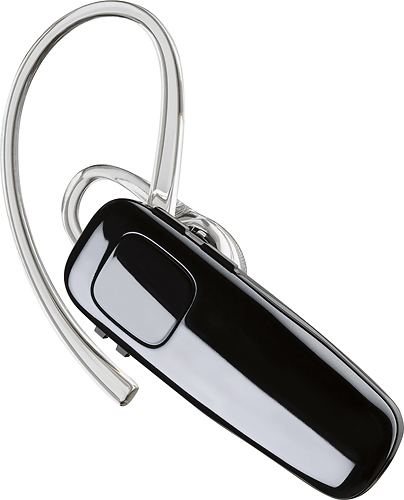
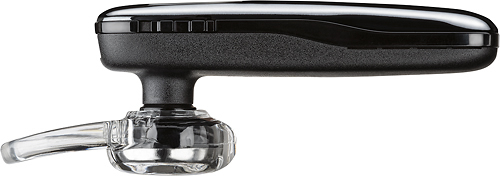
Customers praise the M95 Bluetooth Headset's sound quality, battery life, and ease of use. Many also appreciate its comfortable fit and the long talk time it provides. While some users found the maximum volume insufficient, and occasional connection issues were reported, the positive feedback on other features outweighs these concerns. The headset is also frequently cited as lightweight and affordable.
This summary was generated by AI based on customer reviews.
Not very good
||Posted .This reviewer received promo considerations or sweepstakes entry for writing a review.Fits good but can not hear very good on it so I exchanged for jabra
No, I would not recommend this to a friendBrand response from PlantronicsRepresentative
Posted .Thank you for taking the time to share your feedback on our M95. We're sorry to hear you didn't find your earpiece loud enough. Please make sure you configure the volume levels on both the headset and phone until optimum audio is met. You might also want to try resetting the Bluetooth connection. To do so: https://goo.gl/emzUTA. Please note that all of our headsets meet and exceed OSHA standard regulations/requirements. none of our headsets exceed 118dBA. Our Customer Care Team is available at: https://www.plantronics.com/us/en/support/contact if you have any questions!

Bad ear piece
||Posted . Owned for 1 week when reviewed.This reviewer received promo considerations or sweepstakes entry for writing a review.Sound is very low Don't syn Lo properly Very shot reach
No, I would not recommend this to a friendBrand response from PlantronicsRepresentative
Posted .Hi! Thank you for your review on our M95 headset, however, we are sorry to hear about your experience. Please note this headset counts with a range of up to 10 meters/ 30 feet. If you are experiencing low volume on the headset, you may want to try increasing the volume directly from your mobile to see if there is an improvement. You may also want to try resetting the Bluetooth connection with your mobile. To do so: 1) Unpair the headset from your mobile phone by accessing your Bluetooth settings. 2) Power off your mobile phone for 2 minutes and turn it back on. 3) Re-pair the headset by pressing and holding down the call control button until you see the LED flashing red and blue. 4) Access to your Bluetooth settings and select "PLT_M95". Once successfully paired, you will hear "pairing successful" and the LED on your headset will stop flashing red and blue. We also recommend testing the headset with a different mobile to completely isolate the issue. If for some reason you still encounter the same issue, then it means it has an actual problem and it is best to replace it. Remember this unit counts with a limited warranty since the first day of purchase, and if you need a replacement you can click on the following link for further instructions: https://bit.ly/2N637EC. Our intention is to provide the highest quality products to our customers and we thank you for bringing this issue to our attention. Please feel free to contact our Customer Care Team at 800-985-9815 if you require assistance.

Not right for me
||Posted .This reviewer received promo considerations or sweepstakes entry for writing a review.I couldn't get the ear piece to fit on my ear right, it would fall off if I raised my arm to get something off a shelf above my head. I really never got an opportunity to use it because I realized that it would pop off my ear easily, I decided not to take a chance with it. I returned it.
No, I would not recommend this to a friendBrand response from PlantronicsRepresentative
Posted .Thank you for your honest review on our M95, we will forward your comments and feedback to our team for future consideration when developing new products and accessories.
Audio quality needs to be improved
||Posted .This reviewer received promo considerations or sweepstakes entry for writing a review.To much echo when trying to communicate needs improvement
No, I would not recommend this to a friendBrand response from PlantronicsRepresentative
Posted .Thank you for sharing your experience on our M95 Headset. We're sorry to hear you've had audio issues with the unit. Please try resetting the Bluetooth connection with your phone and hopefully this will fix the issue: 1. Delete the headset from your cell phone’s list of paired devices. 2. Once deleted, power your phone completely off, then power it back on. This resets the Bluetooth stack in the Bluetooth software on the phone. 3. Re-pair the headset with your phone. Testing your headset with a different phone and at different locations might also help to isolate the cause of the issue. In case you still get echo after following these tests, please note this unit has a one-year warranty from date of purchase. If you have any questions, please don't hesitate to contact our Customer Care Team at: https://www.plantronics.com/us/en/support/contact. We thank you for your comments. We will share them with our Team as a future consideration.
Not sure if it's worth the money
||Posted . Owned for 2 months when reviewed.This reviewer received promo considerations or sweepstakes entry for writing a review.I really enjoy the headset, however multiple people are complaining of an echo that they hear when I talk to them through the headset. I've tried adjusting the volume but to no avail. Not sure if it's a good purchase.
No, I would not recommend this to a friendBrand response from PlantronicsRepresentative
Posted .Hi Johnny and thank you for your honest review on our M95. We're sorry to hear you've had complaints regarding the microphone. To troubleshoot it, please reset the BT connection. To do so: https://bit.ly/2OOMfnw. To re-pair the earpiece, set it in pair mode by pressing the call button for 6-8 seconds until LED Flashes red and blue repeatedly. Lastly, test the earpiece with a different cell phone model, as it is ideal to isolate the cause of the issue. If you still get the same results, then most likely the unit has an actual problem related to hardware and it is best to replace it. If you're vendor is no longer able to replace it, please note this model counts with a one-year manufacturer's warranty. We thank you for bringing this to our attention. If you require further assistance, feel free to contact our Customer Care Team at: 1 888 248 4143 or 1 916 928 7561
Terrible purchase
||Posted . Owned for 10 months when reviewed.This reviewer received promo considerations or sweepstakes entry for writing a review.Worse earphone I’ve ever gotten from Best Buy. I can hear perfectly with it but people on the other end say it sounds like I’m in the bottom of a well talking to them!
No, I would not recommend this to a friendNot a good product
||Posted .This reviewer received promo considerations or sweepstakes entry for writing a review.Very disappointed with this headset, I’ve owned several plantronics headsets and this is pretty low on the list. Constantly drops calls, disconnects from phone for no reason,
No, I would not recommend this to a friendBrand response from PlantronicsRepresentative
Posted .Hello and thank you for your honest feedback on our M95. We're sorry to hear you've had connectivity issues. Please rest assured that we take the quality of our products very seriously, and scenarios like these are very unlikely. To troubleshoot your unit, please reset the connection between your phone and earpiece. To do so: https://goo.gl/emzUTA. We strongly suggest you to test the earpiece with a different phone, as it is ideal to isolate the cause of the issue. For example, if you have an iPhone, try to test it with an android phone. This will help us to verify if the issue is related to an iOS update and not the actual earpiece, or vice versa. If you still get the same results, then the unit might have an actual problem and it is best to replace it. This model counts with a one-year manufacturer's warranty. We will forward your comments to our team for review and consideration. If you have any questions, feel free to contact our Customer Care Team at: 1-888-363-0726.
Echo
||Posted .This reviewer received promo considerations or sweepstakes entry for writing a review.Callers told me that every time I spoke that got a constant echo
No, I would not recommend this to a friendBrand response from PlantronicsRepresentative
Posted .That may be an issue with the headset or with the connection between the headset and phone. You might want to try resetting the Bluetooth connection between your phone and headset to see if that helps the issue.
To do so:
1. Delete the headset from your cell phone's list of paired devices.
2. Once deleted, power your phone completely off, then power it back on. This resets the Bluetooth stack in the Bluetooth software on the phone.
3. Re-pair the headset with your phone and test.
If the issue is the same we recommend testing the device with another phone to determine if it's on the phone or headset. If the issue persists even on a different phone we can replace that device, it comes with a 1 year warranty from the date of purchase. You can use the following URL to view our replacement steps: www.plantronics.com/us/support/kb/detail.jsp?vfurl=/articles/en_US/Warranty/RN9669&retURL=%2Fapex%2FknowledgeSearch®ion=us&p=&c=All&k=warranty&t=All&lang=en_US&popup=false&c=All
look elsewhere!
||Posted . Owned for 1 month when reviewed.This reviewer received promo considerations or sweepstakes entry for writing a review.less than 3 week return window????/ do not buy received may 27th june 24th unusable because of echo . ticked off! I will never buy from worst buy again!
No, I would not recommend this to a friendBrand response from PlantronicsRepresentative
Posted .Thank you for sharing your honest feedback; However, we're sorry to hear about your experience with your M95. To troubleshoot audio issues, please reset the Bluetooth connection. To do so: https://bit.ly/2OOMfnw. To re-pair, make sure you set the earpiece in pair mode by pressing and holding the call button for 6-8 seconds until LED flashes red and blue repeatedly. Then go to Bluetooth settings and select it. Lastly, testing the earpiece with a different cell phone model and while it is paired with a single Bluetooth device is also ideal to determine the cause of the issue. Please note each retailer has their own return policy but the earpiece if purchased as brand new in its retail packaging through an authorized reseller, it comes with a one-year manufacturer's warranty. We thank you for your comments. We will surely forward them to our team for review and consideration. If you require further assistance, please contact our Customer Care Team at: 1 888 248 4143 or 1 916 928 7561.
Not a good value.
||Posted .This reviewer received promo considerations or sweepstakes entry for writing a review.I have been using this for almost one year, and during this time I've had a number of problems, from very low battery life to background noise to simply stop working for no apparent reason. Its performance is mediocre at best, and for me it was a big waste of money.
No, I would not recommend this to a friendBrand response from PlantronicsRepresentative
Posted .Thank you for your honest review on our M95, we are sorry to hear you experienced trouble with your unit. If you've already tried using another charger and cable but you have the same results you will need to replace that headset. Please don't hesitate to contact our customer care group at www.plantronics.com/support if you require assistance!
Terrible
||Posted . Owned for 3 weeks when reviewed.This reviewer received promo considerations or sweepstakes entry for writing a review.Constantly drops signal from iPhone 11. Would return but cannot find packaging. Waste of money. iPhone users should buy the AirPods.
No, I would not recommend this to a friendBrand response from PlantronicsRepresentative
Posted .Hello and thank you for your honest review on our M95; However, we're sorry to hear you've had connectivity issues with your earpiece. In order to troubleshoot it, please reset the connection between your phone and earpiece. To do so: Delete the headset from your cell phone’s list of paired devices. Once deleted, power your phone completely off, then power it back on. This resets the Bluetooth stack in the Bluetooth software on the phone. Lastly, re-pair the unit with your phone. If it drops the connection, then please test the earpiece with a different phone in order to isolate the cause of the issue. The M95 is compatible with any cell phone that supports Bluetooth Headsets. If possible, test your iPhone with a different Bluetooth device and see if you have the same experience, as it could be a problem with the Bluetooth signal of the actual phone. Please note the earpiece counts with a one-year manufacturer's warranty. If you need further assistance, please don't hesitate to contact our Customer Care Team at: 1-888-363-0726.
Noisey
||Posted .This reviewer received promo considerations or sweepstakes entry for writing a review.I didn't care for this earpiece because it was very noisey.
No, I would not recommend this to a friendBrand response from PlantronicsRepresentative
Posted .Thank you for your honest review and feedback on our M95 Bluetooth headset, please don't hesitate to contact us at www.plantronics.com/support if you require assistance with your unit.
Almost unuseable
||Posted .This reviewer received promo considerations or sweepstakes entry for writing a review.Repeatedly powers on and off, won't work if more than 10 ft away from phone, says it is disconnected. took back to store to get it replaced and they said that it was working correctly. Absolutely worthless if you have to carry phone in your pocket to make it work.
No, I would not recommend this to a friendBrand response from PlantronicsRepresentative
Posted .Thank you for your honest review on our M95, we are sorry to hear you're experiencing trouble with your unit.
In order to troubleshoot connectivity or audio issues you might want to try resetting the Bluetooth connection between your phone and headset to see if that helps the issue. To do so:
1. Delete the headset from your cell phone's list of paired devices.
2. Once deleted, power your phone completely off, then power it back on. This resets the Bluetooth stack in the Bluetooth software on the phone.
3. Re-pair the headset with your phone. If this does not fix your issue, we suggest pairing the headset to another cell phone as a test.
If the issue is not present on the second phone, then the problem may be with the first phone, rather than the headset. If the issue exists on the second phone as well, you will need to replace the headset. Please don't hesitate to contact our customer care group at www.plantronics.com/support if you require assistance.
Can hear everybody else
||Posted .This reviewer received promo considerations or sweepstakes entry for writing a review.Doesn't keep out other noises and sounds so watch it
No, I would not recommend this to a friendM95 Headset
||Posted . Owned for 3 weeks when reviewed.This reviewer received promo considerations or sweepstakes entry for writing a review.I have since returned this Headset, it was very easy to set up but it only had a ranch of a couple of feet, and if the iphone was in a holster , and you put on a leather jacket the headset would cut out.
No, I would not recommend this to a friendBrand response from PlantronicsRepresentative
Posted .Hello! Thank you for your review of our M95, however, we are sorry to hear about your experience. We really appreciate you taking valuable time out of your day to give your feedback. We will forward your comments to our Product Development Team, as we appreciate feedback based on customer use to create the best possible products. Please don't hesitate to contact our Customer Care Team at 1-888-363-0726 if you require assistance.
Junk
||Posted .This reviewer received promo considerations or sweepstakes entry for writing a review.Thus product gets extremely hot after 15 minutes of use. It’s not fit to use. Best Buy customer service was rude on the phone as the weather didn’t permit getting out to send back. So now I’m stuck with costly and hazardous merchandise.
No, I would not recommend this to a friendCould be better
||Posted .This reviewer received promo considerations or sweepstakes entry for writing a review.Not the most comfortable or best sounding headset.
No, I would not recommend this to a friendBrand response from PlantronicsRepresentative
Posted .Thank you for your honest review on our M95 Bluetooth headset, we will forward your feedback to our team for future consideration when developing new products and accessories. Please don't hesitate to contact our customer care group at www.plantronics.com/support if you require assistance!
It works ok
||Posted .This reviewer received promo considerations or sweepstakes entry for writing a review.I have trouble keeping it in my ear and it scratches me
No, I would not recommend this to a friendNot that great
||Posted .This reviewer received promo considerations or sweepstakes entry for writing a review.It hurts your ear if you have it in for over an hour
No, I would not recommend this to a friendBrand response from PlantronicsRepresentative
Posted .Thank you for your review on our M95 Bluetooth headset, we will forward your feedback to our product managers for consideration. Please don't hesitate to contact us at www.plantronics.com/support if you require assistance with your unit.
Disappointed user
||Posted . Owned for 1 month when reviewed.This reviewer received promo considerations or sweepstakes entry for writing a review.Bought this model as I had One before until I put It through the washing machine. It had worked great for years. This one was horrible. Everyone complained about the sound quality.
No, I would not recommend this to a friendBrand response from PlantronicsRepresentative
Posted .Hi Mike and thank you for taking the time to share your feedback on our M95; Though we're sorry to hear about your experience. There are a couple of things you could try that might fix audio issues. First, reset the BT connection. To do so: https://bit.ly/2OOMfnw. To re-pair it, press and hold the call button for 6-8 seconds until LED flashes red and blue repeatedly. This will make the headset detectable. Furthermore, testing the earpiece with a different cell phone model is also ideal to determine the cause of the issue. If you still get the same issue after performing these tests, then the earpiece might have an actual problem and it is best to replace it. This model has a one-year limited warranty. We thank you for bringing this to our attention. If you require further assistance, please don't hesitate to contact our Customer Care Team at: 1 888 248 4143 or 1 916 928 7561.