Customer Ratings & Reviews
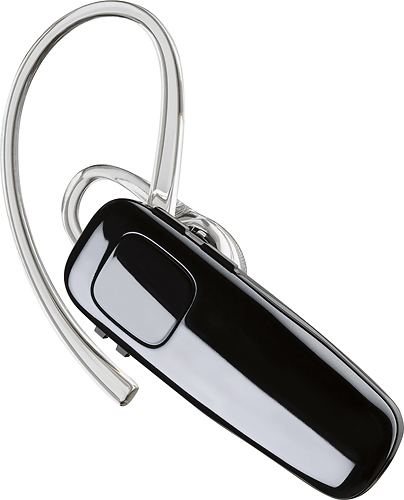

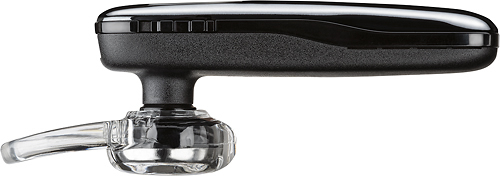
- Model:
- 200749-63
- SKU:
- 5709005
Rating by feature
- Sound Quality
Rating 4.2 out of 5 stars
- Battery Life
Rating 4.5 out of 5 stars
- Connectivity
Rating 4.5 out of 5 stars
Customers are saying
Customers praise the M95 Bluetooth Headset's sound quality, battery life, and ease of use. Many also appreciate its comfortable fit and the long talk time it provides. While some users found the maximum volume insufficient, and occasional connection issues were reported, the positive feedback on other features outweighs these concerns. The headset is also frequently cited as lightweight and affordable.
This summary was generated by AI based on customer reviews.
Can’t use, too much echo.
||Posted .This reviewer received promo considerations or sweepstakes entry for writing a review.I would like to return it. Everyone I talk to when using it says the echo is so bad I can’t use it. I have tried everything with adjusting the volume on it and my phone. Very dissatisfied.
No, I would not recommend this to a friendBrand response from PlantronicsRepresentative
Posted .Hi! thank you for reviewing our M95 headset, however, we are sorry to hear about your experience. We intend to provide the highest quality products to our customers and we thank you for bringing this to our attention. If you are experiencing echo with your headset, we recommend lowering the volume, in some cases, if the headset volume is too high, the microphone might pick up the sound from the speaker creating an echo on the far end. You may also want to try resetting the Bluetooth connection with your mobile by unpairing and re-pairing the headset. Last but not least we always recommend testing the headset with a different mobile phone to see where the issue is coming from. If for some reason the same issue persists, then it will be best to replace this headset. Remember this unit does have a limited warranty from the date of purchase and you can request a replacement directly through our official website. If you require further assistance, please don't hesitate to contact our Customer Care Team at 1-888-363-0726.

I don't recommend this product don't waist your mo
||Posted . Owned for 1 month when reviewed.This reviewer received promo considerations or sweepstakes entry for writing a review.I start using this product ok but after 3 weeks I can't speak anymore the people that I'm calling they can't hear me , they say there's to much noise, I don't recommend this product.
No, I would not recommend this to a friendBrand response from PlantronicsRepresentative
Posted .Hi! thank you for your honest review on our M95, however, we are sorry to hear about your experience. We intend to provide the highest quality products to our customers and we thank you for bringing this to our attention. If you are experiencing echo or audio problems with your headset, we recommend lowering the volume, in some cases, if the headset volume is too high, the microphone might pick up the sound from the speaker creating an echo on the far end. As for the background noise, we recommend resetting the Bluetooth connection with your mobile by unpairing and re-pairing the headset. Last but not least we always recommend testing the headset with a different mobile phone to see where the issue is coming from. If for some reason the issue persists, it will be best to replace this headset. Remember this unit does have a limited warranty from the date of purchase and you can request a replacement directly through our official website. If you require further assistance, please don't hesitate to contact our Customer Care Team at 1-888-363-0726.
Aweful!
||Posted . Owned for 1 week when reviewed.This reviewer received promo considerations or sweepstakes entry for writing a review.I am disgusted with this purchase. I spent $50 for an earpiece that echos my works and shoots high pitched static into my ear. I will never buy anything from here again.
No, I would not recommend this to a friendBrand response from PlantronicsRepresentative
Posted .Hi Laura and thank you for sharing your honest review on our M95; Though we're very sorry to hear about your experience. Was the headset purchased brand new? Did the packaging present any tear or evident tampering? To troubleshoot audio issues, please reset the Bluetooth connection: https://bit.ly/2OOMfnw. In case you still get issues, please test the earpiece with a different cell phone model as this is ideal to determine where the issue is coming from. If this issue persists, then most likely the unit has an actual problem related to hardware and it is best to replace it. This model counts with a one-year limited warranty. We thank you for bringing this to our attention. We will surely forward your comments to our team for review and consideration. If you have any questions, please contact our Customer Care Team at: 1 888 248 4143 or 1 916 928 7561
DID NOT WORK
||Posted . Owned for 1 month when reviewed.This reviewer received promo considerations or sweepstakes entry for writing a review.The product stopped working. I used it during my business flight and the person stated they could not hear me at all so I had to hold the phone the entire call. Very frustrating!!
No, I would not recommend this to a friendBrand response from PlantronicsRepresentative
Posted .Thank you for sharing your honest feedback on our M95 Earpiece. We're truly sorry to hear your unit stopped working. If callers were not able to hear you during your business flight, then we strongly recommend you to test it at different locations to rule out any wireless interference. If possible, you could also test your phone with a different Bluetooth headset during a business flight and see if you get the same experience. Furthermore, to troubleshoot audio issues, you might want to try to reset the connection between your phone and earpiece. To do so: https://goo.gl/emzUTA. Testing the earpiece with a different phone is also ideal to isolate the cause of the issue. If you still get the same results after performing the previous suggestions, then most likely there is a problem with the unit and it is best to replace it. This model comes with a one-year limited warranty. We thank you for bringing this to our attention. We will forward your comments to our team for review and consideration. If you require further assistance, please don't hesitate to contact our Customer Care Team at: 1-888-363-0726.
No Customer Service
||Posted .This reviewer received promo considerations or sweepstakes entry for writing a review.I bougjt a blue tooth on may 5th and it just totally died i went to the exact same store i bought it from and they would not swap it out or anything and they were rude as heck ill never shop there again ty
No, I would not recommend this to a friendBrand response from PlantronicsRepresentative
Posted .Thank you for your honest review on our M95, we are sorry about your negative experience with your unit. This model has a one year limited warranty in the US, please don't hesitate to contact us at https://www.plantronics.com/us/en/support/contact if you require assistance!

Your callers will complain
||Posted . Owned for 3 weeks when reviewed.This reviewer received promo considerations or sweepstakes entry for writing a review.I would give no stars if possible. Worst sound quality of any earpiece I’ve ever owned. All my callers complain about background noise as well as a high pitched tone.
No, I would not recommend this to a friendBrand response from PlantronicsRepresentative
Posted .Hi! thank you for your review of our M95 headset, however, we are sorry to hear about your experience. We intend to provide the highest quality products to our customers and we thank you for bringing this to our attention. If you are experiencing noise or echo with your headset, we recommend lowering the volume, in some cases, if the headset volume is too high, the microphone might pick up the sound from the speaker creating an echo on the far end. You may also want to try resetting the Bluetooth connection with your mobile by unpairing and re-pairing the headset. Last but not least we always recommend testing the headset with a different mobile phone to see where the issue is coming from. If for some reason the issue persists, then it could be an actual problem with the headset and it will be best to replace it. Remember this unit does have a limited warranty from the date of purchase and you can request a replacement directly through our official website. If you require further assistance, please don't hesitate to contact our Customer Care Team at 1-888-363-0726
terrible design
||Posted . Owned for less than 1 week when reviewed.This reviewer received promo considerations or sweepstakes entry for writing a review.I have brought back this item at least 5 times for the same model and I continue to have to bring them back because they stop working before 6 months. Why are they still being sold?
No, I would not recommend this to a friendBrand response from PlantronicsRepresentative
Posted .Hello and thank you for your review on our M95 headset, however, we are sorry to hear about our experience. As with any complex consumer electronic device, this unit is at risk from any number of environmental stressors that can affect the longevity of the product’s lifecycle. There can be many factors influencing the performance of the headset and each case will mainly depend on their use. At the moment we don't have specifics cases reporting an official problem with these headsets. Our recommendation is to make sure you purchase a brand new product to avoid inconveniences in the future. Please don't hesitate to contact our Customer Care Team at https://www.plantronics.com/us/en/support/contact if you require technical assistance.
Bad idea
||Posted . Owned for 3 weeks when reviewed.This reviewer received promo considerations or sweepstakes entry for writing a review.Bad idea. After hours of charging ,you can hear echoes and and static. Could not return it because I lost my receipt.
No, I would not recommend this to a friendBrand response from PlantronicsRepresentative
Posted .Hi! Thank you for your review of our M95, however, we are sorry to hear about your experience. We intend to provide the highest quality products to our customers and we thank you for bringing this to our attention. If you are experiencing echo with your headset, we recommend lowering the volume, in some cases, if the headset volume is too high, the microphone might pick up the sound from the speaker creating an echo on the far end. You may also want to try resetting the Bluetooth connection with your mobile by unpairing and re-pairing the headset. Last but not least we always recommend testing the headset with a different mobile phone to see where the issue is coming from. If the same issue persists, then it will be best to replace it. Remember this unit does have a limited warranty from the date of purchase and you can request a replacement directly through our official website. If you require further assistance, please don't hesitate to contact our Customer Care Team at 1-888-363-0726.
- Pros mentioned:Battery life, Ease of use, Sound quality
best headphone
Posted .This reviewer received promo considerations or sweepstakes entry for writing a review.Works flawlessly, sounds very good, excellent battery time. Easily pairs with all my electronics
I would recommend this to a friend Muddy voice quality
||Posted .This reviewer received promo considerations or sweepstakes entry for writing a review.Everyone I called said they had a hard time hearing me clearly and audio would regularly drop out. Made phone calls from several locations and tried re-pairing 3 times. Returned one day after purchase.
No, I would not recommend this to a friendBrand response from PlantronicsRepresentative
Posted .Thank you for your honest review on our M95. We are sorry for your experience, our customer care group is available any time at www.plantronics.com/support in order to assist you before returning your product.
Very poor volume
||Posted .This reviewer received promo considerations or sweepstakes entry for writing a review.After returning the 2nd one, because I was unable to hear clearly. I purchased the Motorola Boom 2 , which I am very happy with. Working outdoors or even listening to music at the gym
No, I would not recommend this to a friendBrand response from PlantronicsRepresentative
Posted .Thank you for taking the time to share your feedback on our M95 Headset. We're sorry to hear you didn't find this unit loud enough. Please note that all of our headsets are Plantronics headsets meet and exceed OSHA standard regulations/requirements, none of our headsets exceed 118dBA. We thank you for bringing this to our attention, your comments will be shared with our Product Development team, as we appreciate feedback based on customer use to create the best possible products. Please don't hesitate to contact our Customer Care Team at: https://www.plantronics.com/us/en/support/contact if you require further assistance!
No
||Posted .This reviewer received promo considerations or sweepstakes entry for writing a review.Don't buy it. It isn't any better than one you get for $10 at a graceful store. Looses connection and rarely can you answer the phone with it. I bought two at the same time and both work equally bad.
No, I would not recommend this to a friendBrand response from PlantronicsRepresentative
Posted .Thank you for your honest review on our M95, we are sorry to hear you're experiencing trouble with your unit.
In order to troubleshoot connectivity or audio issues you might want to try resetting the Bluetooth connection between your phone and headset to see if that helps the issue. To do so:
1. Delete the headset from your cell phone's list of paired devices.
2. Once deleted, power your phone completely off, then power it back on. This resets the Bluetooth stack in the Bluetooth software on the phone.
3. Re-pair the headset with your phone. If this does not fix your issue, we suggest pairing the headset to another cell phone as a test.
If the issue is not present on the second phone, then the problem may be with the first phone, rather than the headset. If the issue exists on the second phone as well, you will need to replace the headset. Please don't hesitate to contact our customer care group at www.plantronics.com/support if you require assistance.
No good
||Posted . Owned for 3 weeks when reviewed.This reviewer received promo considerations or sweepstakes entry for writing a review.This bluetooth wasn't good at all and I returned it and they gave me a gift card, I would like to purchase another better one with my gift card,Thanks!
No, I would not recommend this to a friendBrand response from PlantronicsRepresentative
Posted .Thank you for your honest feedback on our M95 Headset; However, we're sorry to hear you were not satisfied with our product. This model Reduces noise, wind, and echo from calls and delivers HD audio clarity when used with wideband-enabled smartphones and mobile service. If you've experienced any technical difficulties and you would like further assistance, please don't hesitate to contact our Customer Care Team at: https://www.poly.com/us/en/support/contact 1-888-363-0726.
No more Plantronics for me.
||Posted . Owned for 1 week when reviewed.This reviewer received promo considerations or sweepstakes entry for writing a review.I used to love plantronics Bluetooth monaural in ear. This M90 was a bust. Just echoed into the other person's ear continuously.
No, I would not recommend this to a friendBrand response from PlantronicsRepresentative
Posted .Hi Kyra and thank you for sharing your honest feedback. We're deeply sorry to hear about your experience with your M90. Was the headset purchased brand new? Did the packaging present any tear or evident tampering? To troubleshoot audio issues, please perform the following reset: https://bit.ly/2OOMfnw. To re-pair it, make sure you set it in pair mode by pressing and holding the call button for 6-8 seconds until LED flashes red and blue repeatedly. Also, please reset the Network settings on your cell phone. Lastly, testing the earpiece with a different cell phone model is also ideal to determine the cause of the issue. If you still get the same result, please note this model counts with a one-year limited warranty. We thank you for bringing this to our attention. If you require further assistance, feel free to contact our Customer Care Team at: https://www.poly.com/us/en/support/contact
Poor Choice
||Posted . Owned for 1 month when reviewed.This reviewer received promo considerations or sweepstakes entry for writing a review.Terrible echo for anyone that I call when using this earpiece...tried all the tricks to adjust it to no avail. Would NOT recommend.
No, I would not recommend this to a friendBrand response from PlantronicsRepresentative
Posted .Thank you for sharing your honest review on our M95; However we're sorry to hear you've had audio issues with your unit. Please reset the Bluetooth connection with your phone. To do so: . Delete the headset from your cell phone’s list of paired devices. Once deleted, power your phone completely off, then power it back on. This resets the Bluetooth stack in the Bluetooth software on the phone. Lastly, re-pair the unit with your phone. To set the earpiece in pair mode, press and hold the call button for 6-8 seconds until LED flashes red and blue repeatedly. Lastly, test the earpiece with a different cell phone model while it is connected to a single Bluetooth device, as it is ideal to isolate the cause of the issue. If you still get the same issue, then most likely the unit has an actual problem and it is best to replace it. This model counts with a one-year limited warranty. We will surely forward your comments to our team for review and consideration. If you require further assistance, feel free to contact our Customer Care Team at: 1-855-765-7878
Not for me
||Posted . Owned for 9 months when reviewed.This reviewer received promo considerations or sweepstakes entry for writing a review.Did not like anything about this Bluetooth, it’s big and clumsy looking. I returned and purchased a smaller size
No, I would not recommend this to a friendSound quality sucks
||Posted . Owned for 3 weeks when reviewed.This reviewer received promo considerations or sweepstakes entry for writing a review.people started complaining about the transmission quality. Sounds fine on my end. People on the other end complaint about static and screeching sounds.
No, I would not recommend this to a friendpitiful
||Posted .This reviewer received promo considerations or sweepstakes entry for writing a review.This blue tooth is by far the worst that I have ever owned. the sound quality is so poor that I have to be in a completely quite room in order for my callers to hear and understand me.
No, I would not recommend this to a friendBrand response from PlantronicsRepresentative
Posted .That may be an issue with the headset or with the connection between the headset and phone. You might want to try resetting the Bluetooth connection between your phone and headset to see if that helps the issue. To do so:
1. Delete the headset from your cell phone's list of paired devices.
2. Once deleted, power your phone completely off, then power it back on. This resets the Bluetooth stack in the Bluetooth software on the phone.
3. Re-pair the headset with your phone and test.
If the issue is the same we recommend testing the device with another phone to determine if it's on the phone or headset. If the issue persists even on a different phone we can replace that device, it comes with a 1 year warranty from the date of purchase. You can use the following URL to view our replacement steps: http://www.plantronics.com/us/support/kb/detail.jsp?vfurl=/articles/en_US/Warranty/RN9669&retURL=%2Fapex%2FknowledgeSearch®ion=us&p=&c=All&k=replacement&t=All&lang=en_US&popup=false&c=All
Not good at all
||Posted .This reviewer received promo considerations or sweepstakes entry for writing a review.Would keep disconnecting and re-connecting on it's own, well within it's range so distance wasn't causing it. Swapped it out for a more expensive Jabra, this is working well.
No, I would not recommend this to a friendBrand response from PlantronicsRepresentative
Posted .Thank you for your honest review on our M95, we are sorry to hear you're experiencing trouble with your unit.
Most audio and connectivity related issues can be fixed simply by resetting the Bluetooth connection between your phone and headset, you can do so by following these steps:
1. Delete the headset from your cell phone's list of paired devices.
2. Once deleted, power your phone completely off, then power it back on. This resets the Bluetooth stack in the Bluetooth software on the phone.
3. Re-pair the headset with your phone. If this does not fix your issue, we suggest pairing the headset to another cell phone as a test.
If the issue is not present on the second phone, then the problem may be with the first phone, rather than the headset. If the issue exists on the second phone as well, you will need to replace the headset. Please don't hesitate to contact our customer care group at www.plantronics.com/support if you require assistance.
Worst product
||Posted .This reviewer received promo considerations or sweepstakes entry for writing a review.Getting a lot of disturbance. Interviewer was irritated by the sound and he told many times stating that getting a lot of disturbance. Worst product. Waste of time and money
No, I would not recommend this to a friendBrand response from PlantronicsRepresentative
Posted .Thank you for your honest review on our M95, we are sorry to hear you're experiencing trouble with your unit.
In order to troubleshoot connectivity or audio issues you might want to try resetting the Bluetooth connection between your phone and headset to see if that helps the issue. To do so:
1. Delete the headset from your cell phone's list of paired devices.
2. Once deleted, power your phone completely off, then power it back on. This resets the Bluetooth stack in the Bluetooth software on the phone.
3. Re-pair the headset with your phone. If this does not fix your issue, we suggest pairing the headset to another cell phone as a test.
If the issue is not present on the second phone, then the problem may be with the first phone, rather than the headset. If the issue exists on the second phone as well, you will need to replace the headset. Please don't hesitate to contact our customer care group at www.plantronics.com/support if you require assistance.