Customer Ratings & Reviews
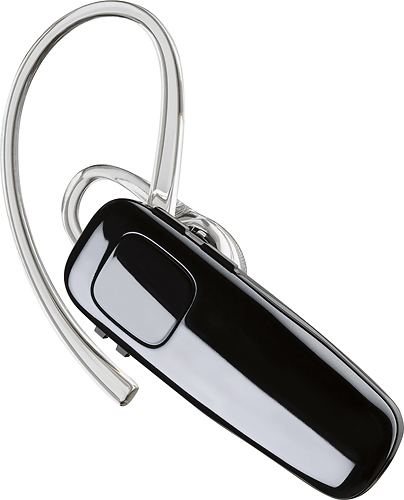

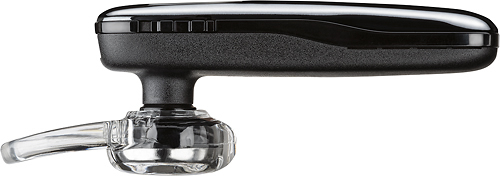
- Model:
- 200749-63
- SKU:
- 5709005
Rating by feature
- Sound Quality
Rating 4.2 out of 5 stars
- Battery Life
Rating 4.5 out of 5 stars
- Connectivity
Rating 4.5 out of 5 stars
Customers are saying
Customers praise the M95 Bluetooth Headset's sound quality, battery life, and ease of use. Many also appreciate its comfortable fit and the long talk time it provides. While some users found the maximum volume insufficient, and occasional connection issues were reported, the positive feedback on other features outweighs these concerns. The headset is also frequently cited as lightweight and affordable.
This summary was generated by AI based on customer reviews.
No good.
||Posted .This reviewer received promo considerations or sweepstakes entry for writing a review.I will be returning. This doesn't stay connected and has a lot of static sound when talking to someone.
No, I would not recommend this to a friendBrand response from PlantronicsRepresentative
Posted .Thank you for your honest review on our M95, we are sorry to hear you're experiencing trouble with your unit.
In order to troubleshoot connectivity or audio issues you might want to try resetting the Bluetooth connection between your phone and headset to see if that helps the issue. To do so:
1. Delete the headset from your cell phone's list of paired devices.
2. Once deleted, power your phone completely off, then power it back on. This resets the Bluetooth stack in the Bluetooth software on the phone.
3. Re-pair the headset with your phone. If this does not fix your issue, we suggest pairing the headset to another cell phone as a test.
If the issue is not present on the second phone, then the problem may be with the first phone, rather than the headset. If the issue exists on the second phone as well, you will need to replace the headset. Please don't hesitate to contact our customer care group at www.plantronics.com/support if you require assistance.
nice headset
||Posted .This reviewer received promo considerations or sweepstakes entry for writing a review.I am taking it back, it won't recharge. but other wise was good, until it when low on charge.
I would recommend this to a friendBrand response from PlantronicsRepresentative
Posted .Thank you for sharing your experience with our M95 Headset, however we're very sorry to hear it wasn't functioning correctly. Please make sure you try using a different micro-USB Cable and wall adapter to isolate the cause of the issue. If you get the same results, then most likely there is an actual problem with your unit and it is best to replace it. Please note this unit has a one-year limited warranty from date of purchase. If you have any questions, feel free to contact our Customer Care Team at: https://www.plantronics.com/us/en/support/contact
Piece of Junk
||Posted . Owned for less than 1 week when reviewed.This reviewer received promo considerations or sweepstakes entry for writing a review.Unacceptable feedback to incoming callers. Have to stop using.
No, I would not recommend this to a friendBrand response from PlantronicsRepresentative
Posted .Thank you for sharing your honest feedback on our M95. We're sorry to hear this. Please rest assured that we take the quality of our products very seriously, and scenarios like these are very unlikely.To troubleshoot it, please reset the BT connection between your cell phone and the earpiece. To do so: https://bit.ly/2OOMfnw. To set the earpiece in pairing mode, press and hold the call button for 6-8 seconds until LED flashes red and blue repeatedly. Lastly, testing the earpiece with a different cell phone and while it is paired to a single Bluetooth device is also ideal to isolate the cause of the issue. If you still get the same results, then the earpiece might have an actual problem and it is best to replace it. This model counts with a one-year limited warranty. We thank you for bringing this to our attention. If you require further assistance, please contact our Customer Care Team at: 1-888-363-0726

It’s not so good
||Posted .This reviewer received promo considerations or sweepstakes entry for writing a review.I suggest not buy this one as Bluetooth head set. You can buy apple Bluetooth. Thanks
No, I would not recommend this to a friendBrand response from PlantronicsRepresentative
Posted .Hi! Thank you for your honest review on our M95 headset, however, we are sorry to hear this. Our intention is to provide the highest quality products to our customers and we thank you for bringing this to our attention. Please don't hesitate to contact our Customer Care Team at https://www.plantronics.com/us/en/support/contact if you require technical assistance.
Junk
||Posted . Owned for 1 year when reviewed.This reviewer received promo considerations or sweepstakes entry for writing a review.This product quit working with 6 months. Total junk! Don't buy!!!
No, I would not recommend this to a friendBrand response from PlantronicsRepresentative
Posted .Thank you for sharing your honest review. We're sorry to hear about your experience. The life span of the product depends on the usage but on the vast majority of cases they last for way past their warranty period. If your earpiece is no longer charging or it doesn't turn on, please try using a different micro-USB cable along with a 5-volt wall charger. If you still get the same results, then most likely it has an actual problem related to the battery and it is best to replace it. We do have a few tips we believe you should take into account in order to extend the battery life of our products: https://bit.ly/35IMed5. Please note this model counts with a one-year manufacturer's warranty as long as it is purchased as brand new and through an authorized retailer. If you require further assistance, feel free to contact our Customer Care Team at: 1-888-363-0726 and we'll gladly assist you.
I love plantronics but this one is horrible
||Posted .This reviewer received promo considerations or sweepstakes entry for writing a review.I put one because they did'nt have a zero to choose
No, I would not recommend this to a friendBrand response from PlantronicsRepresentative
Posted .Hi and thank you for sharing your honest review on our M95; However, we're sorry to hear this has been your experience. Was the headset purchased brand new? Did the packaging present any tear or evident tampering? Please rest assured that we take the quality of our products very seriously, and scenarios like these are very unlikely. If you're experiencing technical difficulties, please don't hesitate to contact our Customer Care Team at: 1 888 248 4143 or 1 916 928 7561.
Don't waste ur money
||Posted .This reviewer received promo considerations or sweepstakes entry for writing a review.We have went thru three in a month. Keeps quiting or dropping calls. Going to buy another brand.
No, I would not recommend this to a friendBrand response from PlantronicsRepresentative
Posted .Thank you for your honest review on our M95, we are sorry to hear you're experiencing trouble with your unit.
In order to troubleshoot connectivity or audio issues you might want to try resetting the Bluetooth connection between your phone and headset to see if that helps the issue. To do so:
1. Delete the headset from your cell phone's list of paired devices.
2. Once deleted, power your phone completely off, then power it back on. This resets the Bluetooth stack in the Bluetooth software on the phone.
3. Re-pair the headset with your phone. If this does not fix your issue, we suggest pairing the headset to another cell phone as a test.
If the issue is not present on the second phone, then the problem may be with the first phone, rather than the headset. If the issue exists on the second phone as well, you will need to replace the headset. Please don't hesitate to contact our customer care group at www.plantronics.com/support if you require assistance.
POOR SOUND
||Posted .This reviewer received promo considerations or sweepstakes entry for writing a review.Blue tooth expericenced alot of static and unclear sound. I am exchanging item.
No, I would not recommend this to a friendBrand response from PlantronicsRepresentative
Posted .Hi! Thank you for your honest review on our M95 headset, however, we are sorry to hear about your experience. If you are experiencing some audio issues with the headset, you may want to reset the Bluetooth connection with your mobile. To do so: 1) Unpair the headset from your mobile phone by accessing your Bluetooth settings. 2) Power off your mobile phone for 2 minutes and turn it back on.
3) Re-pair the headset by pressing and holding down the call control button until you see the LED flashing red and blue. 4) Access to your Bluetooth settings and select "PLT_M95". Once successfully paired, you will hear "pairing successful" and the LED on your headset will stop flashing red and blue. You may also want to test the headset with a different mobile to completely isolate the issue. If for some reason you still encounter the same issue with the headset then it means the headset has an actual problem and it is best to replace it. Remember this unit counts with a limited warranty since the first day of purchase, and if you need a replacement you can simply click on the following link for further instructions: https://bit.ly/2N637EC. Please don't hesitate to contact our Customer Care Team at 800-985-9815 if you require assistance.
Plantronics
||Posted .This reviewer received promo considerations or sweepstakes entry for writing a review.Everyone I talked to said it sounded horrible like an echo.
No, I would not recommend this to a friendBrand response from PlantronicsRepresentative
Posted .Hi Marie and thank you for sharing your honest review on our M95; However, we're truly sorry to hear about your experience. This model features a noise-cancelling microphone that reduces noise, wind, and echo. To troubleshoot audio issues, please reset the Bluetooth connection between your phone and the earpiece. To do so: https://bit.ly/2OOMfnw. To set the earpiece in pairing mode, press and hold the call button ofr 6-8 seconds, until the indicator light flashes red and blue repeatedly. Lastly, testing the earpiece with a different cell phone model and while it is paired to a single Bluetooth device is ideal to determine the cause of the issue. If you still get the same results, then most likely the unit has an actual problem and it is best to replace it. This model counts with a one-year limited warranty. We thank you for bringing this to our attention. Your comments will be forwarded to our team for review and consideration. If you require further assistance, feel free to contact our Customer Care Team at: 1-888-363-0726
horrible headset
||Posted . Owned for 3 weeks when reviewed.This reviewer received promo considerations or sweepstakes entry for writing a review.Very uncomfortable in ear lots of feedback during phone calls
No, I would not recommend this to a friendBrand response from PlantronicsRepresentative
Posted .Hello! Thank you for your review on our M95, however, we are sorry to hear about your experience. These headsets are designed to fit the vast majority of ear shapes and sizes; however, we do know that one size may not fit all and if you find the product too uncomfortable for normal use we strongly recommend that you consider using a headset with a different wearing style. If you are experiencing echo or feedback with your headset, we recommend lowering the volume, in some cases, if the headset volume is too high, the microphone might pick up the sound from the speaker creating an echo on the far end. You may also want to try resetting the Bluetooth connection with your mobile by unpairing and re-pairing the headset. Last but not least we always recommend testing the headset with a different mobile phone to see where the issue is coming from. If for some reason the issue remains, then it could be an actual problem with the headset and it will be best to replace it. We will forward your comments to our Product Development Team, as we appreciate feedback based on customer use to create the best possible products. Please don't hesitate to contact our Customer Care Team at 1-888-363-0726 if you require assistance.
Doesn’t pair easily
||Posted . Owned for 1 week when reviewed.This reviewer received promo considerations or sweepstakes entry for writing a review.Horrible product don’t waste your money on it and it won’t pair properly
No, I would not recommend this to a friendBrand response from PlantronicsRepresentative
Posted .Hi! Thank you for your honest review on our M95 headset, however, we are sorry to hear about your experience. In order to pair the headset to a new device, you will need to make sure the headset is in pairing mode. With the headset powered on, press and hold down the call control button for at least 10 seconds until you hear "pairing". Access your phone Bluetooth settings and select "PLT_M95". Once successfully paired, you will hear "pairing successful". Please note that our intention is to provide the highest quality products to our customers and we thank you for bringing this to our attention. Please feel free to contact our Customer Care Team at https://www.plantronics.com/us/en/support/contact if you require technical assistance.
Not a good bluetooth.
||Posted . Owned for 6 months when reviewed.This reviewer received promo considerations or sweepstakes entry for writing a review.Didn't have no features compared to other Bluetooth...............
No, I would not recommend this to a friendBrand response from PlantronicsRepresentative
Posted .Hello and thank you for your honest review on our M95 Headset; However, we're sorry to hear you were not satisfied with the product. Your comments will be forwarded to team for review and consideration. If you have any questions related to our products, please don't hesitate to contact our Customer Care Team at: 1-888-363-0726
not working
||Posted . Owned for 1 month when reviewed.This reviewer received promo considerations or sweepstakes entry for writing a review.not working only had it for a month, dies fast and now it wont turn on
No, I would not recommend this to a friendBrand response from PlantronicsRepresentative
Posted .Hi! Thank you for your review on our M95 headset, however, we are sorry to hear about your experience. Charging/Power issues with Bluetooth headsets can be a problem caused by the power source, cable or the product itself (it can be the charging connector or the battery on some cases). We recommend charging the headset using a different charging cable and power source to completely isolate the issue. If for some reason you still encounter the same issue, then it means the headset has an actual problem and it is best to replace it. Remember this unit counts with a limited warranty since the first day of purchase, and if you need a replacement you can click on the following link for further instructions: https://bit.ly/2N637EC. Please note the life span of the product depends on the usage but on many cases they last for way past their warranty period. Please don't hesitate to contact our Customer Care Team at 800-985-9815 if you require assistance.
Always going dead
||Posted . Owned for 1 week when reviewed.This reviewer received promo considerations or sweepstakes entry for writing a review.Battery goes dead in 30 minutes and it charges fast
No, I would not recommend this to a friendBrand response from PlantronicsRepresentative
Posted .Hello! Thank you for reviewing our M95, however, we are sorry to hear you are having problems with your headset. If your headset is not holding the charge, we recommend that you try another charging cable or another wall outlet if possible to isolate the problem. If the same issue persists, then it could be an actual problem with the unit and it will be best to replace it. Please note this model does have a limited warranty from the date of purchase and you can request a replacement directly through our official website. Please don't hesitate to contact our Customer Care Team at 1-888-363-0726 if you require assistance.
- Pros mentioned:Ease of use, Fit, Sound quality
Very clear.
Posted .This reviewer received promo considerations or sweepstakes entry for writing a review.Perfect fit, voices come through very clear, very easy to use.
I would recommend this to a friend Poor quality
||Posted . Owned for 1 month when reviewed.This reviewer received promo considerations or sweepstakes entry for writing a review.Poor quality, very hard to hear even with volume turned to the max
No, I would not recommend this to a friendBrand response from PlantronicsRepresentative
Posted .Hello and thank you for your honest review on our M95 Headset; However, we're sorry to hear you didn't find your headset loud enough. If you have already increased the volume on both your phone and earpiece, you might want to try resetting the Bluetooth connection: https://goo.gl/emzUTA. Please note that all Plantronics headsets meet and exceed OSHA standard regulations/requirements. None of our headsets exceed 118dBA. If you've noticed the earpiece has a lower level of volume, then it is best to replace it. This model has a one-year warranty from date of purchase. We thank you for your comments. We will forward them to our team for review and consideration.
Poor mic volume. Lots of feedback on devices.
||Posted . Owned for 1 week when reviewed.This reviewer received promo considerations or sweepstakes entry for writing a review.S411tty for a minimum of 43 characters .............
No, I would not recommend this to a friendBrand response from PlantronicsRepresentative
Posted .Hi Brian and thank you for taking the time to share your feedback on our M95. We're sorry to hear about your experience. As the rest of our Bluetooth Headsets, this model counts with a noise-cancelling microphone, designed to reduce background noises. In order to troubleshoot your unit, please reset the connection between your phone and earpiece. To do so: https://goo.gl/emzUTA. You might also want to reset the Network settings on your phone. Lastly, testing the earpiece with a different phone and while it is connected to a single Bluetooth device is also ideal to isolate the cause of the issue. In case you still get the same issue, please note this model comes with a one-year limited warranty. If you require further assistance, please don't hesitate to contact our Customer Care Team: 1-888-363-0726.
Not so good..
||Posted .This reviewer received promo considerations or sweepstakes entry for writing a review.The parties on the receiving end all said it sounded like an echo chamber!
No, I would not recommend this to a friendBrand response from PlantronicsRepresentative
Posted .Thank you for sharing your feedback on our M95 Headset however, we're sorry to hear you've had trouble with your unit. You might want to try resetting the Bluetooth connection to see if it improves the performance of the microphone, to do so: https://goo.gl/6ZG6LW. Also, please test your headset with a different phone and at different locations while connected to a single device to isolate the cause of the problem. In case you get the same results, please note this unit does have a one-year limited warranty from date of purchase and you can submit a claim and request a replacement from our website. Please feel free to contact our Customer Care Team at: https://www.plantronics.com/us/en/support/contact
Bluetooth
||Posted .This reviewer received promo considerations or sweepstakes entry for writing a review.Died after 4 months usually they last longer so I'm very disappointed
No, I would not recommend this to a friendBrand response from PlantronicsRepresentative
Posted .Hi! Thank you for your honest review on our M95 headset, however we are sorry to hear about your experience. Our intention is to provide the highest quality products to our customers and please note that this unit counts with a limited warranty since the first day of purchase. The life span of the product depends on the usage but on many cases they last for way past their warranty period. Please don't hesitate to contact our Customer Care Team at 800-985-9815 if you require assistance.
Poor
||Posted . Owned for 1 month when reviewed.This reviewer received promo considerations or sweepstakes entry for writing a review.The bluetooth isn't noise cancelling,not alot to desire.
No, I would not recommend this to a friendBrand response from PlantronicsRepresentative
Posted .Thank you for your honest feedback on our M95. We're sorry to hear you were not satisfied with the microphone from this model. The M95 reduces noise, wind, and echo from calls and delivers HD audio clarity when used with wideband-enabled smartphones and mobile service. If callers are hearing a lot of background noises, please try to reset the Bluetooth connection between your phone and earpiece: https://goo.gl/emzUTA. Testing it with a different phone is also ideal to isolate the cause of the issue. If you still get the same results, even after performing the previous tests, then there might be an issue with the unit. This model comes with a one-year limited warranty. In any case we thank you for bringing this to our attention. We will forward your comments to our team for review and consideration. If you require further assistance, please don't hesitate to contact our Customer Care Team at: 1-888-363-0726