Customer Ratings & Reviews




- Model:
- B09WZBPX7K
- SKU:
- 6531758
Rating by feature
- Video Quality
Rating 4.8 out of 5 stars
- Mobile App
Rating 4.8 out of 5 stars
- Sound Quality
Rating 4.7 out of 5 stars
Customers are saying
Customers enjoy the Battery Doorbell Plus Smart Wifi Video Doorbell for its clear video quality, overall performance, and ease of use. Many appreciate the awesome battery life, head-to-toe view, and quick installation, finding it adds a sense of security with quick motion detection. However, some customers have reported connectivity issues, and a few found the installation instructions to be inadequate.
This summary was generated by AI based on customer reviews.
Ring Doorbell Plus
||Posted . Owned for 2 weeks when reviewed.This reviewer received promo considerations or sweepstakes entry for writing a review.Excellent addition to my Ring. Head to toe great..
I would recommend this to a friendRing Battery Doorbell Plus
||Posted . Owned for 3 weeks when reviewed.This reviewer received promo considerations or sweepstakes entry for writing a review.This is a great doorbell camera system, highly recommend!
I would recommend this to a friendLove my ring!!
||Posted . Owned for 1 month when reviewed.This reviewer received promo considerations or sweepstakes entry for writing a review.So clear, and easy to use. The video playback is awesome
I would recommend this to a friendRing
||Posted . Owned for 3 weeks when reviewed.This reviewer received promo considerations or sweepstakes entry for writing a review.We love the Ring camera!! So easy to setup and use!!
I would recommend this to a friendA great doorbell
||Posted . Owned for 3 weeks when reviewed.This reviewer received promo considerations or sweepstakes entry for writing a review.The doorbell works great and so glad it was set up
I would recommend this to a friend- Pros mentioned:Video quality
Not reliable
||Posted . Owned for 3 weeks when reviewed.This reviewer received promo considerations or sweepstakes entry for writing a review.The video and device quality in general is good. But the battery consumption is a lot. It lasts max a month despite the advertisements saying 3 to 6 months. It responds to motions with delay. Sometimes I intentionally move in front of the camera and I don't get any notification. If I increase the sensibility it'll send me lots of notifications almost every 2 mins. It is installed close to wifi device but it's hard to connect to it sometimes to see a live video. I have to try many times. I went over all the settings but it's still not a reliable thing.
No, I would not recommend this to a friendBrand response from Ring
Posted .Hi Francis.
Thank you for taking the time to share your experience with us. We understand how important it is to have your Ring Battery Doorbell Plus capture all the correct motion events. The Ring Battery Doorbell Plus was designed to capture motions based on your specifications to help keep your home secure. We are here to provide you with some information to resolve the issue you mentioned in your review.
It sounds like the device is not performing as expected. It is important to ensure that you have the proper motion settings in place for your environment. This camera uses adjustable motion detection and runs on passive infrared sensors. The system identifies visitors via a moving heat signature and sends a notification to your smart device when one is detected. You can adjust three preset motion zones and their distances under the "Motion Settings" tab on the device's page in the Ring app. Additionally, you can choose how often the camera checks for movement in those predefined zones via the "Motion Frequency" setting. If you find that your camera is missing some motions, please set the motion frequency to "Frequently."
Accuracy in motion detection can also be improved by enabling the "Smart Alerts" feature for people only in your Ring app. To enable "Smart Alerts," please follow these steps:
Tap the menu (≡) on the top left.
Tap "Devices."
Tap the device that you want to adjust.
Tap "Motion Settings."
Tap "Smart Alerts."
Tap "Enable Feature."
Tap "Continue."
Select the notification options that you want for "Person" and "Other Motion."
You'll see a video camera where you can select or de-select recording and a bell icon to represent alert notifications.
After you've adjusted your settings, tap "Done."
There are some troubleshooting steps that you can take to ensure that you have your device set up for optimal battery-life performance. The more events captured by your Ring devices, the more your battery is used. Using "Live View" can also drain your battery faster. If your device is capturing an excessive number of events each day, you may need to recharge your battery sooner.
To prevent excessive activity, under "Motion Settings" for your device in the Ring app, you can:
Adjust your "Motion Sensitivity" slider to a lower sensitivity.
Redraw your "Customizable Motion Zones."
Change "Motion Frequency" to regularly or periodically.
You could also adjust the direction of your Ring device so it doesn't detect as much motion.
You can go to "Power Settings" in the Ring app to see what features may be draining your battery.
To access "Power Settings," open the Ring app:
Tap the menu (≡) on the top left of the dashboard.
Tap "Devices."
Tap the individual device (video doorbell or security camera) you want to check.
Tap "Power Settings" to check your "Battery Level" percentage and "Feature Power Usage."
Tap a feature to adjust "Snapshot Capture," "Motion Frequency," and "Video Recording Length.".
If any additional information is needed regarding your Ring Battery Doorbell Plus, please reach out to our community. Ring Community is our first peer-to-peer community forum, giving our customers the ability to help one another and share their feedback and experiences directly with Ring.
Thank you,
Melissa from Ring.
Good Camera
||Posted . Owned for 8 months when reviewed.This reviewer received promo considerations or sweepstakes entry for writing a review.Extremely useful with a good viewing area. Would reccomend.
I would recommend this to a friendBrand response from Ring
Posted .Hi Gaurav.
Thank you for taking the time to share your experience with us. We are pleased to read that you are enjoying your new Ring Floodlight Cam Plus device and that the features included are meeting your expectations. At Ring, we believe in keeping people close to what’s important. That is why we are driven to create products that help you protect what matters most at home and empower you to connect with your visitors from wherever you are. Together, we’ll make neighborhoods safer!
If any additional information is needed regarding your Ring Floodlight Cam Plus, please reach out to our community. Ring Community is our first peer-to-peer community forum, giving our customers the ability to help one another and share their feedback and experiences directly with Ring.
Thank you,
Matthew from Ring.
Ring
||Posted . Owned for 1 month when reviewed.This reviewer received promo considerations or sweepstakes entry for writing a review.Good just don’t like how you have a pay monthly or yearly to use the basic features.
I would recommend this to a friendGood
||Posted . Owned for 2 weeks when reviewed.This reviewer received promo considerations or sweepstakes entry for writing a review.I've been wanting one I'm glad I got it. It works well to keep your home safe.
I would recommend this to a friendBrand response from Ring
Posted .Hi WilliamW.
Thank you for taking the time to share your feedback with us. We are pleased to read that you are finding value in your Ring Battery Doorbell Plus. At Ring, we believe in keeping people close to what’s important. That is why we are driven to create products that help you protect what matters most at home and empower you to connect with your visitors from wherever you are. Together, we’ll make neighborhoods safer!
We invite you to reach out to our community if any additional information is needed regarding your new Ring Battery Doorbell Plus. Ring Community is our first peer-to-peer community forum, giving our customers the ability to help one another and share their feedback and experiences with Ring.
Thank you,
Melissa from Ring.
Ring doorbell camera
||Posted . Owned for 1 month when reviewed.This reviewer received promo considerations or sweepstakes entry for writing a review.It brings a needed level of security to myself being a senior living alone.
I would recommend this to a friendBrand response from Ring
Posted .Hi MaureenS.
Thank you for taking a moment to leave your Ring Battery Doorbell Plus rating. Here at Ring, we believe that stronger communities are the key to safer neighborhoods. That is why we are driven to create products that help you protect what matters most at home and empower you to connect with your neighbors from wherever you are. Together, we’ll make neighborhoods safer!
We are pleased to read that you are enjoying the benefits of having a Ring security device installed! The features and technology provided by the Ring Battery Doorbell Plus are incredibly valuable and help provide you with peace of mind about your home security.
Ring Community is our first peer-to-peer community forum, giving our customers the ability to help one another and share their feedback/experiences with Ring. We invite you to reach out if you have any additional questions or feedback regarding your Ring Battery Doorbell Plus.
Thank you,
Melissa from Ring.
decent
||Posted . Owned for 3 weeks when reviewed.This reviewer received promo considerations or sweepstakes entry for writing a review.seems to be working well as they have with past purchases
I would recommend this to a friendBrand response from Ring
Posted .Hi pfd603.
Thank you for taking the time to share your review of the Ring Battery Doorbell Plus. We are pleased to read that you are enjoying your new Ring device and that the features included are meeting your expectations. At Ring, we believe in keeping people close to what’s important. That is why we are driven to create products that help you protect what matters most at home and empower you to connect with your visitors from wherever you are. Together, we’ll make neighborhoods safer!
Ring Community was launched to help deliver the most current news and educational information to our neighbors. This online forum is divided into four categories: Product Boards, Ring Updates, Tips and Tricks, and a Moderators’ Corner. The Product Boards are where you can begin new topics with your questions or feedback; there is also a search option that helps you find topics that have already been posted by other neighbors. We invite you to visit our community today.
Thank you,
Melissa from Ring.
Replacement ring doorbell
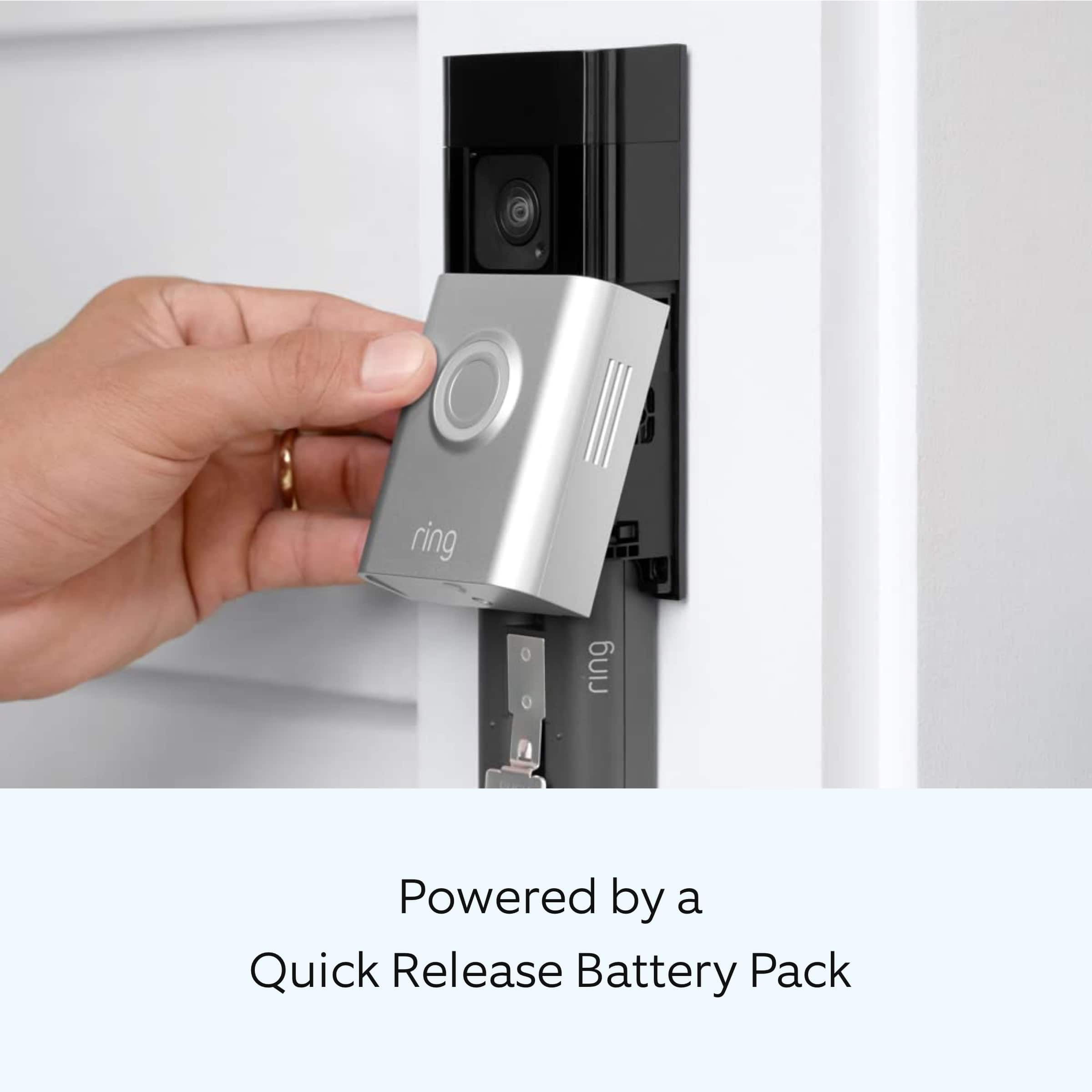
||Posted . Owned for 3 weeks when reviewed.This reviewer received promo considerations or sweepstakes entry for writing a review.The newer ring has more sensitive battery connection prongs so be careful when replacing the battery
I would recommend this to a friendBrand response from Ring
Posted .Hi CarolY.
Thank you for taking the time to share your Ring experience with us and other consumers. We believe in keeping people close to what’s important. That is why we are driven to create products that help you protect what matters most at home and empower you to connect with your visitors from wherever you are. Together, we’ll make neighborhoods safer!
For more information on your Ring Battery Doorbell Plus, we invite you to reach out to our community. Ring Community is our first peer-to-peer community forum, giving our customers the ability to help one another and share their personal feedback and experiences with Ring. We look forward to hearing from you if we can be of any further assistance!
Thank you,
Miyuki from Ring.
Works well
||Posted . Owned for 3 weeks when reviewed.This reviewer received promo considerations or sweepstakes entry for writing a review.Works well but difficult to install with just a screw driver. You’ll need at least a small drill.
I would recommend this to a friendNew Ring
||Posted . Owned for 1 month when reviewed.This reviewer received promo considerations or sweepstakes entry for writing a review.Had to replace old one it just quit working so just had to get a new one. Serves it purpose
I would recommend this to a friendBrand response from Ring
Posted .Hi Kimberly.
At Ring, we appreciate you taking the time to share your feedback with us. We are glad to read that you are enjoying your new Ring Batttery Doorbell Plus! Furthermore, we believe in keeping people close to what’s important. That is why we are driven to create products that help you protect what matters most at home and empower you to connect with your visitors from wherever you are. Together, we’ll make neighborhoods safer!
Ring Community launched in March 2019 to help deliver the most current news and educational information to our neighbors. It is our first peer-to-peer community forum, giving our customers the ability to help one another and share their feedback and experiences with Ring. Please reach out to our community if any additional information is needed regarding your Ring Battery Doorbell Plus.
Thank you,
Melissa from Ring.
Amazing
||Posted . Owned for 3 weeks when reviewed.This reviewer received promo considerations or sweepstakes entry for writing a review.Works great never lets me down always works and helps alot when not home
I would recommend this to a friendBrand response from Ring
Posted .Hi JovanE.
Thank you for taking the time to share your experience with us. We are pleased to read that you are enjoying your new Ring Battery Doorbell Plus and that the features included are meeting your expectations. At Ring, we believe in keeping people close to what’s important. That is why we are driven to create products that help you protect what matters most at home and empower you to connect with your visitors from wherever you are. Together, we’ll make neighborhoods safer!
Ring Community was launched to help deliver the most current news and educational information to our neighbors. This online forum is divided into four categories: Product Boards, Ring Updates, Tips and Tricks, and a Moderators’ Corner. The Product Boards are where you can begin new topics with your questions or feedback; there is also a search option that helps you find topics that have already been posted by other neighbors. We invite you to visit our community today.
Thank you,
Melissa from Ring.
Door bell ring
||Posted . Owned for 3 weeks when reviewed.This reviewer received promo considerations or sweepstakes entry for writing a review.I like the head to toe of this ring, it doesn't tell me I have a package all the time maybe 70 percent of the time
I would recommend this to a friendDisappointed in Ring doorbell Plus
||Posted .This reviewer received promo considerations or sweepstakes entry for writing a review.Bought to replace Doorbell 2. Big disappointment, didn't have the vision reach, plus the videos were circular, like watching through a tunnel. I prefer the rectangular screen, more video. Hopefully Ring will go back to the original screen/camera view. Returned the Plus
No, I would not recommend this to a friendBrand response from Ring
Posted .Hi SAL1952.
Thank you for taking the time to share your experience with us. At Ring, we want to ensure that you have the best possible experience with our products. Your peace of mind and security are extremely important to us. The features and technology provided by the Ring Battery Doorbell Plus are incredibly valuable and help provide you with peace of mind about your home security. Rest assured, we're here to help!
At Ring, we believe that stronger communities are the key to safer neighborhoods. That is why we are driven to create products that help you protect what matters most at home, and empower you to connect with your visitors from wherever you are. We are saddened to read that this device did not meet your expectations but are still here to assist you. Our support team is available 24/7.
Ring Community was launched to help deliver the most current news and educational information to our neighbors. This online forum is divided into four categories: Product Boards, Ring Updates, Tips + Tricks, and a Moderators’ Corner. The Product Boards are where you can begin new topics with your questions or feedback; there is also a search option which helps you find topics that were already posted by other neighbors. We invite you to join our community today!
Thank you,
Amilia from Ring.
Ms Rob
||Posted . Owned for 1 week when reviewed.This reviewer received promo considerations or sweepstakes entry for writing a review.Good product I will recommend it to everybody and will by another one
I would recommend this to a friendBrand response from Ring
Posted .Hi AngelineR.
Thank you for taking the time to share your feedback with us. We are pleased to read that you are finding value in your Ring Battery Doorbell Plus. At Ring, we believe in keeping people close to what’s important. That is why we are driven to create products that help you protect what matters most at home and empower you to connect with your visitors from wherever you are. Together, we’ll make neighborhoods safer!
We invite you to reach out to our community if any additional information is needed regarding your new Ring device. Ring Community is our first peer-to-peer community forum, giving our customers the ability to help one another and share their feedback and experiences with Ring.
Thank you,
Melissa from Ring.
Efficient!
||Posted . Owned for 2 months when reviewed.This reviewer received promo considerations or sweepstakes entry for writing a review.It is efficient without being overly intrusive. Plus it is not cumbersome and unattractive.
I would recommend this to a friendLow battery life
||Posted . Owned for 4 months when reviewed.This reviewer received promo considerations or sweepstakes entry for writing a review.Works better than our original, but battery last about 1/3 as long as our old ring doorbell.
I would recommend this to a friend