Customer Ratings & Reviews

- Model:
- B0B2BY4ZG7
- SKU:
- 12197867
Rating by feature
- Video Quality
Rating 4.7 out of 5 stars
- Mobile App
Rating 4.7 out of 5 stars
- Sound Quality
Rating 4.6 out of 5 stars
Camera
||Posted . Owned for 1 week when reviewed.This reviewer received promo considerations or sweepstakes entry for writing a review.Great product I would recommend to anyone looking for a doorbell camera
I would recommend this to a friendRing
||Posted . Owned for 1 week when reviewed.This reviewer received promo considerations or sweepstakes entry for writing a review.The picture quality could use improvement. There are also other doorbells one can buy that there isn’t any yearly fee.
I would recommend this to a friendBrand response from Ring
Posted .Hi 1234.
We appreciate you taking the time to share your feedback with us. At Ring, we believe in keeping people close to what’s important. That is why we are driven to create products that help you protect what matters most at home and empower you to connect with your visitors from wherever you are. Together, we’ll make neighborhoods safer! We can definitely provide you with more information regarding the concerns mentioned in your review regarding video quality and the optional Ring Protect Plan.
We understand the importance of having all relevant product information prior to purchasing. The Ring Protect Plan provides valuable capabilities, such as accessing paid features and the ability to save, download, and review footage captured by your Ring device.
Ring devices require high-speed internet to bring you crisp, clear video and audio. Poor network connectivity can affect the performance of your Ring device. We are happy to share some troubleshooting steps to help you diagnose and fix common video issues that you may experience with Ring doorbells and cameras.
Ring devices with 1080p video require at least 1 Mbps upload and download speeds, though 2 Mbps is recommended for optimal performance. In addition to ensuring that you have sufficient wifi speeds, you will also want to check the signal strength of your device. A poor wifi signal can cause connectivity with your Ring device to be unreliable. To learn more about your device's signal strength, follow these steps:
Open the Ring app.
Tap the menu (☰).
Tap “Devices.”
Select the ring device you would like to test.
Tap on the “Device Health” tile.
Scroll to “Signal Strength” under the “Network” section.
The green, amber, and red colors are indicators of your device connection. Green is good; red is poor.
Ring Community launched in March 2019 to help deliver the most current news and educational information to our customers. We invite you to reach out to our community if more information is needed regarding your Ring Battery Doorbell Pro. This peer-to-peer forum allows our neighbors to share their feedback and experiences.
Thank you,
Melissa from Ring.
Disappointing camera capture
||Posted .This reviewer received promo considerations or sweepstakes entry for writing a review.Good basic camera but only picks up large vehicles and people standing within 10 feet of it. Does not pick up people on a sidewalk.
No, I would not recommend this to a friendBrand response from Ring
Posted .Hi JulieC.
Thank you for taking the time to share your experience with us. We understand how important it is for your Ring Battery Doorbell Pro to function consistently and reliably, so you are alerted to any wanted or unwanted activity in or around your home. The features and technology provided by the Ring Battery Doorbell Pro are incredibly valuable and help provide you with peace of mind about your home security. We are eager to address the issue you raised in your review and provide you with a resolution today.
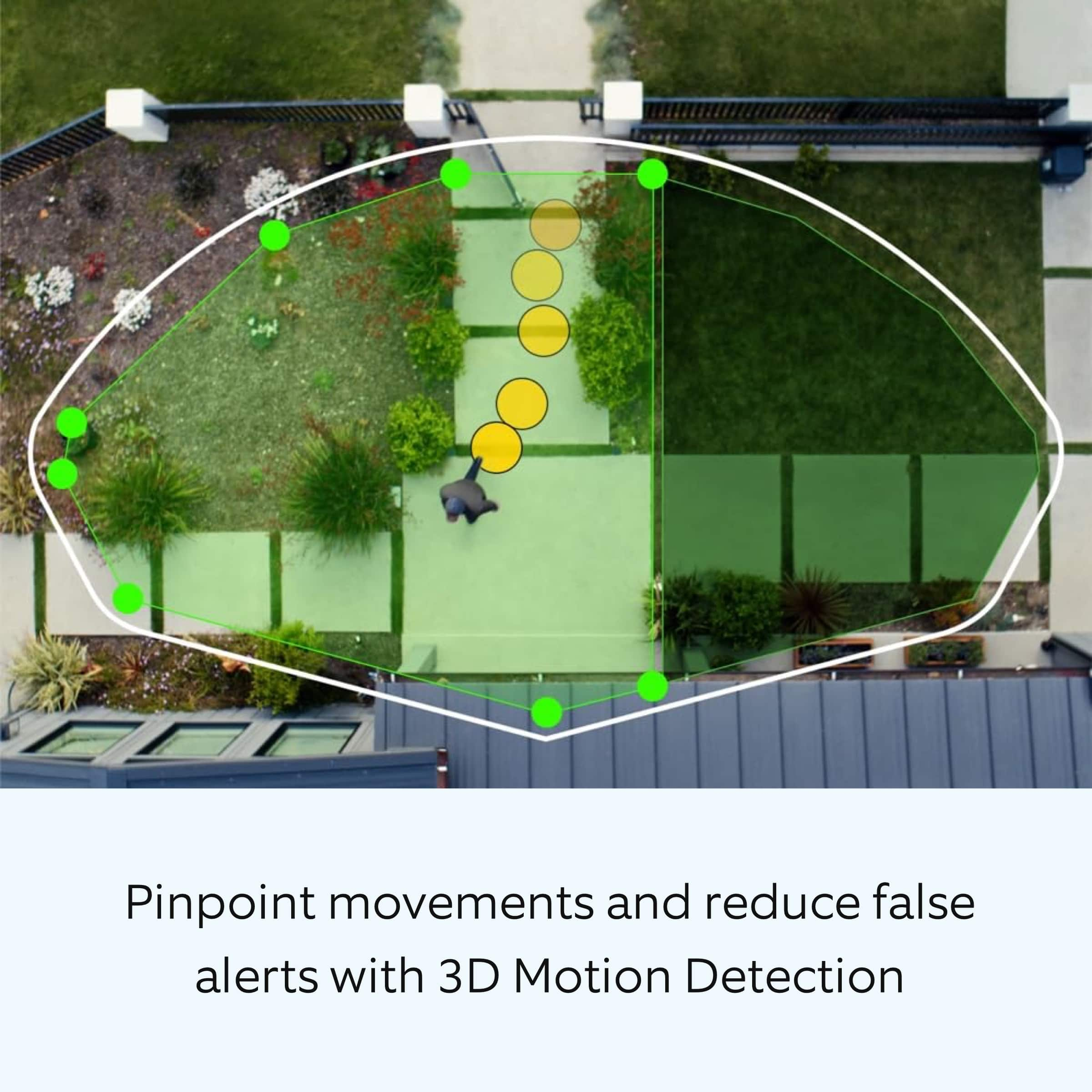
It sounds like your Ring Battery Doorbell Pro is not performing as expected. We would love the opportunity to share with you some troubleshooting steps that you can try to get your Ring Battery Doorbell Pro functioning as intended. It is important to ensure that you have the proper motion settings in place for your environment. This camera uses adjustable motion detection and runs on passive infrared sensors. The system identifies visitors via a moving heat signature and sends a notification to your smart device when one is detected. You can adjust three preset motion zones and their distances under the "Motion Settings" tab on the device's page in the Ring app. Additionally, you can choose how often the camera checks for movement in those predefined zones via the "Motion Frequency" setting. If you find that your camera is missing some motions, please set the motion frequency to "Frequently."
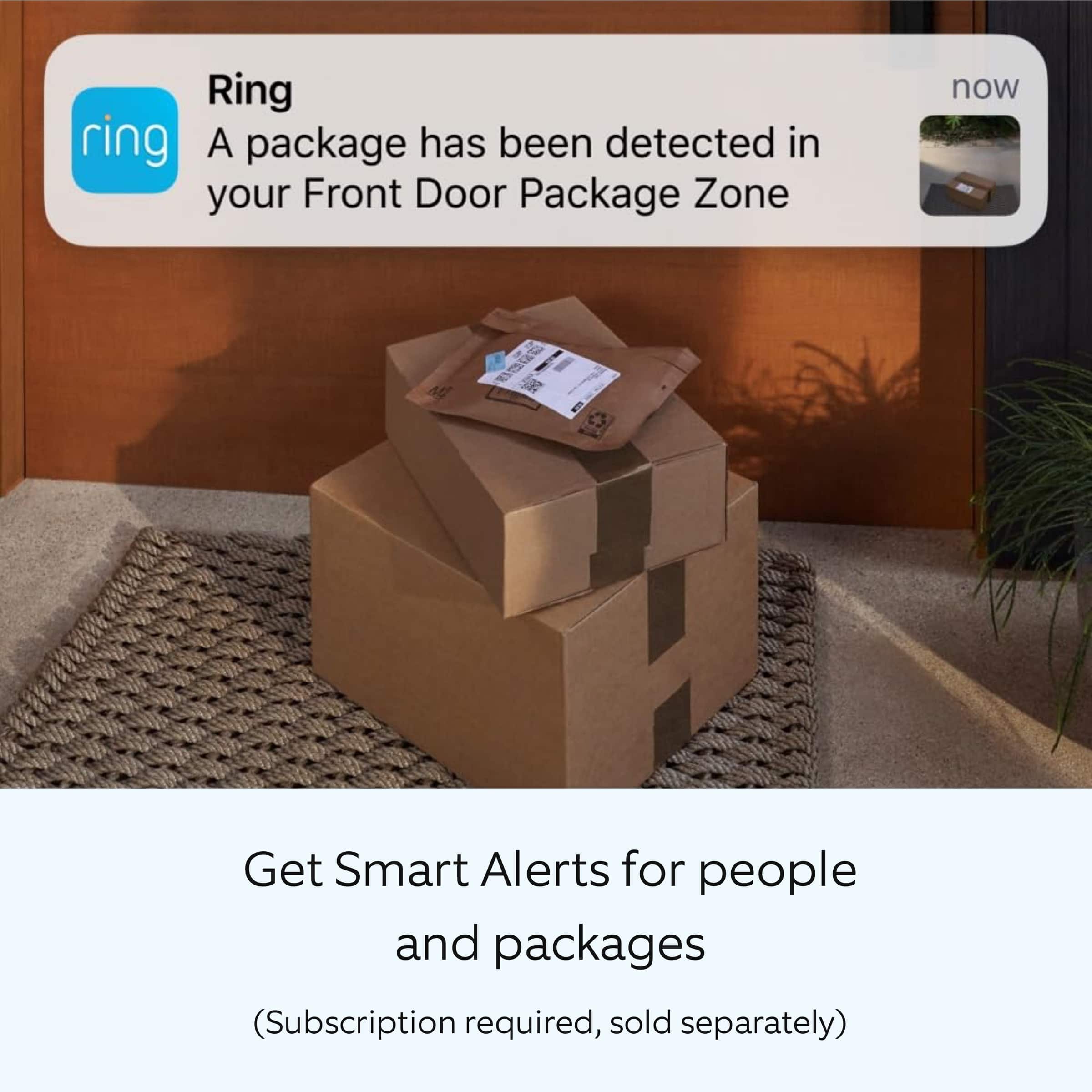
Accuracy in motion detection can also be improved by enabling the "Smart Alerts" feature for people only in your Ring app. To enable "Smart Alerts," please follow these steps:
Tap the menu (≡) on the top left.
Tap "Devices."
Tap the device that you want to adjust.
Tap "Motion Settings."
Tap "Smart Alerts."
Tap "Enable Feature."
Tap "Continue."
Select the notification options that you want for "Person" and "Other Motion."
You'll see a video camera where you can select or de-select recording and a bell icon to represent alert notifications.
After you've adjusted your settings, tap "Done.
We invite you to reach out to our Community if any additional information is needed regarding your Ring Battery Doorbell Pro. The Ring Community is our first peer-to-peer community forum, giving our customers the ability to help one another by sharing their feedback and experiences with each other.
Sincerely,
Miyuki from Ring.
Ring Review
||Posted . Owned for less than 1 week when reviewed.This reviewer received promo considerations or sweepstakes entry for writing a review.This is awesome and great for protecting your home. I recommend for anyone.
I would recommend this to a friendLove ring
||Posted . Owned for 1 month when reviewed.This reviewer received promo considerations or sweepstakes entry for writing a review.We now have 5 of these on our property and they have never failed us.
I would recommend this to a friendLove it!
||Posted . Owned for 1 week when reviewed.This reviewer received promo considerations or sweepstakes entry for writing a review.Love it! Made vacation easier as I could monitor everything while away!
I would recommend this to a friendVery good
||Posted . Owned for 1 week when reviewed.This reviewer received promo considerations or sweepstakes entry for writing a review.gooood, it works as expected. I like it and highly recommended
I would recommend this to a friendReview
||Posted . Owned for 2 weeks when reviewed.This reviewer received promo considerations or sweepstakes entry for writing a review.This is a replacement. Other one only lasted /m2 years
I would recommend this to a friendRing
||Posted . Owned for 1 week when reviewed.This reviewer received promo considerations or sweepstakes entry for writing a review.Excellent for what I need it for my door for Protection
I would recommend this to a frienddoor bell camera
||Posted . Owned for 1 month when reviewed.This reviewer received promo considerations or sweepstakes entry for writing a review.difficult to install on phone.....................
No, I would not recommend this to a friendBrand response from Ring
Posted .Hi SusanG.
Thank you for taking the time to share your experience with us. We understand the importance of a seamless setup process so that you can begin using your Ring Battery Doorbell Pro right away. The features and technology provided by the Ring Battery Doorbell Pro are incredibly valuable and help provide you with peace of mind about your home security. We can definitely provide you with more information regarding the concern mentioned in your review.
It sounds like you are experiencing an issue with the setup of the device.
To set up your Ring Battery Doorbell Pro, you can scan the QR code on your Ring device or product packaging via the Ring app. Follow these instructions in the Ring app:
Tap the three lines (≡) on the left side of your dashboard in the Ring app.
Tap "Set up a Device" and select "Doorbells."
Tap "I’m Ready to Scan."
Point your smartphone’s camera at the QR code on your Ring device or product packaging. (Note: If you don’t see the QR code, please remove your video doorbell’s faceplate).
Center the code in the phone camera’s view at the bottom half of the screen.
When the code is recognized, a green square will appear and a pop-up with your device image detected.
If you experience issues scanning the QR code, please follow these steps:
Move your camera closer or further from the QR code to help it focus.
Once your camera finds focus, hold it steady for a few seconds.
If your camera won’t focus, clean your camera lens, move to a well-lit area, and try again.
If you continue to experience issues, please follow these additional steps:
Tap "Other Options" below the scanner.
Select Can’t Scan the QR code.
Confirm by selecting "Enter code manually" (this corresponds to PIN code digits underneath the QR code).
Find your device in the list.
Enter your five digit PIN which can be found below the QR code.
For additional support, we recommend reaching out to our Ring Customer Support team. They are available 24/7 at: 1-800-656-1918. We also invite you to reach out to our community. The Ring Community is our first peer-to-peer community forum, giving our customers the ability to help one another by sharing their feedback and experiences with each other.
Thank you,
Miyuki from Ring.
Ring pro
||Posted . Owned for 1 week when reviewed.This reviewer received promo considerations or sweepstakes entry for writing a review.This ring is so much better quality than the others...
I would recommend this to a friendMy cam
||Posted . Owned for 2 weeks when reviewed.This reviewer received promo considerations or sweepstakes entry for writing a review.This was a great investment for me. I should’ve done it sooner.
I would recommend this to a friendExperience
||Posted . Owned for 1 week when reviewed.This reviewer received promo considerations or sweepstakes entry for writing a review.I would say 4.5 because the bird's eye view was blurry on the map. However, the ring doorbell is great.
I would recommend this to a friendBrand response from Ring
Posted .Hi Deafboy21.
We appreciate you taking the time to share your experience with us. We are pleased to read that you are enjoying your new Ring Battery Doorbell Pro! At Ring, every device and service we make is designed to help give Neighbors peace of mind inside, protection outside, and a connection to what’s happening in the neighborhood.
Ring devices require high-speed internet to bring you crisp, clear video and audio. Poor network connectivity can affect the performance of your Ring device and the video quality when using the "Live View" feature. We are happy to share some troubleshooting steps to help you diagnose and fix common video issues that you may experience with Ring doorbells and cameras.
Ring devices with 1080p video require at least 1 Mbps upload and download speeds, though 2 Mbps is recommended for optimal performance. In addition to ensuring that you have sufficient wifi speeds, you will also want to check the signal strength of your device. A poor wifi signal can cause connectivity with your Ring device to be unreliable.
Check the Device Health section of your Ring application to ensure the device’s RSSI is within an acceptable range. The recommended range for optimal performance is 0 to -60 for the RSSI. Turn off your mobile device's cellular data and connect to the same wifi network as your Ring device. Open the Ring app. Tap the menu (☰). Tap “Devices.” Select your device. Trigger an event on your Ring device. This could mean pressing the button on a doorbell or activating the motion sensors on a camera. Answer the event and examine the resulting video.
We have listed some possible outcomes from this test here:
1. The footage is crisp and clear.
If your video appears good when next to the router, the issue may be caused by a disruption in between your router and your Ring device’s normal location. To fix this, try moving your device closer to the router or extending your wifi signal with a wifi extender like the Ring Chime Pro.
2. The footage is heavily pixelated.
If you’re seeing heavy pixilation, even next to the router, this may be due to slow wifi speeds.
Ring Community is our first peer-to-peer community forum, giving our customers the ability to help one another and share their feedback and experiences with Ring. We invite you to reach out to our community if any additional information is needed regarding your Ring Battery Doorbell Pro.
Thank you,
Melissa from Ring.
Ring DoorBell Pro Smart Wi-Fi Video Doorbell
||Posted . Owned for 1 month when reviewed.This reviewer received promo considerations or sweepstakes entry for writing a review.This was very easy to install and has been a great buy!
I would recommend this to a friendSo far so good
||Posted .This reviewer received promo considerations or sweepstakes entry for writing a review.Love everything so far,except for the monthly subscription,it’s just unnecessary and a rip off
I would recommend this to a friendBrand response from Ring
Posted .Hi General.
Thank you for taking the time to share your experience with us. We are happy to hear that you are enjoying the functionality of your Ring Battery Doorbell Pro. We believe in keeping people close to what’s important. That is why we are driven to create products that help you protect what matters most at home and empower you to connect with your visitors from wherever you are. Together, we’ll make neighborhoods safer!
We understand the importance of having all relevant product information prior to purchasing. The Ring Protect Plan provides valuable capabilities, such as accessing paid features and the ability to save, download, and review footage captured by your Ring device. We can definitely provide you with more information regarding the concern mentioned in your review.
It sounds like there was some confusion regarding the optional Ring Protect Plan. With a Ring Protect Plan, you can save, review, and share video recordings from your Ring devices to your Ring account. Without a Ring Protect Plan, you can still view real-time video for Ring doorbells and cameras and answer doorbell notifications when they happen, but you don’t get video recordings of those events.
Ring Community was launched to help deliver the most current news and educational information to our neighbors. This online forum is divided into four categories: Product Boards, Ring Updates, Tips + Tricks, and a Moderators’ Corner. The Product Boards are where you can begin new topics with your questions or feedback; there is also a search option which helps you find topics that were already posted by other neighbors. We invite you to visit our community today!
Thank you,
Melissa from Ring.
Great Quality Videos
||Posted . Owned for 3 weeks when reviewed.This reviewer received promo considerations or sweepstakes entry for writing a review.Love the Ring but battery seems to not last very long.
I would recommend this to a friendThe best Camera ever
||Posted . Owned for 3 weeks when reviewed.This reviewer received promo considerations or sweepstakes entry for writing a review.I love how it tells you when someone is at your front door
I would recommend this to a friendRing
||Posted . Owned for 3 weeks when reviewed.This reviewer received promo considerations or sweepstakes entry for writing a review.Good video the motion capture isnt the greatest unless you max out the sensitivity
I would recommend this to a friendBrand response from Ring
Posted .Hi ShaneP.
Thank you for taking the time to share your Ring Battery Doorbell Pro experience with us and other consumers. We believe in keeping people close to what’s important. That is why we are driven to create products that help you protect what matters most at home and empower you to connect with your visitors from wherever you are. Together, we’ll make neighborhoods safer!
It is important to ensure that you have the proper motion settings in place for your environment. This camera uses adjustable motion detection and runs on passive infrared sensors. The system identifies visitors via a moving heat signature and sends a notification to your smart device when one is detected. You can adjust three preset motion zones and their distances under the "Motion Settings" tab on the device's page in the Ring app. Additionally, you can choose how often the camera checks for movement in those predefined zones via the "Motion Frequency" setting. If you find that your camera is missing some motions, please set the motion frequency to "Frequently."
Accuracy in motion detection can also be improved by enabling the "Smart Alerts" feature for people only in your Ring app. To enable "Smart Alerts," please follow these steps:
Tap the menu (≡) on the top left.
Tap "Devices."
Tap the device that you want to adjust.
Tap "Motion Settings."
Tap "Smart Alerts."
Tap "Enable Feature."
Tap "Continue."
Select the notification options that you want for "Person" and "Other Motion."
You'll see a video camera where you can select or de-select recording and a bell icon to represent alert notifications.
After you've adjusted your settings, tap "Done."
Ring Community was launched to help deliver the most current news and educational information to our neighbors. This online forum is divided into four categories: Product Boards, Ring Updates, Tips + Tricks, and a Moderators’ Corner. The Product Boards are where you can begin new topics with your questions or feedback; there is also a search option which helps you find topics that were already posted by other neighbors. We invite you to visit our community today!
Thank you,
Melissa from Ring.
Deceitful Salesman
||Posted . Owned for 1 month when reviewed.This reviewer received promo considerations or sweepstakes entry for writing a review.Salesperson gave us the the WRONG information with regards to the subscription. We were told we could get 7 day look back without subscription. This is false! Without the subscription you get NO look back, only live feed.... useless!
No, I would not recommend this to a friendBrand response from Ring
Posted .Hi BillyBob.
Thank you for taking the time to share your experience and feedback with us. We understand the importance of having events recorded on your Ring Battery Doorbell Plus. Being able to save, download, and review footage captured by your Ring Battery Doorbell Plus is a valuable feature of the Ring Home Plan. We are happy to hear that you are enjoying the functionality of the device. While subscribed to one of our Ring Home Plans, you will have access to videos of every motion and live view event. Without this service, you will still receive real-time video alerts on your smartphone and have access to the live view feature. For more information on Ring Home Plans, please visit our Ring Community site.
If any additional information is needed regarding your Ring Battery Doorbell, please reach out to our community. Ring Community is our first peer-to-peer community forum, giving our customers the ability to help one another and share their feedback and experiences directly with Ring. If any additional information is needed regarding your Ring Battery Doorbell Plus, please reach out to our community. Ring Community is our first peer-to-peer community forum, giving our customers the ability to help one another and share their feedback and experiences directly with
Sincerely,
Matthew from Ring.
Nice job
||Posted . Owned for 1 week when reviewed.This reviewer received promo considerations or sweepstakes entry for writing a review.Kameron is awesome. Did a great job very impressed
I would recommend this to a friend