Customer Ratings & Reviews


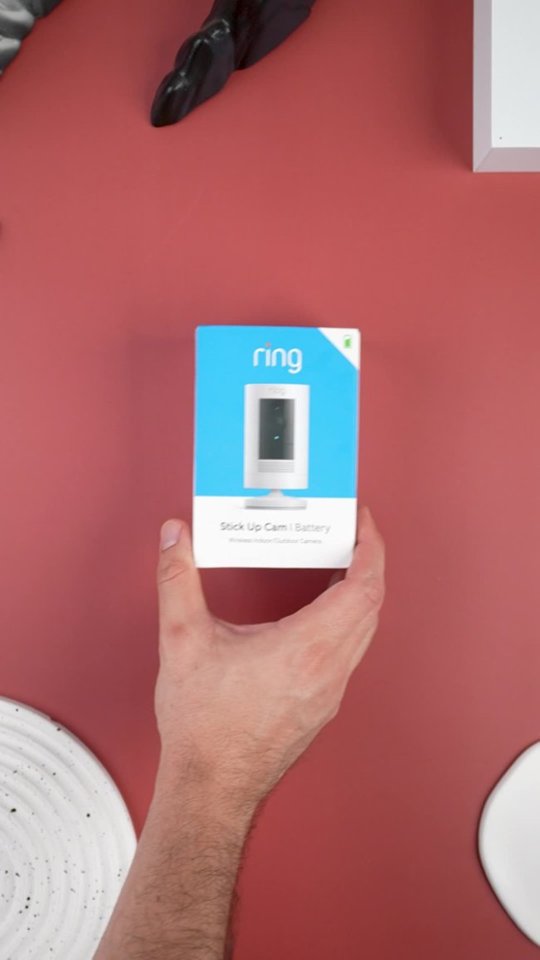
- Model:
- 8SC1S9-WEN0/B0C5QRZ47P
- SKU:
- 12558192
Rating by feature
- Value
Rating 4.6 out of 5 stars
- Quality
Rating 4.7 out of 5 stars
- Ease of Use
Rating 4.7 out of 5 stars
Customers are saying
Customers admire the exceptional camera quality and user-friendly interface that make this product a reliable choice for home security. Users frequently praise the long-lasting battery life and straightforward installation process, which contribute to its overall strong performance. While the device is highly regarded for its night vision and field of view, some individuals have noted occasional inconsistencies with motion detection and connectivity. Despite these minor technical challenges, the product remains a popular and affordable solution for those seeking enhanced monitoring capabilities.
This summary was generated by AI based on customer reviews.
Stick up cam
||Posted . Owned for 1 month when reviewed.This reviewer received promo considerations or sweepstakes entry for writing a review.Good camera during the day, but at night with some light makes my grass look like it snowed
No, I would not recommend this to a friendBrand response from Ring
Posted .Hi Vinny.
Thank you for taking the time to share your experience with us. We understand how important it is for your Ring Stick Up Cam to record clear and concise videos so that you can effectively monitor your home. The features and technology provided by the Ring Stick Up Cam are incredibly valuable and help provide you with peace of mind about your home security. We want to ensure your device is working as intended by providing you with solutions to resolve the video quality concern you mentioned in your review.
It sounds like the device is not performing as expected. To improve visibility at night, using the Night Vision feature is recommended. The Night Vision feature is an invaluable feature of the Ring Stick Up Cam that allows you to clearly view what’s happening on your property after dark.
Enable "Color Night Vision" in the Ring app to help improve clarity at night.
To turn the "Color Night Vision" on or off, follow these instructions:
Open the Ring app.
Tap the "Menu" (☰).
Tap "Devices."
Select the device you want to adjust.
Tap "Device Settings."
Tap "Video Settings."
Toggle "Color Night Vision" on or off.
Ring Community was launched to help deliver the most current news and educational information to our neighbors. This online forum is divided into four categories: Product Boards, Ring Updates, Tips and Tricks, and a Moderators’ Corner. The Product Boards are where you can begin new topics with your questions or feedback; there is also a search option that helps you find topics that have already been posted by other neighbors. We invite you to visit our Ring Community today.
Thank you,
Miyuki from Ring.
- Cons mentioned:Motion detection
Ok
||Posted . Owned for less than 1 week when reviewed.This reviewer received promo considerations or sweepstakes entry for writing a review.Not my favorite and I think it could of been better especially the skipping when motion is detected to live view
No, I would not recommend this to a friendBrand response from Ring
Posted .Hi Rich.
Thank you for taking the time to share your rating of the Ring Stick Up Cam. We understand the importance of having your Ring Stick Up Cam detect the appropriate motion events and alert you to the activity in and around your home. Having a camera that functions consistently allows you to properly monitor your property with peace of mind. We are here today to provide you with more information on the issue that you mentioned in your review.
It sounds like the device is not performing as expected. When the camera detects motion, if you click on the event before it is done recording, it will automatically move to a live view. The event will still record if you have a Ring Protect Plan subscription, and you can view it in "Event History" in the Ring app. It is important to ensure that you have the proper motion settings in place for your environment. This camera uses adjustable motion detection and runs on passive infrared sensors. The system identifies visitors via a moving heat signature and sends a notification to your smart device when one is detected. You can adjust three preset motion zones and their distances under the "Motion Settings" tab on the device's page in the Ring app. Additionally, you can choose how often the camera checks for movement in those predefined zones via the "Motion Frequency" setting. If you find that your camera is missing some motions, please set the motion frequency to "Frequently."
Accuracy in motion detection can also be improved by enabling the "Smart Alerts" feature for people only in your Ring app. To enable "Smart Alerts," please follow these steps:
Tap the menu (≡) on the top left.
Tap "Devices."
Tap the device that you want to adjust.
Tap "Motion Settings."
Tap "Smart Alerts."
Tap "Enable Feature."
Tap "Continue."
Select the notification options that you want for "Person" and "Other Motion."
You'll see a video camera where you can select or de-select recording and a bell icon to represent alert notifications.
After you've adjusted your settings, tap "Done."
If any additional information is needed regarding your Ring Stick Up Cam, please reach out to our community. Ring Community is our first peer-to-peer community forum, giving our customers the ability to help one another and share their feedback and experiences directly with Ring.
Thank you,
Melissa from Ring.
Stickup
||Posted . Owned for 1 month when reviewed.This reviewer received promo considerations or sweepstakes entry for writing a review.The compact size of the stickup cam makes it easy to place
I would recommend this to a friendRing camera
||Posted . Owned for 1 month when reviewed.This reviewer received promo considerations or sweepstakes entry for writing a review.The ring is ok but doesnt capture every time someone is at the door
I would recommend this to a friendCamera
||Posted . Owned for 3 weeks when reviewed.This reviewer received promo considerations or sweepstakes entry for writing a review.Looks good on our black brick. We wanted it to blend in with the color of house
I would recommend this to a friendPro and con
||Posted . Owned for 8 months when reviewed.This reviewer received promo considerations or sweepstakes entry for writing a review.PRO Good to keep and eye out for personal safety. CON. there is a major Delay in notifications to your cellular device which gives porch pirates an advantage.
I would recommend this to a friendBrand response from Ring
Posted .Hi Bables.
Thank you for sharing your experience with us. We understand you've selected Ring to keep you updated on activity around your home, and receiving notifications when activity is detected is essential. Having a solid connection ensures you do not miss any activity around your home. We are here today to provide you with education to assist you in finding the best solution for your home’s environment.
It sounds like you experienced some connection issues with the device. Usually, delayed notification is related to poor wifi connectivity caused by signal fluctuations, channel congestion, or data loss.
To determine whether or not the problem is caused by poor upload speed, run a speed test to determine if your network can support Ring devices. In edition to ensuring that you have sufficient wifi speeds, you will also want to check the signal strength of your device. Ring devices with 1080p video require at least 1 Mbps upload and download speeds, though 2 Mbps is recommended for optimal performance.
A poor wifi signal can cause connectivity with your Ring device to be unreliable. Check the Device Health section of your Ring application to ensure the device’s RSSI is within an acceptable range. The recommended range for optimal performance is 0 to -60 for the RSSI.
If your networking equipment hasn’t been power cycled in a while, try unplugging it for 30 seconds and plugging it back in. Wireless networks utilize different channels for communication. In the United States, the 2.4 GHz band uses channels 1-11 and the 5 GHz band uses channels 36-165. In some cases, setting up your Ring device(s) can fail due to wireless interference or congestion.
If any additional information is needed regarding your concern, please reach out to our community. Ring Community is our first peer-to-peer community forum, giving our customers the ability to help one another and share their feedback and experiences directly with Ring. Join the Ring Community today!
Thank you,
Miyuki from Ring.
Camera number 3
||Posted . Owned for less than 1 week when reviewed.This reviewer received promo considerations or sweepstakes entry for writing a review.This is great for safety and video recording. I feel better knowing I have the added protection.
I would recommend this to a friendA good camera.
||Posted . Owned for 1 month when reviewed.This reviewer received promo considerations or sweepstakes entry for writing a review.The camera is on the outside of the house and provides a good view of the front area. It does take a minute or two to view the area on your phone (live view).
I would recommend this to a friendBrand response from Ring
Posted .Hi MikeB.
Thank you for taking the time to share your experience with us. We understand how important it is to be able to connect to live view quickly. Live View is an important feature that gives you peace of mind by allowing you to see who is on your property at any given time. We are eager to provide you with a solution for the connectivity concern mentioned in your review.
It sounds like the device is not operating as intended. If you are experiencing a delay when loading the live view, this could be due to a connection issue with either your mobile device or your Ring device. We recommend checking the signal strength of your device by following these steps:
Open the Ring app.
Tap the menu (☰).
Tap Devices.
Select the Ring device you would like to test.
Tap on the Device Health tile.
Scroll to Signal Strength under the Network section.
The green, amber, and red colors are indicators of your device connection. Green is good; red is poor.
Try turning the wifi off on your phone and see if the cellular data works faster. For an enhanced notification experience, we recommend turning on the Rich Notifications feature in the Ring app. Rich Notifications send you a snapshot image of what’s happening in front of your Ring security camera or video doorbell so you can easily see what’s going on without needing to open the Ring app. They are included in your Ring Home subscription. You may need to update your mobile device's operating system and download the latest version of the Ring app to access the latest in-app features.
When a Rich Notification appears, you can expand the notifications to zoom in and see a bigger version of the image. The process of expanding the image is a little different for iOS and Android. On iOS follow these instructions to enable the feature: Tap and hold the thumbnail to open up the full-frame snapshot. On Android follow these instructions to enable the feature: Drag down the thumbnail to open up the full-frame snapshot. A regular notification to your smartphone will be sent as soon as possible and then that notification will be updated with an image. Rich Notification snapshots are available on your phone until your notification is dismissed. We do not store Rich Notification snapshots in the Ring app. If your phone has a poor connection, we store the snapshot in the cloud for up to four minutes so that we can deliver it to you as soon as you are back online. In some cases of poor connection, you may not receive Rich Notifications. You can toggle Rich Notifications on or off by doing the following: Open the Ring app. Tap the menu (☰). Tap Device. Select a device. Tap the Device Settings tile. Tap Notification Settings. Tap Rich Notifications. Toggle on or off to update your Rich Notifications settings.
Ring Community was launched to help deliver the most current news and educational information to our neighbors. This online forum is divided into four categories: Product Boards, Ring Updates, Tips + Tricks, and a Moderators’ Corner. The Product Boards are where you can begin new topics with your questions or feedback; there is also a search option that helps you find topics that have already been posted by other neighbors.
Thank you,
Miyuki from Ring.
Ring stick up
||Posted . Owned for 5 months when reviewed.This reviewer received promo considerations or sweepstakes entry for writing a review.I have my stick up in two locations one at my front and one of my side yard.
I would recommend this to a friendAwesome
||Posted . Owned for 3 weeks when reviewed.This reviewer received promo considerations or sweepstakes entry for writing a review.Love this camera. It works great. I have several of them.
I would recommend this to a friendRing home security
||Posted .This reviewer received promo considerations or sweepstakes entry for writing a review.Exactly what I was looking for in home security. Very happy.
I would recommend this to a friendSecurity camera
||Posted .This reviewer received promo considerations or sweepstakes entry for writing a review.Have them myself, got this for my son. So he can keep an eye on his. Ar out front
I would recommend this to a friendGreat Camera
||Posted . Owned for 3 months when reviewed.This reviewer received promo considerations or sweepstakes entry for writing a review.Excellent view...its very clear. I really enjoy this security camera.
I would recommend this to a friendGreat camera for beginners!
||Posted . Owned for 3 weeks when reviewed.This reviewer received promo considerations or sweepstakes entry for writing a review.Added this camera to cover my cars. This my second camera for I have one for my porch as well.
I would recommend this to a friendGreat compact security camera
||Posted .This reviewer received promo considerations or sweepstakes entry for writing a review.Nice Ring camera, good thing is it can be used both indoor and outdoor, Super simple to install.
I would recommend this to a friendBrand response from Ring
Posted .Hi Purchase.
Thank you for taking the time to share your Ring experience with us. We appreciate the value and trust you have placed in Ring for your home security needs. It is great knowing that the setup and installation of the Ring Outdoor Cam (Formerly known as the Ring Stick Up Cam) was easy and straight-forward.
Ring Community was launched to help deliver the most current news and educational information to our neighbors. This online forum is divided into four categories: Product Boards, Ring Updates, Tips and Tricks, and a Moderators’ Corner. The Product Boards are where you can begin new topics with your questions or feedback; there is also a search option that helps you find topics that have already been posted by other neighbors. We invite you to visit our Ring Community today.
Thank you,
Miyuki from Ring.
Outdoor Cam
||Posted . Owned for 3 weeks when reviewed.This reviewer received promo considerations or sweepstakes entry for writing a review.The quality of the camera is fie, but the battery doesn’t stay charge long.
I would recommend this to a friendPicks up everything
||Posted . Owned for less than 1 week when reviewed.This reviewer received promo considerations or sweepstakes entry for writing a review.Great sounds, picks up everything. My wife and I feel very safe.
I would recommend this to a friend- Cons mentioned:Motion detection
Kinky
||Posted . Owned for 3 months when reviewed.This reviewer received promo considerations or sweepstakes entry for writing a review.Doesn’t pick up Moton as quick as the door bell. I ya more near sighted. It’s ok for starters.
I would recommend this to a friendBrand response from Ring
Posted .Hi Slim,
It is important that the motion detection feature on your Ring Stick Up Indoor/Outdoor Wire Free Cam meet your needs and expectations. We understand you've selected Ring to keep you updated on activity around your home, and receiving notifications when activity is detected is essential.
This camera uses Adjustable Motion Detection and runs using passive infrared sensors. The system identifies visitors via a moving heat signature and sends a notification to your smart device when one is detected. You can adjust three preset motion zones and their distance. Customizable Motion Zones have been a standard feature on wired Ring devices for some time, but now they're an option with our battery-powered devices. To learn more about this new feature, please visit the link below.
https://support.ring.com/hc/en-us/articles/360050360052-Customizable-Motion-Zones-for-Battery-Powered-Devices-
We agree that your Ring Stick Up Cam should notify you when someone is at your home consistently and reliably. Please reach out to us at https://community.ring.com/ for additional tips and support! Our top priority is ensuring the motion detection is meeting your needs.
Thank you,
Danielle with Ring
Good camera
||Posted . Owned for 2 weeks when reviewed.This reviewer received promo considerations or sweepstakes entry for writing a review.Very good. Great camera that can be used for indoor and outdoor.
I would recommend this to a friendWouldve loved to have my ring
||Posted . Owned for 1 month when reviewed.This reviewer received promo considerations or sweepstakes entry for writing a review.Had to return due to store not having entire order upon install
I would recommend this to a friend