Customer Ratings & Reviews


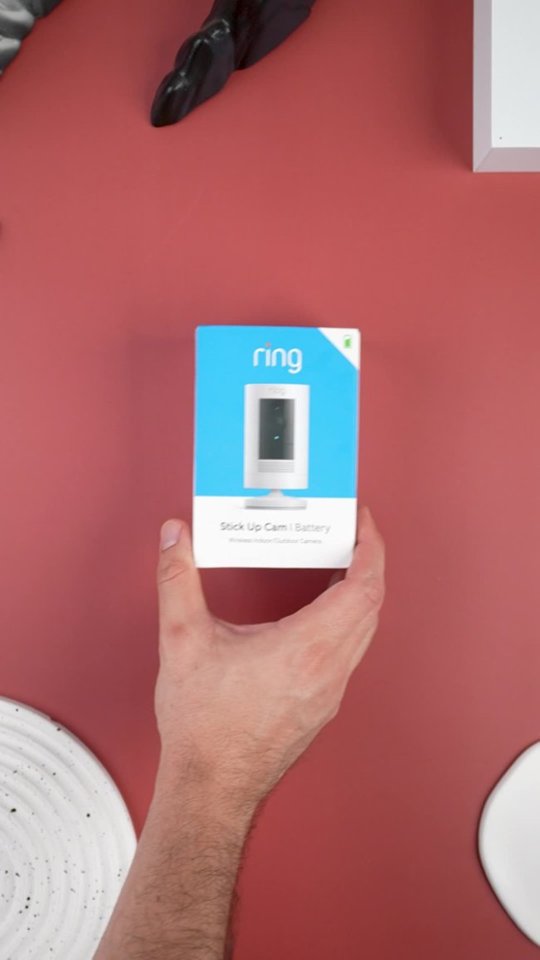
- Model:
- 8SC1S9-WEN0/B0C5QRZ47P
- SKU:
- 12558192
Rating by feature
- Value
Rating 4.6 out of 5 stars
- Quality
Rating 4.7 out of 5 stars
- Ease of Use
Rating 4.7 out of 5 stars
Customers are saying
Customers admire the exceptional camera quality and user-friendly interface that make this product a reliable choice for home security. Users frequently praise the long-lasting battery life and straightforward installation process, which contribute to its overall strong performance. While the device is highly regarded for its night vision and field of view, some individuals have noted occasional inconsistencies with motion detection and connectivity. Despite these minor technical challenges, the product remains a popular and affordable solution for those seeking enhanced monitoring capabilities.
This summary was generated by AI based on customer reviews.
Back door
||Posted . Owned for 1 month when reviewed.This reviewer received promo considerations or sweepstakes entry for writing a review.Not charging to full capacity don't know which unit is not working bought 2 sets camera & solar chargers what a bummer
I would recommend this to a friendBrand response from Ring
Posted .Hello Backdoorwhatdoyouwant,
Thank you for taking a moment to leave your review of the Ring Stickup Camera. We understand how important it is to ensure that the battery is holding its proper charge and how cumbersome recharging the batteries can be. While batteries in Ring devices can go months between recharges with normal use, this is dependent on a number of factors in your home’s environment, such as the local weather and the number of activities captured. Please know that we are here to resolve these concerns with you today.
After reading your review, it seems that your Ring Solar Panel is not fully charging your Ring Stickup Camera Battery. Ring recommends at least three to four hours of direct sunlight, depending on your usage. Make sure there are no obstructions that could cast a shadow on your solar power device, such as an extended roof, tree branches, or bushes. If your installation area is frequently very cloudy or gets a lot of rain or snow, this could limit the amount of sunlight that your solar power device receives.
The solar panel requires direct sunlight. Filtered/indirect sunlight through the clouds will not provide a charge to your doorbell/camera. Here is a helpful article that explains this in more detail: https://support.ring.com/hc/en-us/articles/115005282806-Solar-Panel-for-Spotlight-Cam-and-Stick-Up-Cam-Battery-Information.
Ring Community launched in March 2019 to help deliver the most current news and educational information to our customers. You can find tips and tricks from other Ring users at https://community.ring.com/. This peer-to-peer forum allows our neighbors to share their feedback and experiences to assist each other in resolving their concerns.
Thank you, Jamila with Ring.
Ring camera
||Posted . Owned for 1 month when reviewed.This reviewer received promo considerations or sweepstakes entry for writing a review.One camera is perfect. Second camera is upside down with no way to turn it otherwise
I would recommend this to a friendBrand response from Ring
Posted .Hello Ring, We are always looking for ways to improve our neighbors' experiences, and your feedback is an invaluable part of this process. Thank you for taking the time to share your experience with us. At Ring, we are driven to create products that help you protect what matters most at home and empower you to connect with your neighbors from wherever you are. Having the peace of mind that you purchased the Ring Stickup Camera for is critical. Based on your review, you are having trouble adjusting your Stickup Camera. If this is the case, we offer an accessory that is available for purchase for this issue: https://support.ring.com/hc/en-us/articles/360059658211-Installing-your-Stick-up-Cam-Battery-with-the-ceiling-mount Find your ideal viewing angle with this adjustable mount for the Stick Up Cam (2nd and 3rd Generation). Mount your Stick Up Cam on the ceiling or a wall and adjust the angle to optimize your motion detection and field of view. It also comes with a spare parts kit, so you can set everything up in just a few minutes: https://ring.com/products/stick-up-security-camera-mount?_pos=2&_sid=43419204f&_ss=r. We invite you to visit our Help Center for some additional tips and tricks: https://support.ring.com/hc/en-us. If you have any further questions or concerns, please visit our community forum at https://community.ring.com/ for assistance. Thank you, Jamila with Ring.
surveillance camera's
||Posted . Owned for 2 months when reviewed.This reviewer received promo considerations or sweepstakes entry for writing a review.Good camera's to have,only wish you could plug them in instead of changing the batteries out all the time.
I would recommend this to a friendBrand response from Ring
Posted .Hello Tbone,
We know how important it is to rely on your Ring Stick Up Cameras for continuous home security. The battery version of this camera is intended to provide excellent security without having to recharge it all too often. For those needing more power, Ring does offer this device in a plug-in version as well, and we are here to help you better understand your options.
The Ring Stick Up Cam - Plug-In installs in minutes and plugs into standard power outlets, so you'll never have to worry about charging a battery. You can place it on a flat surface for flexibility or on a wall for a secure mount.
The included Barrel Plug Power Adapter is weather resistant, and includes an indoor and an outdoor configuration. The outdoor measures 14.7 ft. (4.5 m.), while the indoor features and AC Input Plug: 2.21 in. x 1.67 in. x 1.53 in. (56.35 mm. x 42.56 mm. x 39.0 mm.).
If you would like to purchase this optional accessory for you Ring Stick Up Cam - Battery, you can do so by following the link below.
https://ring.com/products/indoor-outdoor-power-adapter-barrel-plug
If you have further questions, please visit our Community Forums at https://community.ring.com/. Where you can post similar questions and have other members of the Ring Community share their experience and knowledge with you.
All the best,
Marlom at Ring
goes offline
||Posted . Owned for 1 month when reviewed.This reviewer received promo considerations or sweepstakes entry for writing a review.if your garage is not attached to the house near the router then you may have a problem. mine went offline as soon as I installed it on the front of the garage. I have Verizon with a wifi extender my ring doorbell works but this one won't stay online. so back up the ladder to take it down and try to reinstall it. which is funny because my office is closer to the garage than my front door.
No, I would not recommend this to a friendBrand response from Ring
Posted .Hello rhonda,
We are thankful for your feedback regarding your experience with the Ring Stickup Camera. We are constantly pushing ourselves to develop products to empower users with an affordable, effective way to monitor and secure their home. In pursuit of our mission to make neighborhoods safer, when applying technologies to our business, we always consider our three pillars of customer security, privacy, and user control. We understand how important it is to have your devices working as intended, as it offers a level of security in your home. After reading your review, it seems that your Ring Stickup Camera is having trouble staying connected to your home wifi. When this occurs, we recommend rebooting your wifi modem and router. Since your router and modem are usually the hardest-working devices in your house, for optimal performance, you should reboot them about once a month. To reboot routers or modems, follow the instructions below: Unplug your router or modem from its power supply (don’t just turn it off). If your router and modem are separate, unplug both of them. Wait at least 30 seconds, then plug them back in. Wait for your internet to be restored. Here is a helpful article which walks you through additional steps to take if the issue still persists for you after your modem/router reboot: https://support.ring.com/hc/en-us/articles/217240386-In-app-Setup-Failing-Repeatedly. Additionally, if you have not already, please check out our Ring Community forum where other Ring users, like yourself, have an open discussion platform to share their experiences, as well as solutions to issues experienced: https://community.ring.com/. Thank you, Jamila with Ring.
Hello Tommie1,Thank you for sharing your Stick Up Camera feedback with us. Our top priority at Ring is to ensure that our customers have the best possible experience with our products. It is important to us that you have all the necessary information to ensure that your purchase experience is seamless. We truly value your feedback, simply because it helps us improve the product from a consumer standpoint. Rest assured, we are here to provide you with more information regarding the generation differences you mentioned. While we are saddened to read that the Ring Stickup Camera 3rd Generation did not meet your expectations, we are happy to read that the 2nd Generation Stick Up Camera did! You are absolutely correct. The 2nd generation model has a 115 degree horizontal field of view and a 65 degree vertical field of view. The 3rd generation model has a 110 degree horizontal field of view and a 57 degree vertical field of view. Here is a helpful article with more Ring security camera side by side comparisons, for your future reference: https://support.ring.com/hc/en-us/articles/115004687606-Ring-Security-Camera-Product-Comparison. We would love to hear from you directly on our Ring Community forum. If you have any experiences to share, questions regarding Ring devices and our services, or any feedback and product suggestions, we encourage you to have your voice heard: https://community.ring.com/. Thank you,Jamila with Ring
Fair
||Posted . Owned for 1 month when reviewed.This reviewer received promo considerations or sweepstakes entry for writing a review.Too long to set up Teck Support’s very poor too long to set up Teck Support’s were very poor short battery life
I would recommend this to a friendBrand response from Ring
Posted .Hello dolphins13,
Thank you for taking a moment to leave your review on the Ring Battery-Powered Spotlight. We sincerely appreciate it! At Ring, we believe that stronger communities are the key to safer neighborhoods. That is why we are driven to create products that help you protect what matters most at home, and empower you to connect with your visitors from wherever you are.
While we are saddened to read that this device did not meet your expectations, if you still have the Ring device in your possession, we invite you to reach out to us at https://community.ring.com/.
We look forward to hearing from you, if you have any further feedback regarding your overall experience.
Thank you,
Jamila with Ring
Battery does not last
||Posted . Owned for 6 months when reviewed.This reviewer received promo considerations or sweepstakes entry for writing a review.Works well when the battery is ok. Problem is that the battery dies too quickly, even on the saver setting.
No, I would not recommend this to a friendBrand response from Ring
Posted .Hello Funtimes,
The Ring Stick Up Cam Battery is designed to be a DIY home security solution that can be trusted to provide you with lasting service. While Ring batteries can go months between recharges with normal use, this is dependent on a number of factors in your home's environment. It is imperative to have peace of mind when it comes to your home security and the battery life in your Ring camera plays a big role in that.
Battery life is heavily dependent on frequency of use, therefore, please consider the following. If you have located your device in a high traffic area, please ensure the motion settings accurately reflect your needs. For example, you could reduce the size of the motion zone to pick unnecessary movement and thus save battery life. If your needs require maximum performance, consider using a Ring Solar or Super Solar Panel. These can help trickle charge the battery and extend the time between manual recharges.
Additionally, the battery life may be affected by poor signal strength. If you've noticed wifi issues, such as poor video quality or trouble connecting to live video, a wifi extender such as the Ring Chime Pro may improve the signal getting to your camera. A cost-effective alternative would be to relocate your router (or camera) in an area that has less interference, even a couple feet can make a big difference.
Please reach out to us today at https://community.ring.com/ for additional tips and support.
Thanks,
Alexis with Ring
Good Camera
||Posted . Owned for 3 weeks when reviewed.This reviewer received promo considerations or sweepstakes entry for writing a review.The camera works very well but have had issues with the app not giving me the alerts.
No, I would not recommend this to a friendBrand response from Ring
Posted .Hi scooby.
Thank you for taking the time to share your experience with us. We understand how important it is for your Ring Outdoor Cam (Formerly known as the Ring Stick Up Cam) to function consistently and reliably, so you are alerted to any wanted or unwanted activity in or around your home. The features and technology provided by the Ring Outdoor Cam are incredibly valuable and help provide you with peace of mind about your home security. We are eager to address the issue you raised in your review and provide you with a resolution today.
It sounds like your Ring Outdoor Cam is not performing as expected. We would love the opportunity to share with you some troubleshooting steps that you can try to get your Ring Outdoor Cam functioning as intended. It is important to ensure that you have the proper motion settings in place for your environment. This camera uses adjustable motion detection and runs on passive infrared sensors. The system identifies visitors via a moving heat signature and sends a notification to your smart device when one is detected. You can adjust three preset motion zones and their distances under the "Motion Settings" tab on the device's page in the Ring app. Additionally, you can choose how often the camera checks for movement in those predefined zones via the "Motion Frequency" setting. If you find that your camera is missing some motions, please set the motion frequency to "Frequently."
Accuracy in motion detection can also be improved by enabling the "Smart Alerts" feature for people only in your Ring app. To enable "Smart Alerts," please follow these steps:
Tap the menu (≡) on the top left.
Tap "Devices."
Tap the device that you want to adjust.
Tap "Motion Settings."
Tap "Smart Alerts."
Tap "Enable Feature."
Tap "Continue."
Select the notification options that you want for "Person" and "Other Motion."
You'll see a video camera where you can select or de-select recording and a bell icon to represent alert notifications.
After you've adjusted your settings, tap "Done.
If any additional information is needed regarding your Ring Outdoor Cam, please reach out to our community. Ring Community is our first peer-to-peer community forum, giving our customers the ability to help one another and share their feedback and experiences directly with Ring. Join the Ring Community today!
Thank you,
Miyuki from Ring.
- Pros mentioned:Battery life
Ring Stick Up Wired
||Posted .This reviewer received promo considerations or sweepstakes entry for writing a review.My preference is the Ring Stick Up battery you charge it no wire to power or conceal
No, I would not recommend this to a friendBrand response from Ring
Posted .Hi 1charles.
Thank you for taking the time to share your rating of the Ring Stick Up Cam. We understand the importance of having a security camera that you can rely on to suit your needs. Having the ability to use your Ring Stick Up Cam wirelessly gives you the independence to use the device where you need it to effectively monitor your home. We are happy to hear that you are enjoying the features and functionality of the device and are here to provide you with more information on your concern that you mentioned in your review, comparing it to the wired device.
The Ring Stick Up Cam is our leading indoor and outdoor-ready security camera with flexible mounting options. Your Ring Stick Up Cam will be happy just about anywhere, indoors or out. It can sit on its own stand, or mount to a wall or ceiling. If the view from your Stick Up Cam or Stick Up Cam Pro is upside-down, inverted or rotated, your camera is most likely not in its ideal mounted position.
We have included the installation instructions for the Ring Stick Up Cam here:
1. Charge the provided battery.
Fully charge the provided battery using a USB power source and the orange cable until the battery’s LED light is green.
1. Remove the battery cover.
Twist the battery cover counterclockwise to unlock, then remove it from your Stick Up Cam.
1. Choose a location.
Choose the spot where Stick Up Cam can provide the view you want.
1. Remove the base.
Unscrew the base using a standard Philips-head screwdriver.
1. Attach the Stick Up Cam Mount.
Attach the smaller end of the Stick Up Cam Mount to the rear of the Stick Up Cam. Screw it into place using the large silver screw that comes in your Stick Up Cam Mount packaging.
1. Attach the rubber pad.
Be sure that the white rubber pad is attached to the base of the Stick Up Cam Mount. Otherwise attach it by pushing the rubber pad into the base of the mount.
1. Swivel the stand.
Once you've attached the mount to the back of your Stick Up Cam, swivel the mount so that the base is above the camera..You will not be able to change the orientation of upside-down videos in the Ring app. (if you have a Ring Protect Plan).
Make sure to install your camera right side up.
We recommend getting an adjustable Stick Up Cam base if you need addtional mounting options.
1. Place the camera.
Place the Stick Up Cam where you want to mount it, rubber side down.
1. Screw in the camera.
Use the three mounting screws to secure the Stick Up Cam Mount base to the ceiling.
Important: Use the enclosed drill bit to drill holes in the ceiling, then push the enclosed anchors into the holes when installing on masonry or stucco.
1. Replace the cover.
Slide the back cover of the Stick Up Cam back into place. Use the star-shaped end of the screwdriver included with the Stick Up Cam to tighten the attached screw.
If any additional information is needed regarding your Ring Stick Up Cam, please reach out to our community. Ring Community is our first peer-to-peer community forum, giving our customers the ability to help one another and share their feedback and experiences directly with Ring.
Thank you,
Melissa from Ring.
Ok for price
||Posted .This reviewer received promo considerations or sweepstakes entry for writing a review.Picture is good BUT gaining immediate access to video takes way too long.
I would recommend this to a friendBrand response from Ring
Posted .Hello Good,
Thank you for taking the time to share your feedback with our team directly. We are pleased to read that you are enjoying the video quality on your Stick Up Camera. Rest assured, we are here to provide you with steps to resolve the video taking too long to load. You should be able to see and speak with visitors in a few seconds.
It sounds like you may have recently received a notification on your mobile device of a motion event in your Ring app. But when you opened your Ring app to view the event, you got a blurry screen with a message that the app was having trouble connecting to the Ring device. Receiving this error means that there's an issue with the data transfer between your Ring device and the app. As a result, your Ring app is unable to display the video image from your Ring's camera. The three most common causes of this problem are the following:
A poor connection between your mobile device and the internet.
Slow internet upload and/or download speeds.
A poor connection between your Ring device and your router.
Ring Community is our first peer-to-peer community forum, giving our customers the ability to help one another and share their feedback and experiences with Ring. We invite you to reach out at https://community.ring.com/ if any additional information is needed regarding your Ring Stick Up Camera device.
Thank you,
Alexis with Ring
Not as I expected
||Posted . Owned for 3 weeks when reviewed.This reviewer received promo considerations or sweepstakes entry for writing a review.Doesn’t have the resolution like the other devices. Nor does the motion zones work the same but gets the job done
I would recommend this to a friendBrand response from Ring
Posted .Hi Streetz.
Thank you for taking the time to share your experience with us. We understand the importance of having your Ring Stick Up Cam record clear and concise videos so that you can effectively monitor your home. The Ring Stick Up Cam was designed to activate based on your specific needs. Rest assured, we are here to provide you with solutions today.
It sounds like you are concerned with the video quality and motion detection of the device. The RIng Stick Up Cam is equipped with 1080p HD Video & Color Night Vision. Ring devices require high-speed internet to bring you crisp, clear video and audio. Poor network connectivity can affect the performance of your Ring device. We are happy to share some troubleshooting steps to help you diagnose and fix common video issues that you may experience with Ring doorbells and cameras.
Ring devices with 1080p video require at least 1 Mbps upload and download speeds, though 2 Mbps is recommended for optimal performance. In addition to ensuring that you have sufficient wifi speeds, you will also want to check the signal strength of your device. A poor wifi signal can cause connectivity with your Ring device to be unreliable. For more information on troubleshooting poor video quality, please visit this link:
https://ring.com/support/articles/qmv6i/Troubleshooting-Poor-Video-Quality.
It is important to ensure that you have the proper motion settings in place for your environment. This camera uses adjustable motion detection and runs on passive infrared sensors. The system identifies visitors via a moving heat signature and sends a notification to your smart device when one is detected. You can adjust three preset motion zones and their distances under the "Motion Settings" tab on the device's page in the Ring app. You can find more information on using motion zones by clicking this link: https://ring.com/support/articles/85pqb/Using-Camera-Motion-Zones.
Additionally, you can choose how often the camera checks for movement in those predefined zones via the "Motion Frequency" setting. If you find that your camera is missing some motions, please set the motion frequency to "Frequently." For more information on using motion frequency, please visit this link: https://ring.com/support/articles/9m71f/Optimizing-Motion-Alerts-with-Motion-Frequency.
Accuracy in motion detection can also be improved by enabling "Smart Alerts" for people only in your Ring app. Learn more about "Smart Alerts" in this article: https://ring.com/support/articles/9qnpt/Refining-Your-Motion-Alerts-for-People-and-Other-Motions.
We invite you to reach out to our community if any additional information is needed regarding your Ring Stick Up Cam. The Ring Community is our first peer-to-peer community forum, giving our customers the ability to help one another by sharing their feedback and experiences with each other. You can find it here: https://community.ring.com/.
Thank you,
Melissa from Ring.
Indoor only
||Posted . Owned for 1 month when reviewed.This reviewer received promo considerations or sweepstakes entry for writing a review.This is ok for indoor, but not outside. The recording does not seem to work.
I would recommend this to a friendBrand response from Ring
Posted .Hello Tree53,
We appreciate you bringing your Ring Indoor camera experience to our attention. The Indoor Cam is a smaller next-generation security camera specifically designed to be used indoors to bolster the security around your home. This device also features 1080p full HD resolution, two-way audio, HD video recording, and a wide viewing angle. Please know that it is a priority for us to be of assistance and find a resolution to your concern.
Based on your review, it seems that you are not fully satisfied with your Ring Indoor Camera. The Ring Indoor Camera uses infrared motion capturing to detect motion within its field of view. You can use the Ring app to determine the Ring Indoor Camera motion detection range and the specific zones where motion will trigger a smart alert. These settings help ensure that the Ring Indoor Camera will capture the events you want to see and ignore the ones you don’t. Here is a helpful article with more information on how to resolve motion concerns with your device: https://support.ring.com/hc/en-us/articles/360022462472-Utilizing-Motion-Detection-with-your-Ring-Battery-Devices.
Also, Ring Community is our first peer-to-peer community forum, giving our customers the ability to help one another and share their experiences with Ring directly. We invite you to reach out at https://community.ring.com/if any additional information is needed regarding your Ring Indoor Camera device and its performance.
Thank you,
Jamila with Ring
Meh
||Posted . Owned for 1 month when reviewed.This reviewer received promo considerations or sweepstakes entry for writing a review.Wish it came with the ceiling mount or at the very least you carried it im stock in the store.
No, I would not recommend this to a friendBrand response from Ring
Posted .Hello Cantwritewhatisant,
We know how important it is to be able to mount your device in the manner that fits your house the best. Your Ring Stick Up Camera can be mounted on a flat surface or to a wall for a more permanent solution. We understand that all households are unique, and mounting from a ceiling may be more convenient at times. Our team is here to offer a solution.
We've made the previous generations' mount compatible with your 3rd generation camera. It is available for purchase as an optional accessory through our web store. By using it, you can mount the camera from a ceiling without affecting video orientation or motion detection. Please follow the link below to learn more.
https://ring.com/products/stick-up-security-camera-mount
You can always check with your local retailer to see which Ring accessories they may carry in stock. Otherwise, you're welcome to browse our web store.
For further tips, tricks or to start a conversation, please visit our community forum at https://community.ring.com/
Regards,
Marlom at Ring
Just ok
||Posted . Owned for 10 months when reviewed.This reviewer received promo considerations or sweepstakes entry for writing a review.It's ok. Not the greatest, and I wish I bought something better.
No, I would not recommend this to a friendBrand response from Ring
Posted .Hi DavG, thank you for your feedback. If you have any questions about your Stick Up Cam, you may be able to find an answer in our Help Center here https://support.ring.com/hc/en-us/sections/360006458791-Stick-Up-Cam-Battery-Solar-3rd-Generation-. For any other questions or concerns, feel free to check out the Ring Community at https://community.ring.com/ to find solutions from other neighbors. All the best, Ashley from Ring.
Fairly good camera for a ring camera
||Posted . Owned for 8 months when reviewed.This reviewer received promo considerations or sweepstakes entry for writing a review.Works well enough, but batteries do not last evenl
I would recommend this to a friendBrand response from Ring
Posted .Hello SSAYS,
It is imperative to have peace of mind when it comes to your home security, and the battery life in your Ring camera plays a big role in that. The Ring Stick Up Cam Battery is designed to be a DIY home security solution that can be trusted to provide you with lasting service.
Batteries in Ring devices are designed to go months between charges under normal conditions. However, real battery life is dependent on a number of factors such as local weather, number of events captured, and frequency of activation. Here is a helpful support article with more information on how to improve your device's battery life: https://ring.com/support/articles/oj8z4/Troubleshooting-Ring-Device-Batteries-Draining-Too-Fast.
Battery life is heavily dependent on frequency of use, therefore, please consider the following. If you have located your device in a high traffic area, please ensure the motion settings accurately reflect your needs. For example, you could reduce the size of the motion zone to pick unnecessary movement and thus save battery life. If your needs require maximum performance, consider using a Ring Solar or Super Solar Panel. These can help trickle charge the battery and extend the time between manual recharges.
Additionally, the battery life may be affected by poor signal strength. If you've noticed wifi issues, such as poor video quality or trouble connecting to live video, a wifi extender such as the Ring Chime Pro may improve the signal getting to your camera. A cost-effective alternative would be to relocate your router (or camera) in an area that has less interference, even a couple feet can make a big difference.
Thank you,
Alexis with Ring
- Cons mentioned:Motion detection
Very Disappointed
||Posted . Owned for 3 weeks when reviewed.This reviewer received promo considerations or sweepstakes entry for writing a review.This camera is very disappointing. It’s supposed to detect movement and it only does after several minutes of movement. The pictures are horrible. I regret ever buying them. Spend a little more and buy the Arlo cameras.
No, I would not recommend this to a friendBrand response from Ring
Posted .Hi Maria,
We understand how vital it is to receive timely and accurate motion detection from your Ring Stick Up Security Camera. Ring devices were designed to alert you consistently and reliably of motion at your home. Having accurate motion detection is essential in providing the peace of mind that Ring strives for.
Adjustable motion zones allow you to select an area that you want your Ring Camera to cover and greatly increase the effectiveness of your Ring. The following article will provide some further detail regarding the adjustable motion zones:
https://support.ring.com/hc/en-us/articles/360018349711-Utilizing-Motion-Zones-with-your-Stick-Up-Cam-Battery
We would love to connect you with our executive product specialist to help get this resolved as soon as possible. Please reach out to us, so we can improve your overall Ring experience and ensure the motion detection is meeting your needs.
Thank you,
Nicole from Ring
- Cons mentioned:Motion detection
Waste of money!
||Posted . Owned for less than 1 week when reviewed.This reviewer received promo considerations or sweepstakes entry for writing a review.This camera barely detects motion. Change settings several times even adjusted camera angle and still you can stand, walk, jump, wave and it picks up nothing! Upset I discarded the box so no possibility of returning. So much for home security ! :(
No, I would not recommend this to a friendBrand response from Ring
Posted .Hello Cholo,
We are thankful for your feedback regarding your experience with the Ring Stickup Camera. We are constantly pushing ourselves to develop products to empower users with an affordable, effective way to monitor and secure their home. In pursuit of our mission to make neighborhoods safer, when applying technologies to our business, we always consider our three pillars of customer security, privacy, and user control. We understand how important it is to have your devices working as intended, as it offers a level of security in your home.
Based on your review, it seems that you are having trouble with your Ring Stickup Camera picking up the correct motion. The Stick Up Cam uses infrared motion capturing to detect motion, within its field of view. You can use the Ring app to determine the Stick Up Cam’s motion detection range and the specific zones where motion will trigger a smart alert. These settings help ensure that the Stick Up Cam will capture the events you want to see and ignore the ones you don’t. Here is a helpful article with more information on how to resolve motion concerns with your device: https://support.ring.com/hc/en-us/articles/213106363-How-to-Set-Up-Motion-Detection-for-Your-Stick-Up-Cam.
Also, Ring Community is our first peer-to-peer community forum, giving our customers the ability to help one another and share their experiences with Ring directly. We invite you to reach out at https://community.ring.com/ if any additional information is needed regarding your Ring Stickup Camera device and its performance.
Thank you,
Jamila with Ring
Disappointed
||Posted . Owned for 1 week when reviewed.This reviewer received promo considerations or sweepstakes entry for writing a review.Inconsistent captures & defective battery only lasted 8 days, exchanged.
No, I would not recommend this to a friendBrand response from Ring
Posted .Hello Disappointed,
Thank you for taking a moment to leave your review on the Ring Stickup Camera. At Ring, we believe that stronger communities are the key to safer neighborhoods. That is why we are driven to create products that help you protect what matters most at home, and empower you to connect with your visitors from wherever you are. We are saddened to read that this device did not meet your expectations, but we are pleased to read that your concerns were resolved with a product replacement.
Your experience with Ring is impactful on our future as a company, and we would love to hear from you directly on our Ring Community forum. If you have any experiences to share, questions regarding Ring and our services, or any feedback and product suggestions, we encourage you to have your voice be heard: https://community.ring.com/!
Thank you, Jamila with Ring
Poor battery life
||Posted . Owned for 3 weeks when reviewed.This reviewer received promo considerations or sweepstakes entry for writing a review.Poor battery life and had to buy a second battery so I have one on hand then thinking of having to buy the solar panel so that I don’t have to keep charging the battery. This is become more of an expense then hiring an electrician to come over and putting in a normal Ring security camera light
No, I would not recommend this to a friendBrand response from Ring
Posted .Hello Miam,
Thank you for taking the time to share your Ring Stick Up Camera feedback with us directly, we appreciate it! While batteries in Ring devices can go months between recharges with normal use, this is dependent on a number of factors in your home's environment, such as the local weather and the number of activities captured. Rest assured, we are here to provide you with assistance to get the most out of your Ring device's battery life.
If your Ring security camera battery is draining too fast, it might be caused by a poor wifi connection. Your doorbell or camera may be frequently disconnecting and reconnecting to your wifi network. Each time a disconnection or reconnection happens, your Ring device uses power, which then contributes to the battery draining too fast. Here is a helpful article that has some tips and tricks to improve your battery life: https://support.ring.com/hc/en-us/articles/4405531384468-How-to-Fix-a-Ring-Doorbell-or-Security-Camera-Battery-Draining-Too-Fast.
At Ring, we are constantly innovating on behalf of our customers to develop products that best meet their home and security needs, and provide them with as much choice as possible. Ring Community is our first peer-to-peer community forum, giving our customers the ability to help one another and share their feedback/experiences with Ring. We invite you to reach out at https://community.ring.com/ if you have any additional questions or feedback regarding your Ring Stick Up Camera. We look forward to hearing from you!
Thank you,
Alexis with Ring
Nope
||Posted . Owned for 8 months when reviewed.This reviewer received promo considerations or sweepstakes entry for writing a review.Unfortunately never use the product and too late to return
No, I would not recommend this to a friendBrand response from Ring
Posted .Hi Brook. It can definitely be a challenge figuring out what home security devices you want in your home. If you're interested in using your Stick Up Cam, you can learn more about it and what features are available here: https://support.ring.com/hc/en-us/articles/115004442203-Stick-Up-Cam-Information. That may help you figure out a good use for the Stick Up Cam based on your needs. For any other questions you might have, check out the Ring Community at https://community.ring.com/ to find answers from other neighbors. All the best, Ashley from Ring.
Stick up camera
||Posted . Owned for 1 month when reviewed.This reviewer received promo considerations or sweepstakes entry for writing a review.Works good but uses power quickly. Would be helpful to better instructions.
I would recommend this to a friendBrand response from Ring
Posted .Hello Kent,
Thank you for leaving a review. Our top priority at Ring is to ensure that our customers have the best possible experience with our products and services. We truly value our consumer's feedback, simply because it helps us improve not only the product from a consumer standpoint but also our standards of service. If you are noticing that the battery in your Ring Stickup Camera is dying we recommend adjusting your motion settings as frequent motion alerts can drain your battery faster.
While batteries in Ring devices can go months between recharges with normal use, this is dependent on a number of factors in your home’s environment such as the local weather and the number of activities captured. This article will detail some of the factors that may cause your battery to require more frequent recharges: https://support.ring.com/hc/en-us/articles/208190773.Ring Community was launched to help deliver the most current news and educational information to our neighbors. This online forum is divided into four categories: Product Boards, Ring Updates, Tips + Tricks, and a Moderators’ Corner.
The Product Boards are where you can begin new topics with your questions or feedback; there is also a search option which helps you find topics that
were already posted by other neighbors. We invite you to visit our site at https://community.ring.com/ today.
Thank you,Jamila with Ring