Customer Ratings & Reviews


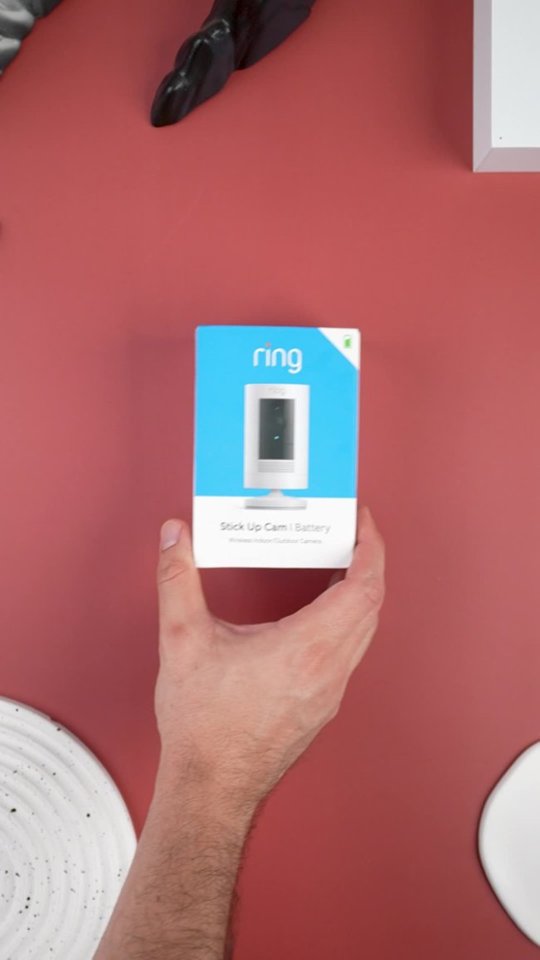
- Model:
- 8SC1S9-WEN0/B0C5QRZ47P
- SKU:
- 12558192
Rating by feature
- Value
Rating 4.6 out of 5 stars
- Quality
Rating 4.7 out of 5 stars
- Ease of Use
Rating 4.7 out of 5 stars
Customers are saying
Customers admire the exceptional camera quality and user-friendly interface that make this product a reliable choice for home security. Users frequently praise the long-lasting battery life and straightforward installation process, which contribute to its overall strong performance. While the device is highly regarded for its night vision and field of view, some individuals have noted occasional inconsistencies with motion detection and connectivity. Despite these minor technical challenges, the product remains a popular and affordable solution for those seeking enhanced monitoring capabilities.
This summary was generated by AI based on customer reviews.
Good and cheap in price
||Posted . Owned for 3 weeks when reviewed.This reviewer received promo considerations or sweepstakes entry for writing a review.Good if you just need a camera indoors and that can blend in with other items in the house, it does need to be charged every other month.
I would recommend this to a friendDidn’t work for me
||Posted . Owned for 1 week when reviewed.This reviewer received promo considerations or sweepstakes entry for writing a review.I bought two of these and live view didn’t work on either. The frame was either extremely laggy or frozen in place. Ring blamed my internet, but I have 1gig/1gig speeds the Eufy cams that I have work perfectly fine and stream in a higher resolution.
No, I would not recommend this to a friendBrand response from Ring
Posted .Hello Elwots
We understand how necessary a solid connection to your Ring Doorbell Pro is anytime you wish to access your video through the Ring App. When you experience a slow connection to your Ring device, this is typically due to the connection your phone has to the Ring device. Sometimes, cellular signals can be weak in remote locations, such as near mountains or in sparsely-populated areas. Try connecting to wifi for a better connection. Additionally, a busy wifi network at home may also affect connectivity. If other people on your network are watching videos or using the internet while you are trying to connect, your device may have trouble establishing a connection.
Ring Community launched in March 2019 to help deliver the most current news and educational information to our customers. You can find tips and tricks from other Ring users at https://community.ring.com/. This peer-to-peer forum allows our neighbors to share their feedback and experiences to assist each other in resolving their concerns.
Thank you,
Antonio from Ring
So far so good
||Posted . Owned for 1 week when reviewed.This reviewer received promo considerations or sweepstakes entry for writing a review.Very easy to set up, although I thought the image quality was going to be better, im very happy with the purchase and would recommend!
I would recommend this to a friend- Pros mentioned:Overall performance
Best Buy is TERRIBLE!!!
||Posted . Owned for 3 weeks when reviewed.This reviewer received promo considerations or sweepstakes entry for writing a review.The product is awesome!!! Best Buy sucks!!! They don't deliver products when promised!!! They don't stand behind their promises of reimbursement, discounts, etc...They also never call back after numerous requests!!!
I would recommend this to a friendBrand response from Ring
Posted .Hi MoparTommy,
We are happy to hear that you are enjoying your new Ring Stick Up Wire Free Camera! We appreciate the value and trust you have placed in Ring for your home security needs. The Ring Stick Up Wire Free Camera is designed to bring you peace of mind with reliable performance. By using one, you should be able to see, hear, and speak to your visitors.
If you have a question about an order or discount with Best Buy's service, contacting their customer service is normally the best course of action. Once you speak with a representative, they should be able to find a fair solution to your concerns.
Ensuring your Ring camera is meeting your needs and expectation is our top priority. For any additional questions or concerns, please feel free to reach out on our community forum at https://community.ring.com/. We look forward to hearing from you soon!
Sincerely,
Danielle from Ring
Dislike this camera
||Posted . Owned for 1 month when reviewed.This reviewer received promo considerations or sweepstakes entry for writing a review.The recording sucks! And then my 30 days trial was up so I purchased the basic and it doesn't record! I'm waiting for a refund.
No, I would not recommend this to a friendBrand response from Ring
Posted .Hi TinaM.
Thank you for taking the time to share your experience with us. We understand how important it is to have your Ring Stick Up Cam capture and record all the correct motion events. The Ring Stick Up Cam was designed to capture motions based on your specifications to help keep your home secure. We are here to provide you with some information to resolve the issue you mentioned in your review.
It sounds like the device is not performing as expected. It is important to ensure that you have the proper motion settings in place for your environment. Please make certain that the device is toggled on for "Motion Detection" under "Device Settings" in the Ring app. This camera uses adjustable motion detection and runs on passive infrared sensors. The system identifies visitors via a moving heat signature and sends a notification to your smart device when one is detected. You can adjust three preset motion zones and their distances under the "Motion Settings" tab on the device's page in the Ring app. Additionally, you can choose how often the camera checks for movement in those predefined zones via the "Motion Frequency" setting. If you find that your camera is missing some motions, please set the motion frequency to "Frequently."
Accuracy in motion detection can also be improved by enabling the "Smart Alerts" feature for people only in your Ring app. To enable "Smart Alerts," please follow these steps:
Tap the menu (≡) on the top left.
Tap "Devices."
Tap the device that you want to adjust.
Tap "Motion Settings."
Tap "Smart Alerts."
Tap "Enable Feature."
Tap "Continue."
Select the notification options that you want for "Person" and "Other Motion."
You'll see a video camera where you can select or de-select recording and a bell icon to represent alert notifications.
After you've adjusted your settings, tap "Done."
If any additional information is needed regarding your Ring Stick Up Cam, please reach out to our community. Ring Community is our first peer-to-peer community forum, giving our customers the ability to help one another and share their feedback and experiences directly with Ring.
Thank you,
Melissa from Ring.
Battery Camera
||Posted . Owned for 1 week when reviewed.This reviewer received promo considerations or sweepstakes entry for writing a review.Added to my Ring camera system when on sale for $60. My first battery based camera so don't know how long the battery lasts.
I would recommend this to a friend- Cons mentioned:Motion detection
DO NOT BUY
||Posted . Owned for 1 month when reviewed.This reviewer received promo considerations or sweepstakes entry for writing a review.Terrible, you have to be standing in front of it practically speaking directly into the camera for it to receive a trigger and alert motion.
No, I would not recommend this to a friendBrand response from Ring
Posted .Hi LLCC.
Thank you for sharing your feedback with us.
We understand how critical it is for your Ring Stick Up Cam to notify you of meaningful motion events where the device is installed. The Ring Stick Up Cam was designed to capture motions based on your specifications to help keep your home secure. We are here today to provide you with solutions that will assist you in finding the best device settings for your home’s environment.
It sounds like your device is not detecting the motion you want it to. Motion Zones allow you to select a specific area that you want your Ring doorbell or security cam to cover and greatly increase the effectiveness of your Ring device.
To access Motion Zones, go to Motion Settings on your Ring app and edit the zones by dragging the dots and creating unique shapes to monitor a specific area. Follow these steps to adjust your settings:
1. Go to the Ring app.
2. Tap on the three lines (≡) on the left side of your dashboard.
3. Tap on Devices and select your device.
4. Under Motion Settings, go to Advanced Settings.
5. Make sure that Advanced Motion Detection is set to "On."
6. Now you can Edit Motion Zones.
7. To edit Motion Zones:
Tap on Add Zones.
Tap on Edit Zones.
With Customizable Motion Zones, you can easily customize the area you would like to focus on by drawing up to three different free-form shapes.
Ring Community was launched to help deliver the most current news and educational information to our neighbors. This online forum is divided into four categories: Product Boards, Ring Updates, Tips & Tricks, and a Moderators’ Corner. The Product Boards are where you can begin new topics with your questions or feedback; there is also a search option that helps you find topics that have already been posted by other neighbors.
All the best,
Nicole from Ring.
Average camera
||Posted .This reviewer received promo considerations or sweepstakes entry for writing a review.Coverage area not great. May be better options for less.
I would recommend this to a friendBrand response from Ring
Posted .Hello Das1,
We are thankful for your feedback regarding your experience with the Ring Stickup Camera. We are constantly pushing ourselves to develop products to empower users with an affordable, effective way to monitor and secure their home. In pursuit of our mission to make neighborhoods safer, when applying technologies to our business, we always consider our three pillars of customer security, privacy, and user control. We understand how important it is to have your devices working as intended, as it offers a level of security in your home.
Based on your review, it seems that you are having trouble with your Ring Stickup Camera picking up the correct motion. The Stick Up Cam uses infrared motion capturing to detect motion, within its field of view. You can use the Ring app to determine the Stick Up Cam’s motion detection range and the specific zones where motion will trigger a smart alert. These settings help ensure that the Stick Up Cam will capture the events you want to see and ignore the ones you don’t. Here is a helpful article with more information on how to resolve motion concerns with your device: https://support.ring.com/hc/en-us/articles/213106363-How-to-Set-Up-Motion-Detection-for-Your-Stick-Up-Cam.
Also, Ring Community is our first peer-to-peer community forum, giving our customers the ability to help one another and share their experiences with Ring directly. We invite you to reach out at https://community.ring.com/ if any additional information is needed regarding your Ring Stickup Camera device and its performance.
Thank you,
Jamila with Ring
Stop working
||Posted . Owned for more than 2 years when reviewed.This reviewer received promo considerations or sweepstakes entry for writing a review.Stop working in 2 years I have the entire ring system every type. I have had to replace two of the cameras in over 2 years. I would have hope I could have gotten at least 5 years out of each camera.
No, I would not recommend this to a friendBrand response from Ring
Posted .Hi JessicaWare. The Ring Stick Up Cams are designed to be weather-resistant for outdoor use and can last up to several years. Exposure to extreme weather conditions may still cause damage to the device. If there doesn't appear to be any physical damage, try rebooting your Stick Up Cam in the Ring app by following these steps: https://support.ring.com/hc/en-us/articles/7438395032980-How-to-Reboot-your-Ring-Doorbell-or-Security-Camera-from-the-Ring-App-. If that doesn't help, you can also browse the Ring Community at https://community.ring.com/ to find troubleshooting tips and tricks from other neighbors. All the best, Ashley from Ring.
Absolutely useless
||Posted . Owned for less than 1 week when reviewed.This reviewer received promo considerations or sweepstakes entry for writing a review.This camera fails to the most basic things expected of it - show a live view and record activity when it detects motion. The setup goes through fine, the device health shows everything is OK - wi-fi strength is good... yet, when you try to get a live view from the camera, it just spins around "Activating Device". The videos that is records after detecting motion come out completely dark. Tried resetting the camera, but ended up with the same result. Ironically, the other Ring camera in the home (video doorbell) works just fine. A quick internet search for this issue shows people having this problem even a year ago, so there's clearly an issue that Ring hasn't been able to identify and fix.
No, I would not recommend this to a friendBrand response from Ring
Posted .Hi Atul,
First and foremost, we thank you for your business and the opportunity in serving your home security needs. The Ring Stick Up Wire Free Camera is designed to connect you to 1080p HD video consistently and reliably. We understand how important the video feature is, as this allows you to see your visitors.
Poor video quality and connectivity can sometimes be caused by a wifi issue. We recommend running a distance test in order to discover what video resolution you are receiving at your router, compared to how it performs when mounted. For the best results, please do the following:
1. Remove your Ring Camera from its mount and bring it into the same room as your wifi router.
2. Be sure you've turned off your cellular data and connected to the same 2.4GHz wifi network as your Ring device.
3. Open your Ring app on your smart-phone or tablet.
4. Trigger a motion event on your Ring Camera.
5. Test to see how quickly you are connected and examine the resulting video.
If you find that the video is clear, and you are connected fast, then we recommend improving the wifi signal to your Ring camera by connecting it to a wifi extender, such as the Ring Chime Pro. However, if you find that the video is still of poor quality or takes too long to load, then you will want to address issues with your wifi speeds. It is worth mentioning that Ring devices can only work as well as the strength of your home wifi signal. For example, if your internet package is not intended to handle multiple wireless devices at once, one or more of your Ring devices may underperform.
We appreciate that you have placed value in owning Ring devices to secure your home and know it's vital that the video feature meet your needs and expectations. Please reach out to us today at https://community.ring.com/ for additional tips and support!
All the Best,
Danielle from Ring
Does the job
||Posted . Owned for 3 weeks when reviewed.This reviewer received promo considerations or sweepstakes entry for writing a review.Ring does what it is advertised to do. Had a Ring doorbell and knew what to expect. Good coverage and reliability.
I would recommend this to a friendFair
||Posted . Owned for 1 month when reviewed.This reviewer received promo considerations or sweepstakes entry for writing a review.Was a little hard to install want to mount in corner
I would recommend this to a friendBrand response from Ring
Posted .Hi Linn.
Thank you for taking the time to share your experience with us. We understand the importance of having your Ring Stick Up Cam record clear and concise videos so that you can effectively monitor your home. Being able to rely on the recordings from your Ring Stick Up Cam is an essential feature of the device. We can definitely provide you with more information regarding the concern that you mentioned in your review.
It sounds like the device is not performing as expected. The Ring Stick Up Cam is our leading indoor and outdoor-ready security camera with flexible mounting options. Your Ring Stick Up Cam will be happy just about anywhere, indoors or out. It can sit on its own stand or be mounted to a wall or ceiling.
We have included the installation instructions for the Ring Stick Up Cam here:
1. Charge the provided battery.
Fully charge the provided battery using a USB power source and the orange cable until the battery’s LED light is green.
2. Remove the battery cover.
Twist the battery cover counterclockwise to unlock it, then remove it from your Stick Up Cam.
3. Choose a location.
Choose the spot where Stick Up Cam can provide the view you want.
4. Remove the base.
Unscrew the base using a standard Philips-head screwdriver.
5. Attach the Stick Up Cam Mount.
Attach the smaller end of the Stick Up Cam Mount to the rear of the Stick Up Cam. Screw it into place using the large silver screw that comes in your Stick Up Cam Mount packaging.
6. Attach the rubber pad.
Be sure that the white rubber pad is attached to the base of the Stick Up Cam Mount. Otherwise, attach it by pushing the rubber pad into the base of the mount.
7. Swivel the stand.
Once you've attached the mount to the back of your Stick Up Cam, swivel the mount so that the base is above the camera. You will not be able to change the orientation of upside-down videos in the Ring app. (if you have a Ring Protect Plan).
Make sure to install your camera right side up.
We recommend getting an adjustable Stick Up Cam base if you need additional mounting options.
8. Place the camera.
Place the Stick Up Cam where you want to mount it, rubber side down.
9. Screw in the camera.
Use the three mounting screws to secure the Stick Up Cam Mount base to the ceiling.
Important: Use the enclosed drill bit to drill holes in the ceiling, then push the enclosed anchors into the holes when installing on masonry or stucco.
10. Replace the cover.
Slide the back cover of the Stick Up Cam back into place. Use the star-shaped end of the screwdriver included with the Stick Up Cam to tighten the attached screw.
If any additional information is needed regarding your Ring Stick Up Cam, please reach out to our community. Ring Community is our first peer-to-peer community forum, giving our customers the ability to help one another and share their feedback and experiences directly with Ring.
Thank you,
Melissa from Ring.
Horrible experience with a lot of problems ...sm
||Posted . Owned for 1 week when reviewed.This reviewer received promo considerations or sweepstakes entry for writing a review.It kept dropping the connections even though the wi-fi readings within their app kept showing I was well within the acceptable ranges. I purchased the additional wi-fi booster which only made the connection worse than without it. The most common excuse they gave was that with COVID-19 more people worked from home and kids doing school work were jamming up the internet. What the heck kind of excuse is that? I finally gave up and decided to return it. Do yourself a favor and buy Blink - that's what I got to replace it - easier to set up and doesn't drop connections!
No, I would not recommend this to a friendBrand response from Ring
Posted .Hello CindyO,
Thank you for taking a moment to leave your review of the Ring Stickup Camera. At Ring, we believe that stronger communities are the key to safer neighborhoods. That is why we are driven to create products that help you protect what matters most at home, and empower you to connect with your visitors from wherever you are. We are saddened to read that this device did not meet your expectations, but are still here to assist you, if needed.
If you still have the Ring device in your possession, we invite you to reach out to us at https://community.ring.com/. Ring Community is our first peer-to-peer community forum, giving our customers the ability to help one another and share their personal feedback/experiences with Ring. We look forward to hearing from you, if we can be of any further assistance!
Thank you, Jamila with Ring.
Poorly designed
||Posted . Owned for more than 2 years when reviewed.This reviewer received promo considerations or sweepstakes entry for writing a review.Bro this item stopped working within the month and never worked again which makes no darn sense. I contacted ring and they couldn’t even help but yet I spent a good amount on one camera for it not to last a month and this was for the outdoors and didn’t last.
No, I would not recommend this to a friendBrand response from Ring
Posted .Hi Tonyv.
We appreciate the time you have taken to share your Ring experience with us. We understand how important it is for your Ring Stick Up Cam to function consistently and reliably, so you are alerted to any wanted or unwanted activity in or around your home. The features and technology provided by the Ring Stick Up Cam are incredibly valuable and help provide you with peace of mind about your home security. Rest assured, we're here to help!
It sounds like your Ring Stick Up Cam is not performing as expected. We would love the opportunity to share with you some troubleshooting steps that you can try to get your Ring Stick Up Cam functioning as intended. If your device is unresponsive, try pressing and holding the reset button for 20 seconds.
Follow these steps in the Ring app to reconnect the Ring Stick Up Cam to your wifi network:
1. Open the Ring app.
2. Tap the menu (≡).
3. Tap "Devices" and select the camera you'd like to reconnect to wifi.
4. Tap the "Device Health" tile.
5. Under "Network," tap "Change Network" and follow the prompts in the app.
Allow some time for your device to fully reconnect to the network, then check your wifi signal strength in "Device Health" to confirm it has successfully reconnected.
If you still have the Ring Stick Up Cam in your possession, we invite you to reach out to our community. Ring Community is our first peer-to-peer community forum, giving our customers the ability to help one another and share their personal feedback and experiences with Ring. We look forward to hearing from you. Please let us know if we can be of any further assistance!
Thank you,
Amilia from Ring.
- Cons mentioned:Motion detection
Not recommended
||Posted . Owned for 2 weeks when reviewed.This reviewer received promo considerations or sweepstakes entry for writing a review.HORRIBLE. Doesn't detect and record motion, regardless of your settings, like it's supposed to. If it wasn't too late I'd return it for a refund.
No, I would not recommend this to a friendBrand response from Ring
Posted .Hello mch64,
Thank you for voicing your motion and video recording concerns. We know the importance of being able to rely on your Stick Up Camera for home security. This device should provide you accurate motion detection and video storage when paired with a Ring Protect plan.
Motion detection relies on your device's position. A common error is mounting Stick Up Cam too high, and aiming it too low.
Stick Up Cam works great at eye-level, or slightly higher. At 5-7 feet from the ground, your Stick Up Cam can cover a wide visual area, as well as capture HD video of visitors' faces.
When Stick Up Cam is mounted too high, it often gets angled sharply downwards. This can work if you're only looking to detect motion in a very small area, but this often results in not detecting approaching visitors or capturing the top of heads when the motion sensors are triggered.
Can you please reach us when you get a moment? We'd love to evaluate your situation and help find a solution that you can rely on.
Regards,
Marlom at Ring.
Audio speaker is awful!
||Posted . Owned for 2 weeks when reviewed.This reviewer received promo considerations or sweepstakes entry for writing a review.Unfortunately its very hard to hear audio from this unit when I try to speak through the microphone and video colors are incorrect red colors show as pink.
No, I would not recommend this to a friendBrand response from Ring
Posted .Hello Corey,
Thank you for taking the time to leave a review. We understand how important the audio feature is on your Ring Stickup Camera. This ensures that you are able to speak to the person who is at your door, in real time. The Ring Stickup Camera is intended to provide you with peace of mind about your home security. Rest assured, we are here to provide you with some solutions to resolve the audio concerns you expressed.
After reading your review, it seems that you are having trouble with the audio on your Ring Stickup Camera. If you are having audio trouble with your Ring Stickup Camera, we recommend checking your mobile device to make sure that the external volume control is turned up to an adequate level to hear the person. Please see our help center article for more tips: https://support.ring.com/hc/en-us/articles/360050175212-Audio-and-Sound-Issues-Troubleshooting-Guide.
Ring Community launched in March 2019 to help deliver the most current news and educational information to our neighbors. It is our first peer-to-peer community forum, giving our customers the ability to help one another and share their feedback/experiences with Ring. Please reach out at https://community.ring.com/if any additional information is needed regarding your Ring Stickup Camera concern.
Thank you, Jamila with Ring
Bored? Spend your free time reviewing false alerts
||Posted . Owned for 2 weeks when reviewed.This reviewer received promo considerations or sweepstakes entry for writing a review.Not nearly ready for release to the Public unless you want to pretend to be busy by constantly checking for false alerts. All the clever settings they offer are useless since none of them work.
No, I would not recommend this to a friendBrand response from Ring
Posted .Hello Rippem,
We are thankful for your feedback regarding your experience with the Ring Stickup Camera. We are constantly pushing ourselves to develop products to empower users with an affordable, effective way to monitor and secure their home. In pursuit of our mission to make neighborhoods safer, when applying technologies to our business, we always consider our three pillars of customer security, privacy, and user control. We understand how important it is to have your devices working as intended, as it offers a level of security in your home.
Based on your review, it seems that you are having trouble with your Ring Stickup Camera picking up the correct motion. The Stick Up Cam uses infrared motion capturing to detect motion, within its field of view. You can use the Ring app to determine the Stick Up Cam’s motion detection range and the specific zones where motion will trigger a smart alert. These settings help ensure that the Stick Up Cam will capture the events you want to see and ignore the ones you don’t. Here is a helpful article with more information on how to resolve motion concerns with your device: https://support.ring.com/hc/en-us/articles/213106363-How-to-Set-Up-Motion-Detection-for-Your-Stick-Up-Cam.
Also, Ring Community is our first peer-to-peer community forum, giving our customers the ability to help one another and share their experiences with Ring directly. We invite you to reach out at https://community.ring.com/ if any additional information is needed regarding your Ring Stickup Camera device and its performance.
Thank you,
Jamila with Ring
- Cons mentioned:Motion detection
Ring review
||Posted . Owned for 9 months when reviewed.This reviewer received promo considerations or sweepstakes entry for writing a review.Catches motion when the really not needed, but for important incidents. Nothing. I even wave at the camera and still doesn’t catch motion!
No, I would not recommend this to a friendBrand response from Ring
Posted .Hello Great,
It is important that the motion detection feature on your Ring Stick Up Camera meets your needs and expectations. We understand you've selected Ring to keep you updated on activity around your home, and receiving notifications when activity is detected is essential. Please know that we are here to assist you and are confident that together we can find a solution.
This camera uses Adjustable Motion Detection and runs using passive infrared sensors. The system identifies visitors via a moving heat signature and sends a notification to your smart device when one is detected. You can adjust three preset motion zones and their distance. Additionally, you can choose how often the camera checks for movement in those predefined zones via the Motion Frequency setting. If you find that your camera is missing some motion, please set the Motion Frequency to 'Frequently'. To learn more about this feature, please visit: https://support.ring.com/hc/en-us/articles/115003477106-Understanding-and-Optimizing-Motion-Detection-with-Motion-Frequency.
Ring Community was launched in March 2019 to help deliver the most current news and educational information to our neighbors. It is our first peer-to-peer community forum, giving our customers the ability to help one another and share their feedback and experiences with Ring. Please reach out at https://community.ring.com/ if any additional information is needed regarding your motion detection concern.
Regards,
Jess from Ring
Do not let Best Buy near your home!
||Posted .This reviewer received promo considerations or sweepstakes entry for writing a review.Worst installation ever! They came 2 hours sfter the expected window. They were obviously annoyed. When I asked them to wait a few minutes, they grumbled under their breath that this should be rescheduled. When I objected, they left the open containers at my front door and left the job.
No, I would not recommend this to a friendBrand response from Ring
Posted .Hello BuyerBeware,
Thank you for taking the time to share your experience with us. We understand the importance of a seamless installation process, as this allows you to start using your Ring Stickup Camera right away. What you describe is not the experience we want you to have, rest assured we hear you and are here to offer you some assistance.
In this particular case, we’d suggest you reach out to Best Buy’s customer service: 1-888-237-8289 or https://www.bestbuy.com/services/triage/home. We are confident that they will be able to provide you resolution to the installation concerns you have described.
If you need assistance from Ring, Ring Community is our first peer-to-peer community online forum, giving our customers the ability to help one another and share their feedback directly with Ring.
We invite you to reach out at https://community.ring.com/ if any additional installation information is needed regarding the Ring Stickup Camera. We are eager to turn around your experience!
Thank you, Jamila with Ring.
- Cons mentioned:Mounting
Can Not Mount On Ceiling Terrible
||Posted . Owned for 2 months when reviewed.This reviewer received promo considerations or sweepstakes entry for writing a review.Can not mount on Ceiling…. Waste of Money TERRIBLE
No, I would not recommend this to a friendBrand response from Ring
Posted .Hi Alonzo.
Thank you for taking a moment to share this feedback with us.
We understand the importance of a seamless installation process so that you can begin using your Ring Stick-Up Cam Battery device right away. The features and technology provided by the Ring Stick-Up Cam Battery are incredibly valuable and help provide you with peace of mind about your home security. We can definitely provide you with more information regarding the concern mentioned in your review.
It sounds like you are wanting to mount your Ring Stick-Up Cam Battery on the ceiling. Your Stick-Up Cam will be happy just about anywhere, indoors or out. It can sit on its own stand or mount to a wall or ceiling with a special Stick-Up Cam Mount (sold separately). The Ring Stick-Up Cam Mount lets you find the perfect viewing angle. Visit our support center for additional details.
Ring Community was launched to help deliver the most current news and educational information to our neighbors. This online forum is divided into four categories: Product Boards, Ring Updates, Tips + Tricks, and a Moderators’ Corner. The Product Boards are where you can begin new topics with your questions or feedback; there is also a search option that helps you find topics that have already been posted by other neighbors.
All the best,
Nicole from Ring.