Customer Ratings & Reviews



- Model:
- 8VRASZ-VEN0
- SKU:
- 11457249
Rating by feature
- Video Quality
Rating 4.7 out of 5 stars
- Mobile App
Rating 4.7 out of 5 stars
- Sound Quality
Rating 4.7 out of 5 stars
Customers are saying
Customers consistently note the product's strong overall performance, with many reporting it works properly. They also appreciate the camera quality, finding its size to be just right.
This summary was generated by AI based on customer reviews.
Ms
||Posted . Owned for less than 1 week when reviewed.This reviewer received promo considerations or sweepstakes entry for writing a review.Great very happy with it now l can see who is at the door safely
I would recommend this to a friendlimited view
||Posted . Owned for 1 month when reviewed.This reviewer received promo considerations or sweepstakes entry for writing a review.Overall it does the job it says it will do but it will not always catch everything and when the sensor is up high it wastes the battery fast.
I would recommend this to a friendBrand response from Ring
Posted .Hi Issa.
Thank you for taking the time to share your experience with us. We understand how important it is to have your Ring Video Doorbell (2nd Gen.) capture all the correct motion events. The Ring Video Doorbell (2nd Gen.) was designed to capture motions based on your specifications to help keep your home secure. We are here to provide you with some information to resolve the issue you mentioned in your review.
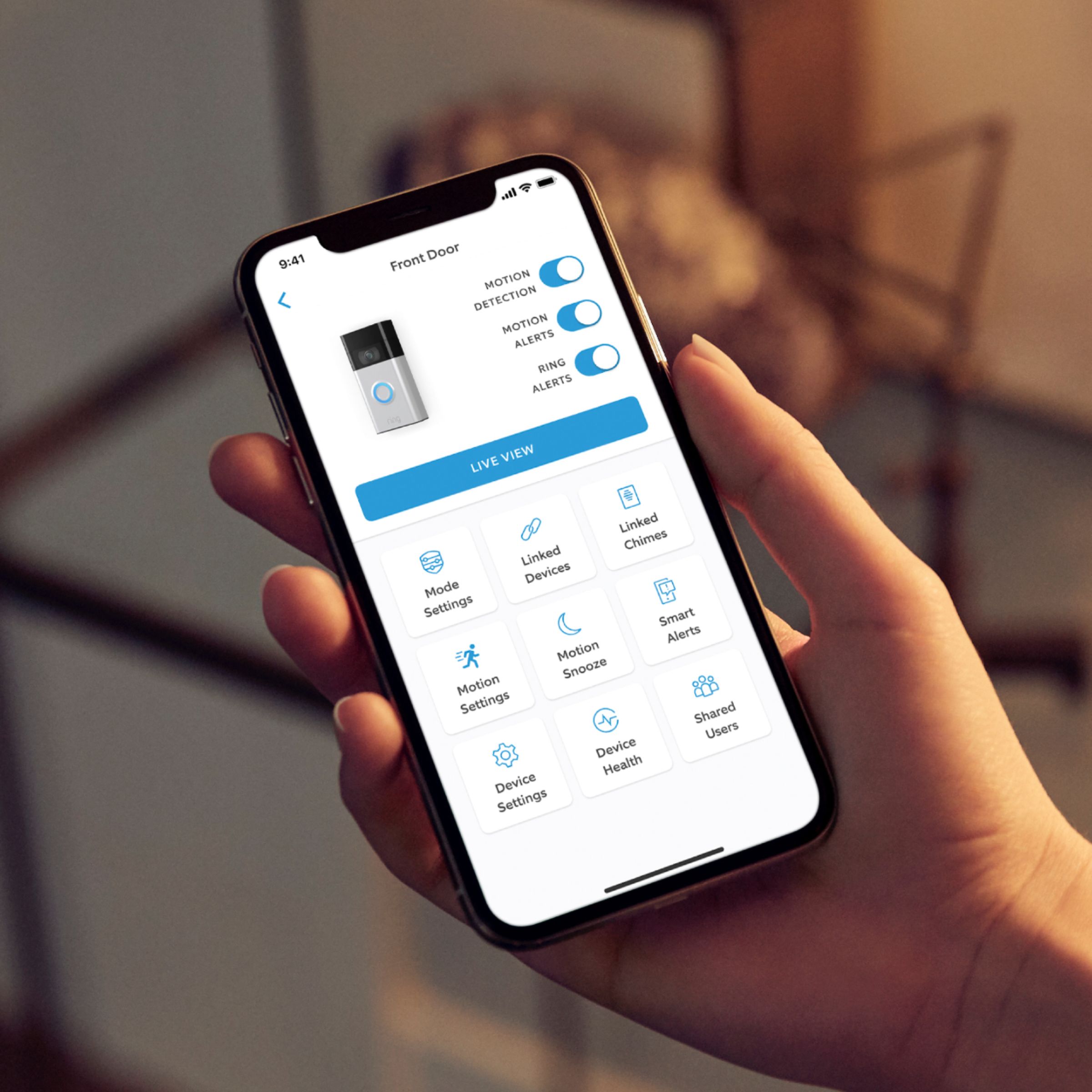
It sounds like the device is not performing as expected. It is important to ensure that you have the proper motion settings in place for your environment. This camera uses adjustable motion detection and runs on passive infrared sensors. The system identifies visitors via a moving heat signature and sends a notification to your smart device when one is detected. You can adjust three preset motion zones and their distances under the "Motion Settings" tab on the device's page in the Ring app. Additionally, you can choose how often the camera checks for movement in those predefined zones via the "Motion Frequency" setting. If you find that your camera is missing some motions, please set the motion frequency to "Frequently."
Accuracy in motion detection can also be improved by enabling the "Smart Alerts" feature for people only in your Ring app. To enable "Smart Alerts," please follow these steps:
Tap the menu (≡) on the top left.
Tap "Devices."
Tap the device that you want to adjust.
Tap "Motion Settings."
Tap "Smart Alerts."
Tap "Enable Feature."
Tap "Continue."
Select the notification options that you want for "Person" and "Other Motion."
You'll see a video camera where you can select or de-select recording and a bell icon to represent alert notifications.
After you've adjusted your settings, tap "Done."
If any additional information is needed regarding your Ring Video Doorbell (2nd Gen.), please reach out to our community. Ring Community is our first peer-to-peer community forum, giving our customers the ability to help one another and share their feedback and experiences directly with Ring. You can find it here: https://community.ring.com/.
Thank you,
Melissa from Ring.
Ring doorbell camera
||Posted . Owned for 1 month when reviewed.This reviewer received promo considerations or sweepstakes entry for writing a review.Great doorbell camera with easy setup. Would highly recommend.
I would recommend this to a friendSmile, we see you
||Posted . Owned for 1 week when reviewed.This reviewer received promo considerations or sweepstakes entry for writing a review.I can watch my door and get my packages as soon as they arrive
I would recommend this to a friendThe best doorbell.
||Posted . Owned for 1 month when reviewed.This reviewer received promo considerations or sweepstakes entry for writing a review.Easy to install and use. It’s nice to know who is at the door.
I would recommend this to a friendMs Galveston Tx
||Posted . Owned for 1 month when reviewed.This reviewer received promo considerations or sweepstakes entry for writing a review.I love it thank u I will buy another 1 when I move in my house
I would recommend this to a friendRing over blink
||Posted . Owned for 1 week when reviewed.This reviewer received promo considerations or sweepstakes entry for writing a review.Way better than blink. Happy we got this Black Friday bargain.
I would recommend this to a friendRing video doorbell
||Posted . Owned for 3 weeks when reviewed.This reviewer received promo considerations or sweepstakes entry for writing a review.Great product. Very accurate and easy to program. Great value.
I would recommend this to a friendGreat
||Posted .This reviewer received promo considerations or sweepstakes entry for writing a review.Best ring doorbell easy to use and to setup no Problems at all
I would recommend this to a friendRing doorbell
||Posted .This reviewer received promo considerations or sweepstakes entry for writing a review.Easy to operate. Installed for piece of mind……… Good purchase
I would recommend this to a friendRing
||Posted . Owned for 1 month when reviewed.This reviewer received promo considerations or sweepstakes entry for writing a review.Great product easy to install and easy to use with live video
I would recommend this to a friendRing Door Bell
||Posted . Owned for 1 month when reviewed.This reviewer received promo considerations or sweepstakes entry for writing a review.Easy to install and working great ..nice item for the price.
I would recommend this to a friendMs.
||Posted . Owned for 1 month when reviewed.This reviewer received promo considerations or sweepstakes entry for writing a review.I keep getting an error message stating week Wi-Fi signal. All of the reviews I've seen say the same thing even after the purchased the Wi-Fi extender. Wish I would have seen this before making the purchase.
No, I would not recommend this to a friendBrand response from Ring
Posted .Hello Dee64,
Ring understands the importance of having your Ring Video Doorbell online and working so you can keep your home secure. We know you rely on your Ring doorbell to keep your home secure. We will be more than happy to help you with this today.
One of the most important measurements in your Ring security network is the strength of your wifi signal. You may run a special connectivity test at any time to see if a bad wifi connection is responsible for problems with your device. We have included step by step instructions below:
-Open Ring app
-Hamburger Menu/ 3 Lines
-Select Devices
-Select a Ring device
-Select Device Health
-Select "Test your Wifi" under the Tools Section
-Tap "Start test
-Once the test is done, Enter your Results from the Speed test
Sometimes, even with high internet speeds, the connection is not as strong at the location of the Ring device. Ring Community was launched to help deliver the most current news and educational information to our neighbors. This online forum is divided into four categories: Product Boards, Ring Updates, Tips + Tricks, and a Moderators’ Corner. The Product Boards are where you can begin new topics with your questions or feedback; there is also a search option which helps you find topics that were already posted by other neighbors. We invite you to visit our site at https://community.ring.com/ today!
Thank you,
Antonio from Ring
Ring review
||Posted . Owned for 2 months when reviewed.This reviewer received promo considerations or sweepstakes entry for writing a review.It doesn’t catch everything and there was a glitch. Also if you miss the subscription it’s difficult to have . For the cost and the hype I expected better. I switched from blink which is significantly less expensive and was better the customer service just sucked. I don’t pay for subscription because it’s not really worth it because I can’t catch everything. Totally missed cars coming in my driveway it was a lot
No, I would not recommend this to a friendBrand response from Ring
Posted .Hi AriannaM.
Thank you for taking the time to share your experience with us. Thank you for taking the time to share your experience with us. We understand how important it is to have your Ring Video Doorbell (2nd Gen.) capture all the correct motion events. The Ring Video Doorbell (2nd Gen.) was designed to capture motions based on your specifications to help keep your home secure. We are here to provide you with some information to resolve the issue you mentioned in your review.
It sounds like the device is not performing as expected in regards to person detection. It is important to ensure that you have the proper motion settings in place for your environment. This camera uses adjustable motion detection and runs on passive infrared sensors. The system identifies visitors via a moving heat signature and sends a notification to your smart device when one is detected. You can adjust three preset motion zones and their distances under the "Motion Settings" tab on the device's page in the Ring app. Additionally, you can choose how often the camera checks for movement in those predefined zones via the "Motion Frequency" setting. If you find that your camera is missing some motions, please set the motion frequency to "Frequently."
Accuracy in motion detection can also be improved by enabling the "Smart Alerts" feature for people only in your Ring app. To enable "Smart Alerts," please follow these steps:
Tap the menu (≡) on the top left.
Tap "Devices."
Tap the device that you want to adjust.
Tap "Motion Settings."
Tap "Smart Alerts."
Tap "Enable Feature."
Tap "Continue."
Select the notification options that you want for "Person" and "Other Motion."
You'll see a video camera where you can select or de-select recording and a bell icon to represent alert notifications.
After you've adjusted your settings, tap "Done."
If any additional information is needed regarding your Ring Video Doorbell (2nd Gen.), please reach out to our community. Ring Community is our first peer-to-peer community forum, giving our customers the ability to help one another and share their feedback and experiences directly with Ring. You can find it here: https://community.ring.com/.
Thank you,
Melissa from Ring.
Ring
||Posted . Owned for 4 months when reviewed.This reviewer received promo considerations or sweepstakes entry for writing a review.My ring doorbell doesn't work very well. Sometimes shows activity sometimes doesn't. The battery life is good though. Not really happy with it for security
No, I would not recommend this to a friendBrand response from Ring
Posted .Hello bisbee11,
Thank you for taking the time to share your Ring experience with us. We appreciate that you have placed value in owning a Ring device to secure your home. Ring understands the importance of having the motion detection and battery work as intended. It is a valuable feature that is designed to notify you as to who may be near your home. Please know that it is a priority for us to be of assistance and find a resolution to your concern.
After reading your review, it seems that your Ring Video Doorbell is not picking up the correct motion. The Ring Video Doorbell (2020 release) is the next generation of the original Ring Video Doorbell. In addition to new video features such as Near Zone functionality, the 2020 release Video Doorbell boasts 1080p video, improved night vision, improved audio quality and near motion zone detection. If you are having trouble with your device picking up the correct motion. We recommend adjusting your motion settings and zones. Motion Zones allow you to define a specific area that you want your Ring device to cover while ignoring everything outside that area. By selecting Motion Zones to cover only areas you want the Ring device to monitor, you can effectively monitor the area you want as well as reduce the number of “false positive” motion alert. For more information on adjusting your motion settings to better fit your needs, please see our help center article titled: https://support.ring.com/hc/en-us/articles/360041248971-Using-Motion-Zones-with-your-Ring-Video-Doorbell-2020-release-.
If you still have concerns regarding this, we would love to hear from you directly on our Ring Community forum. This is a platform intended for Ring users, just like yourself, to create open discussions regarding their Ring experiences, provide suggestions or feedback, and more: https://community.ring.com/.
Thank you, Jamila with Ring
Works like a charm.
||Posted . Owned for 2 weeks when reviewed.This reviewer received promo considerations or sweepstakes entry for writing a review.I love how it alerts me every time someome passes by my door.
I would recommend this to a friendGood Ring
||Posted . Owned for 2 weeks when reviewed.This reviewer received promo considerations or sweepstakes entry for writing a review.Love not only what this does but also the look and the price!
No, I would not recommend this to a friendPerfect
||Posted . Owned for 2 weeks when reviewed.This reviewer received promo considerations or sweepstakes entry for writing a review.I love my ring door bell work perfectly those have good video
I would recommend this to a friendPerfect
||Posted . Owned for 1 month when reviewed.This reviewer received promo considerations or sweepstakes entry for writing a review.Excellent, I love this thing. Very easy to use and understand
I would recommend this to a friendVideo camera
||Posted . Owned for 1 month when reviewed.This reviewer received promo considerations or sweepstakes entry for writing a review.Great door camera love it very happy and satisfied with it.
I would recommend this to a friend