Customer Ratings & Reviews



- Model:
- 8VRASZ-VEN0
- SKU:
- 11457249
Rating by feature
- Video Quality
Rating 4.7 out of 5 stars
- Mobile App
Rating 4.7 out of 5 stars
- Sound Quality
Rating 4.7 out of 5 stars
Customers are saying
Customers consistently note the product's strong overall performance, with many reporting it works properly. They also appreciate the camera quality, finding its size to be just right.
This summary was generated by AI based on customer reviews.
Perfect
||Posted . Owned for 1 month when reviewed.This reviewer received promo considerations or sweepstakes entry for writing a review.I love the ring doorbell it’s so convenient to be able to talk people without having to open the door. Once you set the detection zone like you like it you can even see them before they get to the door which is really good if your expecting a package since they sometimes don’t ring the bell.
I would recommend this to a friendOnly free recording for the first 30 days
||Posted . Owned for 1 month when reviewed.This reviewer received promo considerations or sweepstakes entry for writing a review.It’s all good until it isn’t. My thing is that it should be independent instead of me having to buy their protection plan after 30 days. Which is a bummer. But the product is so far so good.
I would recommend this to a friendBrand response from Ring
Posted .Hi Josh!
We appreciate your feedback regarding the Ring Protect Plan. We understand how paramount the ability to save your videos can be to your home security, which is why we leave the option available if you decide this is a feature that is important to you. The Ring Video Doorbell (2020 Release) was designed to alert you of motions or visitors at your home. We are happy to hear that you are enjoying your Ring doorbell, however, we would love to get in touch with you directly to help improve your experience with us!
Please reach out to us at your earliest convenience, so we may get connected as soon as possible. In the meantime, we would like to invite you to join in on Ring Community forum where you can share your experience with other Ring users like yourself: https://community.ring.com/.
Wishing you the best,
Caitlin with Ring
I had the same one for many years and did not Any
||Posted . Owned for 3 months when reviewed.This reviewer received promo considerations or sweepstakes entry for writing a review.I have some issue with this ring of the Delay notifications I had the same one for many years and did not give me issues like this one
No, I would not recommend this to a friendBrand response from Ring
Posted .Hi ChrissyY. I can understand the importance of receiving timely notifications from your Video Doorbell so you can be alerted of visitors at your door. If you're experiencing delays with notifications, I'd suggest first checking the connection that your Doorbell is receiving. You can learn more about how to do that here: https://support.ring.com/hc/en-us/articles/217271526-Understanding-RSSI-and-Wifi-Signal-Strength. If the connection looks good, you can find some additional troubleshooting steps for notifications on android devices here: https://support.ring.com/hc/en-us/articles/211676423-How-to-Troubleshoot-Ring-Notification-Issues-for-Android-Devices. For iOS devices, check out this article: https://support.ring.com/hc/en-us/articles/210266406-How-to-Troubleshoot-Ring-Notification-Issues-for-Apple-iOS-Devices. Lastly, you can browse the Ring Community at https://community.ring.com/ to ask what solutions worked for other neighbors. All the best, Ashley from Ring.
A nice addition
||Posted .This reviewer received promo considerations or sweepstakes entry for writing a review.A great camera, helps me see my door. But it can’t record and save with out a subscription.
I would recommend this to a friendRing video doorbell 8VRASZ-Veno
||Posted . Owned for 1 month when reviewed.This reviewer received promo considerations or sweepstakes entry for writing a review.It does not always capture when someone is there. For the most part I do like it
I would recommend this to a friendBrand response from Ring
Posted .Hi ConstanceC.
Thank you for taking the time to share your experience with us.
We understand how important it is to have your Ring Video Doorbell (2nd Generation) capture all the correct motion events. The Ring Video Doorbell (2nd Generation) was designed to capture motions based on your specifications to help keep your home secure. We are here today to provide you with information to assist you in finding the best solution for your home’s environment.
It sounds like you are enjoying the features your Ring Video Doorbell (2nd Generation) has to offer, but there is some concern regarding the motion detection. The motion sensors in your Ring Video Doorbell are designed to detect motion up to 155 degrees horizontally and from five to 25 feet outward from the fixture. They're also more sensitive to horizontal movement across the detection area than vertical movement. If you mount the Ring Doorbell too high, you're more likely to catch the heat of passing cars than the heat of incoming visitors. For optimal motion detection, your device should be mounted approximately 48 inches above the ground. Visit our support center for more information on how to optimize motion detection for your device.
Ring Community was launched to help deliver the most current news and educational information to our neighbors. This online forum is divided into four categories: Product Boards, Ring Updates, Tips + Tricks, and a Moderators’ Corner. The Product Boards are where you can begin new topics with your questions or feedback; there is also a search option that helps you find topics that have already been posted by other neighbors.
All the best,
Nicole from Ring.
Not happy
||Posted . Owned for 2 months when reviewed.This reviewer received promo considerations or sweepstakes entry for writing a review.Camera is ok but dose not work with any Solar panels I bought a couple do you not wanna hook up to it.. only camera out of 7 that losses Internet all the time
No, I would not recommend this to a friendBrand response from Ring
Posted .Hello PattyR,
We appreciate that you have placed value in owning a Ring device to secure your home. Ring understands the importance of having the Ring Video Doorbell 2020 work as intended. It is a valuable device that is designed to notify you as to who may be near your home. Please know that it is a priority for us to be of assistance and find a resolution to your concern.
The Ring Video Doorbell (2020 release) is the next generation of the original Ring Video Doorbell. In addition to new video features such as Near Zone functionality, the 2020 release Video Doorbell boasts 1080p video, improved night vision, improved audio quality and near motion zone detection.
After reading your review, it seems that your Ring Video Doorbell 2020 is having trouble staying connected to your home wifi. When this occurs, we recommend rebooting your wifi modem and router. Since your router and modem are usually the hardest working devices in your house, for optimal performance, you should reboot them about once a month. To reboot routers or modems, follow the instructions below:
Unplug your router or modem from its power supply (don’t just turn it off).
If your router and modem are separate, unplug both of them.
Wait at least 30 seconds, then plug them back in.
Wait for your internet to be restored.
Here is a helpful article which walks you through additional steps to take if the issue still persists for you after your modem/router reboot: https://support.ring.com/hc/en-us/articles/217240386-In-app-Setup-Failing-Repeatedly.
Additionally, if you have not already, please check out our Ring Community forum where other Ring users, like yourself, have an open discussion platform to share their experiences, as well as solutions to issues experienced: https://community.ring.com/.
Thank you, Jamila with Ring
Ring
||Posted . Owned for 8 months when reviewed.This reviewer received promo considerations or sweepstakes entry for writing a review.This is a good product, but the one I have stopped working after two months. Maybe it’s a defect in that particular one but now I’m stuck with something that’s not working.
I would recommend this to a friendBrand response from Ring
Posted .Hello Tarheelsman,,
Our top priority at Ring is to ensure that our customers have the best possible experience with our products. We really appreciate your feedback. Our team is always striving to improve our products and their performance.
All our devices do come with a limited one-year warranty, in which Ring will repair or replace any Ring products that malfunction due to defective parts or workmanship, at no charge to you. There is also an extended warranty available through our Ring Protect Plus Plan option.
Please reach out to us directly via our community forum at https://community.ring.com/ so we can find a solution to best resolve this and ensure the Ring Video Doorbell 2020 is functioning as it was intended.
Thank you,
Antonio from Ring
Ring doorbell without angle
||Posted . Owned for 1 month when reviewed.This reviewer received promo considerations or sweepstakes entry for writing a review.No angle ability on doorbell. Battery doesn’t last long and is difficult to get out and charge. I should have done my homework. Would not have purchased
No, I would not recommend this to a friendBrand response from Ring
Posted .Hello Trrr,
Our top priority at Ring is to ensure that our customers have the best possible experience with our products. We really appreciate your feedback. Our team is always striving to improve our products and their performance.
The corner mount is an optional accessory used to angle your Ring Video Doorbell 15 degrees left or right away from the wall. If you installed your Ring Video Doorbell on a corner or adjacent wall, the corner mount can improve motion detection and view:https://support.ring.com/hc/en-us/articles/115003034406-Installing-the-Wedge-Kit-and-Corner-Mount-for-the-Ring-Video-Doorbell-2-.
Ring Community was launched to help deliver the most current news and educational information to our neighbors. This online forum is divided into four categories: Product Boards, Ring Updates, Tips + Tricks, and a Moderators’ Corner. The Product Boards are where you can begin new topics with your questions or feedback; there is also a search option which helps you find topics that were already posted by other neighbors. We invite you to visit our site at https://community.ring.com/ today!
Thank you,
Antonio from Ring
Not impressed
||Posted . Owned for 2 weeks when reviewed.This reviewer received promo considerations or sweepstakes entry for writing a review.Video quality isn’t great compared to SimpliSafe doorbell. I got it because it works with SmartThings. Design is bulky too. Load time is great, no connection issues.
No, I would not recommend this to a friendBrand response from Ring
Posted .Hello Rhookie,
Poor video quality can be attributed to the wifi/bandwidth connection. One of the most important measurements in your Ring security network is the strength of your wifi signal. You may run a special connectivity test at any time to see if a bad wifi connection is responsible for problems with your device. We have included step by step instructions below:
-Open Ring app
-Hamburger Menu/ 3 Lines
-Select Devices
-Select a Ring device
-Select Device Health
-Select "Test your Wifi" under the Tools Section
-Tap "Start test
-Once the test is done, Enter your Results from the Speed test
Sometimes, even with high internet speeds, the connection is not as strong at the location of the Ring device. Ring Community launched in March 2019 to help deliver the most current news and educational information to our neighbors. It is our first peer-to-peer community forum, giving our customers the ability to help one another and share their feedback/experiences with Ring. Please reach out at https://community.ring.com/ if any additional information is needed regarding your video concern.
Thank you,
Antonio from Ring
What a joke.
||Posted . Owned for 5 months when reviewed.This reviewer received promo considerations or sweepstakes entry for writing a review.Horrible product, horrible app, horrible customer service. Takes several hours to set-up, not nearly the 30 minutes they claim. When it is set-up, it seems to never catch movement directly in front of it but will catch your neighbor across the street in the very corner of it's range every single time. Alerts are usually sent to your phone well after any movement was actually at your door. Live video doesn't usually stay connected for more than a minute. If you're not at home, good luck connecting to it on the app at all. Oh and if you have a power outage, you have to go through the several hours set-up process again! Customer service just takes you in circles of doing the same process over and over that didn't work the first 20 times you tried. I hope other ring products work better because this doorbell is absolute garbage.
No, I would not recommend this to a friendBrand response from Ring
Posted .Hi NathanJ.
Thank you for taking the time to share your experience with us. We understand how important it is to have your Ring Video Doorbell (2nd Gen.) to notify you of meaningful motion events. The Ring Video Doorbell (2nd Gen.) was designed to capture motions based on your specifications to help keep your home secure. We are here to provide you with some information to resolve the motion detection and connection issues that you mentioned in your review.
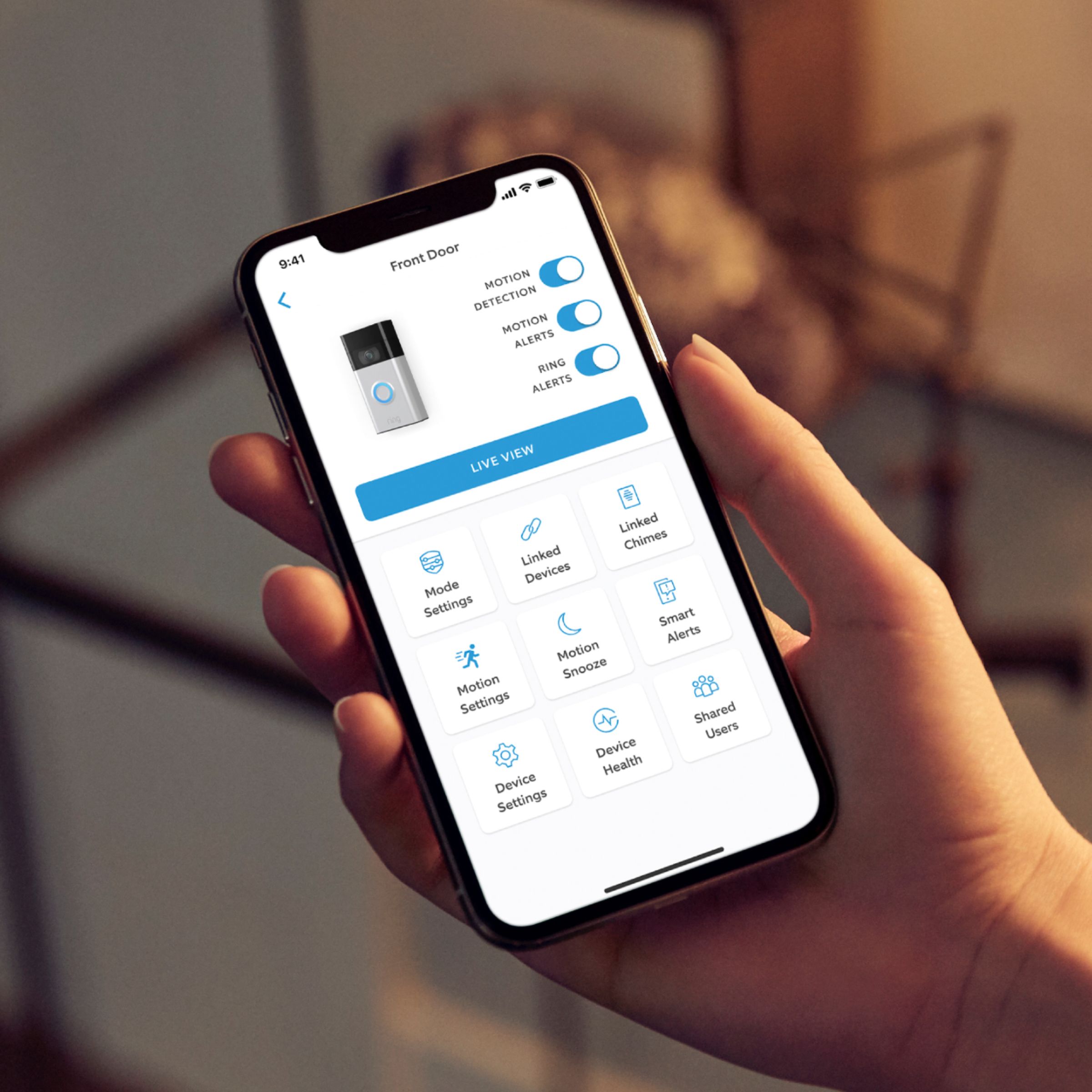
It sounds like the device is not performing as expected. It is important to ensure that you have the proper motion settings in place for your environment. This camera uses adjustable motion detection and runs on passive infrared sensors. The system identifies visitors via a moving heat signature and sends a notification to your smart device when one is detected. You can adjust three preset motion zones and their distances under the "Motion Settings" tab on the device's page in the Ring app. Additionally, you can choose how often the camera checks for movement in those predefined zones via the "Motion Frequency" setting. If you find that your camera is missing some motions, please set the motion frequency to "Frequently."
Accuracy in motion detection can also be improved by enabling the "Smart Alerts" feature for people only in your Ring app. To enable "Smart Alerts," please follow these steps:
Tap the menu (≡) on the top left.
Tap "Devices."
Tap the device that you want to adjust.
Tap "Motion Settings."
Tap "Smart Alerts."
Tap "Enable Feature."
Tap "Continue."
Select the notification options that you want for "Person" and "Other Motion."
You'll see a video camera where you can select or de-select recording and a bell icon to represent alert notifications.
After you've adjusted your settings, tap "Done."
In some cases, poor connection on your mobile device may delay notifications and cause issues with "Live View." If you're having issues getting notifications, make sure you're connected to wifi and that your mobile device is receiving a strong signal. Notification delays are often related to wifi connection or mobile device variables. A delay of under six seconds is expected due to signal fluctuation.
We invite you to reach out to our community if any additional information is needed regarding your Ring Video Doorbell (2nd Gen.). The Ring Community is our first peer-to-peer community forum, giving our customers the ability to help one another by sharing their feedback and experiences with each other.
Thank you,
Melissa from Ring.
Extremely disappointed
||Posted . Owned for 1 month when reviewed.This reviewer received promo considerations or sweepstakes entry for writing a review.Not satisfied with description or product fist of all Recording of ring video expires after 30 days the. You must subscribe and pay for this service the reason for purchasing this item is protection from package thief’s and being attacked omg this item was also pricier for me over $100.00
No, I would not recommend this to a friendBrand response from Ring
Posted .Hi Customer.
Thank you for taking the time to share your experience with us.
We understand the importance of having all relevant product information prior to purchasing. Being able to save, download, and review footage captured by your Ring device is a valuable feature of the Ring Protect Plan. We can definitely provide you with more information regarding the concern mentioned in your review.
It sounds like there was some confusion regarding the optional Ring Protect Plans. The Ring Protect Plan is a subscription that gives you access to paid features for your Ring device. With a Ring Protect Plan, you can save, review, and share video recordings from your Ring devices to your Ring account.
If you would like to save videos for a longer period of time, you can download one video at a time from the Ring app, or download up to 50 videos at a time in bulk from your account on the Ring website.
Without a Ring Protect Plan, you can still view real-time video for Ring doorbells and cameras and answer doorbell notifications when they happen, but you don’t get video recordings of those events.
Visit our support center for more information.
Ring Community was launched to help deliver the most current news and educational information to our neighbors. This online forum is divided into four categories: Product Boards, Ring Updates, Tips + Tricks, and a Moderators’ Corner. The Product Boards are where you can begin new topics with your questions or feedback; there is also a search option that helps you find topics that have already been posted by other neighbors.
All the best,
Nicole from Ring.
Could be a bit better
||Posted . Owned for 3 weeks when reviewed.This reviewer received promo considerations or sweepstakes entry for writing a review.Could have better sound, when taking to someone at the door. They seem to have trouble understanding what your saying.
I would recommend this to a friendBrand response from Ring
Posted .Hello Snema
Thank you for sharing your experience. We understand how important it is to have all features on your Ring device work correctly. We have this Help Center page with steps to try to fix poor audio quality: https://support.ring.com/hc/en-us/articles/360023556192-Fixing-Poor-Audio-Video-Quality-by-Adjusting-Your-Router.
Best wishes
Ivan from Ring
The Best Doorbell Ever
||Posted . Owned for 3 weeks when reviewed.This reviewer received promo considerations or sweepstakes entry for writing a review.The ring doorbell is great. It can see who’s at my door before I answer it.
I would recommend this to a friendBrand response from Ring
Posted .Hi KatrinaW.
Thank you for taking the time to share your experience with us.
Here at Ring, we believe that stronger communities are the key to safer neighborhoods. That is why we are driven to create products that help you protect what matters most at home and empower you to connect with your neighbors from wherever you are. Together, we’ll make neighborhoods safer!
We are pleased to hear that you are enjoying the benefits of having a Ring Video Doorbell (2nd Generation) installed! With the Ring Video Doorbell (2nd Generation), you can stay connected to your home from anywhere by seeing who’s at your door and answering it right from the Ring app. It offers enhanced features like upgraded video quality from 720p HD to 1080p HD, near-zone motion detection in areas as close as 5 to 15 feet in front of your home, and a reimagined mounting setup that simplifies installation and removal of the battery for easy charging.
Ring Community was launched to help deliver the most current news and educational information to our neighbors. This online forum is divided into four categories: Product Boards, Ring Updates, Tips + Tricks, and a Moderators’ Corner. The Product Boards are where you can begin new topics with your questions or feedback; there is also a search option that helps you find topics that have already been posted by other neighbors.
All the best,
Nicole from Ring.
Ring door bell
||Posted . Owned for 2 weeks when reviewed.This reviewer received promo considerations or sweepstakes entry for writing a review.We was waiting on black Friday to get a good deal and they had one. It works great but some times it ring in the house and sometimes it doesn't? I don't know if we have to buy something else? But you have to pay for the service after 30 days if you want to keep your recording?
I would recommend this to a friendWaste of time and money
||Posted . Owned for 3 months when reviewed.This reviewer received promo considerations or sweepstakes entry for writing a review.Doorbell does not have a replaceable battery. We were sold a battery replacement only to find out this model does not let you replace the battery you have to recharge the whole. Such a waste of money. And the Return date is passed so we are stuck with a Ring Doorbell and a replaceable battery that we can't use.
No, I would not recommend this to a friendBrand response from Ring
Posted .Hi LuckyLarry. Thank you for taking the time to share your experience with us. We understand the importance of having all relevant product information prior to purchasing. The features and technology provided by the Ring Video Doorbell (2nd Gen.) are incredibly valuable and help provide you with peace of mind about your home security. We are eager to address the issue you raised in your review and provide you with a resolution today.
It sounds like the device is not functioning as expected. With Ring Video Doorbell (2nd Generation), stay connected to your home from anywhere by seeing who’s at your door and answering it right from the Ring app. To charge the battery for your Ring Video Doorbell (2nd Generation), use a common micro-USB cable, such as the orange one included in your Ring box. Simply plug it into any USB power source. Your doorbell can take around 5-10 hours to fully charge, depending on whether the USB cable is plugged into a USB port or a wall outlet. . When the doorbell is fully charged, the light will be solid blue. Reattach the Ring unit to the mounting bracket using your security screws. After about 30 seconds (time for the Ring doorbell to start up), test your Ring doorbell by pressing the button on the front.
At Ring, we understand you have many choices when it comes to your home security. If the retailer has not resolved this concern for you, please reach out to our Community Forum today. We appreciate that you have chosen Ring to secure your home and look forward to providing you a solution so that you have a device you can rely on.
Thank you,
Melissa from Ring.
Dead battery
||Posted . Owned for 5 months when reviewed.This reviewer received promo considerations or sweepstakes entry for writing a review.Battery died and could not charge before 6 months of purchase. Geek squad warranty purchased, will head to the store to see how this will go
No, I would not recommend this to a friendBrand response from Ring
Posted .Hello Jose,
Thank you for taking the time to share your Ring Video Doorbell 2020 experience with us. We appreciate it. Our products are intended to provide you with long-term peace of mind in terms of home security.Ring devices all include a one-year limited warranty on parts and hardware: https://ring.com/warranty. If you are a Ring Protect Plus member, an added benefit of this plan is an extended product warranty that would cover replacement for the lifetime of the device. Rest assured, whether you are a Protect Plus member or not, we do have some solutions that can resolve your concerns and ensure you have a Ring device that is capturing visitors around your home when you need it most!
To obtain the benefit of the limited warranty, please contact Ring community support at http://support.ring.com/or 1 (800) 656-1918 (US). For any additional questions or concerns, please feel free to reach out on our community forum at https://community.ring.com/. This forum was launched in 2019 to allow our neighbors to share their experiences and feedback directly with Ring.
We are eager to get a solution in place for you so you can monitor your home and get notified in a timely manner of visitors approaching your door. We look forward to hearing from you soon!
Thank you, Jamila with Ring.
Worked Good
||Posted . Owned for 2 months when reviewed.This reviewer received promo considerations or sweepstakes entry for writing a review.Worked good however I had an issue because this was my second doorbell and there is an issue when 2 doorbells on the same existing chime.
I would recommend this to a friendBrand response from Ring
Posted .Hello BoyNike,
Thank you for taking a moment to leave your review on the Ring Video Doorbell 2020. At Ring, we believe that stronger communities are the key to safer neighborhoods. That is why we are driven to create products that help you protect what matters most at home, and empower you to connect with your visitors from wherever you are.
Your experience with Ring is impactful on our future as a company, and we would love to hear from you directly on our Ring Community forum. If you have any experiences to share, questions regarding Ring and our services, or any feedback and product suggestions, we encourage you to have your voice be heard: https://community.ring.com/!
Thank you, Jamila with Ring
Need some improvement
||Posted . Owned for 1 month when reviewed.This reviewer received promo considerations or sweepstakes entry for writing a review.The connection is not straight forward and interface is not easy to use
No, I would not recommend this to a friendBrand response from Ring
Posted .Hi Bilgutay.
Thank you for taking the time to share this feedback with us.
We understand the importance of a seamless setup process so that you can begin using your Ring Video Doorbell (2nd Generation) right away. The features and technology provided by the Ring Video Doorbell (2nd Generation) are incredibly valuable and help provide you with peace of mind about your home security. We would love the opportunity to work with you to ensure your device is working as intended and answer any questions you might have.
It sounds like there was some difficulty setting your device up. We recommend setting your device up in the Ring app prior to mounting it to the wall. Follow these steps to get started setting up your Ring Video Doorbell (2nd Generation):
Open the Ring app.
Tap the menu (☰).
Tap Set Up a Device.
Tap Video Doorbells.
Tap the blue I’m Ready to Scan button.
Use your mobile device’s camera to scan the QR code on the device’s packaging.
When a green square and a pop-up with your device image appear, the code has been recognized.
Once here, the Ring app will walk you through completing setup and customizing the settings of your device to best meet your needs. If any additional information is needed, visit our support center or reach out to our support team.
Ring Community was launched to help deliver the most current news and educational information to our neighbors. This online forum is divided into four categories: Product Boards, Ring Updates, Tips + Tricks, and a Moderators’ Corner. The Product Boards are where you can begin new topics with your questions or feedback; there is also a search option that helps you find topics that have already been posted by other neighbors.
All the best,
Nicole from Ring.
back door
||Posted . Owned for 3 weeks when reviewed.This reviewer received promo considerations or sweepstakes entry for writing a review.Hopefully, it will work after it is installed properly.
I would recommend this to a friendBrand response from Ring
Posted .Hi MyPalace.
Thank you for taking the time to share your thoughts with us.
We understand the importance of a seamless installation and setup process so that you can begin using your Ring Video Doorbell (2nd Generation) right away. The features and technology provided by the Ring Video Doorbell (2nd Generation) are incredibly valuable and help provide you with peace of mind about your home security. We would like to provide you with solutions to the concerns you are experiencing today!
It sounds like you are having some trouble installing your device. Prior to physically installing your device, we recommend fully charging the built-in battery by plugging it into a USB power source using the provided orange cable.When only one of the two LEDs on the battery is lit, the battery is fully charged. Once charging is complete, in the Ring app, select Set Up a Device and follow the in-app instructions.
After setup is complete, you are ready to physically install your device. For the best results, mount it around four feet (1.2 meters) above the ground. If you're connecting to existing doorbell wiring that's higher than four feet and want to angle your Ring Doorbell down for a better view, you can purchase a wedge kit online. Visit our support center for more information on how to physically install your Ring Video Doorbell (2nd Generation).
Ring Community was launched to help deliver the most current news and educational information to our neighbors. This online forum is divided into four categories: Product Boards, Ring Updates, Tips + Tricks, and a Moderators’ Corner. The Product Boards are where you can begin new topics with your questions or feedback; there is also a search option that helps you find topics that have already been posted by other neighbors.
All the best,
Nicole from Ring.
Video doorbell entry level,May not work for all si
||Posted . Owned for 1 week when reviewed.This reviewer received promo considerations or sweepstakes entry for writing a review.Video doorbell entry level,May not work for all Mounting surfaces, as well as mechanical versus electric door chime. You may consider stepping up to the pro to minimize any issues
I would recommend this to a friendBrand response from Ring
Posted .Hello EliteInstaller,
Thank you for taking a moment to leave your review on the Ring Video Doorbell 2020. At Ring, we believe that stronger communities are the key to safer neighborhoods. That is why we are driven to create products that help you protect what matters most at home, and empower you to connect with your visitors from wherever you are.
Your experience with Ring is impactful on our future as a company, and we would love to hear from you directly on our Ring Community forum. If you have any experiences to share, questions regarding Ring and our services, or any feedback and product suggestions, we encourage you to have your voice be heard: https://community.ring.com/!
Thank you, Jamila with Ring