Customer Ratings & Reviews



- Model:
- 8VRASZ-VEN0
- SKU:
- 11457249
Rating by feature
- Video Quality
Rating 4.7 out of 5 stars
- Mobile App
Rating 4.7 out of 5 stars
- Sound Quality
Rating 4.7 out of 5 stars
Customers are saying
Customers consistently note the product's strong overall performance, with many reporting it works properly. They also appreciate the camera quality, finding its size to be just right.
This summary was generated by AI based on customer reviews.
Ring
||Posted . Owned for 1 week when reviewed.This reviewer received promo considerations or sweepstakes entry for writing a review.Would not work with my WiFi. Worked with Ring Customer Support but they could not get it to work.
No, I would not recommend this to a friendBrand response from Ring
Posted .Hi GeorgeW.
Thank you for taking the time to share your experience with us. We understand the importance of a seamless setup process so that you can begin using your Ring Video Doorbell (2nd Gen.) right away. The features and technology provided by the Ring Video Doorbell (2nd Gen.) are incredibly valuable and help provide you with peace of mind about your home security. Rest assured, we are here to provide you with solutions today.
It sounds like the device is not operating as expected. With Ring Video Doorbell (2nd Generation), stay connected to your home from anywhere by seeing who’s at your door and answering it right from the Ring app. Enjoy enhanced features like upgraded video quality from 720p HD to 1080p HD, Near Zone Motion Detection in areas as close as 5 to 15 feet in front of your home, and a reimagined mounting setup that simplifies installation.
In some cases, setting up your Ring device(s) can fail when there are too many devices on one network. Wireless networks utilize different channels for communication. The 2.4 GHz band uses channels 1–11 within the United States and 1–13 in some other countries. The 5 GHz band utilizes select channels between 36 and 165. Multiple wireless devices using the same channels at the same time can cause wireless interference. If you are receiving a message that the network cannot be found or is too far away when connecting devices to the 2.4 GHz frequency, it could be due to this interference. We recommend switching your router’s channel to 1, 6, or 11 to avoid overlapping other channels. If your Ring device does not find any wifi networks, try starting the setup from the beginning or from another mobile device. If the Ring device finds networks but not your own network, you might need to make the Ring device scan for new networks. For battery-powered devices, such as the Ring Video Doorbell 2nd Gen., in order to scan for an updated network list, you will need to exit and re-enter setup mode using the setup button on the device. This will cause it to generate a fresh scan of the available networks for your next setup attempt. A wifi analyzer application can be used on Android devices, or sometimes within your router, to evaluate which channels have the most congestion. We recommend doing this when you are experiencing setup problems, poor audio and/or video quality, or delays with notifications. Open up your Ring device’s ability to communicate by following these steps: Create a DHCP reservation. A DHCP reservation is a permanent IP address assignment that is reserved for the use of one device. Locate the Mac ID listed on the back of your Ring device or on the box. Create a DHCP reservation to ensure that every time your Ring device connects to your router, it will be given the same address. Note: There are many different terms for this option; please check your router’s manual to be sure. Set a static IP. You can also set a static IP during the setup process in the Ring app. Note: Ensure the address you provide is outside the range of your DHCP server in order to prevent an IP conflict. Once a DHCP reservation or static IP is in place, try the following: Move your ring device to the DMZ (demilitarized zone). Using the IP address you reserved, place your Ring device in the demilitarized zone (sometimes referred to as the IP passthrough) of your router. This will allow the Ring device’s traffic to pass through any security settings that may be preventing connection. Note: This can only be done for one connected device at a time. Once you have verified that all steps in the Ring app have been completed and neither your internet connection nor your wifi password are the cause of your connectivity issue, troubleshoot by going through the following solutions one at a time, step by step. Check the SSID (name) of your network. If it has special characters or blank spaces before or after the name, rename the network to something simpler. Once the device is online, a firmware update will start. Once updated successfully, return your network to its previous settings. Set the Ring device back up to see if it will connect. Enable and connect to a guest network. A guest network is a separate access point for your network that is isolated from your other devices. By creating one, you can create a firewall-free network for your Ring device. Create a guest network with a simple, alphanumeric SSID name and password, and connect your Ring device(s) to it. Wifi 6 (802.11 ax): If you have a wifi 6 router in 802.11 af/ax mode and can't complete your setup, change your router or guest network to 802.11 b/g/n and complete your setup.
We invite you to reach out to our community if any additional information is needed regarding your Ring Video Doorbell (2nd Gen.). The Ring Community is our first peer-to-peer community forum, giving our customers the ability to help one another by sharing their feedback and experiences with each other.
Thank you,
Melissa from Ring.
Not a good product.
||Posted . Owned for 1 month when reviewed.This reviewer received promo considerations or sweepstakes entry for writing a review.Ring 2 doesn't do what is says. It was to be an upgrade from my original Ring doorbell, but conversations at door are terrible. There is also a delay on when doorbell catches motions.
No, I would not recommend this to a friendBrand response from Ring
Posted .Hello Berk,
We appreciate you reaching out to us by leaving a review. We fully understand the importance of having the motion detection work as intended. It is a valuable feature that is designed to notify you as to who may be near your home. Please know that it is a priority for us to be of assistance and find a resolution to your concern.
Based on your review, it seems that you are having trouble with your Ring Video Doorbell picking up correct motion. The Ring Doorbell sees the world is through a network of PIR or "Passive Infrared" motion sensors. These are heat sensors that detect motion by monitoring heat within the detection area. Since people are hotter than the surrounding areas, as a person enters the detection area, the heat measurements change. The motion sensors register this change as movement and send out an alert. If this is the case, we recommend you to adjust your current set motion zones. Motion Zones allow you to define a specific area that you want your Ring device to cover while ignoring everything outside that area. By selecting Motion Zones to cover only areas you want the Ring device to monitor, you can effectively monitor the area you want as well as reduce the number of “false positive” motion alert. Please see our help center article for more information: https://support.ring.com/hc/en-us/articles/360041248971-Using-Motion-Zones-with-your-Ring-Video-Doorbell-2020-release-.
In addition, if you are having audio trouble with your Ring Video Doorbell, we recommend checking your mobile device to make sure that the external volume control is turned up to an adequate level to hear the person. Please see our help center article for more tips: https://support.ring.com/hc/en-us/articles/360050175212-Audio-and-Sound-Issues-Troubleshooting-Guide.
Ring Community is our first peer-to-peer community forum, giving our customers the ability to help one another and share their feedback/experiences with Ring. We invite you to reach out at https://community.ring.com/ if any additional information is needed regarding your Ring Video Doorbell Wired motion concern.
Thank you, Jamila with Ring
Door bell
||Posted . Owned for 1 month when reviewed.This reviewer received promo considerations or sweepstakes entry for writing a review.We were advised that we have to pay monthly fee to keep recording videos not very happy.
No, I would not recommend this to a friendBrand response from Ring
Posted .Hi MelindaS.
Thank you for sharing this feedback with us.
We understand the importance of having all relevant product information prior to purchasing. Being able to save, download, and review footage captured by your Ring Video Doorbell is a valuable feature of the Ring Protect Plan. We can definitely provide you with more information regarding the concern mentioned in your review.
It sounds like there was some confusion regarding the optional Ring Protect Plans for Ring devices. The Ring Protect Plan is a subscription that gives you access to paid features for Ring devices. With a Ring Protect Plan, you can save, review, and share video recordings from your Ring devices to your Ring account.
Without a Ring Protect Plan, you can still view real-time video for Ring doorbells and cameras and answer doorbell notifications when they happen, but you don’t get video recordings of those events.
Ring Community was launched to help deliver the most current news and educational information to our neighbors. This online forum is divided into four categories: Product Boards, Ring Updates, Tips + Tricks, and a Moderators’ Corner. The Product Boards are where you can begin new topics with your questions or feedback; there is also a search option that helps you find topics that have already been posted by other neighbors.
All the best,
Nicole from Ring.
Did not work in my house
||Posted .This reviewer received promo considerations or sweepstakes entry for writing a review.Did not work in my house and cost me $300 for an electrician to tell me that. The advertising makes it look so easy, but it is not.
No, I would not recommend this to a friendBrand response from Ring
Posted .Hi there. I understand the importance of getting value out of what you paid for, and I'd be happy to offer some guidance. The Ring Video Doorbell is battery powered, so you can still use it even if your home does not have any compatible doorbell wiring already in place. You can find instructions for how to install your Video Doorbell without an existing doorbell circuit in our Help Center article here: https://support.ring.com/hc/en-us/articles/360041190411-How-to-Physically-Install-Your-Ring-Video-Doorbell-2nd-Generation-Without-an-Existing-Doorbell. If that doesn't help, try browsing the Ring Community at https://community.ring.com/. The Ring Community is our peer-to-peer forum where neighbors can interact with each other and ask one another questions. Best, Ashley from Ring.
Camara
||Posted . Owned for 3 weeks when reviewed.This reviewer received promo considerations or sweepstakes entry for writing a review.Garbage for almost 200 dollars very disappointing not good with my android
No, I would not recommend this to a friendBrand response from Ring
Posted .Hi VeloriaT.
Thank you for sharing your experience with us.
We understand how critical it is for your Ring Video Doorbell (2nd Generation) to function consistently and reliably, alerting you to any desired or unwanted activity in or around your home.The features and technology provided by the Ring Video Doorbell (2nd Generation) are incredibly valuable and help provide you with peace of mind about your home security. We want to ensure your device is working as intended by providing you with solutions to resolve your concerns.
It sounds like your Ring Video Doorbell (2nd Generation) is not working with your Android device as expected. If Ring notifications sent to your Android device are delayed, or if you aren’t receiving them at all, try the tips below to resolve these issues.
Be sure your notifications are enabled and that your Ring device is online.
Tap the three lines (≡) on the top left of your dashboard.
Tap Devices.
Tap the device you want to check.
You'll then be on your device's dashboard.
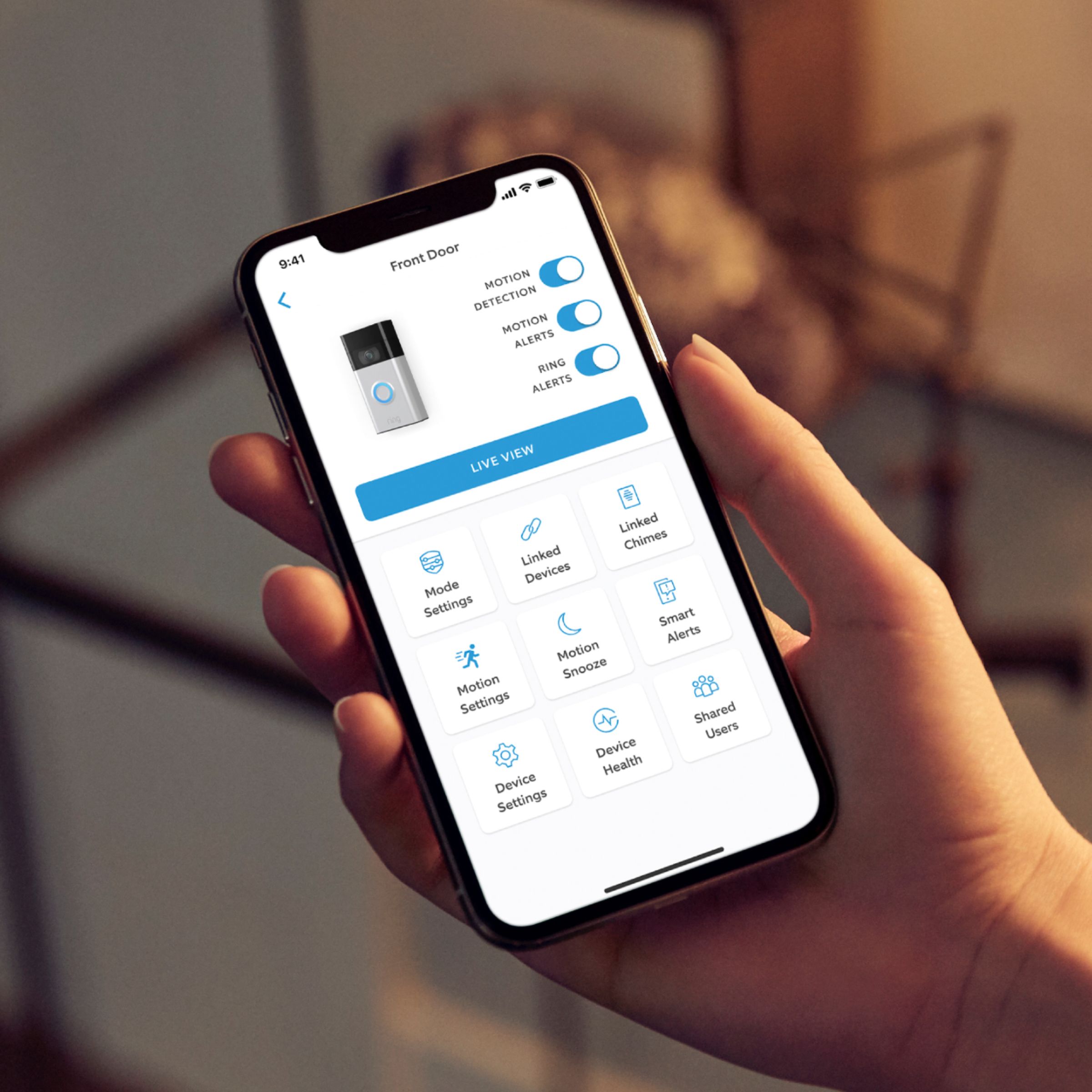
Make sure your Ring Alerts, Motion Detection, and Motion Alerts are toggled on (blue).
If you are not connected to wifi, you will not receive any notifications. You can check to make sure your Ring device is online by going to the Device Health page in the Ring App.
To check your wifi connection, tap Device Health.
Under Network, you'll see your RSSI signal strength number.
If your signal strength is in red, tap the question mark icon to find some additional troubleshooting steps.
Visit our support center for additional details.
Ring Community was launched to help deliver the most current news and educational information to our neighbors. This online forum is divided into four categories: Product Boards, Ring Updates, Tips + Tricks, and a Moderators’ Corner. The Product Boards are where you can begin new topics with your questions or feedback; there is also a search option that helps you find topics that have already been posted by other neighbors.
All the best,
Nicole from Ring.
I’m screwed
||Posted .This reviewer received promo considerations or sweepstakes entry for writing a review.I purchased this unit to use in one of our units! And, when I went to install it… it didn’t have all of the screws necessary to make the install!
No, I would not recommend this to a friendBrand response from Ring
Posted .Hello Dfrank,
Thank you for taking the time to share your experience with us. We understand the importance of a seamless installation process, as this allows you to start using your Ring Video Doorbell right away. What you describe is not the experience we want you to have, rest assured we hear you and are here to offer you some assistance.
In this particular case, we’d suggest you reach out to Best Buy’s customer service: 1-888-237-8289 or https://www.bestbuy.com/services/triage/home. We are confident that they will be able to provide you resolution to the installation concerns you have described.
If you need assistance from Ring, Ring Community is our first peer-to-peer community online forum, giving our customers the ability to help one another and share their feedback directly with Ring.
We invite you to reach out at https://community.ring.com/ if any additional installation information is needed regarding the Ring Video Doorbell 2020. We are eager to turn around your experience!
Thank you, Jamila with Ring.
Door bell services
||Posted . Owned for 1 month when reviewed.This reviewer received promo considerations or sweepstakes entry for writing a review.My door bell doesnt work now,it use tobwork now we cant hear it
I would recommend this to a friendBrand response from Ring
Posted .Hi BerthinaJ.
Thank you for taking the time to share your experience with us.
We understand how important it is to be notified when someone is at your door. The features and technology provided by the Ring Video Doorbell (2nd Generation) are incredibly valuable and help provide you with peace of mind about your home security. We can definitely assist you with this today to ensure your Ring device is performing optimally.
It sounds like you are not getting notifications inside your home when someone rings your doorbell. If your doorbell is functioning but you can’t hear your internal chime, there are several possible reasons.
One possible reason you are no longer hearing your internal chime kit is that your doorbell transformer may be worn out and need replacement. A licensed electrician can help you determine if your transformer needs to be replaced.
Another possible reason could be that cold weather is affecting your doorbell's performance. Extremely cold weather has unfortunate effects on lithium-ion batteries such as those used in Ring devices. As the temperature drops, these batteries begin to have trouble holding a charge, and if it gets cold enough, they'll stop working entirely.
Visit our support center for more information on why your device may not be triggering your internal chime kit.
Ring Community was launched to help deliver the most current news and educational information to our neighbors. This online forum is divided into four categories: Product Boards, Ring Updates, Tips + Tricks, and a Moderators’ Corner. The Product Boards are where you can begin new topics with your questions or feedback; there is also a search option that helps you find topics that have already been posted by other neighbors.
All the best,
Nicole from Ring.
Disconnect easy from internet
||Posted . Owned for 1 month when reviewed.This reviewer received promo considerations or sweepstakes entry for writing a review.Not a good product it disconnects from the internet and I have to pay for them to install another one. I’m getting a refund
No, I would not recommend this to a friendBrand response from Ring
Posted .Hi Beverly. I understand the importance of being able to rely on your Video Doorbell for your security. If your Doorbell is disconnecting from your wifi network, it may not have a strong connection. Try reviewing the information in our Help Center article here: https://support.ring.com/hc/en-us/articles/217271526-Understanding-RSSI-Values-and-Wifi-Signal-Strength. You may need to move your wifi router closer to your Doorbell, or use a wifi extender to improve the signal that your Doorbell is receiving. If you have any additional questions, check out the Ring Community at https://community.ring.com/. As a peer-to-peer forum, the Ring Community allows you to interact with other neighbors and ask each other questions. Best, Ashley from Ring.
Doesnt work
||Posted . Owned for less than 1 week when reviewed.This reviewer received promo considerations or sweepstakes entry for writing a review.This units works but doesnt work to chime my home doorbell sound... the first generation works but this one doesnt?
No, I would not recommend this to a friendBrand response from Ring
Posted .Hi GhostyJoker.
Thank you for sharing your concerns with us.
We understand how vital it is for your internal chime kit to ding when someone presses the doorbell button on your Ring Video Doorbell (2nd Generation). Being notified of visitors at your door is an important feature of this device. We would love the opportunity to work with you to ensure we get your device working as intended.
It sounds like your Ring Video Doorbell (2nd Generation) is online and working but not properly triggering your internal chime kit. The Ring Video Doorbell (2nd Generation) is compatible with AC-powered door chimes operating between 8 and 24 volts AC, but is not compatible with wireless door chimes or any chime or intercom system using a DC transformer.
We recommend first checking that your home's chime kit is working on its own, without the Ring Video Doorbell attached. Once you have confirmed the chime kit is still working, we suggest checking that it is compatible with the Ring Video Doorbell (2nd Generation). Attached is a list of doorbell chimes we have tested and confirmed are compatible: https://support.ring.com/hc/en-us/articles/360053138112-Ring-Video-Doorbell-2nd-Generation-Chime-Kit-Compatibility-List.
Ring Community was launched in March 2019 to help deliver the most current news and educational information to our neighbors. It is our first peer-to-peer community forum, giving our customers the ability to help one another and share their feedback and experiences with Ring. Please reach out at https://community.ring.com/ if any additional information is needed regarding your concern.
All the best,
Nicole from Ring.
Ring product has not lived up to it’s hype!
||Posted . Owned for 1 month when reviewed.This reviewer received promo considerations or sweepstakes entry for writing a review.Ring product has not lived up to it’s touting! I have seen hiccups after hiccups, Amazon outage and a multiplicity of wifi connectivity issues…
No, I would not recommend this to a friendBrand response from Ring
Posted .Hello 1HumbleOfferings,
We appreciate that you have placed value in owning a Ring device to secure your home. Ring understands the importance of having the Ring Video Doorbell 2020 work as intended. It is a valuable device that is designed to notify you as to who may be near your home. Please know that it is a priority for us to be of assistance and find a resolution to your concern.
The Ring Video Doorbell (2020 release) is the next generation of the original Ring Video Doorbell. In addition to new video features such as Near Zone functionality, the 2020 release Video Doorbell boasts 1080p video, improved night vision, improved audio quality and near motion zone detection.
After reading your review, it seems that your Ring Video Doorbell 2020 is having trouble staying connected to your home wifi. When this occurs, we recommend rebooting your wifi modem and router. Since your router and modem are usually the hardest working devices in your house, for optimal performance, you should reboot them about once a month. To reboot routers or modems, follow the instructions below:
Unplug your router or modem from its power supply (don’t just turn it off).
If your router and modem are separate, unplug both of them.
Wait at least 30 seconds, then plug them back in.
Wait for your internet to be restored.
Here is a helpful article which walks you through additional steps to take if the issue still persists for you after your modem/router reboot: https://support.ring.com/hc/en-us/articles/217240386-In-app-Setup-Failing-Repeatedly.
Additionally, if you have not already, please check out our Ring Community forum where other Ring users, like yourself, have an open discussion platform to share their experiences, as well as solutions to issues experienced: https://community.ring.com/.
Thank you, Jamila with Ring
Return policy is horrible
||Posted . Owned for 1 month when reviewed.This reviewer received promo considerations or sweepstakes entry for writing a review.Have no clue about the doorbell but the return policy and procedures are absolutely horrible
No, I would not recommend this to a friendBrand response from Ring
Posted .Hello Best Buy customer
We appreciate you sharing your feedback. We do have this page available, which covers our shipping and return policies when a Ring device is purchased through us: https://ring.com/shipping-and-returns.
Best wishes
Ivan from Ring
C CROCKETT
||Posted . Owned for 1 month when reviewed.This reviewer received promo considerations or sweepstakes entry for writing a review.The customer service was awful no customer skills.
I would recommend this to a friendBrand response from Ring
Posted .Hi CecileC..
Thank you for taking the time to share your experience with us.
At Ring, we believe in keeping people close to what’s important. That is why we are driven to create products that help you protect what matters most at home and empower you to connect with your visitors from wherever you are. Together, we’ll make neighborhoods safer!
We are always looking for ways to improve our neighbor's experiences, and your feedback is an invaluable part of this process. The features and technology provided by the Ring Video Doorbell (2nd Generation) are incredibly valuable and help provide you with peace of mind about your home security. We would love the opportunity to work with you and address the concerns mentioned in your review.
Ring Community was launched to help deliver the most current news and educational information to our neighbors. This online forum is divided into four categories: Product Boards, Ring Updates, Tips + Tricks, and a Moderators’ Corner. The Product Boards are where you can begin new topics with your questions or feedback; there is also a search option that helps you find topics that have already been posted by other neighbors.
All the best,
Nicole from Ring.
Homeowner
||Posted .This reviewer received promo considerations or sweepstakes entry for writing a review.Battery drains too quickly, non consistent motion detector, Doorbell doesn’t ring at times. Had people ring the doorbell and it only displays as a motion
No, I would not recommend this to a friendBrand response from Ring
Posted .Hello NHere,
As Ring users, we know the importance of having a video doorbell to rely on. The Ring Video Doorbell (2020 Release) was designed with reliability in mind. You should be able to count on timely Ring alerts and near instant motion detection for a seamless experience. Please know that we hear your concern and are here to help.
If you haven't already, please visit the 'Device Health' section of the Ring app. This will help you address any underlying problems that can lead to decreased performance. For example, a poor internet connection can lead to missed Ring notifications and inconsistent motion detection.
Can you please reach us when you get a moment? We're confident that by working together, we'll find the best way forward.
All the best,
Marlom at Ring.
Defective product
||Posted . Owned for 1 month when reviewed.This reviewer received promo considerations or sweepstakes entry for writing a review.The Ring Doorbell Pro was defective. I paid an electrician $500 to try to trouble shoot. In the end I had to request a replacement from Ring.
No, I would not recommend this to a friendBrand response from Ring
Posted .Hello Disappointed,
Thank you for taking the time to share your experience with us directly. We appreciate it. We can certainly understand your desire to find a product to secure your home that is worth your time and money. Having all the Ring Doorbell Pro installation instructions before purchase is imperative for you to make an informed purchasing decision. Rest assured, we are here to provide you some information to assist you with your replacement device.
In some cases, installation by a qualified electrician may be required in your area. Refer to your local laws and building codes before performing electrical work; permits plus professional installation may be required by law. If you are comfortable working with electricity and performing the installation yourself, these instructions will guide you along the way: https://support.ring.com/hc/en-us/articles/360036047831-Physically-Installing-your-Ring-Video-Doorbell-Pro.
We invite you to reach out at https://community.ring.com/ if any additional information is needed regarding your new Ring Pro device, or it's replacement. Ring Community is our first peer-to-peer community forum, giving our customers the ability to help one another and share their feedback/experiences with Ring.
Thank you,
Alexis with Ring
There are Better options
||Posted . Owned for 1 week when reviewed.This reviewer received promo considerations or sweepstakes entry for writing a review.Battery version. Very hard to recharge as it requires the removal of 2 very small screws. Prone to loss.
No, I would not recommend this to a friendBrand response from Ring
Posted .Hi GaryB, thanks for sharing your feedback. If you find that the battery in your Video Doorbell is draining more quickly than expected, try reviewing the information on battery drain here https://support.ring.com/hc/en-us/articles/4405531384468-How-to-Fix-Unexpected-Battery-Drain-in-Your-Ring-Video-Doorbell-or-Security-Camera. If you have any other questions about your Ring Doorbell, check out the Ring Community at https://community.ring.com/ to find solutions from other neighbors. All the best, Ashley from Ring.
Ring Doorbell
||Posted . Owned for 3 weeks when reviewed.This reviewer received promo considerations or sweepstakes entry for writing a review.Enjoying this device, able to see my property, receive alerts and talk to people at my door. Highly recommend this product.
I would recommend this to a friendBrand response from Ring
Posted .Hello Rivers,
Thank you for leaving a review. We love reading how your Ring Video Doorbell has added an extra layer of security in your home and how it is working as intended. Our top priority at Ring is to ensure that our customers have the best possible experience with our products. We really appreciate your feedback. Our team is always striving to improve our products and their performance.
We would love to hear more about your experience with Ring. We invite you to share your experience with other Ring users, like yourself, on our Ring Community page: https://community.ring.com/.
Thank you, Jamila, with Ring.
Rings
||Posted . Owned for 3 weeks when reviewed.This reviewer received promo considerations or sweepstakes entry for writing a review.I still do not have the both of my rings set up yet. I thought it would be so easy. Ha ha not really
I would recommend this to a friendBrand response from Ring
Posted .Hi KimS, it can definitely be confusing setting up a new device for the first time. You can find the in-app setup instructions for the Video Doorbell here https://support.ring.com/hc/en-us/articles/360041353291-Setting-Up-Your-Ring-Video-Doorbell-2nd-Generation-in-the-Ring-App. For installation steps, those would be here (with an existing doorbell) https://support.ring.com/hc/en-us/articles/360041352731-How-to-Physically-Install-Your-Ring-Video-Doorbell-2nd-Generation-With-an-Existing-Doorbell and here (without an existing doorbell) https://support.ring.com/hc/en-us/articles/360041190411-How-to-Physically-Install-Your-Ring-Video-Doorbell-2nd-Generation-Without-an-Existing-Doorbell. If you have any other questions about your new Doorbell, try asking the Ring Community https://community.ring.com/ for help from other neighbors. Best wishes, Ashley from Ring.
Horrible. Never connected even with help
||Posted . Owned for less than 1 week when reviewed.This reviewer received promo considerations or sweepstakes entry for writing a review.Returned it, bought a WYZE which is great! This was crap.
No, I would not recommend this to a friendBrand response from Ring
Posted .Hi Elsie. Thank you for taking the time to share your experience with us. At Ring, we understand it is essential to have your Ring Video Doorbell (2nd Gen.) online and working properly so you can keep your home secure. The features and technology provided by the Ring Video Doorbell (2nd Gen.) are incredibly valuable and help provide you with peace of mind about your home security. We are eager to address the issue you raised in your review and provide you with a resolution today.
It sounds like your device is not performing as you expected. The Ring Video Doorbell (2nd Gen.) is designed to work with your home's wifi network and is compatible with b/g/n wifi networks operating on 2.4 GHz frequencies. If you're receiving a 'Setup did not complete' message and cannot finish setup, it could be due to one of these common causes of setup failures:
* Your Ring device is too far from your wifi router. Ideally, your router should be within 20 feet of your Ring device.
* There's a possible problem with your internet connection.
* There's a possible issue related to your wifi modem or router.
Our support team is available 24/7 if you have any questions or need further assistance getting your device set up. If any additional information is needed regarding your Ring Video Doorbell (2nd Gen.), please reach out to our Community. Ring Community is our first peer-to-peer community forum, giving our customers the ability to help one another and share their feedback and experiences directly with Ring.
Sincerely,
Melissa from Ring.
Too costly
||Posted . Owned for 1 month when reviewed.This reviewer received promo considerations or sweepstakes entry for writing a review.Too costly, Must have a yearly plan for each camera
No, I would not recommend this to a friendBrand response from Ring
Posted .Hi JxRR.
Thank you for sharing your feedback with us.
We understand the importance of having all relevant information prior to purchasing your device. Being able to record videos your Ring Video Doorbell (2nd Generation) captures is a valuable feature provided through the optional Ring Protect Plan. We can definitely provide some additional information regarding the concern mentioned in your review.
It sounds like there is some confusion surrounding the paid and unpaid features of the Ring Video Doorbell (2nd Generation). Without any paid subscription, the Ring Video Doorbell (2nd Generation) allows you to view real-time video and answer doorbell notifications when they happen, but you don’t get video recordings of those events.
Ring does offer an optional Ring Protect Plan, starting at as little as $3.99 per month, per device. The optional subscription gives you access to paid features that allow you to save, review, and share video recordings from your Ring device to your Ring account.
Ring Community was launched to help deliver the most current news and educational information to our neighbors. This online forum is divided into four categories: Product Boards, Ring Updates, Tips + Tricks, and a Moderators’ Corner. The Product Boards are where you can begin new topics with your questions or feedback; there is also a search option that helps you find topics that have already been posted by other neighbors.
All the best,
Nicole from Ring.
not recommendable
||Posted . Owned for 1 month when reviewed.This reviewer received promo considerations or sweepstakes entry for writing a review.because it is not fair that you buy that device and have to pay membership every month or year to record
No, I would not recommend this to a friendBrand response from Ring
Posted .Hi Door. A Ring Protect Plan is not required to use our devices. Without a Ring Protect Plan, you can still receive Motion Alerts, use 2 Way Audio and Live View. To learn about our Ring Protect Plans, visit this page here: https://ring.com/protect-plans. If you have any further questions or concerns, try browsing the Ring Community at https://community.ring.com/. As our first peer-to-peer forum, the Ring Community allows you to ask questions and interact with other neighbors to discuss your Ring devices. Best wishes, David with Ring.