Customer Ratings & Reviews



- Model:
- B08M125RNW
- SKU:
- 6453038
Rating by feature
- Video Quality
Rating 4.6 out of 5 stars
- Mobile App
Rating 4.6 out of 5 stars
- Sound Quality
Rating 4.5 out of 5 stars
to a friend
Customers are saying
Customers are enthusiastic about the Wired Doorbell Plus Smart Wi-Fi Video Doorbell, highlighting its great audio and video quality and ease of use. Users find the installation process straightforward and appreciate the overall performance and security features. Some concerns were raised regarding the price, Wi-Fi connectivity, and the need for a subscription.
This summary was generated by AI based on customer reviews.
Video doorbell wifi
||Posted . Owned for 1 month when reviewed.This reviewer received promo considerations or sweepstakes entry for writing a review.We love the video door bell it gives you clear photo/video
I would recommend this to a friendDoorbell randomly activating
||Posted . Owned for less than 1 week when reviewed.This reviewer received promo considerations or sweepstakes entry for writing a review.Returned the item. I installed and uninstalled, reset and contacted the support team. My doorbell inside my residence would start ringing randomly. Continued to follow the instructions and reinstalled the old ring Gen 1 that was fading out and the doorbell issue stopped. I have read many issues relative to this same issue from other customers. I am going to locate another ring doorbell pro at another store and continue to see if it was an issue with this specific item. I have installed many ring products and never had this issue. If anyone has a solution I would appreciate your input, thanks.
No, I would not recommend this to a friendBrand response from Ring
Posted .Hi NicholasR.
Thank you for taking the time to share your experience with us.
We understand how important it is for your Ring Video Doorbell Pro to function consistently and reliably. The features and technology provided by the Ring Video Doorbell Pro are incredibly valuable and help provide you with peace of mind about your home security. We want to ensure your device is working as intended by providing you with solutions to resolve the concern you mentioned in your review.
It sounds like your internal chime kit is triggering without someone pressing the doorbell button. The Ring Video Doorbell Pro requires a minimum of 16 volts AC to power the device. If your Video Doorbell Pro is not receiving enough power, your Ring Video Doorbell Pro will not ring your existing internal doorbell correctly.
We recommend following these steps to check your transformer's voltage:
Open the Ring app.
Tap the top menu (☰).
Tap Devices.
Select Video Doorbell Pro.
Tap the Device Health tile.
Under Power, you should see the transformer voltage status. Tap that section to reveal the voltage.
For Video Doorbell Pro to operate, the voltage needs to be listed as "good." If you are continuing to have issues, it may be the electrical wiring at your location. Older wires from your wall can deteriorate over time and may need to be replaced. Visit our support center for more troubleshooting steps.
Ring Community was launched to help deliver the most current news and educational information to our neighbors. This online forum is divided into four categories: Product Boards, Ring Updates, Tips + Tricks, and a Moderators’ Corner. The Product Boards are where you can begin new topics with your questions or feedback; there is also a search option that helps you find topics that have already been posted by other neighbors.
All the best,
Nicole from Ring.
Great doorbell
||Posted . Owned for 3 weeks when reviewed.This reviewer received promo considerations or sweepstakes entry for writing a review.Clear view camera. This doorbell was worth the purchase.
I would recommend this to a friendGood product
||Posted . Owned for 3 weeks when reviewed.This reviewer received promo considerations or sweepstakes entry for writing a review.Sound and video quality is very good, I like this product
I would recommend this to a friendUseful
||Posted . Owned for 1 week when reviewed.This reviewer received promo considerations or sweepstakes entry for writing a review.Very Useful. I do wish there was an option to position a secondary camera for a better angle of the view.
I would recommend this to a friendBrand response from Ring
Posted .Hi KristalR, I'm glad to hear your Doorbell Pro has been working well so far. If you have any questions about your Doorbell Pro, you can try searching our Help Center for answers https://support.ring.com/hc/en-us/sections/201870586-Ring-Video-Doorbell-Pro. You're also welcome to browse the Ring Community https://community.ring.com/ to see what other neighbors have to say. Best wishes, Ashley from Ring.
Ring Doorbell Pro
||Posted . Owned for 1 month when reviewed.This reviewer received promo considerations or sweepstakes entry for writing a review.Not real happy as I initially though I would be. Had to contact Customer Support several times?
No, I would not recommend this to a friendBrand response from Ring
Posted .Hi JMA77.
Thank you for taking the time to share your experience with us.
We understand how important it is for your Ring Wired Doorbell Plus to function consistently and reliably. The features and technology provided by the Ring Wired Doorbell Plus are incredibly valuable and help provide you with peace of mind about your home security. We want to work with you to ensure your device is working as intended.
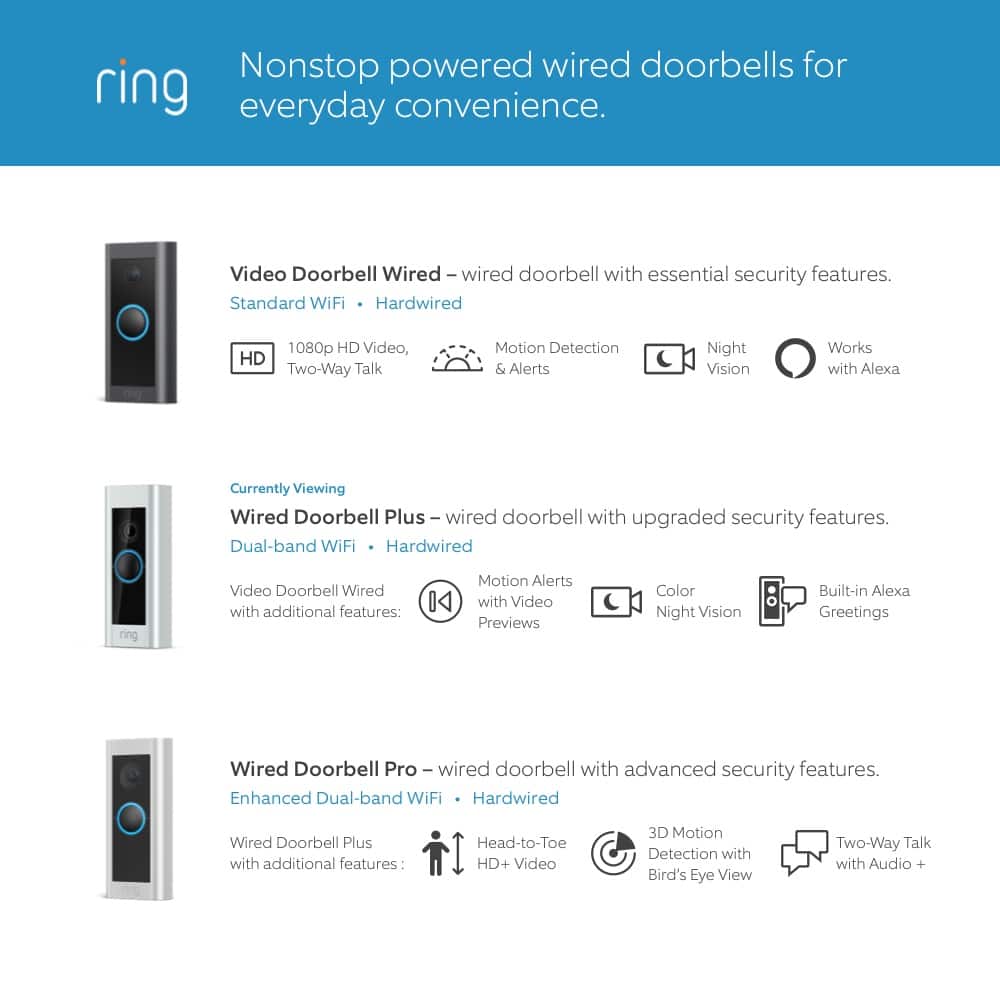
It sounds like you have some concerns with your Ring Wired Doorbell Plus. The Wired Doorbell Plus offers advanced motion detection, 1080p video, two-way talk & quick replies, color night vision, and Alexa greetings. With Ring’s advanced doorbell, you can check in on your front door anytime, from anywhere, and see and speak to visitors at your door in real-time using your Ring app or Alexa-enabled device. With Wired Doorbell Plus, you’ll always be connected to your home, so you can watch over your property and answer the door from anywhere. We invite you to visit our support center if any additional information is needed.
Ring Community was established to assist in providing our neighbors with the most recent news and instructional material. Four sections make up this online forum: Ring Updates, Product Boards, Tips & Tricks, and a Moderators' Corner. You can start new topics on the Product Boards with your questions or suggestions; a search function will assist you in locating subjects that other neighbors have previously posted.
All the best,
Nicole from Ring.
Button stopped working
||Posted . Owned for 2 weeks when reviewed.This reviewer received promo considerations or sweepstakes entry for writing a review.The doorbell button stopped working the second day. Video recording was still working.
I would recommend this to a friendBrand response from Ring
Posted .Hi Warafa.
Thank you for taking the time to share your experience with us. We understand how important it is for your Ring Wired Doorbell Plus to function consistently and reliably, so you are alerted to any wanted or unwanted activity in or around your home. Being able to rely on the alerts to know when someone rings the doorbell is an essential feature of the Ring Wired Doorbell Plus. We are eager to address the issue you raised in your review and provide you with a resolution today.
It sounds like the device is not functioning as intended. Wired Doorbell Plus requires a minimum of 16 volts AC to power the device. If your Wired Doorbell Plus is not receiving enough power, you may see issues like this happen:
Regularly losing connection to your wifi network
Regularly shutting off (the white light on the front will turn off)
Freezing up during a live event
Not ringing your existing internal doorbell correctly
Night vision doesn't work
The device works fine for a couple of events and then stops working
Check your Transformer Voltage
We suggest that you follow these steps to troubleshoot the chime issue that you are experiencing:
Open the Ring app.
Tap the top menu (☰).
Tap Devices.
Select Wired Doorbell Plus.
Tap the Device Health tile.
Under Power, you should see the Transformer Voltage Status. Tap that section to reveal voltage.
For the Ring Wired Doorbell Plus to operate, the voltage needs to be listed as "Good". If you are continuing to have issues, it may be the electrical wiring at your location. Older wires from your wall can deteriorate over time and may need to be replaced.
For optimal performance, be sure that your Ring Pro Power Kit is properly installed. We have listed the installation instructions here for your review:
1. Turn off the circuit breaker for your internal doorbell.
2. Remove the cover from your internal doorbell.
3. Loosen the "Front" and "Trans" terminal screws on your internal doorbell.
4. Connect one wire from the Pro Power Kit to the “Front” terminal, and the other wire to the “Transformer” terminal, leaving the existing doorbell wires in place. Then, re-tighten the screws. It doesn't matter which Pro Power Kit wire goes to each terminal.
5. Position the Pro Power Kit within your internal doorbell, away from any moving parts. Use the adhesive on the back of the Pro Power Kit to fix it in place, if desired.
6. Replace the cover on your internal doorbell.
Ring Community was launched to help deliver the most current news and educational information to our neighbors. This online forum is divided into four categories: Product Boards, Ring Updates, Tips + Tricks, and a Moderators’ Corner. The Product Boards are where you can begin new topics with your questions or feedback; there is also a search option that helps you find topics that have already been posted by other neighbors. We invite you to visit our community if more information is needed regarding your Ring Wired Doorbell Plus.
Thank you,
Melissa from Ring.
Doorbell ring
||Posted . Owned for 1 week when reviewed.This reviewer received promo considerations or sweepstakes entry for writing a review.Ring video doorbell works excellent. Also expandable.
I would recommend this to a friendEasy Install
||Posted . Owned for 3 weeks when reviewed.This reviewer received promo considerations or sweepstakes entry for writing a review.Easy to install, very convenient to check on packages.
I would recommend this to a friendA Wonderful Christmas Gift
||Posted . Owned for 3 weeks when reviewed.This reviewer received promo considerations or sweepstakes entry for writing a review.Excellent. Easy to install. No problems whatsoever.
I would recommend this to a friendwish it worked
||Posted . Owned for 1 month when reviewed.This reviewer received promo considerations or sweepstakes entry for writing a review.When it works it’s great but it doesn’t work 70% of the time. I hope geek squad can fix it
I would recommend this to a friendBrand response from Ring
Posted .Hello bestbuyer,
Thank you for reaching out to us. Rest assured, we hear your concerns and are here to lend you some assistance. The Ring Pro was designed to give you real time alerts and give you peace of mind in your home security. Moving forward if the Ring products and features are not matching your expectations, we have some options available for you.
Based on your review, it seems that you are having trouble with your Ring Pro. If your Ring Pro is not working as intended, we recommend resetting the device. To reset your Ring Pro press and hold the setup button for 10-15 seconds. Once the white light stops spinning you can continue with setup. For more information on how to troubleshoot your Ring Pro please see our help center article: https://support.ring.com/hc/en-us/articles/216536983-What-to-Do-if-Your-Ring-Video-Doorbell-Pro-Goes-Offline.
Additionally, if you have not already, please check out our Ring Community forum where other Ring users, like yourself, have an open discussion platform to share their experiences, as well as solutions to issues experienced: https://community.ring.com/.
Thank you, Jamila with Ring.
Un-Stable Performance
||Posted . Owned for 1 month when reviewed.This reviewer received promo considerations or sweepstakes entry for writing a review.I contacted Ring 3 times. Voltage issues even after replacing transformer. Ring had no more ideas. Returned to Best buy.
No, I would not recommend this to a friendBrand response from Ring
Posted .Hi Saute.
Thank you for taking the time to share your experience with us. We understand the importance of having all relevant product information prior to purchasing. The features and technology provided by the Ring Wired Doorbell Plus are incredibly valuable and help provide you with peace of mind about your home security. We can definitely provide you with more information regarding the concern mentioned in your review.
It sounds like the device is not working as expected. Wired Doorbell Plus is Ring’s ultra-slim video doorbell with a variety of advanced features. The Wired Doorbell Plus offers "Advanced Motion Detection," 1080p video, "Two-Way Talk," "Quick Replies," "Color Night Vision," and "Alexa Greetings." With Ring’s advanced doorbell, you can check in on your front door anytime, from anywhere, and see and speak to visitors at your door in real-time using your Ring app or Alexa-enabled device.
We are happy to provide you with the instructions for installing the Ring Wired Doorbell Plus without an existing doorbell.
Please follow these steps:
1. Install the transformer. For your safety, only use an existing doorbell transformer within the range specified below or compatible Ring accessories to power your device. Since you’ll be working with high-voltage electricity, first turn off the main power switch on your fusebox or consumer unit.
Ring accessories are sold separately and may include:
Plug-In Adapter (24VDC, 500mA)
The Ring Wired Doorbell Plus is not compatible with third-party DC adapters, halogen transformers, or garden-lighting transformers. Using incompatible power sources can damage your device and cause electric shock.
If you need help with this process, you should consult a qualified electrician
2. Connect the Pro Power Kit. The Pro Power Kit V2 is designed to bypass your existing doorbell. Even if you are not bypassing an existing doorbell, connecting the Pro Power Kit is a required step with AC transformers in order to protect your new doorbell and transformer.
3. Install your Video Doorbell Pro. Use the Phillips end for the mounting screws and the star-shaped end for the security screw. Use a 6mm drill bit with a power drill to drill holes for the (optional) anchors if installing on concrete, stucco, or brick. Use two mounting screws to mount your Ring Doorbell. Secure the faceplate with one of the security screws.
4. Restore power at the breaker. You’re almost there! After turning the power back on, it’s time to set up your doorbell in the Ring app.
5. Finish setting up your Video Doorbell Pro by following the steps in the Ring app. The Ring app connects your Ring Doorbell to your mobile device running iOS or Android, making sure you’re always home. Open the Ring app and tap Set Up Device to begin the setup process. Select Ring Video Doorbell Pro from the list and follow the in-app instructions.
We invite you to reach out to our community if any additional information is needed regarding your Ring Wired Doorbell Plus. The Ring Community is our first peer-to-peer community forum, giving our customers the ability to help one another by sharing their feedback and experiences with each other.
Thank you,
Matthew from Ring.
Return policy isn’t worth buying from them!
||Posted . Owned for 3 weeks when reviewed.This reviewer received promo considerations or sweepstakes entry for writing a review.I purchased this ring doorbell and it worked at first until I had to change my wifi router and the electrical company switched it to a different version of the ring doorbell. I only had it for 20 days and they still wouldn’t return it. Now I am out $150. Won’t be making a purchase like this from here again because of their return policy!
No, I would not recommend this to a friendBrand response from Ring
Posted .Hi CQ80.
Thank you for taking the time to share your experience with us. At Ring, we want to ensure that you have the best possible experience with our products. Your peace of mind and security are extremely important to us. The features and technology provided by the Ring Wired Doorbell Plus are incredibly valuable and help provide you with peace of mind about your home security. Rest assured, we're here to help!
In this particular case, we'd suggest you reach out to Best Buy's customer service: 1-888-237-8289 or https://www.bestbuy.com/services/triage/home. We are confident that they will be able to provide you with a resolution to this concern.
If you still have the Ring device in your possession, we invite you to reach out to us at our community. Ring Community is our first peer-to-peer community forum, giving our customers the ability to help one another and share their personal feedback/experiences with Ring. We look forward to hearing from you, if we can be of any further assistance!
Thank you,
Amilia from Ring.
Ring Pro
||Posted . Owned for 1 month when reviewed.This reviewer received promo considerations or sweepstakes entry for writing a review.I like the sleek look, but i feel my Doorbell 2 had better video quality.
No, I would not recommend this to a friendBrand response from Ring
Posted .Hello EmilyK
We appreciate you sharing your feedback. The Video Doorbell Pro has a video resolution of 1080p HD. If you feel your Pros video quality is not meeting its full resolution, review this Help Center article on troubleshooting poor video quality: https://support.ring.com/hc/en-us/articles/205348254-Troubleshooting-Poor-Video-Quality-
Best wishes
Ivan from Ring
Best buy "DISASTER"
||Posted . Owned for 1 week when reviewed.This reviewer received promo considerations or sweepstakes entry for writing a review.I ordered this product and was never told that BB is not in charge of the people that install the ring doorbell. I am sitting here writing this review while waiting for someone from BB to answer my complaint. As of now I have been on hold for 1 hr and 20 mins and no one is responding. My door bell camera has been installed three different times, three different units, and has never worked for more than !/2 hr. Now due to their fooling with my door bell it doesn't work either. And the tech had the gall to tell me the problem is that I don't have power at the door.
No, I would not recommend this to a friendBrand response from Ring
Posted .Hello mike, Thank you for taking the time to share your Bestbuy experience with us. We understand the importance of a seamless install, as this allows you to use your Ring device right away! Rest assured, we hear you and are here to offer you some help. In this particular case, it may be best for you to reach out to Bestbuy's customer service team and see what solutions they have for you:1 (888) 237-8289 or https://corporate.bestbuy.com/contact-corporate-responsibility/. We are confident that they will be able to provide you a resolution to the installation concern you’ve expressed. Also, Ring Community is our first peer-to-peer community forum, giving our customers the ability to help one another and share their feedback/experiences with Ring. We invite you to reach out at https://community.ring.com/ if any additional information or assistance is needed regarding your Ring device. Thank you, Jamila with Ring.
Doorbell
||Posted . Owned for 1 month when reviewed.This reviewer received promo considerations or sweepstakes entry for writing a review.I have the ring doorbell for pro one seem to have a problem going off all the time. perimeters changed rebooted it still wouldn’t work went through the tech support with ring. Finally returned it to Best Buy got a second one, but this is a newer model ring 2 pro and it’s also having issues check my wiring, it won’t ring the interior doorbell. Accessory keeps telling me the power is not enough doesn’t work right I’m returning it. I will not buy another ring doorbell. 
No, I would not recommend this to a friendBrand response from Ring
Posted .Hi Lindy.
Thank you for taking the time to share your experience with us. We understand how important it is for your Ring Wired Doorbell Plus to function consistently and reliably, so you are alerted to any wanted or unwanted activity in or around your home. The features and technology provided by the Ring Wired Doorbell Plus are incredibly valuable and help provide you with peace of mind about your home security. Rest assured, we hear you and are here to offer you some help.
It sounds like you are experiencing power issues with the device. Wired Doorbell Plus requires a minimum of 16 volts AC to power the device. If your Wired Doorbell Plus is not receiving enough power, you may see issues like this happen:
Regularly losing connection to your wifi network
Regularly shutting off (the white light on the front will turn off)
Freezing up during a live event
Not ringing your existing internal doorbell correctly
Night vision doesn't work
The device works fine for a couple of events and then stops working
Check your Transformer Voltage.
Open the Ring app.
Tap the top menu (☰).
Tap Devices.
Select Wired Doorbell Plus.
Tap the Device Health tile.
Under Power, you should see the Transformer Voltage status. Tap that section to reveal voltage.
For Wired Doorbell Plus to operate, the voltage needs to be listed as "Good". If you are continuing to have issues, it may be the electrical wiring at your location. Older wires from your wall can deteriorate over time and may need to be replaced.
Ring Community was launched to help deliver the most current news and educational information to our neighbors. This online forum is divided into four categories: Product Boards, Ring Updates, Tips + Tricks, and a Moderators’ Corner. The Product Boards are where you can begin new topics with your questions or feedback; there is also a search option which helps you find topics that were already posted by other neighbors. We invite you to visit our community today!
Thank you,
Melissa from Ring.
Disappointment
||Posted . Owned for 1 month when reviewed.This reviewer received promo considerations or sweepstakes entry for writing a review.It worked for 10 days. Ring customer service tried to help me resolve the problem but then said it was defective. They will replace it but not until September because they are out of stock. It was one of my worst purchases ever!
No, I would not recommend this to a friendBrand response from Ring
Posted .Hi SARAS.
Thank you for taking the time to share your experience with us. We understand how important it is for your Ring Wired Doorbell Plus to function consistently and reliably, so you are alerted to any wanted or unwanted activity in or around your home. The features and technology provided by the Ring Wired Doorbell Plus are incredibly valuable and help provide you with peace of mind about your home security.
It sounds like your Wired Doorbell Plus is not performing as expected. Wired Doorbell Plus is Ring’s ultra-slim design video doorbell with a variety of advanced features. The Wired Doorbell Plus offers Advanced Motion Detection, 1080p video, Two-Way Talk & Quick Replies, Color Night Vision and Alexa Greetings. With Ring’s advanced doorbell, you can check in on your front door anytime, from anywhere, and can see and speak to visitors at your door in real-time using your Ring app or Alexa-enabled device.
We invite you to reach out to our community if any additional information is needed regarding your Ring Wired Doorbell Plus. The Ring Community is our first peer-to-peer community forum, giving our customers the ability to help one another by sharing their feedback and experiences with each other.
Thank you,
Matthew from Ring.
Ring
||Posted .This reviewer received promo considerations or sweepstakes entry for writing a review.There are better choices and less expensive when looking for camera door security.
No, I would not recommend this to a friendBrand response from Ring
Posted .Hello Suzema,
Thank you for taking the time to share your Ring Video Doorbell Pro experience with us. We are happy to read that the camera is providing you with peace of mind when monitoring your at home. Being alerted to unwelcome visitors in these areas is essential in a home security device. Thank you for supporting our mission of making neighbors safer!
Your experience with Ring is impactful on our future as a company, and we would love to hear from you directly on our Ring Community forum. If you have any experiences to share, questions regarding Ring and our services, or any feedback and product suggestions, we encourage you to have your voice be heard: https://community.ring.com/!
Thank you, Jamila with Ring
Ring doorbell
||Posted . Owned for 1 month when reviewed.This reviewer received promo considerations or sweepstakes entry for writing a review.The installers had trouble with the install. However, for it working and love to use them.
I would recommend this to a friendBrand response from Ring
Posted .Hello Danam,
Thank you for taking a moment to leave your review on the Ring Video Doorbell Pro. At Ring, we believe that stronger communities are the key to safer neighborhoods. That is why we are driven to create products that help you protect what matters most at home, and empower you to connect with your visitors from wherever you are.
Your experience with Ring is impactful on our future as a company, and we would love to hear from you directly on our Ring Community forum. If you have any experiences to share, questions regarding Ring and our services, or any feedback and product suggestions, we encourage you to have your voice be heard: https://community.ring.com/!
Thank you, Jamila with Ring
security
||Posted . Owned for 1 month when reviewed.This reviewer received promo considerations or sweepstakes entry for writing a review.Had nothing but problem getting this set up but not it works great
I would recommend this to a friendBrand response from Ring
Posted .Hello Shar,
Thank you for taking time out of your day to share your Ring experience with us! We understand the importance of having a seamless setup process and how it can be concerning to see that the device will not set up accordingly. Rest assured that it is a top priority for us to get this working.
I have attached a help article that will provide steps you can take to resolve your setup concern: https://support.ring.com/hc/en-us/articles/115000125043-Ring-Video-Doorbell-Pro-Setup-Mode. When any Ring product is in setup mode, it broadcasts a temporary wifi network. During the setup process, the Ring app will connect to this wifi network to "tell" your Ring product how to connect to your home wifi network. As soon as your Ring product has been set up in the Ring app, it will stop broadcasting this wifi network, and stay connected to your home network.
Also, the Ring Community was launched to help deliver the most current news and educational information to our neighbors. This online forum is divided into four categories: Product Boards, Ring Updates, Tips + Tricks, and a Moderators’ Corner. The Product Boards are where you can begin new topics with your questions or feedback; there is also a search option which helps you find topics that have already been posted by other neighbors. We invite you to visit our site at https://community.ring.com/ today.
All the best,
Jess from Ring