Customer Ratings & Reviews








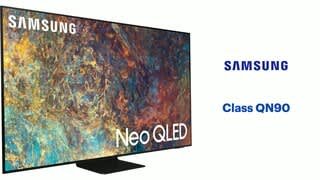
- Model:
- QN75QN90AAFXZA
- SKU:
- 6451487
Rating by feature
- Picture Quality
Rating 4.8 out of 5 stars
- Sound Quality
Rating 4.5 out of 5 stars
- Brightness
Rating 4.8 out of 5 stars
Customers are saying
Customers admire the 75" Class QN90A Neo QLED 4K UHD Smart Tizen TV for its exceptional picture quality, with many praising its vivid colors and sharp images. The TV's large screen size is also a hit, providing an immersive viewing experience. However, some customers have expressed concerns about the TV's remote control, with a few reporting that they did not receive one with their purchase. Additionally, a small number of customers have mentioned issues with dead pixels and blooming on the screen.
This summary was generated by AI based on customer reviews.
- Pros mentioned:Picture quality
Perfect picture
||Posted . Owned for 1 month when reviewed.This reviewer received promo considerations or sweepstakes entry for writing a review.Best tv! Picture is perfect. Best Buy installer did a great job.
I would recommend this to a friend - Pros mentioned:Picture quality
Good but not great
||Posted . Owned for 1 month when reviewed.This reviewer received promo considerations or sweepstakes entry for writing a review.Picture quality is excellent. The stand is evidently not adjustable and the screen is not level
No, I would not recommend this to a friend - Pros mentioned:Picture quality
You can’t go wrong with this TV
||Posted . Owned for 1 month when reviewed.This reviewer received promo considerations or sweepstakes entry for writing a review.Excellent TV, the best picture that I’ve ever seen.
I would recommend this to a friend - Pros mentioned:Picture quality
Great TV worth every penny
||Posted . Owned for 1 month when reviewed.This reviewer received promo considerations or sweepstakes entry for writing a review.Amazing picture almost feels like you at a theater
I would recommend this to a friend Fantastic experience!
||Posted .This reviewer received promo considerations or sweepstakes entry for writing a review.One of the best experiences ever! I highly recommend scheduling an in home consultation. Jim was fantastic to work with and the installation was an excellent experience. Highly satisfied with our investment in having three tv’s installed in our new home. Thank you!
I would recommend this to a friendAmazing display with right videos.
||Posted . Owned for 1 month when reviewed.This reviewer received promo considerations or sweepstakes entry for writing a review.If you really want to experience it’s display, then better watch right videos. Video clarity Is better with lot of sun light in living room. Sound is ok, may be because I got used to sound system. It would have been perfect TV, if it comes with google tv OS. Tizen is bit slower then google tv OS.
I would recommend this to a friendSamsung QN90A
||Posted . Owned for 1 month when reviewed.This reviewer received promo considerations or sweepstakes entry for writing a review.My first Samsung TV I used for 10 years. Its still going strong and still has a good picture. I decided to finally make the jump to 4k and it hasn't disappointed. Since my first TV lasted so long I decided Samsung has earned my business again. The picture is amazing. Samsung makes great TVs.
I would recommend this to a friend- Pros mentioned:Picture quality
TV
||Posted . Owned for 4 months when reviewed.This reviewer received promo considerations or sweepstakes entry for writing a review.Great TV! Picture is so clear!! Would buy again!!
I would recommend this to a friend - Pros mentioned:Picture quality
Great picture - poor remote
||Posted . Owned for 1 month when reviewed.This reviewer received promo considerations or sweepstakes entry for writing a review.Great picture. Side view good with little reflection. Remote not the best.
I would recommend this to a friend Worth the Wait!
||Posted . Owned for 1 month when reviewed.This reviewer received promo considerations or sweepstakes entry for writing a review.We were disappointed when the first TV delivered did not work and we had to wait to get another one. The newer TV has met all the expectations we had when we purchased it. We appreciate all the help from the Geek Squad member when he set it up.
I would recommend this to a friendInspect well upon unboxing
||Posted .This reviewer received promo considerations or sweepstakes entry for writing a review.Great television. It was initially had a small crack behind a label stuck to the screen. Therefore, i would remove all the commercial labels on the screen and inspect thoroughly before wall mounting. We had to take it back down, put it in the box with the rest of the accessories and take it back to Best Buy. However, Best Buy customer service gets five stars for making the exchange quick and easy.
No, I would not recommend this to a friendShould have more than 5 stars for service!!!
||Posted . Owned for 3 weeks when reviewed.This reviewer received promo considerations or sweepstakes entry for writing a review.Extremely happy with the entire process. Great price, great delivery. Kept me on top of the delivery and the set up I can't give it enough stars. The two men that installed everything for me went way beyond my expectations. Five stars is just not enough.
I would recommend this to a friend- Pros mentioned:Picture quality
Solid TV
||Posted . Owned for 1 month when reviewed.This reviewer received promo considerations or sweepstakes entry for writing a review.Great TV for the money, quality image works great with my PS5
I would recommend this to a friend By far, the best TV I ever returned.
||Posted . Owned for 1 month when reviewed.This reviewer received promo considerations or sweepstakes entry for writing a review.Was super excited to get this TV, which, unfortunately, arrived with a cracked screen. I returned it and got a 77" OLED from a different manufacturer, but only because this set was no longer available. My rating is based on what I experienced in the store.
I would recommend this to a friend- Cons mentioned:Blooming
Shoulda got an oled
||Posted . Owned for 1 month when reviewed.This reviewer received promo considerations or sweepstakes entry for writing a review.Ive only bought oleds for the past 5 years. I had burn in on my 2017 c7, so i thought i better not buy another one. This seemed like the best alternative. I wish i had just bought another oled. The blooming is extremely distracting.
No, I would not recommend this to a friend - Pros mentioned:Picture quality
Good picture but 18 month life span
||Posted . Owned for 1.5 years when reviewed.This reviewer received promo considerations or sweepstakes entry for writing a review.Great picture but broke 18 months after purchase, just outside the 12 month warranty. The repairman noted a two-blink error code, which indicates a bad panel. This is a common/known problem with Samsung. It is not repairable.
No, I would not recommend this to a friend Perfect for Movies/Gaming
||Posted . Owned for 3 weeks when reviewed.This reviewer received promo considerations or sweepstakes entry for writing a review.My first 4K tv. Make sure to have 4K HDMI cables and an Ethernet cable if you are able to hardwire. Super thin and really heavy. Quality tv experience. The Samsung OS is also great. I was able to add all the apps I use from Apple TV.
I would recommend this to a friend- Pros mentioned:Picture quality
good picture, not worth the premium price
||Posted .This reviewer received promo considerations or sweepstakes entry for writing a review.The picture is good, but not great. The processor is still very laggy and loaded with too much crap. The picture is extremely close to the same as my prior Q70 75", so definitely not worth the extra $1,000 for the Q90A.
No, I would not recommend this to a friendBrand response from Samsung
Posted .Hi snapper,
Thank you for sharing your thoughts on the picture quality of your QN90A TV. If the picture you are seeing out-of-the-box is not to your liking, there are several picture settings you may want to try adjusting.
You can select the Picture Mode that provides the best viewing experience. Go to Home > Settings > Picture > Picture Mode
1) Standard: Is the default mode suitable for general viewing environments.
2) Natural: Reduces eye strain for a comfortable viewing experience.
3) Movie: Is suitable for watching TV or movies in a dark room.
4) Dynamic: Makes the picture brighter and clearer in bright viewing environments.
5) Filmmaker Mode: You can watch the source content (e.g., movie) as it is. If the image is defined as Filmmaker Mode, it will automatically switch to Filmmaker Mode while watching.
You can also go to: Settings > Picture > Expert Settings > to manually fine tune your image.
To ensure that your TV’s picture is optimized, be sure that you are always running the latest firmware update. You can check this by going to Settings > Support > Software Update or you can enable Auto Update for convenience.
You may also want to optimize the smart TV performance and address your issue with response time with the self-diagnostic tool. This service checks memory and frees up unused cached memory and closes background apps. Go to Settings > Support > Device Care > Start Device Care
Should you need further assistance, please contact Samsung Customer Support at 1-800-SAMSUNG (ask for TVs), available 8AM - 12AM EST, 7 days a week.
For additional support resources, visit us on the Samsung website and click on the ‘Support’ link in the upper right corner of the homepage for:
1) Chat with Us/Product Help: To begin a chat or find solutions, choose ‘TVs & Home Theater’ and select your model & topic.
2) Manuals, Software, & Warranty Info
~ Samsung Specialist
Best TV for us Ever!
||Posted . Owned for 6 months when reviewed.This reviewer received promo considerations or sweepstakes entry for writing a review.This was the top of the line Flagship TV for Samsung at the time we purchased this 6 months ago. Fantastic TV with so many features it has taken us quite a while to find and utilize them all. Our best TV ever.
I would recommend this to a friendFantastic TV
||Posted . Owned for 3 months when reviewed.This reviewer received promo considerations or sweepstakes entry for writing a review.Fantastic TV. Cons: TV is too bright. Even with adjusting brightness. Also, I usually only watch TV at night, and definitely would benefit from an OLED TV a with deeper blacks ( personally preference ) Pro: in the day light, the LED works great.
I would recommend this to a friend