Customer Ratings & Reviews


- Model:
- QN82Q70RAFXZA
- SKU:
- 6331773
Rating by feature
- Picture Quality
Rating 4.4 out of 5 stars
- Sound Quality
Rating 4.5 out of 5 stars
- Brightness
Rating 4.4 out of 5 stars
Customers are saying
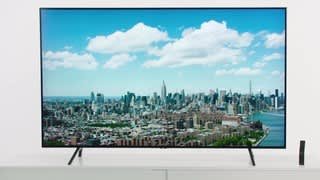
Customers consistently note the exceptional picture quality and impressive sound of the 82" Class - LED - Q70 Series - 2160p - Smart - 4K UHD TV with HDR. Many also appreciate the ease of setting up the TV. The large screen size is another popular feature, with customers expressing their satisfaction with the 82-inch display. While there are concerns about the warranty, the overall positive feedback highlights the TV's strong performance and value for the price.
This summary was generated by AI based on customer reviews.
Tv fine
||Posted . Owned for 1 month when reviewed.This reviewer received promo considerations or sweepstakes entry for writing a review.Haven’t revived a bill and sent my purchase information to another guy in the town I live in not happy probably done shopping at best buy
No, I would not recommend this to a friendBrand response from Samsung
Posted .Tiger,
I am very sorry to see that you had an unfortunate purchasing experience with your seller.
Should you ever need assistance or have questions about using this product, please contact Samsung Customer Support at 1-800-SAMSUNG (ask for TVs) Available 8AM - 12AM EST (Mon-Fri) / 9AM - 11PM EST (Sat-Sun)
Simply copy-paste this link into your browser to LiveChat with us: https://www.samsung.com/us/support/#contact_us_for_support
We are likewise reachable by Facebook Messenger at: https://www.facebook.com/samsungsupport
Or find us on Twitter at https://twitter.com/SamsungSupport
Samsung is committed to providing the best possible product experience, quality, and value, and we are always here to help with any of your questions or concerns.
- Pros mentioned:Picture quality
Good picture and functions
Posted .This reviewer received promo considerations or sweepstakes entry for writing a review.The picture on the tv is great but I see where mine is not refreshing and I see it lagging I do t see anybody saying anything about this so I’m going to change my HDMI and see if that helps and I am wondering since the tv is so big is this going to happen because my 65 Sony didn’t do this
No, I would not recommend this to a friendBrand response from Samsung
Posted .Tobeloved:
Thank you for purchasing the Samsung 82" Q70R QLED TV.
If your concern is with image quality exhibiting judder, this TV comes with a feature called Auto Motion Plus that helps to optimize motion image quality.
You can change Auto Motion Plus settings by following these steps:
HOME > SETTINGS > PICTURE > EXPERT SETTINGS > Auto Motion Plus Settings
Then select one of the three options:
1) Off: Auto Motion Plus will always be off
2) Auto: Auto Motion Plus will automatically activate and deactivate based on the type of program being watched
3) Custom: Allows custom adjustments and settings to be used
By selecting the Custom option, you can access these advanced settings:
1) Blur Reduction: Use the directional keys on the remote to adjust the Blur setting
2) Judder Reduction: Use the directional keys on the remote to adjust the Judder setting
3) LED Clear Motion: Select to turn On/Off
If your issue is something else, please reach out to us so that we can better assist you.
You can reach Samsung Support via:
1) Phone: 1-800-SAMSUNG
Available 8AM - 12AM EST (Mon-Fri) / 9AM - 11PM EST (Sat-Sun)
2) LiveChat: https://www.samsung.com/us/support/#contact_us_for_support
3) Facebook Messenger: https://www.facebook.com/samsungsupport
4) Twitter: https://twitter.com/SamsungSupport
5) The Samsung Members Community is also a great resource for getting help from Samsung moderators and customers: https://us.community.samsung.com
If you have not already done so, we invite you to register your new Samsung product at: https://us.community.samsung.com
Registering your product gives you access to easy warranty support, convenient opt-in to special promos and offers, faster troubleshooting and service, and quick notification of system updates.
- Pros mentioned:Picture quality
Best TV!
Posted .This reviewer received promo considerations or sweepstakes entry for writing a review.This TV is in my Family Room where there’s plenty of light and it’s amazing. The Picture quality and Sound are great!
I would recommend this to a friend - Pros mentioned:Picture quality
Love this Samsung
Posted .This reviewer received promo considerations or sweepstakes entry for writing a review.3 years later and still an amazing tv. Good for movies and games
I would recommend this to a friend - Pros mentioned:Color
Great
Posted .This reviewer received promo considerations or sweepstakes entry for writing a review.Best tv I've ever seen ! Amazing color and clarity. Just buy it !!
I would recommend this to a friend