Customer Ratings & Reviews
- Model:
- ET-WV520K
- SKU:
- 5872200
to a friend
Customers are saying
Customers express satisfaction with the Connect Home AC1300 Mesh Wi-Fi System's ease of use, range, and coverage, frequently citing simple setup and improved Wi-Fi access throughout their homes. Positive feedback also highlights the system's compact design and strong signal. However, some users mention limited configurability options as a drawback.
This summary was generated by AI based on customer reviews.

Astoundingly sparse features
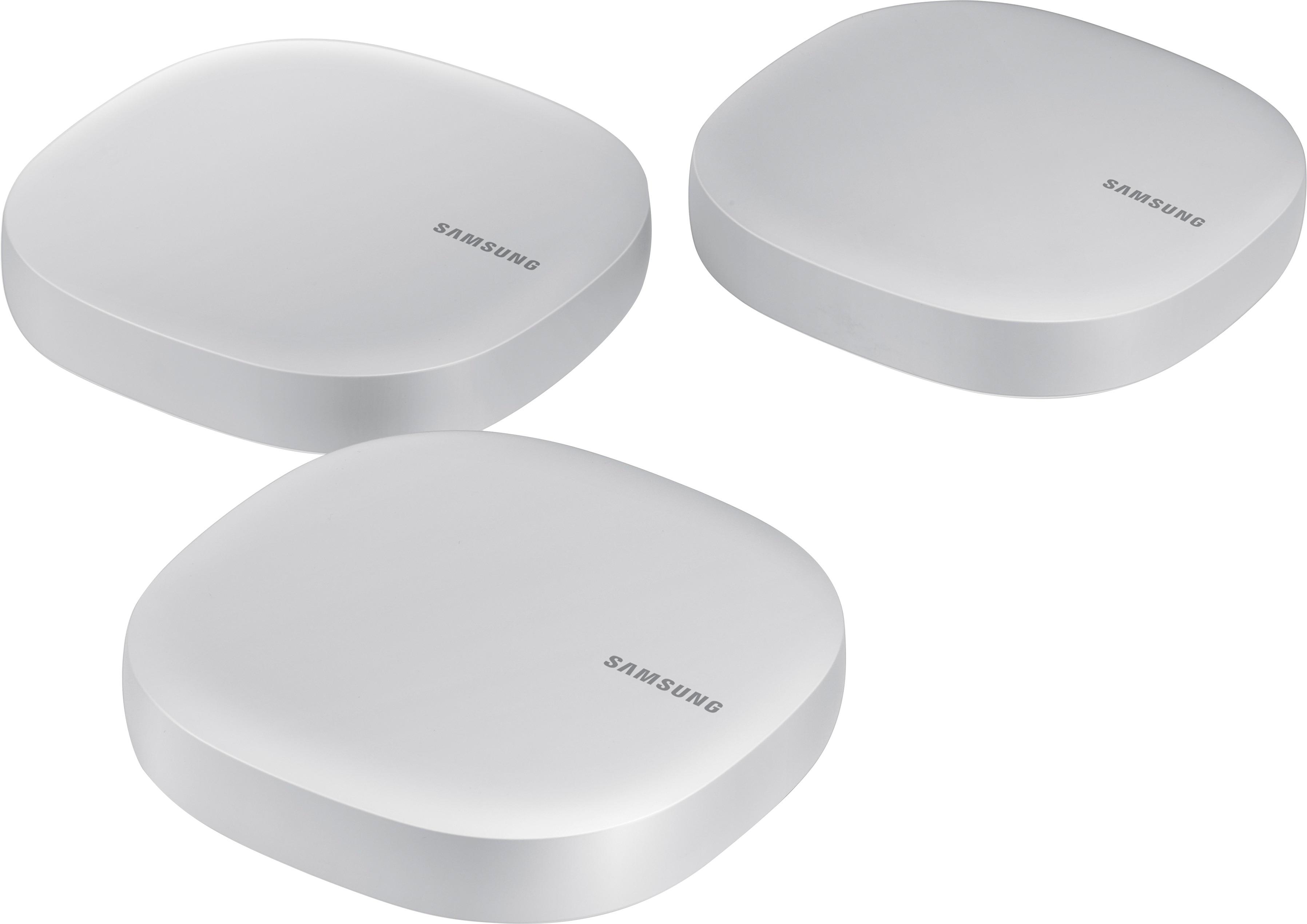
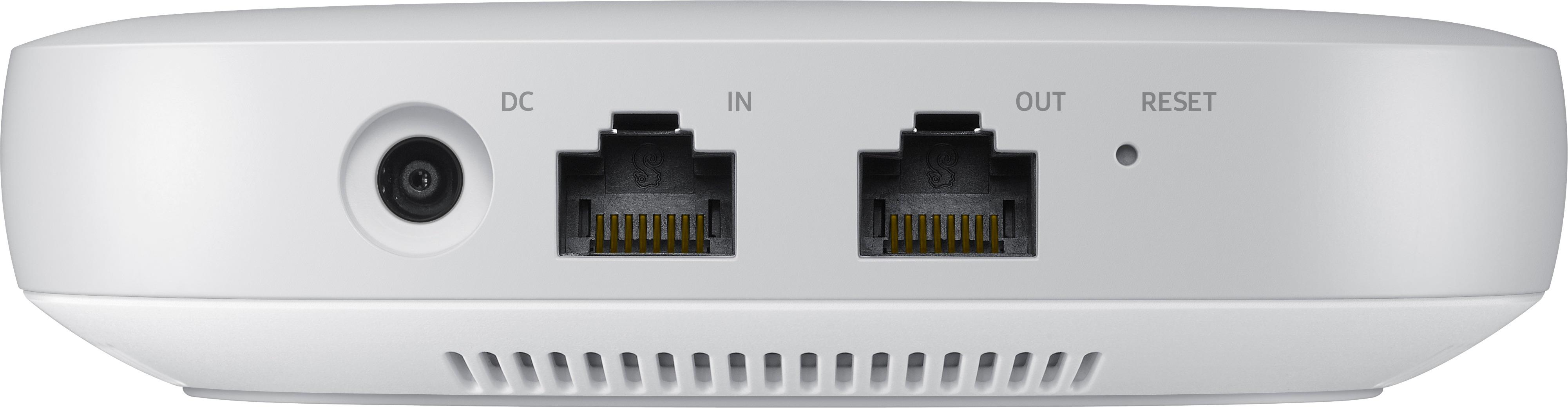
|Posted .This reviewer received promo considerations or sweepstakes entry for writing a review.While this WiFi system incorporates SmartThings Hub functionality, the stand-alone hubs are older products whose functionality is already established and reviewed, so I'm going to focus on the router aspect of these devices, which are something entirely new from Samsung. [ Pros ] - Small and attractive unit design - Uses new mesh topology technology which is coming into favor over the older repeater technology. - Above average signal strength on both frequency bands. Signals were stronger and remained so over longer distances than most similar routers I’ve tested. [ Cons ] - Provides nearly the absolute minimum features and settings for a functional WiFi router, leaving out many basic features usually found in this type of product. - There is no web configuration interface or ‘offline’ configuration. Devices must be associated with a Samsung account using the Samsung Connect app before they can be used, which comes encumbered with Samsung’s non-privacy policy, and an end user agreement that allows Samsung to terminate your account for any or no reason, without notice. These devices rely entirely on Samsung’s good graces and continued support. [ Setup ] The Samsung Connect app (I used the Android version) used to setup this product requires permissions I consider absurd, including access to contacts, files on the device, and location of the device; the app will not operate without all of these permissions enabled. Setting up the first WiFi hub is a simple and very straight-forward process. However, when it comes to connecting ‘sub’ hubs, there is no signal strength indicator to aid in placement (neither during nor after the setup process). Instead, the app will merely tell you whether you need to move the hubs closer together, or that setup is complete. Multi-hub placement is largely a guessing game, with no help offered to optimize their layout. I consider this an inexcusable oversight. [ Features and Settings ] The features are sparser than that of any other WiFi router I’ve used by a gigantic margin. You can set the access point name and password, specify two custom DNS servers, choose how the public IP address is obtained, toggle UPnP, switch between ‘standalone’ and ‘bridge’ modes of operation, toggle the LED indicator light, configure guest network access, block Internet connectivity to specified devices during specified times, and view overall upload and download bandwidth usage. As far as I can tell, this is a rather exhaustive list of the router firmware features available through the Samsung Connect app. Many very basic features--which I consider essential--are missing, such as LAN interface configuration (ie, changing the network address), static DHCP configuration, port forwarding, WiFi channel configuration (the lack of which for me exacerbated the router’s poor choice of 2.4Ghz channels, which directly overlapped those of a nearby access point with strong signal), and WiFi Protected Setup. A myriad of more advanced features which are generally found in other WiFi routers are also missing. While Samsung advertises parental controls, that only includes time lockouts, but not even the basics of keyword and domain name filtering. Again, there’s no web interface or ‘offline’ configuration, which most routers have, even when they offer online/app configuration. These hubs have no USB ports, so shared attached storage is not supported. There is a single ‘out’ port, rather than the several or more LAN ports most other WiFi routers have. [ Conclusion ] The severe lack of features in this WiFi system is truly astounding. It feels like the router portion of these units was barely an afterthought. Only supporting the most basic networking needs, power users or those with non-default configuration requirements are almost certain to find the firmware features of this product woefully inadequate. It is my opinion that users desiring Samsung’s SmartThings support would be far better off using stand-alone SmartThings Hubs along with some other WiFi system.
No, I would not recommend this to a friend- Pros mentioned:Ease of use
No Problems, Pretty Legit
|Posted .This reviewer received promo considerations or sweepstakes entry for writing a review.The set-up is easy, the companion app makes for sufficient management. The overall strength of the wifi completely eliminated all dead spots in my home. 10/10
I would recommend this to a friend - Pros mentioned:Speed
A Nightmare to Setup
|Posted .This reviewer received promo considerations or sweepstakes entry for writing a review.Upon receiving this item, I followed the quick start guide and proceeded to attempt to setup this router system. After several failed attempts of the app trying to locate the hardware via cellular data, I hooked up my old router, then connected the first base, then over WiFi and after a few more tries, I was able to connect to the first base. This took about 30 minutes of resets and waiting for the app to find the device. This unfortunately was the case for the next two bases as well. It took almost an hour to connect all three bases. I almost gave up. This was a complete nightmare. After all three bases were finally connected, there was an update rendered them useless for another 15 minutes. After everything was up and running, I ran speed tests, and I was getting great speeds, 180Mbps on average when right next to the bases. If I got about 10 to 15 feet from a base my download speed drops dramatically. I would get around 50-60Mbps. That's a dramatic fall off. Strange thing is that my upload speed would always be around the same, which was 23Mbps on avg. On top of this the whole system is unstable, meaning I would get dropouts from network while trying to stream videos. I had to re-enable the WiFi on the main router to be able to consistently stream a movie. Since this product is brand new, Samsung may not of worked all the bugs out of it. It is quite possible that a firmware update may fix this, but for now, I can not recommend this product. Especially when they say this kit will give you 4500 sq ft of coverage, and simply walking a few steps away from a base dramatically reduced your speeds or drops your connection entirely.
No, I would not recommend this to a friend Price vs Features vs Support = Stay away!
|Posted .This reviewer received promo considerations or sweepstakes entry for writing a review.To me this is a 1 star or no star product as is. However, considering this is a new productline and concept from Samsung, giving the scope for upgrades and improvements in the future, settling with 2 stars. For advanced users - two words... Stay Away!!! [Setup] Using iOS device(s) setup was a pain in the neck. Spend more than half day with multiple resets and numerous trials finally was able to get it running. [Support] Joke! First of all, if you select correct menu options you will end up with dead silence. I had to trick the system to get help for mobile devices and then explained them its for smart home products. When they internally transfer the line you get a smart home technician. However, they have never heard of Smart Connect device or its model number. They cannot be blamed as if you search samsung support website with the model number, you will get error result. I had to insist to get level 2 support and finally after 30 minutes they figured out samsung has a product called smart connect :)) [Pros] + Full gigabit speed on wired interfaces (unlike Amped Wireless ALLY which limits to 500Mbps), + Decent wireless range compared to its size without antennas, + Built-in smarthings hub + Sleek design [Cons] Pretty much everything about this product - few of them are highlighted below. - Setup - most painful setup I had to go through for a wireless router in my 20+ years of tech life - Price - this product is over priced for its features and functions. - No web GUI - Extremely limited features via smartphone interface - Fixed DHCP IP address range (192.168.2.x) - Bummer! Confirmed with tech support that you cannot change the IP range. - Gigabit internet users out of luck - this router only support unto 866Mbps on 5.0 Ghz and 400Mbps on 2.4Ghz May be ok for basic home users, but definitely a NO for advanced users and Gigabit users.
No, I would not recommend this to a friendGreat mesh home wireless with smart features
|Posted .This reviewer received promo considerations or sweepstakes entry for writing a review.I like the Linksys Velop system for one of the best mesh wireless home systems out. Then came the Samsung. This is just as good but it connects to all smart home accessories except Apple. Even Zwave. This is great because it does not require you to buy Samsung smart devices. Range and interface are average.
I would recommend this to a friend- Pros mentioned:Range
Most trendy router in the market
Posted .This reviewer received promo considerations or sweepstakes entry for writing a review.I live in a tall and wide house with complicated layout beacuse of that I had problems with wi-fi dead zones. This device definitely improved range and eliminated drops and dead zones.(I highly recommend the pro version of this system) Samsung connect home also can communicate with various gadgets over wi-fi, bluetooth, zigbee or z wave Once setup you can control all the connected devices with a smart phone app.
I would recommend this to a friend Needs some serious firmware updates
|Posted .This reviewer received promo considerations or sweepstakes entry for writing a review.I expected to get a decent wifi mesh router with SmartThings integration. I seem to have gotten an incomplete product. It works great as a wifi mesh router. I can cover my entire house with a relatively consistent wireless signal. The added SmartThings hub is great if you are looking for greater base coverage of your SmartThings network. The added out port on each hub is great if you have a wired computer on a different floor that you want to extend coverage to, and to top it all off, the setup was really a breeze, very simple interface and configuration. However, the SmartThings integration is very basic and limited in its compatibility. It seems as though they wanted to give users a simple taste of home automation with the focus on selling their SmartThings branded equipment instead of integrating a fully functional SmartThings hub into the system. This becomes more evident when you realize that you cannot use the SmartThings app, and are forced to use the new Samsung Connect app, which is very limited. It's not like their SmartThings standalone hub that integrates hundreds of zwave and zigbee devices, it's meant for beginners who don't have any existing equipment and are OK only buying SmartThings branded devices. So if you have a SmartThings hub today, this won't replace it. The wireless signal will occasionally drop connections (likely due to my initial placement) and reconnect causing a momentary gap in coverage. The hub itself is very basic in it customizations as will. UPNP seems to be the only way to configure port forwarding as there is no manual control/configuration for this. So if Samsung could update the firmware to add more controls to Port Forwarding and other wifi configurations, the wifi router side of this would be a decent product. I would also like to see more speed. Samsung also needs to update the firmware for the SmartThings side to allow control via the SmartThings app and bring compatibility up to the level of their SmartThings standalone hubs the SmartThings side of this would be a decent product. As it stands, neither side of this product seems "finished". I think this would be OK for someone who has a simple network that doesn't require any customization who just wants to dip their toes in the "Smart Home" pool. However, for about the same price, I can get a decent router and SmartThings Standalone hub.
No, I would not recommend this to a friend- Pros mentioned:Range
Very Disappointed
Posted .This reviewer received promo considerations or sweepstakes entry for writing a review.I have looking at whole home Mesh Network Routers for a while now. I have a large older home with heated ceilings(cement with wires running through it). I came across this Samsung Connect which is a mesh router Smart Hub combo and I thought, Great, let's give this a try. Picked it up from the store and right away I was concerned due to the layer of dust on the package(been there a while). But got it anyway. I only unboxed the first unit and downloaded the app as instructed, then hooked it up and started looking for the connection as instructed. Nothing. Tried several times, reboot, still nothing. Hope you have better luck. Mine is going back.
No, I would not recommend this to a friend - Pros mentioned:Ease of use
Well made device
Posted .This reviewer received promo considerations or sweepstakes entry for writing a review.It's a very good device for home router. Very easy to install and Wireless and Home Iot function works well in everywhere in my place. I've been using many other routers but this one is the best ever so far. Internet speed is also very fast. Highly recommend!
I would recommend this to a friend - Pros mentioned:Coverage
Easy setup, fast speed, and great coverage!
Posted .This reviewer received promo considerations or sweepstakes entry for writing a review.So far its been the super great! Setup was very easy to follow and the network speed and coverage has been awesome! Highly recommended.
I would recommend this to a friend Set up mediocre. Range not as great as expected
Posted .This reviewer received promo considerations or sweepstakes entry for writing a review.My first attempts to install this hub network were met with failure. The limited printed documentation provided was not accurate, and nor were the help screens in the app that you need to use for set-up. For example, the documentation said to plug an ethernet cable into the remote hub. I finally decided to reset the devices and try again. This time, the ethernet connected hub connected pretty quickly. However, I pretty much had to put the satellite hubs in the same room to get them connected to the network. I then moved them to the permanent locations in the house. Online documentation states that the hubs should be within 40 feet of one another. To me this is too small of a range. A few times during the first evening, one of the hubs momentarily lost connectivity, but the overall signal strength of the Wifi (as shown by my cell phone) was pretty good.
I would recommend this to a friendAlmost good but fell short.
Posted .This reviewer received promo considerations or sweepstakes entry for writing a review.First, please note that there is no documentation on how to install or work with the Samsung Connect Home. So, if you do not have experience installing equipment like this may be very difficult to install. You must use your imagination. Wi-Fi works well, it's the best I can say about the product. In Puerto Rico, the houses are in cement and therefore the range of Wi-Fi is much lower. Buy this because I understood that I was going to help expand my z-wave network. And I know it expands if you have more z-wave devices. Even so, I wanted to test how the z-wave part works. I have the primary device in my office that is about 50 feet from the main entrance. I have another device (sub1) near the entrance. I also have the SmartThings arrival sensor. To add it to the HUB I must be near my office, the device that is near the entrance does not work as an intelligent HUB. I expected all HUBs to be part of the z-wave integration. On the other hand, the arrival sensor does not know that I arrive unless I get a little closer to my office. I have other z-wave devices but all must be configured in my office. For that I continue with the old SmartThings HUB. The application SmartThings for second-generation HUB is much more robust than the new one APP. I do not understand why they did not use it. As a router, is very frustrating. You cannot see the devices that are connected via LAN. You will only see those connected via Wi-Fi. But I have a NAS, I cannot see it in the APP. I can not reserve an IP either. It comes with network 192.168.2.0 and can not be modified. These functions are basic, so no use to replace the home router unless all you have use it through Wi-Fi. Once again to expand the Wi-Fi works well but that makes it much better equipment like EERO. With EERO you see the devices that are in the LAN and also sees the intelligent devices using LAN or WI-FI as the bulbs philips hue. What it does not bring is the integration with the devices that use z-wave. In z-wave is where Connect Home should shine but fell short.
No, I would not recommend this to a friendSave your Money...
Posted .This reviewer received promo considerations or sweepstakes entry for writing a review.This is a good idea in theory... I purchased the Pro Version, but I feel my issues apply. Unfortunately, the Samsung Connect App is extremely lacking. As a result, this product just doesn't function well as a "Smart Hub" to replace either Smartthings or Wink. As a router, it was OK, but I couldn't get any Apple products to connect to it. So, I have returned this item and am sticking with my Wink Hub 2, but upgrading my Wifi to the Linksys Velop.
No, I would not recommend this to a friendAwesome wifi router!
Posted .This reviewer received promo considerations or sweepstakes entry for writing a review.It is my first time purchasing wifi router. I did some research about this product and decided to give it a try. The setup was super easy to follow. The wifi reaches my entire house with excellent speed. Highly recommended it!
I would recommend this to a friend