Customer Ratings & Reviews
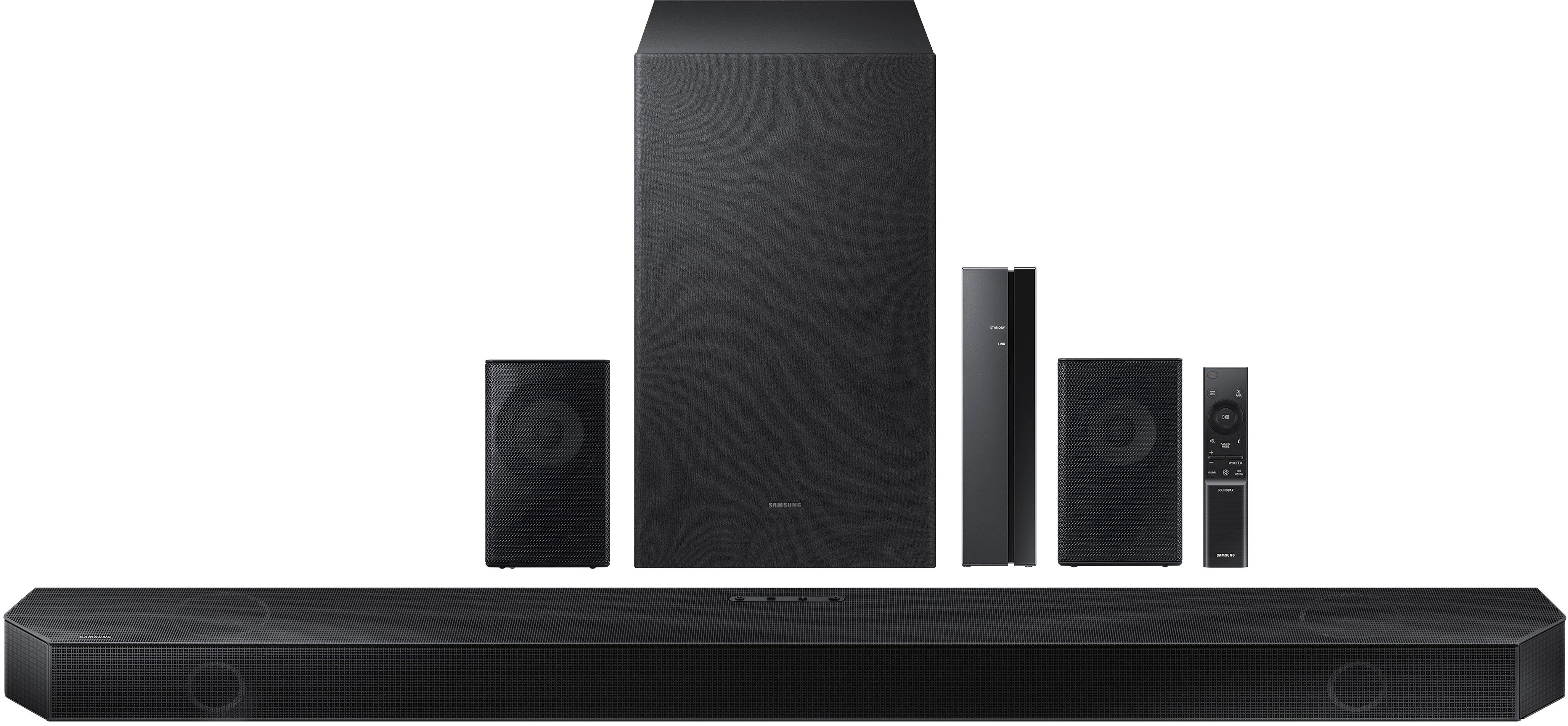
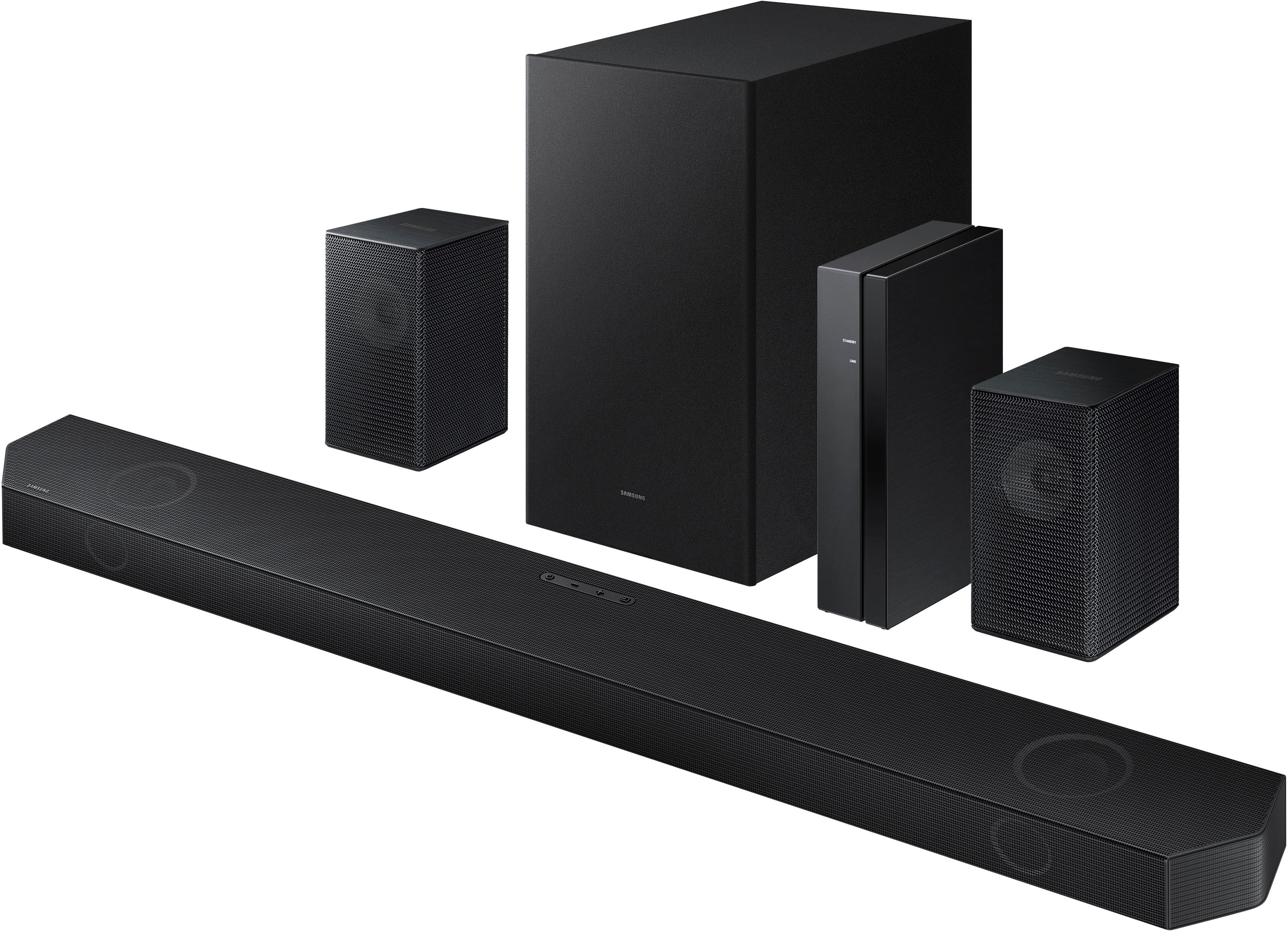


- Model:
- HW-Q750B/ZA
- SKU:
- 6505885
Rating by feature
- Value
Rating 4.4 out of 5 stars
- Quality
Rating 4.5 out of 5 stars
- Ease of Use
Rating 4.4 out of 5 stars
Customers are saying
Customers consistently note the superb sound quality, encompassing excellent bass and effective Dolby Atmos, as the standout feature. Many also praise the ease of setup and compatibility, particularly with Samsung devices. However, some users express concerns about the rear speakers' performance and the clarity of the wireless connection instructions. Overall, the positive feedback on sound quality and ease of use outweighs the negative comments regarding the rear speakers and wireless functionality.
This summary was generated by AI based on customer reviews.
- Pros mentioned:Sound quality
Smooth sound
||Posted . Owned for 3 weeks when reviewed.This reviewer received promo considerations or sweepstakes entry for writing a review.Very nice, better than Bose, Bose are made for music, not movies…
I would recommend this to a friend - Pros mentioned:Sound quality
Samsung soundbar
||Posted . Owned for 1 month when reviewed.This reviewer received promo considerations or sweepstakes entry for writing a review.Sounds amazing! Great for movies and sports games!
I would recommend this to a friend - Pros mentioned:Sound quality
Great Sound
||Posted . Owned for 1 month when reviewed.This reviewer received promo considerations or sweepstakes entry for writing a review.Great sound and rear speakers provide a good surround sound.
I would recommend this to a friend - Pros mentioned:Dolby atmos, Sound quality
Samsung - HW-Q750B/ZA Easy To Install
||Posted . Owned for 2 weeks when reviewed.This reviewer received promo considerations or sweepstakes entry for writing a review.While unit lacks side-firing speakers, the sound is very good. Fun with Dolby Atmos demos on YouTube. Wish there were a way to increase rear left/right wireless sound speaker volume for size of room.
I would recommend this to a friendBrand response from Samsung
Posted .Hi NewToDolbyAtmos
By pressing the CH LEVEL button, you can adjust the volume of the each speaker such as Center level, Front Top level, and Rear level.
To control the volume of the each speaker select Center level, or Front Top level in Sound Settings, and then adjust the volume between -6~+6 by using the Up/Down buttons.
If Surround Speakers are connected, select Rear level and then use the Up/Down buttons to adjust the volume within a -6 to +6 range.
Hopefully, these tips will help make your Soundbar an even more enjoyable experience.
Should you ever have questions or need help, please call us at 1-800-SAMSUNG (ask for Soundbars), available 8 AM – 12 AM EST, 7 days a week.
For additional support resources, visit us on the Samsung website and click on the ‘Support’ link in the upper right corner of the homepage for:
1) Chat with Us/Product Help: To begin a chat or find solutions, choose ‘TVs & Home Theater’ and select your model & topic.
2) Manuals & Software
3) Warranty Info
4) Register a Product: For access to easy warranty support, convenient opt-in to special promos and offers, faster troubleshooting and service, and quick notification of system updates
5) Contact Us
~ Samsung Solutions
- Pros mentioned:Dolby atmos
Samsung
||Posted . Owned for 1 month when reviewed.This reviewer received promo considerations or sweepstakes entry for writing a review.very sleek and modern. Dolby Atmos amazing................
I would recommend this to a friend - Pros mentioned:Sound quality
Impressive, FULL sound
||Posted . Owned for 2 weeks when reviewed.This reviewer received promo considerations or sweepstakes entry for writing a review.I've been very impressed with this soundbar so far. It costs a bit more than others, but after researching and reading a lot articles and reviews, decided this was the best for my needs. I typically buy LG products but after this, may have to rethink that in the future. My only issue is setting the channel levels is a bit convoluted to me. However, once you get it figured out, its not too bad, just dont expect the instruction manual to solve much.
I would recommend this to a friendBrand response from Samsung
Posted .Hello Thisleftisright,
Thank you for taking the time out of your day to leave a review sharing your thoughts and experiences with the new HW-Q750B Soundbar.
I'm glad to hear that you've been impressed with the unit but I am sorry that you had issues with the rear speaker kit.
To be able to control all of the channels on your soundbar, use the CH LEVEL button between -6 to +6.
If you go to Samsung's website, in the top right corner hover your mouse over SUPPORT, then click on MANUALS AND SOFTWARE you will be able to search for your model number and find the full manual. You can either download it or even print it out from there.
Should you ever have questions optimizing your soundbar or need help, please call us at 1-800-SAMSUNG (ask for Soundbars), available 8 AM – 12 AM EST, 7 days a week.
~Samsung Solutions
- Pros mentioned:Sound quality
Great sound
||Posted . Owned for 2 weeks when reviewed.This reviewer received promo considerations or sweepstakes entry for writing a review.Works very well with a 2022 samsung tv. Sound really carries
I would recommend this to a friend - Pros mentioned:Sound quality
HW-Q750B Soundbar Review
||Posted . Owned for 3 weeks when reviewed.This reviewer received promo considerations or sweepstakes entry for writing a review.I really do enjoy my Samsung Soundbar. The sound is great. Love the compatability with my Samsung TV. One concern....Periodically, I do have a slight problem with Audio Syncing.
I would recommend this to a friend - Pros mentioned:Sound quality
A great soundbar package option
||Posted .This reviewer received promo considerations or sweepstakes entry for writing a review.Great mid-level soundbar. Robust theatrical like experience. Not as much base as others even with tweaking but if you aren’t a soundaphile and are just looking for a rich sound experience, this will do the job nicely. Super easy integration with my tv also. In transparency, I did return this system….not because it wasn’t good but because a week later I purchased a new tv and decided to make the jump to one of the high level soundbar system with that tv.
I would recommend this to a friendBrand response from Samsung
Posted .Hello Robin,
Thank you for sharing your review of the Samsung HW-Q750B and for sharing your experience with this soundbar, detailing the reasons you have decided to replace it with a different model.
Your feedback regarding this model is important to us and will be shared with our internal teams.
Should you have questions or need assistance with settings, setup, or features, with your new Samsung soundbar, please know we are always here to help.
Should you ever have questions or need help, Samsung is here for you. Just give us a call at 1-800-SAMSUNG (Ask for Soundbars), 8AM - 12AM EST, 7 days a week. Our LiveChat agents are also available by clicking on the ‘Support’ link on our website.
~ Samsung Solutions
- Pros mentioned:Sound quality
Great sound bar!
||Posted . Owned for 1 month when reviewed.This reviewer received promo considerations or sweepstakes entry for writing a review.Sound really good! It was better than I expected it to be.
I would recommend this to a friend - Pros mentioned:Sound quality
Just okay
||Posted . Owned for less than 1 week when reviewed.This reviewer received promo considerations or sweepstakes entry for writing a review.Not bad, but not good. Good overall sound. It however is seriously laking bass. To the point its hard to tell the sub is on sometimes. For the price tag it should be better. Will be lookign for something different.
No, I would not recommend this to a friendBrand response from Samsung
Posted .Hello JosephK,
I’m sorry to hear that your initial out-of-box experience fell short of your expectations. We appreciate your feedback and this will be shared among our product teams.
Please know, in addition to the available sound modes, your soundbar features a wide range of other customization options accessed with the remote. Use the steps below to further optimize the sound to your personal preference:
You can adjust the Treble and Bass by pressing the TONE CONTROL button then use the Up/Down buttons to adjust the level.
With the Surround Speakers connected, use the CH LEVEL button and select REAR LEVEL. From there, use the Up/Down buttons to adjust the volume within a -6 to +6 range.
If you would like louder (or softer) bass from your subwoofer, you can adjust the level by rocking the WOOFER button on the soundbar remote, and then adjusting the level from -6 to +6. To set the subwoofer volume level to 0, press the button in.
With the sound mode set to Standard, press and hold the SOUND CONTROL button for about 5 seconds to adjust the sound for each frequency band for precise audio adjustments. 150Hz, 300Hz, 600Hz, 1.2kHz, 2.5kHz, 5kHz, and 10kHz are selectable using the Left/Right buttons and each can be adjusted to a setting between -6 to +6 using the Up/Down buttons.
I hope these tips help you enjoy your new product.
You can always contact us for further help at 1-800-SAMSUNG (Ask for Soundbars), 8 AM – 12 AM EST, 7 days a week. Our LiveChat agents are also available by clicking on the ‘Support’ link on our website.
~ Samsung Solutions
- Pros mentioned:Sound quality
Adequate system
||Posted . Owned for 1 month when reviewed.This reviewer received promo considerations or sweepstakes entry for writing a review.Nice, adequate system but challenging to sync with tv.
I would recommend this to a friend - Pros mentioned:Sound quality
Excellent Open Box
||Posted . Owned for 3 weeks when reviewed.This reviewer received promo considerations or sweepstakes entry for writing a review.Great relatively affordable system- as an open box.
I would recommend this to a friend - Pros mentioned:Sound quality
soundbar
||Posted . Owned for 2 months when reviewed.This reviewer received promo considerations or sweepstakes entry for writing a review.this product was amazing I loved it I have no issues
I would recommend this to a friend Another amazing product from Samsung
||Posted . Owned for 5 months when reviewed.This reviewer received promo considerations or sweepstakes entry for writing a review.This sound system pairs well with any Samsung TV. The only downside I’ve found is that the subwoofer will occasionally have difficulty connecting via Bluetooth but that may be the way I have it arranged with the distance being too far
I would recommend this to a friend- Pros mentioned:Sound quality
How to turn off power on with tv?????
||Posted . Owned for less than 1 week when reviewed.This reviewer received promo considerations or sweepstakes entry for writing a review.I like this sound bar a lot, it has very good highs, meds and bass. The Atmos is not to bad either. The only thing I dislike about it is that, when hooked up using the optical cable, it will turn on with the tv, and I can't find how to disable that feature. Samsung tech support is very useless when it comes to help,,, don't bother calling them.
I would recommend this to a friendBrand response from Samsung
Posted .Hello GuyJ,
We appreciate your feedback regarding your new HW-Q750B Soundbar and your experiences contacting Samsung Customer Service. We will be sharing your review with our internal teams and your experiences are very important to us.
I'm glad to see that you are enjoying your soundbar! To be able to turn off the Auto Power Link feature follow the below steps.
Turn on your Soundbar.
Press the Source button (the button that looks like a rectangle with an arrow through it) until you see BT READY scroll across the LED display of your soundbar.
Press and hold the left direction on the direction pad on the remote for more than 5 seconds or until Auto Power Link appears on the soundbar display to activate or deactivate Auto Power Link.
You will then use the UP/DOWN arrows on your soundbar remote to turn the Auto Power Link feature OFF.
I hope this tip helps improve your enjoyment. For more help, please call us at 1-800-SAMSUNG (Ask for Soundbars), 8 AM – 12 AM EST, 7 days a week. LiveChat with an agent as well as manuals, software, and warranty info can be found at the ‘Support’ link on our Samsung website.
~ Samsung Solutions
- Pros mentioned:Sound quality
Good, only a few issues
||Posted . Owned for 2 weeks when reviewed.This reviewer received promo considerations or sweepstakes entry for writing a review.I like it, but im also not an audiophile so i was looking for something that just makes my movie and game experience better than the built-in TV. It does that much more so! Unfortunately the room its in is probably not the best and has a unique shape, so unless youre in the right spot - well it either sounds perfect or it sounds terrible. I think for the room its in we will downgrade because this unit is overkill for being so hit or miss. The other issue I had was trying to get the rear speakers to play louder. I can hear them if theyre next to me but majority of the time the soundbar and bass overwhelm them so they just don’t add much, maybe they do by addint them in another room. Oh and streaming apple music to this unit seems to have little to no bass, its probably user error but was a big letdown for my plug-and-play hopes since it works excellent on my outdoor BT speakers.
I would recommend this to a friendBrand response from Samsung
Posted .Hello Donald,
Thank you for sharing your experiences with the HW-Q750B Soundbar.
I am sorry to see that you are not fully satisfied with your new soundbar. There are a few ways you can optimize your soundbar experience.
If you have a Samsung TV from 2020, 2021 or 2022 then you can go in to the settings to turn on Adaptive Sound+. This will work with your Soundbar's feature called Spacefit Sound. This feature will optimize your sound quality by analyzing the room and giving you the best audio experience available.
By design, the surround speakers are supposed to simulate sounds happening behind the viewer. Therefore, most of the time the surround channels are only used for ambient sounds, which are naturally lower in volume.
However, there are a few settings you can change to adjust the surround effect to your preference:
1) Make sure that the source (e.g. TV output) is sending surround channels to the Soundbar. If the source is not capable of surround, then set the Surround mode to OFF on the Soundbar by pressing the Surround button on the remote.
2) If the source has surround channels, select the desired Sound Mode from the Soundbar remote.
3) Turn off Dynamic Range Control. This is done by pressing and holding the Sound Mode button while the Soundbar is in standby mode. Depending on your soundbar model, you may or may not have DRC.
4) Increase the volume level of the surround speakers using the CH LEVEL button on the Soundbar remote control. Press the button on the soundbar remote, then select REAR LEVEL and use the Up/Down buttons to adjust the volume within a -6 to +6 range.
When you are playing music to your soundbar, check your sources EQ, as this can effect how much bass or treble levels are being sent to the soundbar. You can also press the SOUND CONTROL for roughly 5 seconds to bring up the 7 band equalizer for the soundbar to fine tune your audio.
I hope these tips help you enjoy your new product.
You can always contact us for further help at 1-800-SAMSUNG (Ask for Soundbars), 8 AM – 12 AM EST, 7 days a week. Our LiveChat agents are also available by clicking on the ‘Support’ link on our website.
~ Samsung Solutions
Samsung 5.1.2 Soundbar system
||Posted . Owned for 2 months when reviewed.This reviewer received promo considerations or sweepstakes entry for writing a review.The soundbar system works great with my new Samsung 85" TV. Has great features and works with the Samsung TV with added features to use with the TV speakers to produce a good Atmos / DTS X - sound experience. Great price for the value compared to expensive name brand sound sound system.
I would recommend this to a friendSamsung sound bar
||Posted . Owned for more than 2 years when reviewed.This reviewer received promo considerations or sweepstakes entry for writing a review.Awesome soundbar with excellent sound quality. Definitely recommend!
I would recommend this to a friendSamsung once again for the win.
||Posted . Owned for 1.5 years when reviewed.This reviewer received promo considerations or sweepstakes entry for writing a review.Samsung does it again. Top notch as always. Dont hesitate, just buy it.
I would recommend this to a friend