Customer Ratings & Reviews
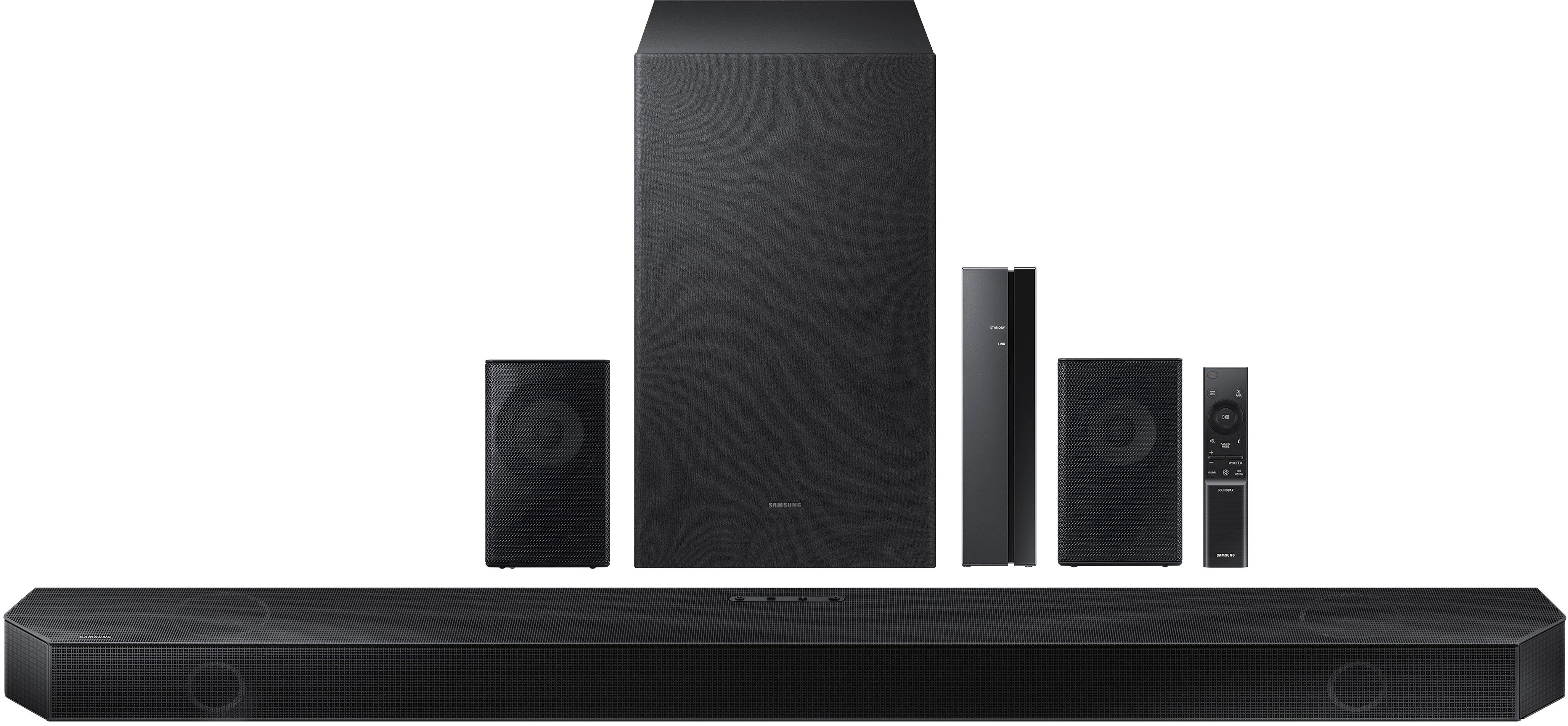
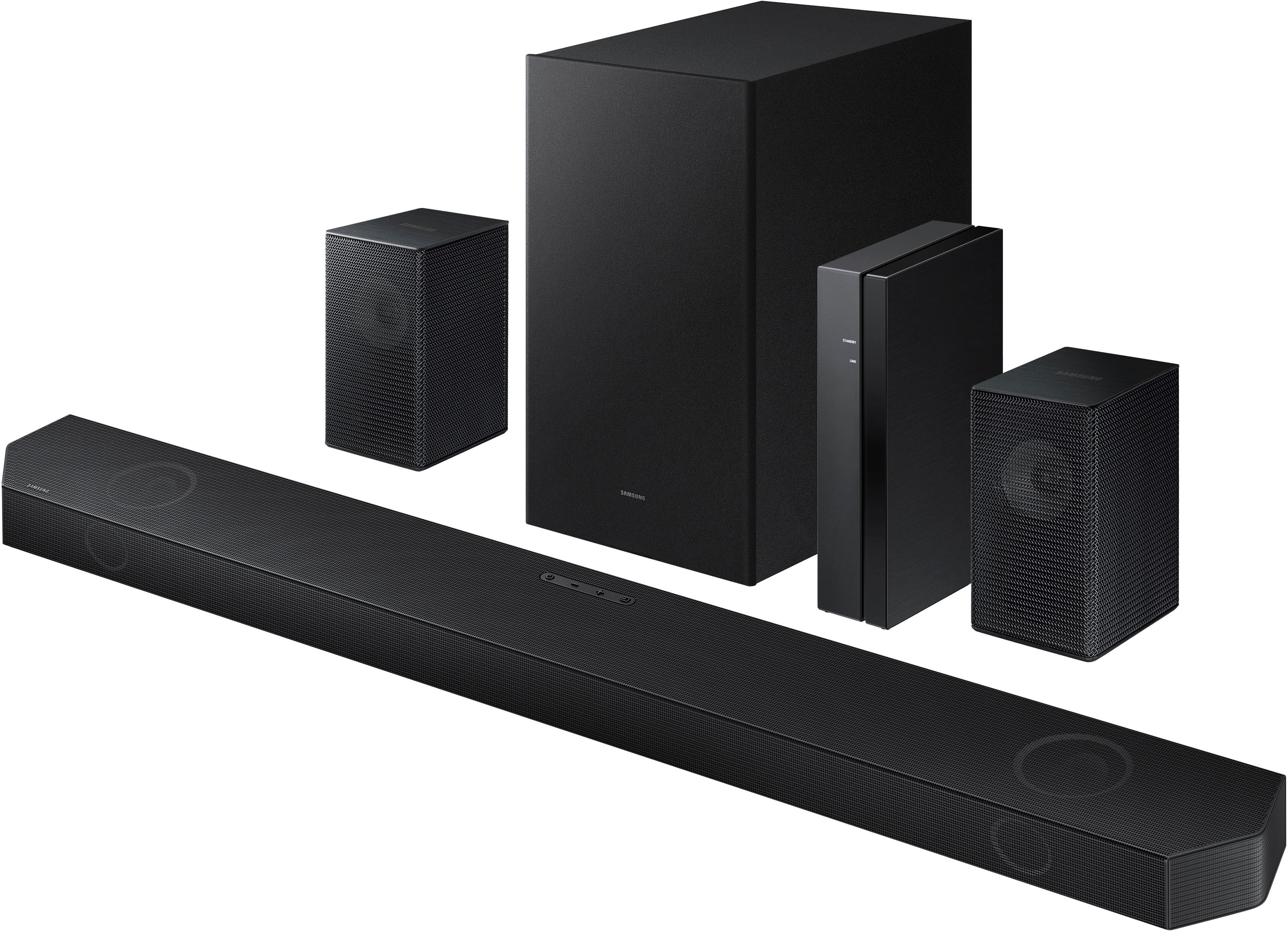


- Model:
- HW-Q750B/ZA
- SKU:
- 6505885
Rating by feature
- Value
Rating 4.4 out of 5 stars
- Quality
Rating 4.5 out of 5 stars
- Ease of Use
Rating 4.4 out of 5 stars
Customers are saying
Customers consistently note the superb sound quality, encompassing excellent bass and effective Dolby Atmos, as the standout feature. Many also praise the ease of setup and compatibility, particularly with Samsung devices. However, some users express concerns about the rear speakers' performance and the clarity of the wireless connection instructions. Overall, the positive feedback on sound quality and ease of use outweighs the negative comments regarding the rear speakers and wireless functionality.
This summary was generated by AI based on customer reviews.
- Pros mentioned:Ease of use, Setup, Sound quality
Love it
Posted .This reviewer received promo considerations or sweepstakes entry for writing a review.Premium sound, easy-to-use, easy to install, packaged rightly, great price and is just what I was looking for in this product, Love it
I would recommend this to a friend Don’t waste your time
||Posted . Owned for 3 weeks when reviewed.This reviewer received promo considerations or sweepstakes entry for writing a review.Worst sound bar total junk very disappointing for such a great company. The sound bar quality was horrible and crackled with any volume past 10. Would pair to bass or speakers.
No, I would not recommend this to a friendBrand response from Samsung
Posted .Hello ErikaF,
Thank you for purchasing the Samsung HW-Q750B Soundbar and sharing your review. This is definitely not the product experience we want for you.
So that we can better assist you, please reach out to Samsung Support via:
1) 1-800-SAMSUNG, 8 AM - 12 AM EST, 7 days a week. Ask for "Soundbars."
2) LiveChat with an agent by clicking the ‘Support’ link on the Samsung website homepage.
Samsung is committed to providing the best possible product experience, quality, and value, and we back this soundbar with a 1-year limited manufacturer's warranty.
We hope to hear from you and to make this right.
~Samsung Solutions
2 Rare speaker (small back)-sssssss sound
||Posted . Owned for 1 week when reviewed.This reviewer received promo considerations or sweepstakes entry for writing a review.2 small black rare speaker has bad sound quality doesnt give sorround sound. Even increase the volumbe of rere speaker from remore setting +6 very low and sound sonething like ssssss sound continuously comming from speaker.
No, I would not recommend this to a friendBrand response from Samsung
Posted .Hello gammer,
Thank you for purchasing the new HW-Q750B Soundbar.
Wireless routers, bluetooth devices and other wireless technology can cause interference when placed near the wireless transmitter or the wireless rear speakers. Please make sure that all of the cables are correctly plugged in matching the colors and firmly seated as loose cables can cause issues with sound quality as well.
In addition to checking the connections of the HW-Q750B Soundbar, please make sure your soundbar is using the latest firmware version. Updating the firmware gives you all the benefits of the latest improvements and may resolve connection or software issues. When the Soundbar is connected to the Internet, Auto Update allows software to update automatically even when the Soundbar is turned off. You can also update by using the SmartThings app or a USB device.
Hopefully these tips will help improve your overall audio quality of the soundbar.
If you continue experiencing these issues, please contact Samsung Customer Support at
1-800-SAMSUNG (ask for Soundbars), available 8 AM – 12 AM EST, 7 days a week.
We will be happy to assist with any troubleshooting or warranty services if need be.
For additional support resources such as downloading a full manual, visit us on the Samsung website and click on the ‘Support’ link in the upper right corner of the homepage.
~Samsung Solutions
Soundbar stopped work after a few days!
||Posted . Owned for 1 week when reviewed.This reviewer received promo considerations or sweepstakes entry for writing a review.My sound bar stopped working in less than a week and the rear speakers were very low. I was able to return and her the downgrade model which is the Samsung 650. Cheaper but worth it!
No, I would not recommend this to a friendBrand response from Samsung
Posted .Hi MitchellK,
Thank you for sharing your feedback on your experience regarding your HW-Q750B and having to go through the experience of replacing it. If you should have any questions or concerns with your new Soundbar, please know that Samsung Customer Support is here to help.
Call us at 1-800-SAMSUNG (ask for Soundbars), available 8 AM – 12 AM EST, 7 days a week.
For additional support resources such as downloading a full manual, visit us on the Samsung website and click on the ‘Support’ link in the upper right corner of the homepage.
~Samsung Solutions
misleading
||Posted .This reviewer received promo considerations or sweepstakes entry for writing a review.The right and left speakers are not wireless. you need to hard wire both speakers to the mini receiver. The bass on the subwoofer is very low. I am not happy with this item.
No, I would not recommend this to a friendBrand response from Samsung
Posted .Hello JosephS,
Thank you for purchasing the Samsung Q750B Soundbar System which comes with a subwoofer and rear speaker kit. We appreciate you sharing your thoughts about the wireless description of the rear speakers.
I am sorry to see that you are not completely satisfied with your purchase.
Occasionally, customers have trouble hiding and running speaker wires from the front of the room (where their soundbar is) to the back of their room (where they have their rear speakers). The Rear Speaker Kit eliminates that hassle. Connect the rear speakers to its wireless module and place these three in the back of your room. One wire is required to connect each rear speaker to the wireless module. Then plug in the power cable to the module. The “wireless” convenience is in connecting your soundbar and any other speakers at the front of the room to the rear speakers – this can now be done via Wi-Fi through the wireless module, eliminating any clutter of long wires running the length of your room.
Should you ever have questions or need help, please call us at 1-800-SAMSUNG (ask for Soundbars), available 8 AM – 12 AM EST, 7 days a week.
For additional support resources such as downloading a full manual, visit us on the Samsung website and click on the ‘Support’ link in the upper right corner of the homepage.
~Samsung Solutions
Not worth it
||Posted . Owned for 1 week when reviewed.This reviewer received promo considerations or sweepstakes entry for writing a review.The sound quality is no better than my vizio system that cost a quater of they want for this. Not to mention i went through 3 of these before i got one that worked or had all the pieces.
No, I would not recommend this to a friendBrand response from Samsung
Posted .Hello KyosukeTk,
Thank you for your review of this Samsung HW-Q750B Soundbar. We appreciate you sharing your audio experience with us. Your feedback is very important to us and will be shared with our product team.
There are some manual adjustments you can do to improve your audio experience.
By pressing the SOUND CONTROL button, you can set the audio function such as Voice Enhance Mode, Night mode, Sync, or Virtual. The desired item can be adjusted using the Up/Down buttons.
• Voice enhance mode enhances spoken dialog in movies and TV to make it easier to hear.
• Night mode is optimized for night time viewing with the settings adjusted to bring the volume down but keep the dialog clear.
• Press and hold the (Sound Control) button for about 5 seconds to adjust the sound for each frequency band. 150Hz, 300Hz, 600Hz, 1.2kHz, 2.5kHz, 5kHz, and 10kHz are selectable using the Left/Right buttons and each can be adjusted to a setting between -6 to +6 using the Up/Down buttons.(Make sure the Sound mode is set to “Standard”.)
• If the video on the TV and audio from the Soundbar are not synchronized, select Sync in Sound Control, and then set the audio delay between 0~300 milliseconds by using the Up/Down buttons.
• Sync is only supported for some functions.
• The Virtual Speaker function can be turned ON/OFF by using the Up/Down buttons.
Should you ever have questions or need help, please call us at 1-800-SAMSUNG (ask for Soundbars), available 8 AM – 12 AM EST, 7 days a week.
For additional support resources, visit us on the Samsung website and click on the ‘Support’ link in the upper right corner of the homepage for:
1) Chat with Us/Product Help: To begin a chat or find solutions, choose ‘TVs & Home Theater’ and select your model & topic.
2) Manuals & Software
3) Warranty Info
4) Register a Product: For access to easy warranty support, convenient opt-in to special promos and offers, faster troubleshooting and service, and quick notification of system updates
5) Contact Us
~ Samsung Solutions
- Pros mentioned:Ease of use, Sound quality
Great buy
Posted .This reviewer received promo considerations or sweepstakes entry for writing a review.Easy to install and great sound. Low profile system
I would recommend this to a friend Bass and soundbar can barely hear
||Posted . Owned for 1 week when reviewed.This reviewer received promo considerations or sweepstakes entry for writing a review.Bass and soundbar can barely hear or you can treat it as a trash if you dont listen carefully.
No, I would not recommend this to a friendBrand response from Samsung
Posted .Hello Benjamin,
Thank you for sharing your thoughts about the HW-Q750B Soundbar. Your feedback is incredibly valuable to us and will be shared with our product teams.
You can try manually optimizing your audio experience with the TONE CONTROL button. By pressing the TONE CONTROL button, you can adjust the volume of the treble or bass sound. It can be adjusted using the Up/Down buttons on your soundbar remote.
By pressing the SOUND MODE button, you can select the desired audio mode such as Surround, Game, Standard, Adaptive sound.
• Standard Mode: Outputs the original sound.
• Surround Mode: Provides a wider sound field than standard.
• Game Mode: Provides stereoscopic sound to immerse you in the action while gaming.
• Adaptive sound Mode: Analyzes the content in real time and automatically provides the optimal sound field based on the characteristics of the content.
By pressing the SOUND CONTROL button (which looks like a gear), you can set the audio function such as Voice enhance mode, Night mode, Sync, Surround speaker mode, Virtual. The desired item can be adjusted using the Up/Down buttons.
• Voice enhance mode enhances spoken dialog in movies and TV to make it easier to hear.
• Night mode is optimized for night time viewing with the settings adjusted to bring the volume down but keep
Press and hold the (Sound Control) button for about 5 seconds to adjust the sound for each frequency band.150Hz, 300Hz, 600Hz, 1.2kHz, 2.5kHz, 5kHz, and 10kHz are selectable using the Left/Right buttons and each can be adjusted to a setting between -6 to +6 using the Up/Down buttons. (Make sure the Sound mode is set to “Standard”.)
When you press the CHANNEL BUTTON, you can adjust the volume of each speaker such as Center level, Wide level, Front Top level, Rear level. To control the volume of each speaker select Center level, Side level, Wide level, or Front Top level in Sound Settings, and then adjust the volume between -6~+6 by using the Up/Down buttons. If Surround Speakers are connected, select Rear level and then use the Up/Down buttons to adjust the volume within a -6 to +6 range.
I hope these tips help you enjoy your new product.
You can always contact us for further help at 1-800-SAMSUNG (Ask for Soundbars), 8 AM – 12 AM EST, 7 days a week. Our LiveChat agents are also available by clicking on the ‘Support’ link on our website.
~ Samsung Solutions
Horrible
||Posted . Owned for 1 month when reviewed.This reviewer received promo considerations or sweepstakes entry for writing a review.Don’t waste your money on this, It is not good, the sound is not good
No, I would not recommend this to a friendBrand response from Samsung
Posted .Hello Mary,
Thank you for sharing your detailed review of the HW-Q750B. Your experiences and feedback are very important to us and will be shared with our product teams.
Please know, in addition to the available sound modes, your soundbar features a wide range of other customization options accessed with the remote. Use the steps below to further optimize the sound to your personal preference:
You can adjust the Treble and Bass by pressing the TONE CONTROL button then use the Up/Down buttons to adjust the level.
With the Surround Speakers connected, use the CH LEVEL button and select REAR LEVEL. From there, use the Up/Down buttons to adjust the volume within a -6 to +6 range.
If you would like louder (or softer) bass from your subwoofer, you can adjust the level by rocking the WOOFER button on the soundbar remote, and then adjusting the level from -6 to +6. To set the subwoofer volume level to 0, press the button in.
With the sound mode set to Standard, press and hold the Sound Control button for about 5 seconds to adjust the sound for each frequency band for precise audio adjustments. 150Hz, 300Hz, 600Hz, 1.2kHz, 2.5kHz, 5kHz, and 10kHz are selectable using the Left/Right buttons and each can be adjusted to a setting between -6 to +6 using the Up/Down buttons.
If we can help with anything else, please call us at 1-800-SAMSUNG (Ask for Soundbars), 8 AM – 12 AM EST, 7 days a week. LiveChat with an agent as well as manuals, software, and warranty info can be found at the ‘Support’ link on our Samsung website.
~ Samsung Solutions
Do not Buy!
||Posted . Owned for 3 weeks when reviewed.This reviewer received promo considerations or sweepstakes entry for writing a review.Worked 1 day then I had to return it so I would not recommend this at all!
No, I would not recommend this to a friendBrand response from Samsung
Posted .Hi Joey,
Thank you for your review of the Samsung HW-Q750B Soundbar and for sharing the issues that have caused you to return your unit. Your experience is very important to us and will be shared with our product team.
It is possible that your unit needed minor troubleshooting, a firmware update, or adjustments in settings.
Should you ever decide to give Samsung Soundbars another try and have questions or need assistance with settings, setup, or features, please know we are always here to help.
1-800-SAMSUNG (ask for Soundbars), available 8 AM – 12 AM EST, 7 days a week.
For additional support resources, visit us on the Samsung website and click on the ‘Support’ link in the upper right corner of the homepage for:
1) Chat with Us/Product Help: To begin a chat or find solutions, choose ‘TVs & Home Theater’ and select your model & topic.
2) Manuals & Software
3) Warranty Info
4) Register a Product: For access to easy warranty support, convenient opt-in to special promos and offers, faster troubleshooting and service, and quick notification of system updates
5) Contact Us
~ Samsung Solutions
returned = no power
||Posted . Owned for 1 month when reviewed.This reviewer received promo considerations or sweepstakes entry for writing a review.Unfortunately the unit was returned due to not powering on.
No, I would not recommend this to a friendBrand response from Samsung
Posted .Hi DavidP,
Thank you for purchasing the HW-Q750B Soundbar and I'm sorry that your unit did not power on. Your experience is very important to us and will be shared with our product team.
Should you ever decide to give Samsung Soundbars another try and have questions or need assistance with settings, setup, or features, please know we are always here to help.
Call us at 1-800-SAMSUNG (ask for Soundbars), available 8 AM – 12 AM EST, 7 days a week.
~ Samsung Solutions
- Pros mentioned:Sound quality
I'm very pleased!
Posted .This reviewer received promo considerations or sweepstakes entry for writing a review.I've been very pleased with this purchase. The sound, the clarity, the volume of the sub is better than i had expected especially for the price. I definitely recommend it for purchase. I'm not in a house though I'm in an apartment. So the volume is definitely enough for me. I love the fact that it syncs with the Samsung Tv i have as well. I also enjoy the fact that i have an app for it so I'm covered just in case i ever lose the actual remote or if the batteries go bad. Can't go wrong here. Get it!
I would recommend this to a friend - Pros mentioned:Sound quality
Greatest sound possible
Posted .This reviewer received promo considerations or sweepstakes entry for writing a review.The sound is amazing on this system, whether listening to music or movies, it’s like sitting in the theater. The wise range of possible sounds is amazing and the hook up and connection is super easy.
No, I would not recommend this to a friend - Pros mentioned:Ease of use, Sound quality
Sound Sound
Posted .This reviewer received promo considerations or sweepstakes entry for writing a review.The Samsung HW-Q750B/ZA sound bar is an amazing system. The overall quality of sound is rich and highly complements my LG NanoCell TV which I also bought at Best Buy. Even though this system would be amazing in any living/game room set up, it's set up in a medium sized bedroom. (16x12) The setup is straight forward and if you follow all directions, you should have no problem. Mounting this to any wall is just as easy if you use the included template. Please make sure that you have measured well. It's not fun to break a mounting washer. Thankfully I had another one available from older system I was replacing. Uses are plenty! My gaming PC is hooked to this system and the immerse sound makes me feel I am in the game. Bluetooth to cellphone was a synch. I would recommend to Samsung to include rear satellite speaker mounting brackets for instant wall mounting as a apart of the wall mount kit. Other than that, base is thumping and could not be happier with my purchase.
I would recommend this to a friend - Pros mentioned:Sound quality
Sound bar
Posted .This reviewer received promo considerations or sweepstakes entry for writing a review.Really loud And good sound, the surround quality is great
I would recommend this to a friend - Pros mentioned:Sound quality
ABOSULUTY NO WIRES
Posted .This reviewer received promo considerations or sweepstakes entry for writing a review.Excellent quality, great for a small room. Place the wireless components anywhere in the room
I would recommend this to a friend - Pros mentioned:Ease of use, Sound quality
Samsung
Posted .This reviewer received promo considerations or sweepstakes entry for writing a review.Good quality and the sound is great, easy to set up.
I would recommend this to a friend - Pros mentioned:Sound quality
soundbar
Posted .This reviewer received promo considerations or sweepstakes entry for writing a review.great sound but hard to set up and good for its price range
I would recommend this to a friend - Pros mentioned:Sound quality
Great sound system
Posted .This reviewer received promo considerations or sweepstakes entry for writing a review.Gave it to my son as a Christmas present and he loves it. Sounds great for regular TV and even better when he's gaming and for movies.
I would recommend this to a friend - Pros mentioned:Bass, Sound quality
Its aight ..
Posted .This reviewer received promo considerations or sweepstakes entry for writing a review.Its honestly not bad thought it would of been louder . I have neighbors so i dont like to blast it i keep it at a decent 27 .. base is decent .. and the sound bar is incredible really does give u a 3d feeling .. keeps u focused then a normal tv sound
I would recommend this to a friendBrand response from Samsung
Posted .Hi Kevo,
Thank you for taking the time to leave a review of your experiences with the new HW-Q750B Soundbar.
By pressing the SOUND MODE button, you can select the desired audio mode such as:
Surround, Game, Standard, Adaptive sound.
• Standard
Outputs the original sound.
• Surround
Provides a wider sound field than standard.
• Game
Provides stereoscopic sound to immerse you in the action while gaming.
• Adaptive sound
Analyzes the content in real time and automatically provides the optimal sound field based on the characteristics of the content.
By pressing the CH LEVEL button, you can adjust the volume of the each speaker such as Center level, Wide level, Front Top level, and Rear level.
• To control the volume of the each speaker select Center level, Wide level, or Front Top level in Sound Settings, and then adjust the volume between -6~+6 by using the Up/Down buttons.
• If Surround Speakers are connected, select Rear level and then use the Up/Down buttons to adjust the volume within a -6 to +6 range.
By pressing the button, you can set the audio function such as Voice Enhance mode, Night mode, Sync, Virtual. The desired item can be adjusted using the Up/Down buttons.
• The Spacefit sound and AVA functions are not supported by Q750B model.
• Voice enhance mode enhances spoken dialog in movies and TV to make it easier to hear.
• Night mode is optimized for night time viewing with the settings adjusted to bring the volume down but keep the dialog clear.
• Press and hold the (Sound Control) button for about 5 seconds to adjust the sound for each frequency band. 150Hz, 300Hz, 600Hz, 1.2kHz, 2.5kHz, 5kHz, and 10kHz are selectable using the Left/Right buttons and each can be adjusted to a setting between -6 to +6 using the Up/Down buttons. (Make sure the Sound mode is set to “Standard”.)
• If the video on the TV and audio from the Soundbar are not synchronized, select Sync in Sound Control, and then set the audio delay between 0~300 milliseconds by using the Up/Down buttons.
• Sync is only supported for some functions.
• The Virtual Speaker function can be turned ON/OFF by using the Up/Down buttons.
Hopefully, these adjustments will help you have a better experience when using your new Samsung Soundbar.
Should you ever have questions or need help, please call us at 1-800-SAMSUNG (ask for Soundbars), available 8 AM – 12 AM EST, 7 days a week.
For additional support resources, visit us on the Samsung website and click on the ‘Support’ link in the upper right corner of the homepage.
~Samsung Solutions