Customer Ratings & Reviews
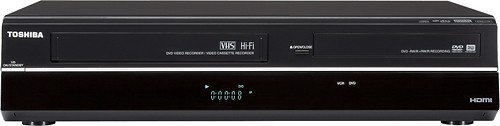
- Model:
- DVR620
- |
- SKU:
- 9642774
Customer reviews
Rating 4.2 out of 5 stars with 1086 reviews
(1,086 customer reviews)Rating by feature
- Ease of Use3.5
Rating 3.5 out of 5 stars
Customers are saying
Customers regard this DVD recorder and VCR combo as user-friendly and are pleased with its VHS to DVD conversion capability. They appreciate the picture quality and find it to be a great value for the price. However, some customers have expressed concerns about the lack of a tuner, confusing instructions, and difficulty in operating the remote control.
This summary was generated by AI based on customer reviews.
- Pros mentioned:Ease of use
Rated 4 out of 5 stars
DVD and VCR All In One
||Posted .This reviewer received promo considerations or sweepstakes entry for writing a review.Easy to use with one remote for both the DVD and the VCR. Only drawback is that is will not play Blue Ray. It was very nice to combine two players into one.
I would recommend this to a friend - Pros mentioned:Ease of use, Vhs to dvd
Rated 5 out of 5 stars
Good DVD recorder/VCR
||Posted .This reviewer received promo considerations or sweepstakes entry for writing a review.Easy to set up and program, this DVD/VCR combo seems to do everything well. There aren't too many VCR's available anymore, and this one does the job.
I would recommend this to a friend - Pros mentioned:Ease of use, Picture quality
Rated 4 out of 5 stars
Very easy dubbing VHS to DVD
||Posted .This reviewer received promo considerations or sweepstakes entry for writing a review.The dubbing feature makes this unit very easy to operate. Once you set up the direction of the transfer you are all set. The only tricky part is labeling the disc once the transfer is completed. I found the Panasonic that I had previously owned a little more easier to use. Just read the user guide which will walk you through the process. The picture quality of the DVD looks really good.
I would recommend this to a friend - Pros mentioned:Vhs to dvd
Rated 5 out of 5 stars
Easy transfer from VHS to DVD
||Posted .This reviewer received promo considerations or sweepstakes entry for writing a review.Works great! Bought this for my grandparents so they can transfer their old VHS tapes to DVD. Also works as a VHS/DVD player as well. This only transfers to DVD in real-time. For the more technologically advanced users, you cannot record any faster like you would if you imported the VHS into a computer and then burned the video file onto a DVD. But this does work with no computer as the middle man.
I would recommend this to a friend - Pros mentioned:Ease of use, Picture quality
Rated 5 out of 5 stars
Nice recorder for price.
||Posted .This reviewer received promo considerations or sweepstakes entry for writing a review.I am well satisfied with this purchase. Easy set up and use. Really an advantage to record on dvd over tape. Also great to dupe from old tapes to dvds.
I would recommend this to a friend - Pros mentioned:Price
Rated 5 out of 5 stars
Good option for those who still have VHS tapes
||Posted .This reviewer received promo considerations or sweepstakes entry for writing a review.If you still have VHS tapes lying around (or want some...) this is a good choice at a reasonable price. When your friends hear you have a working VHS deck, don't be surprised if they ask you to burn their old tapes to DVD as well.
I would recommend this to a friend - Pros mentioned:Picture quality, Vhs to dvd
Rated 5 out of 5 stars
Does everything its ment to
||Posted .This reviewer received promo considerations or sweepstakes entry for writing a review.One of the best home theater vcr's for thoughs old school collection set of dvds you own. Plays anything and records well. a bit old for blue ray though
I would recommend this to a friend Rated 4 out of 5 stars
Great Recording
||Posted .This reviewer received promo considerations or sweepstakes entry for writing a review.Does a good job of recording, but very little editing,. if you want to watch your DVD's on other DVD recorders. Also you need to use (-RW's and -R's). I record in the Video mode so I can watch my recordings in other DVD recorders. One thing- I found out that if you need Closed Caption, when your recording, you need to playback in the Audio-Video mode (composite), not the HDMI, or the Component mode. I have found this problem in all recorders I have used . I have recorded quite a lot and the recordings have turned out great. .
I would recommend this to a friend- Pros mentioned:Ease of use, Picture quality
Rated 5 out of 5 stars
Nice DVD-Recorder/VCR Combo
||Posted .This reviewer received promo considerations or sweepstakes entry for writing a review.Easy to use, works well to record my old vcr tapes, and tv shows
I would recommend this to a friend - Pros mentioned:Ease of use
Rated 5 out of 5 stars
VCR:DVD copier did exactly what I wanted it to do.
||Posted .This reviewer received promo considerations or sweepstakes entry for writing a review.Had a trove of old VCR tapes of my family I wanted to archive to better long-term media. This equipment fit the bill perfectly. Easy to use, relatively compact, 1-piece unit. Quality of resultant DVDs matches the high-grade VCR tapes I used for my family recordings (not high-definition by any means, but then the source/VCR tapes weren't either).
I would recommend this to a friend Rated 4 out of 5 stars
Toshiba VCR DVD combo
||Posted .This reviewer received promo considerations or sweepstakes entry for writing a review.If you are "old school" and still have vhs tapes to convert to dvd's, this is one of the last major brands to offer vhs/dvd combo players that I could find. I had a Panasonic prior to this that had a coaxial IN from cable tv to player. This Toshiba had red/white/yellow IN in lieu of coaxial as the only difference in connections that I noticed. Other than that it seems to work okay in recording and dubbing.
I would recommend this to a friend- Pros mentioned:Vhs to dvd
Rated 4 out of 5 stars
Great DVD/VHS player.
||Posted .This reviewer received promo considerations or sweepstakes entry for writing a review.We have many VHS tapes with great memories on them, and wanted to be sure that we could still watch them. This player does a great job of playing VHS tapes and DVDs.
I would recommend this to a friend Rated 4 out of 5 stars
Good for transferring VHS to DVD
||Posted .This reviewer received promo considerations or sweepstakes entry for writing a review.I am going to re-print here what enabled me to actually use this item: With credit to G.B.Packert from Amazon: 1. Because old videotapes may not track well when they have been unused for several years, fast forward to the end of the tape and rewind the tape before attempting to copy it. The recorder may refuse to copy a tape if it does not track well. 2. Eject the videotape. Apparently Toshiba DVRs (both the 610 and 620) can balk if the videotape is inserted before the DVD. 3. Push the DVD button and insert the blank DVD. 4. Press Record Mode (not Record) button and set the speed (I use SP). 5. Press the Setup button and select Recording. Select Dubbing Mode. Select VCR > DVD. 6. Press the VCR button and insert the videotape. Press Play and then Pause (not Stop) at the point slightly before you wish to start copying. 7. Press the Dubbing button. Push Stop when you want to stop dubbing. You can then insert another videotape to dub onto the same DVD, until it is full. 8. You can add titles on the DVD disk with the Top Menu button by selecting the part you wish to title and clicking on Edit and Edit Title. 9. After adding titles, you should finalize the DVD by pressing the Setup button, selecting DVD Menu and then Finalize (this may take a few minutes). Then you should be able to play the disk on another machine. I have been able to play finalized disks on my Sony DVD player.
I would recommend this to a friend- Pros mentioned:Vhs to dvd
Rated 4 out of 5 stars
Toshiba is a good band for VCRs
||Posted .This reviewer received promo considerations or sweepstakes entry for writing a review.VCRs are harder and harder to find with the explosion of technology; however, I still like using a VCR and many tapes to watch. Recording on the VCR is straight forward. I cannot comment on the DVR side for recording. I hope to master that at a later time. The manual is quite extensive for recording on a DVR.
I would recommend this to a friend - Pros mentioned:Picture quality
Rated 4 out of 5 stars
Decent!
||Posted .This reviewer received promo considerations or sweepstakes entry for writing a review.This is a decent, but not great unti. The recording quality is great, but the menu options are terrible. If u dont mind the menu options then this is ur machine.
I would recommend this to a friend - Pros mentioned:Ease of useCons mentioned:Instructions
Rated 5 out of 5 stars
great for dubbing
||Posted .This reviewer received promo considerations or sweepstakes entry for writing a review.Great for dubbing. Easy to use although included instructions confusing. Better instructions available on-line..
I would recommend this to a friend - Pros mentioned:Ease of use
Rated 4 out of 5 stars
Satisfactory VHS/DVD combo unit
||Posted .This reviewer received promo considerations or sweepstakes entry for writing a review.Fairly easy setup using documentation included in the box. Has cable-in connection but no cable-out to TV, so must use HDMI or component connections. Fairly intuitive and easy to use.
I would recommend this to a friend - Pros mentioned:Ease of use, Picture quality
Rated 5 out of 5 stars
easy to use
||Posted .This reviewer received promo considerations or sweepstakes entry for writing a review.The unit was of good quality and it was easy to use
I would recommend this to a friend - Pros mentioned:Ease of use
Rated 4 out of 5 stars
Good unit for copying VHS tapes
||Posted .This reviewer received promo considerations or sweepstakes entry for writing a review.My older unit stopped working. I researched new units and settled on the Toshiba. Some reviews said it was difficult to use, but I had no trouble with it. I have copied many VHS tapes to DVDs and am pleased with the Toshiba.
I would recommend this to a friend - Pros mentioned:Recording
Rated 4 out of 5 stars
Good machine - not perfect, but good.
||Posted .This reviewer received promo considerations or sweepstakes entry for writing a review.The Toshiba DVD recorder works well for my purposes: converting video camera output to DVD, recording some programs of entertainment interest and recording educational programs. It does this fine as long as you have a tuner.
I would recommend this to a friend