Last-Minute SavingsLimited quantities.Shop now

Skip to content
Gift Ideas
Main Content

Customer Ratings & Reviews
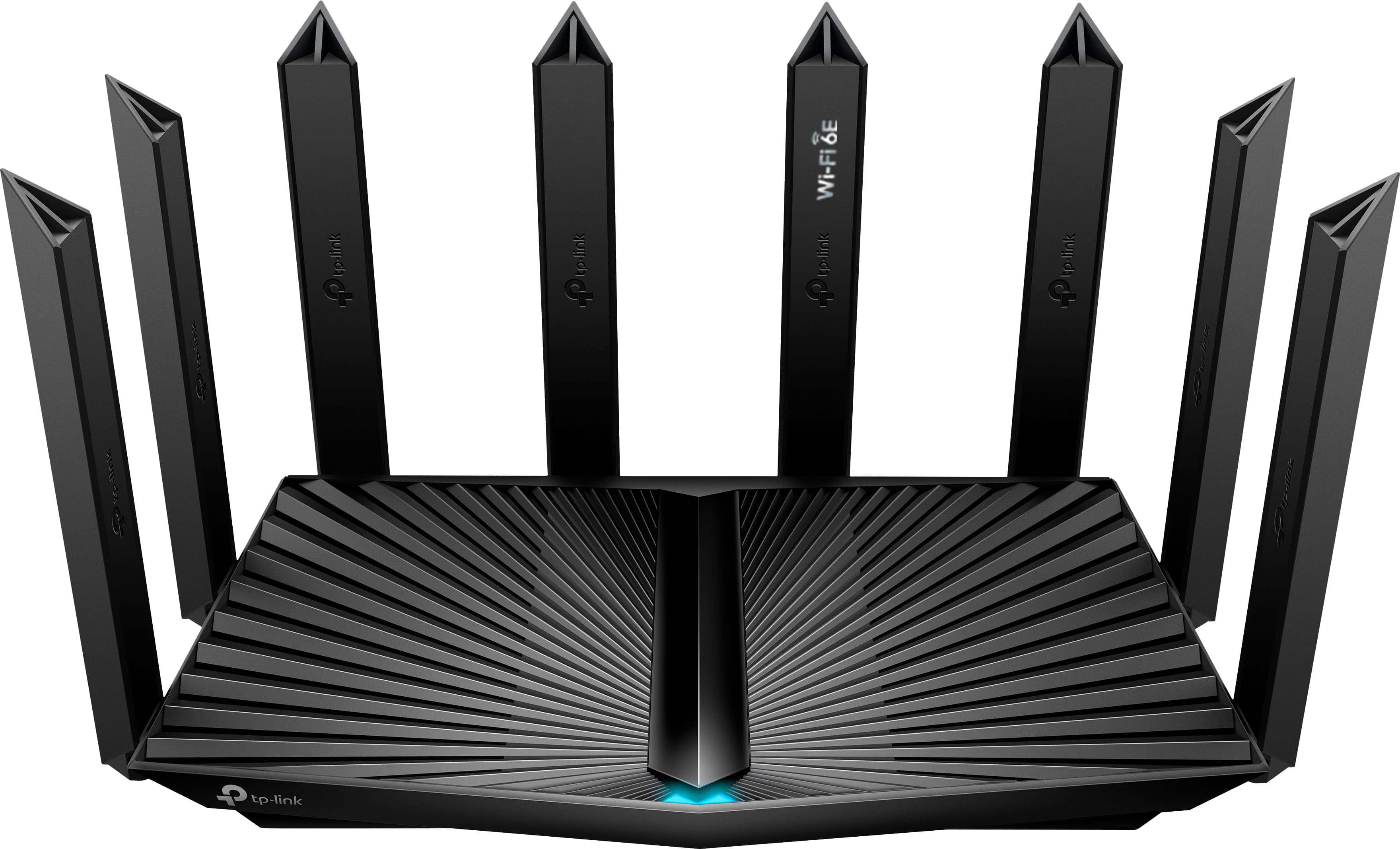
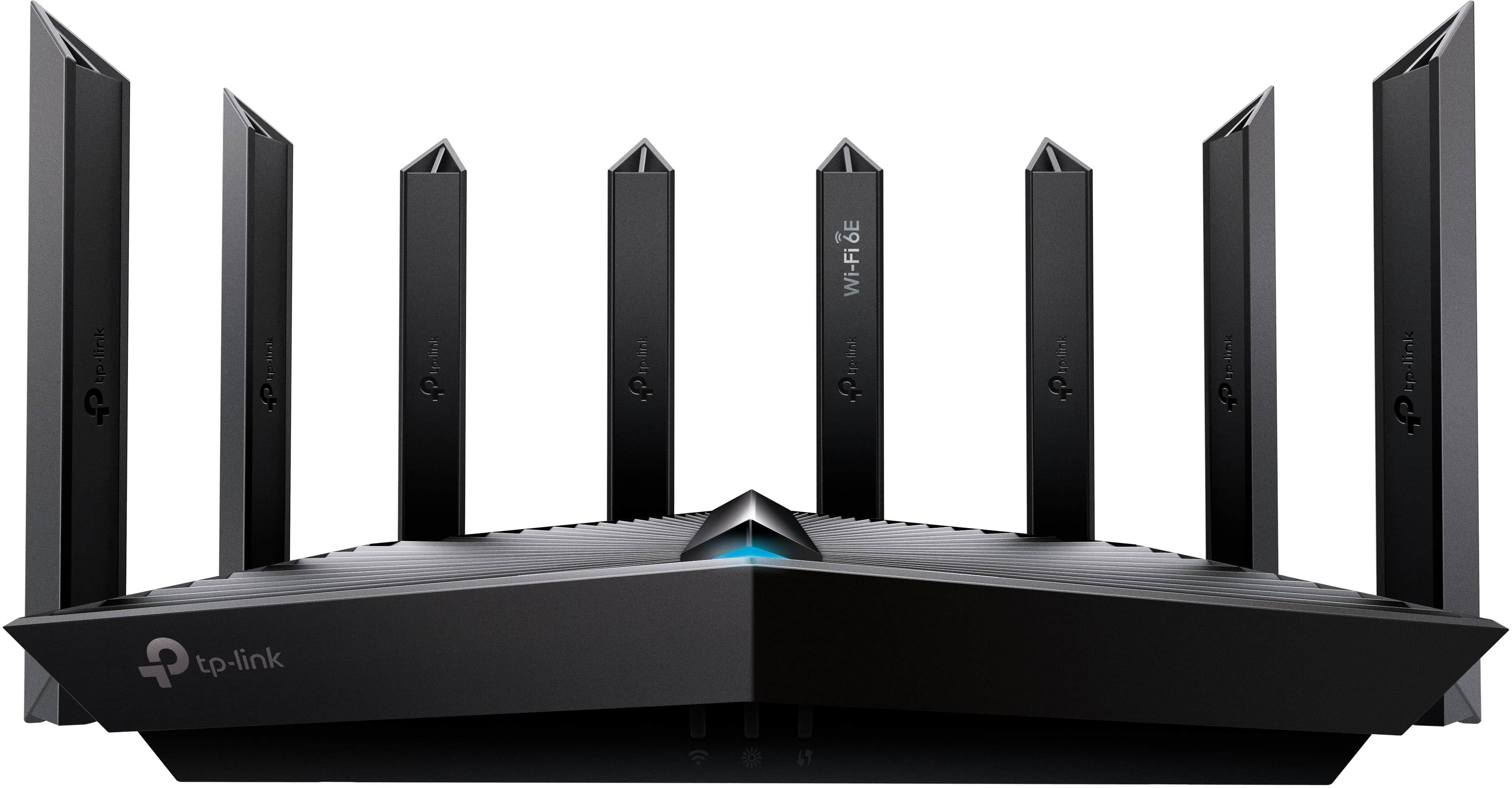
Your price for this item is $129.99
The comparable value price is $229.99

Customer reviews

Rating 4.6 out of 5 stars with 666 reviews

Rating Filter

Rating by feature

  • Setup

    Rating 4.7 out of 5 stars

  • Range

    Rating 4.7 out of 5 stars

  • Signal Strength

    Rating 4.7 out of 5 stars

Pros mentioned filter

Cons mentioned filter

90%would recommend to a friend

Customers are saying

Customers are delighted by the Archer AXE7800 Tri-Band Wi-Fi 6E Router's coverage, signal strength, and performance. They appreciate the easy setup process and the reliable connection it provides. Additionally, the router's Wi-Fi 6E technology and tri-band capabilities are seen as future-proof and compatible with various devices.

This summary was generated by AI based on customer reviews.

The vast majority of our reviews come from verified purchases. Reviews from customers may include My Best Buy members, employees, and Tech Insider Network members (as tagged). Select reviewers may receive discounted products, promotional considerations or entries into drawings for honest, helpful reviews.
Page 32 Showing 621-640 of 666 reviews
  • Rated 1 out of 5 stars

    When ports fail after short period of having route

    |
    |
    Posted . Owned for 1.5 years when reviewed.
    This reviewer received promo considerations or sweepstakes entry for writing a review.

    Wan ports don't work anymore after having only a few months

    No, I would not recommend this to a friend
    • Brand response from TPLinkSupport
      Posted .

      Hi GeorgeS,

      Thank you for your review. Your TP-Link Archer AXE7800 Wi-Fi 6E Router comes with a manufacturer's warranty, and we would greatly appreciate the opportunity to help address your concerns. At your convenience, please reach out to our support team using any of the resources included with the product, or from our official website, and we'll gladly have a Support Agent follow up with you directly.

      Thank you,
      TP-Link Systems Support tplink

  • Rated 3 out of 5 stars

    Was was okay but not great

    |
    |
    Posted . Owned for 8 months when reviewed.
    This reviewer received promo considerations or sweepstakes entry for writing a review.

    Was an okay router, But my old router worked better decided to return this

    No, I would not recommend this to a friend
    • Brand response from TPLinkSupport
      Posted .

      Hi,

      Thank you for your review. To ensure the best possible signal, it is important to make sure placement is as optimal as possible. Reducing obstructions and placing the router in a central location will help ensure your signal reaches the areas you need.

      To ensure optimal performance of your wireless router, please check, and if needed, update its firmware using the steps outlined in FAQ 2139 on our official website: https://www.tp-link.com/us/support/faq/2139/

      If you would like assistance with any TP-Link products, please reach out to our free support team using any of the resources included with the product, or from our official website, and we'll gladly have a Support Agent follow up with you directly.

      Thank you,
      TP-Link Support tplink

  • Pros mentioned:
    Speed

    Rated 1 out of 5 stars

    2.4 GHz failure

    |
    |
    Posted . Owned for 3 months when reviewed.
    This reviewer received promo considerations or sweepstakes entry for writing a review.

    Slow speeds with home network failure at 2.4 GHz. Works perfectly at 5 GHz. Have spent hours trying to get this to work correctly and it seems like a huge waste of time.

    No, I would not recommend this to a friend
    • Brand response from TPLinkSupport
      Posted .

      Hello T,

      We would like to help with this. If you haven't already please reach out to support as soon as you are able to. Please go to our ofiicial website tp-link.com click on support and then contact technical support for options available. Support is free and available 24/7. tplink

  • Rated 1 out of 5 stars

    Failed attempt

    |
    |
    Posted . Owned for 3 weeks when reviewed.
    This reviewer received promo considerations or sweepstakes entry for writing a review.

    I had to return this product due to the firmware in the product was over 1 year old and needed to be updated by me. I tried and bricked the unit, so I returned it to the store.

    No, I would not recommend this to a friend
    • Brand response from TPLinkSupport
      Posted .

      Hello Gregory,

      Products are shipped with the most recent firmware that is available at the time of manufacturing. Depending on how long a product sits on a shelf in in a warehouse before it is purchased there is a change that the firmware could be outdated. If you connect the product to a TP-Link ID then it may be possible to install a firmware from our online OTA servers. Otherwise a manual update is required. Bricking a device is rare and generally happens if the router looses connection or power while installing the new file. I would say contact our support desk for assistance but you motioned you already returned the product. So you are aware our support team is available for free and 24 hours a day. Support can be reached at 866-225-8139 or Support.usa@tp-link.com.

      Best Regards

      TP-Link Systems Technical Support tplink

  • Rated 1 out of 5 stars

    Failed after 4 hours

    |
    |
    Posted . Owned for 3 weeks when reviewed.
    This reviewer received promo considerations or sweepstakes entry for writing a review.

    Had this unit for about 4 hours before it started dropping signals both on mobile devices and my laptops. It might have been a faulty unit but it also took about an hour to get it up and running. I am fairly tech savvy and this one by far one of the worst routers to get setup. I ended up having to return it and swapped it out for a Linksys Mesh system instead. I wish it worked better since I have a lot of TP-Link Network equipment but I will never go with TP-Link when it comes to routers after my experience with this router.

    No, I would not recommend this to a friend
    • Brand response from TPLinkSupport
      Posted .

      Hi,

      Thank you for your review. To ensure the best possible signal, it is important to make sure placement is as optimal as possible. Reducing obstructions and placing the router in a central location will help ensure your signal reaches the areas you need.

      To ensure optimal performance of your wireless router, please check, and if needed, update its firmware using the steps outlined in FAQ 2139 on our official website: https://www.tp-link.com/us/support/faq/2139/

      We regret to hear you decided to return the router. Our support team is always happy to help address any questions or concerns you may have about our products. If you have any questions about your other TP-Link products in the future, please reach out to our support team using the support contact information on our official website, and we'll gladly have a Support Agent follow up with you directly.

      Thank you,
      TP-Link Support tplink

  • Cons mentioned:
    Wi-fi 6e

    Rated 1 out of 5 stars

    Review for TP- wifi

    |
    |
    Posted . Owned for 2 weeks when reviewed.
    This reviewer received promo considerations or sweepstakes entry for writing a review.

    My Wi-Fi speed didn’t even improve it just made it worse.

    No, I would not recommend this to a friend
    • Brand response from TPLinkSupport
      Posted .

      Hi,

      We appreciate your review. Optimizing the placement of your router is crucial to ensuring the best possible signal. By reducing obstructions and positioning it centrally, you can help ensure that your signal reaches all the necessary areas.

      To ensure optimal performance of your wireless router, please check and if needed, update its firmware using the steps outlined in FAQ 2139 on our official website: https://www.tp-link.com/us/support/faq/2139/

      If you would like assistance with any of these steps, please contact our support team using any of the resources included with the product or from our official website, and we'll gladly have a Support Agent follow up with you directly.

      Thank you,
      TP-Link Support tplink

  • Rated 1 out of 5 stars

    Awful

    |
    |
    Posted .
    This reviewer received promo considerations or sweepstakes entry for writing a review.

    Awful do not buy! Bought got damaged right away, got a new one after 1 month got messed up. Do not buy!

    No, I would not recommend this to a friend
    • Brand response from TPLinkSupport
      Posted .

      Hello Trinidad,

      Can you provide more context? Like how did the product get damaged? How was your experience with Support? What issues have you had with the product. We would love to know more. Please email us at support.usa@tp-link.com with a copy of this review and we will work with you to address the concerns we can resolve.

      Best Regards

      TP-Link Systems Support tplink

  • Rated 1 out of 5 stars

    Does NOT Work Out of the Box

    |
    |
    Posted .
    This reviewer received promo considerations or sweepstakes entry for writing a review.

    This router does NOT work out of the box. I followed all the steps in the tp link tether app and it refuses to connect to the internet. My netgear router from 2017 works just fine by simply plugging it in. Absolutely terrible product, would never recommend.

    No, I would not recommend this to a friend
    • Brand response from TPLinkSupport
      Posted .

      Hi,

      Thank you for sharing your experience with our router. It sounds like your cable modem's MAC (Media Access Control) binding needs to be released and renewed so it can provide an IP address (and Internet) to the Router. This is common with Cable Internet Services and can typically be remedied using the following steps:

      1. Unplug the power from both your router and cable modem
      2. Unplug the coax cable from the modem
      3. Re-connect power ONLY to your cable modem
      4. Wait until the cable modem is fully booted, then re-connect coax
      5. Re-connect power to the router and connect it to the modem via Ethernet

      This process should release and renew the MAC binding, so your modem can provide connectivity to the router. If you'd like assistance with any of these steps, please reach out to our toll-free support team using any of the resources included with the product, or from our official website, and we'll gladly have a Support Agent follow up with you directly.

      Thank you,
      TP-Link Support tplink

  • Rated 1 out of 5 stars

    A Waste of Time and Money

    |
    |
    Posted . Owned for 1 week when reviewed.
    This reviewer received promo considerations or sweepstakes entry for writing a review.

    My experience with this router was an absolute letdown because the WIFI signal is weak, the speed is extremely slow even if the distance between a device and the router is close, the internet keeps disconnecting...very disappointed! I have to return it and buy another router of a different brand. I DO NOT RECOMMEND THIS PRODUCT.

    No, I would not recommend this to a friend
    • Brand response from TPLinkSupport
      Posted .

      Hello GRCC.

      Before you do that please consider contacting Support. Our agents can help isolate and in most cases resolve the source of the concern. If we can't resolve we will be able to point you in the right path to get a resolution. tplink

  • Rated 1 out of 5 stars

    Did not last

    |
    |
    Posted . Owned for 4 months when reviewed.
    This reviewer received promo considerations or sweepstakes entry for writing a review.

    I purchased 4 months agao and it has already died. Rebooted several times and then tried factory reset- still dead.

    No, I would not recommend this to a friend
    • Brand response from TPLinkSupport
      Posted .

      Hi Chris,

      Thank you for your review. your TP-Link Wi-Fi 6E Router comes with a 2-year warranty, and we would greatly appreciate the opportunity to help address your concerns. At your convenience, please reach out to our support team using any of the resources included with the product, or from our official website, and we'll gladly have a Support Agent follow up with you directly.

      Thank you,
      TP-Link Support tplink

  • Rated 1 out of 5 stars

    Trash

    |
    |
    Posted . Owned for 3 weeks when reviewed.
    This reviewer received promo considerations or sweepstakes entry for writing a review.

    Its trash. Poorly made. Would not connect. 5g just dissappeared. Get an asus router instead.

    No, I would not recommend this to a friend
  • Rated 2 out of 5 stars

    I don't like it

    |
    |
    Posted . Owned for 1 month when reviewed.
    This reviewer received promo considerations or sweepstakes entry for writing a review.

    It works when it decides to work. Very disappointed.

    No, I would not recommend this to a friend
    • Brand response from TPLinkSupport
      Posted .

      Hello Ccppjj

      Can you please email us at ussupportteam@tp-link.com so we can get more information about your experience and any concerns you have. tplink

  • Rated 1 out of 5 stars

    Horrible! Don’t buy this router

    |
    |
    Posted . Owned for 2 weeks when reviewed.
    This reviewer received promo considerations or sweepstakes entry for writing a review.

    Horrible. I had a a $60 TP Link and it worked a lot better. Ever since I’ve had this router, my streaming services freeze up and buffer all the time.

    No, I would not recommend this to a friend
    • Brand response from TPLinkSupport
      Posted .

      Hi,

      Thank you for your review. To ensure the best possible signal, it is important to make sure placement is as optimal as possible. Reducing obstructions and placing the router in a central location will help ensure your signal reaches the areas you need.

      To ensure optimal performance of your wireless router, please check, and if needed, update its firmware using the steps outlined in FAQ 2139 on our official website: https://www.tp-link.com/us/support/faq/2139/

      If you would like assistance with any of these steps, please reach out to our support team using any of the resources included with the product, or from our official website, and we'll gladly have a Support Agent follow up with you directly.

      Thank you,
      TP-Link Support tplink

  • Rated 1 out of 5 stars

    Not worth it

    |
    |
    Posted . Owned for 3 months when reviewed.
    This reviewer received promo considerations or sweepstakes entry for writing a review.

    Not worth it at all always having trouble with this always getting no internet

    No, I would not recommend this to a friend
    • Brand response from TPLinkSupport
      Posted .

      Hi,

      Thank you for your review. To ensure optimal performance of your wireless router, please check, and, if needed, update its firmware using the steps outlined in FAQ 2139 on our official website: https://www.tp-link.com/us/support/faq/2139/

      If you would like assistance with any of these steps, please contact our support team using any of the resources included with the product or from our official website, and we'll gladly have a Support Agent follow up with you directly.

      Thank you,
      TP-Link Support tplink

  • Rated 1 out of 5 stars

    Extremely hard to install

    |
    |
    Posted . Owned for 1 month when reviewed.
    This reviewer received promo considerations or sweepstakes entry for writing a review.

    No matter how many times I try,it keep saying can’t connect to internet.wasted my money, siting at home collecting dust now.

    No, I would not recommend this to a friend
    • Brand response from TPLinkSupport
      Posted .

      Hi,

      Thank you for sharing your experience with our product. It sounds like your cable modem's MAC (Media Access Control) binding needs to be released and renewed so it can provide an IP address (and Internet) to the Router. This can typically be done using the following steps:

      1. Unplug the power from both your router and cable modem
      2. Unplug the coax cable from the modem
      3. Re-connect power ONLY to your cable modem
      4. Wait until the cable modem is fully booted, then re-connect coax
      5. Re-connect power to the router and connect it to the modem via Ethernet

      This process should release and renew the MAC binding so your modem can provide connectivity to the router. If you'd like assistance with any of these steps, please reach out to our toll-free support team using any of the resources included with the product, or from our official website, and we'll gladly have a Support Agent follow up with you directly.

      Thank you,
      TP-Link Support tplink

  • Rated 1 out of 5 stars

    Nice router , one issue

    |
    |
    Posted . Owned for less than 1 week when reviewed.
    This reviewer received promo considerations or sweepstakes entry for writing a review.

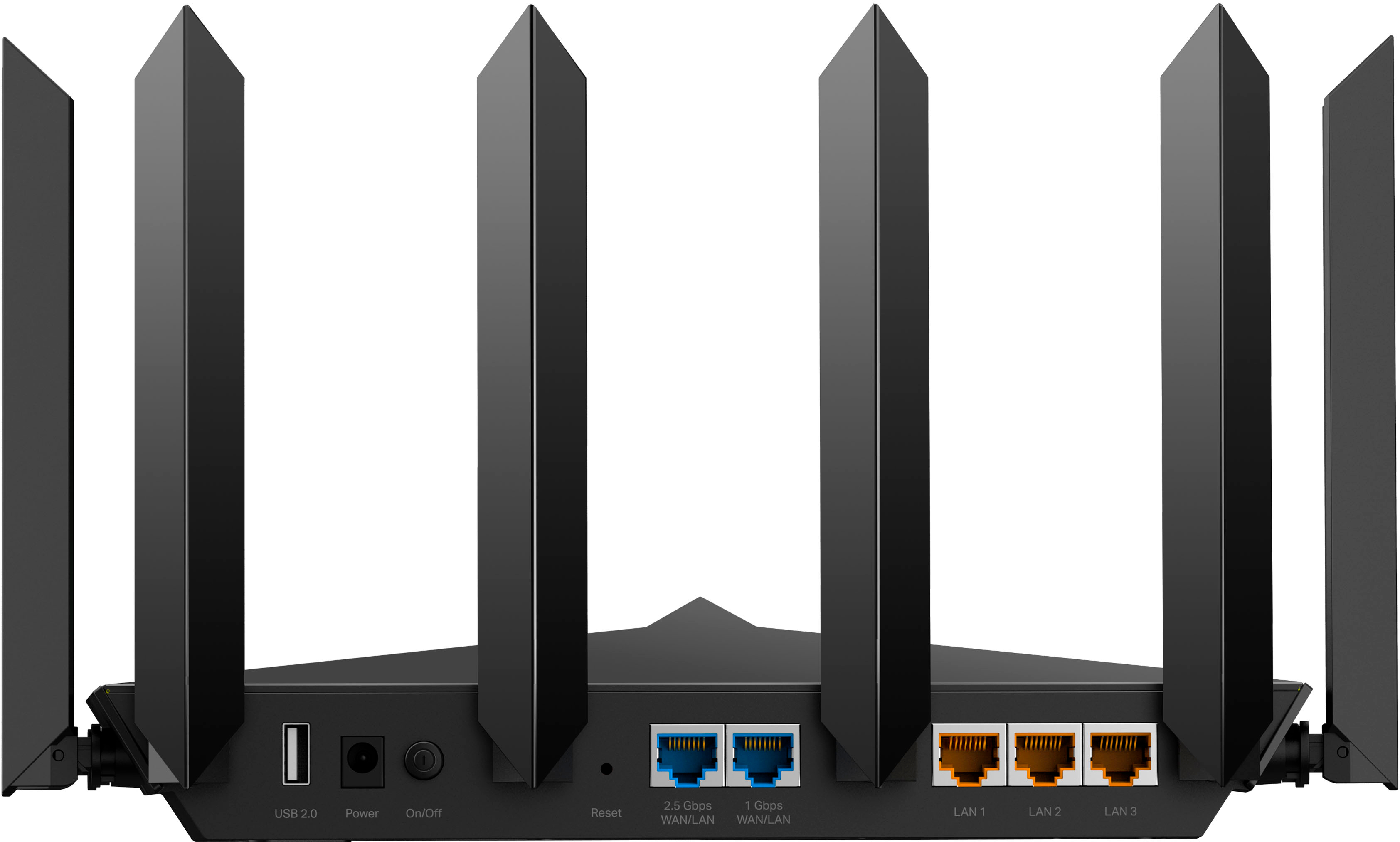
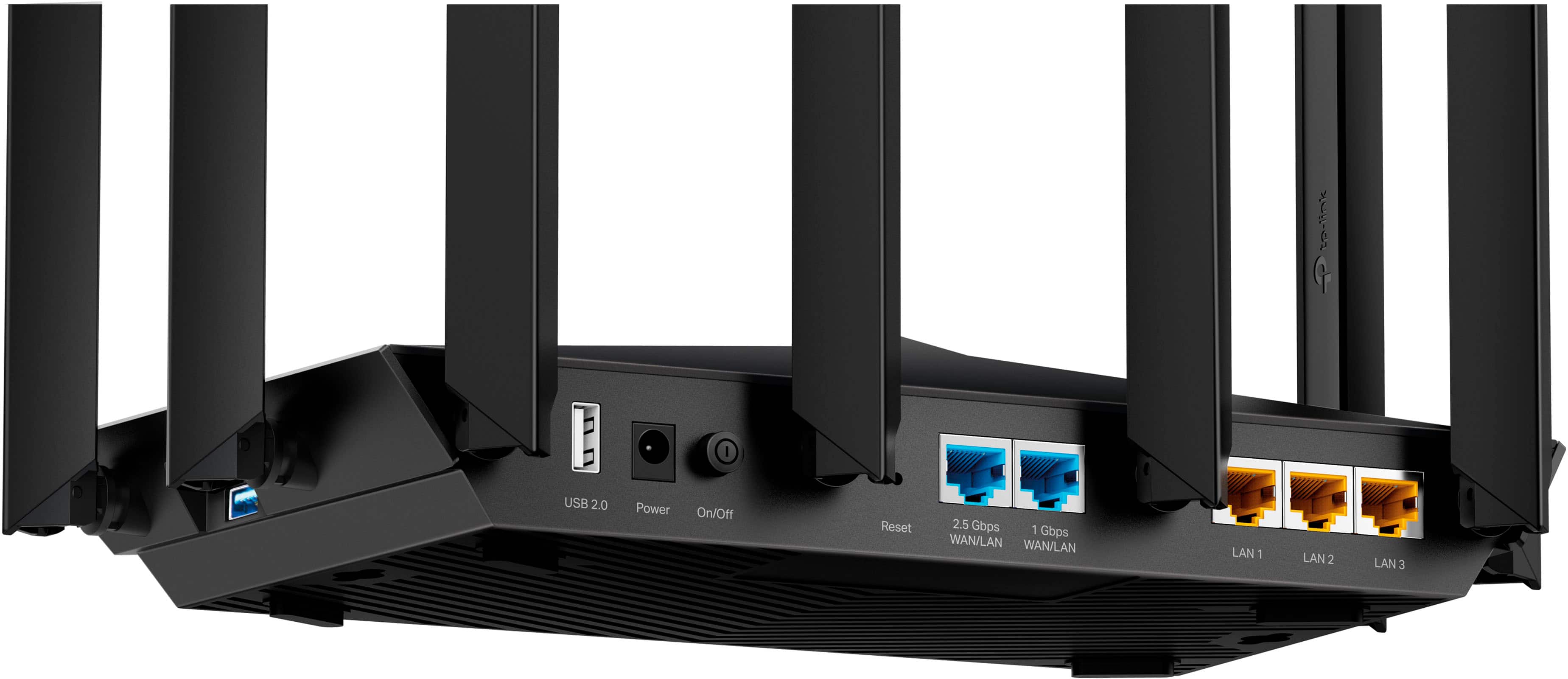
    Only has one 2.5 wan, all the lan ports are one gig. Rules out any 2.5 wired lan.

    No, I would not recommend this to a friend
    • Brand response from TPLinkSupport
      Posted .

      Hi,

      Thank you for your review. If your network topology requires multiple 2.5G ports, we suggest considering one of our Archer Wi-Fi Router models equipped with numerous multi-gig ports, such as the Archer BE800: https://www.bestbuy.com/site/tp-link-archer-be19000-tri-band-wi-fi-7-router-black/6537387.p?skuId=6537387

      Our support team is always happy to help answer any questions you may have about our products. Please feel free to reach out using any of the resources included with the product, or from our official website, and we'll gladly have a Support Agent follow up with you directly.

      Thank you,
      TP-Link Support tplink

  • Rated 1 out of 5 stars

    Faulty Product

    |
    |
    Posted . Owned for less than 1 week when reviewed.
    This reviewer received promo considerations or sweepstakes entry for writing a review.

    I received a faulty product. When I plugged it in it wouldn't turn on so I have no idea how good or bad this product my be!

    No, I would not recommend this to a friend
    • Brand response from TPLinkSupport
      Posted .

      Hi,

      Thank you for your review. Your TP-Link Wi-Fi router comes with a 2-year manufacturer's warranty, and we would greatly appreciate the opportunity to help address your concerns. At your convenience, please reach out to our support team using any of the resources included with the product, or from our official website, and we'll gladly have a Support Agent follow up with you directly.

      Thank you,
      TP-Link Support tplink

  • Pros mentioned:
    Performance

    Rated 5 out of 5 stars

    Excellent solution to inferior provider equipment

    Posted .
    This reviewer received promo considerations or sweepstakes entry for writing a review.

    Installed in the pass-through mode on my AT&T supplied BGW210 access point and it blows away all the connectivity issues in my house. Clean full service at all points including my garage, basement and pole barn 100 ft behind the access point. 100% happy with the decision to purchase. I have tried two ATT mesh solutions and extenders in the past with miserable results. AT&T techs couldn't figure out why they failed to work... Well this solved the problem!

    I would recommend this to a friend
  • Rated 1 out of 5 stars

    Sucks

    |
    |
    Posted . Owned for 2 weeks when reviewed.
    This reviewer received promo considerations or sweepstakes entry for writing a review.

    This didnt work well after a couple of days. Wont recommend this

    No, I would not recommend this to a friend
    • Brand response from TPLinkSupport
      Posted .

      Hi,

      Thank you for your review. To ensure the best possible signal, it is important to make sure placement is as optimal as possible. Reducing obstructions and placing the router in a central location will help ensure your signal reaches the areas you need.

      To ensure optimal performance of your wireless router, please check, and if needed, update its firmware using the steps outlined in FAQ 2139 on our official website: https://www.tp-link.com/us/support/faq/2139/

      If you would like assistance with any of these steps, please reach out to our free support team using any of the resources included with the product, or from our official website, and we'll gladly have a Support Agent follow up with you directly.

      Thank you,
      TP-Link Support tplink

  • Rated 1 out of 5 stars

    You can do better

    |
    |
    Posted . Owned for 1 month when reviewed.
    This reviewer received promo considerations or sweepstakes entry for writing a review.

    Bad router i would not purchase again. Signal strength was terrible all around.

    No, I would not recommend this to a friend
    • Brand response from TPLinkSupport
      Posted .

      Hello JJord,

      We would like to know more about your experience so we can properly address it. Please reach out to Support.USA@tp-link.com at your convenience and share as many details as possible. Thank you! tplink