Customer Ratings & Reviews


- Model:
- TGR1900BLK
- |
- SKU:
- 4409400
Customer reviews
Rating 4.6 out of 5 stars with 779 reviews
(779 customer reviews)to a friend
Customers are saying
Customers enjoy the Google OnHub AC1900 Dual-Band Wi-Fi Router's ease of use, range, and performance, with many praising its simple setup and strong signal. Positive feedback also highlights the router's design and helpful app. However, some customers express disappointment with the limited number of Ethernet ports and the relatively high price point. A few users also mention a lack of advanced features compared to other routers on the market.
This summary was generated by AI based on customer reviews.
- Pros mentioned:Ease of use
Rated 5 out of 5 stars
Beautiful Router
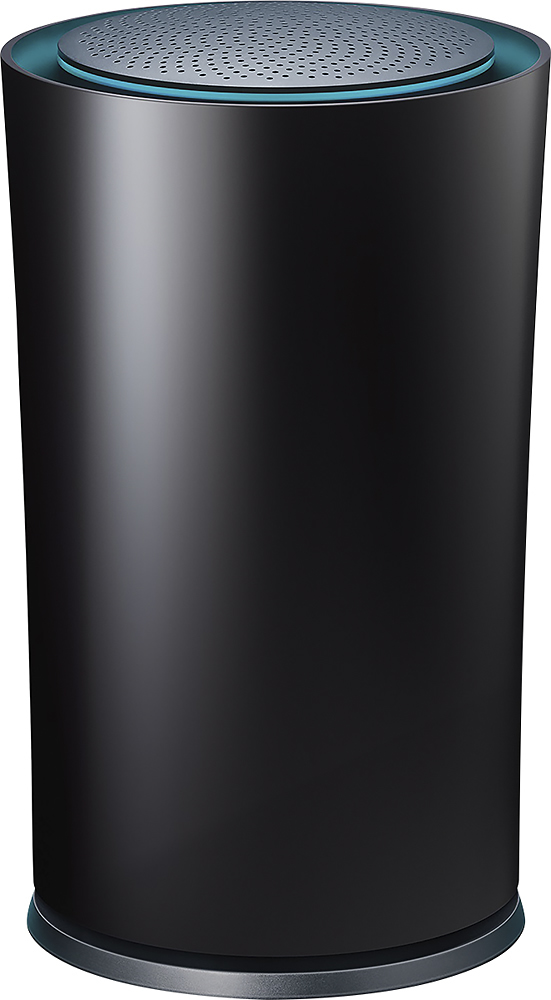
Posted .This reviewer received promo considerations or sweepstakes entry for writing a review.I got this few weeks ago and it is a great router. Setup - Pretty simple and happens from your smartphone, did not have to read manual too. Straight forward Coverage - Covers my 2400 home perfectly. Looks - Stunning and redefines how a router can look. From the regular boring look this router is so charming :)
I would recommend this to a friend Rated 5 out of 5 stars
Great!!!!`
Posted .This reviewer received promo considerations or sweepstakes entry for writing a review.I have a big house, and this router covers every room, including the garage with a full bar of signal. Couldn't have asked for more!! Can't wait to see what google has coming soon that will work with this router!
I would recommend this to a friend- Pros mentioned:Ease of use, Speed
Rated 5 out of 5 stars
Easy Set up
Posted .This reviewer received promo considerations or sweepstakes entry for writing a review.Pretty simple set up, speeds are better than I expected, and a surprise benefit is greater coverage with no drops in coverage, no lags in speed or connectivity. I'm Very HAPPY!!!!!!!!!!!!!!!!!!!!!
I would recommend this to a friend - Pros mentioned:Setup, Speed
Rated 5 out of 5 stars
GREAT ROUTER!
Posted .This reviewer received promo considerations or sweepstakes entry for writing a review.HANDS DOWN THE BEST ROUTER. EASY TO SETUP AND LIGHTNING FAST WITH GREAT COVERAGE/WI-FI RANGE. GOOGLE'S ON-HUB APP IS AMAING AND MAKES EVERYTHING A BREEZE!
I would recommend this to a friend - Pros mentioned:Ease of use
Rated 5 out of 5 stars
Best Wireless Router Ever
Posted .This reviewer received promo considerations or sweepstakes entry for writing a review.I just gave up on cable tv--$185 mo was insane so I went to PS Vue and needed a better router; my prior router was only three months old but it didn't reach my second floor and was slow. I was considering a popular router that was on sale when I saw the Google router. It cost more but the reviews were almost all positive and promised easy configuration. I'm not bad as a tech but yes I'm old don't see well and find router setup a pain--I have to ask why do I have to update firmware in a new router? So I tried the onhub router. You set it up by downloading an app, the app interacts with the router, you don't have to link your computer to a router url--the app sets it up. All devices connected easily even ooma. The range is good , second floor PS Vue connects no problem. Speed is much better than the old router. No I'm not a gamer, just a cord-cutter very happy with the Google router. Added benefit my wife likes the design, it actually looks good.
I would recommend this to a friend - Pros mentioned:Setup, Speed
Rated 5 out of 5 stars
Perfect for spotty wifi
Posted .This reviewer received promo considerations or sweepstakes entry for writing a review.I have comcast xinifity X1 and pay for a 75mbps connection. With the provided modem/router combo, I was getting anywhere from 5-22mbps. I changed to this router and the netgear CM600 modem and now gets 90mpbs. I am actually getting faster speeds over wifi than I pay for. It is expensive, but well worth the money. When I say 90mbps it stays that speed and doesn't fluctuate. Set up is easy and the IOS/Android app is great.
I would recommend this to a friend - Pros mentioned:Ease of use
Rated 5 out of 5 stars
Best router i have ever had
Posted .This reviewer received promo considerations or sweepstakes entry for writing a review.Set up is a breeze. Just download an app and it will do the rest. Our house has three people all streaming and using our phones at the same time and no hiccups.
I would recommend this to a friend - Pros mentioned:Ease of use
Rated 5 out of 5 stars
Love It!
Posted .This reviewer received promo considerations or sweepstakes entry for writing a review.We got this router to improve wi-fi coverage in our home, and it works perfectly. Super easy setup and has worked flawlessly since installation.
I would recommend this to a friend - Pros mentioned:Setup, Speed
Rated 5 out of 5 stars
Great Router
Posted .This reviewer received promo considerations or sweepstakes entry for writing a review.Bought this router about a month ago. Had a Netgear N600 before. My speeds went up almost 4x's with this router. Setup was a breeze with the app. Only downside is that it does not have WPS capabilities for syncing devices so you have to manually enter your password into every device but not a big deal really.
I would recommend this to a friend - Pros mentioned:Ease of use
Rated 5 out of 5 stars
Fast and Easy to use
Posted .This reviewer received promo considerations or sweepstakes entry for writing a review.Great router, I love how easy it is to set up and to use it.
I would recommend this to a friend - Pros mentioned:Ease of use
Rated 5 out of 5 stars
Excellent Router & Fits in Beautifully.
Posted .This reviewer received promo considerations or sweepstakes entry for writing a review.Recently installed this Router and what a difference it made in the footprint alone. Works very well with my powered Internet and do not need a modem. Easy setup with 7 items linked within 15 min. No problem with our Smart TV's in streaming. Only issue came with Ooma which took a little more time due to my using a bridge to connect to OnHub which is located in our living room. Very pleased so far.
This review is from TP-Link - Google OnHub Dual-Band Wireless-AC1900 Gigabit Router - Blue
I would recommend this to a friend - Pros mentioned:Ease of useCons mentioned:Features
Rated 5 out of 5 stars
Works surprisingly well
Posted .This reviewer received promo considerations or sweepstakes entry for writing a review.Very well put together, seems to have great range and its easy to manage and monitor remotely. Lacks some advanced features like VPN, but is great for a casual user.
I would recommend this to a friend - Pros mentioned:Speed
Rated 5 out of 5 stars
Beats any router out there in its price range !
Posted .This reviewer received promo considerations or sweepstakes entry for writing a review.I got this on sale and further a bit cheaper through PM. The setup is a breeze. The speeds are great and delivers consistent 100Mbps on my internet connection. The wireless signal is better than other $200+ routers I tried. It penetrates walls and I now have full bars on my wireless devices. And this is compatible with the new google wireless access points that are releasing soon. Great product Google !
I would recommend this to a friend Rated 5 out of 5 stars
Great Router
Posted .This reviewer received promo considerations or sweepstakes entry for writing a review.I upgraded to this on a whim and I'm very impressed. I live in a 1,024 sq ft apartment and the router sits at the very back. I get great signal throughout, even in the parking lot about 250 feet away from the device. It can take a powerful load of devices and I like how you manage it via an app on my phone. Setup was mostly easy but I did run into a few issues but I've not had any problems since.
I would recommend this to a friend- Pros mentioned:Ease of use
Rated 3 out of 5 stars
Super simple router but a little overpriced
Posted .This reviewer received promo considerations or sweepstakes entry for writing a review.I know the router was super simple and I was intrigued by that. I don't really need or care about all the advanced features for power users. Just as long as it can handle my 12-15 devices without issue, give good range and easy to manage simple settings. It does these things fairly well. The last thing that really intrigued me was the Onhub's requirements of 1 SSID for both 2.4 and 5 GHZ bands. I typically did this anyway on my network. However, the one thing I noticed was that most of my devices would cling to the 2.4 (which is expected since that's stronger) but the router would never move any to the 5GHZ. My previous router would move my devices back and forth when necessary but not this one. The only way to get my phone connected to the 5GHZ band is my disconnecting from Wifi and then reconnecting. So for me this was the deal breaker. If it did a better job moving devices around like my cheaper routers then I would be a keeper.
No, I would not recommend this to a friendBrand response from TPLinkSupport
Posted .Dear scorpiodsu,
Thank you for OnHub review, your feedback is greatly appreciated.
Please keep in mind, the decision to disconnect/connect to an available wireless network is solely at the discretion of the connecting device, which is also referred to as WiFi or wireless roaming.
Fortunately, we were able to locate some additional information regarding this concern directly from Google's OnHub Help Center
https://support.google.com/onhub/answer/6293481?hl=en&ref_topic=6381388
We have released several updates for the OnHub that optimize its performance, improve existing features, and added new exciting features to the router. Please make sure your OnHub is up to date, and your Google On App is updated as well.
Should you have any additional questions or concerns regarding this product, please contact our OnHub Support Team at your earliest convenience via the number and/or email address provided for you below.
Google OnHub Support Team
https://on.google.com/hub/support/
Email: [email protected]
Phone: 844-442-3693 (toll-free from US and Canada)
- Pros mentioned:Setup
Rated 5 out of 5 stars
excellent
Posted .This reviewer received promo considerations or sweepstakes entry for writing a review.I am so pleased with this router. The instructions for installation were very easy; the install took less than 15 minutes. This installation and how the equipment worked was just as the sales person described it. Shout out to IAN in the Northgate Best Buy for his advice when I was choosing what to buy.
I would recommend this to a friend Rated 5 out of 5 stars
Amazing...
Posted .This reviewer received promo considerations or sweepstakes entry for writing a review.After debating between a new ASUS and the Google OnHub, we decided to give the OnHub a shot as our new router. What particularly piqued our interest was the upgrade/patching ability by Google to modify the router as time goes on (i.e. when AC1900 becomes standard, we won't need a new router). This saves us costs in the long run, plus all the other features of OnHub are really awesome. We had to use the tech support to help set up since we have FiOS and Verizon makes everything complicated, but the Google support rep was awesome and stuck through the whole 30 minute process with us while we talked to Verizon. Highly recommended after 2 weeks of consistent use and not a single networking issue.
I would recommend this to a friend- Cons mentioned:Connection
Rated 1 out of 5 stars
bad range, drops connection
Posted .This reviewer received promo considerations or sweepstakes entry for writing a review.I had really high hopes after reading all the positive reviews for this new wireless router, unfortunately it was a big disappointment. The good: setup is easy, as promised The bad: range is inferior to other routers (Airport Extreme, Asus, etc.) The ugly: even if you are close enough to the router to have connection, it drops intermittently For everybody considering this router ... DON'T! It simply doesn't live up to the promise.
No, I would not recommend this to a friendBrand response from TPLinkSupport
Posted .Dear JJ1205,
Thanks for sharing your feedback with OnHub.
We are sorry to hear that our product has not lived up to your expectations, however, we are excited about implementing several new features that will be incorporated within future automatic updates. Should you have any additional questions or concerns regarding OnHub in the future, please contact support https://support.google.com/onhub/answer/6270180 for further assistance with your inquiry.
Google OnHub Support Team
https://on.google.com/hub/support/
email: [email protected]
phone: 844-442-3693 (toll-free from US and Canada)
- Pros mentioned:Ease of use
Rated 5 out of 5 stars
Great Replacement for My Rented Router from The Ca
Posted .This reviewer received promo considerations or sweepstakes entry for writing a review.This router performs exactly as it is advertised and as I was told it would by the salesperson at Best Buy. It was easy to set up and my connections work well.
I would recommend this to a friend - Pros mentioned:Setup
Rated 5 out of 5 stars
Easy Setup; Works Great
Posted .This reviewer received promo considerations or sweepstakes entry for writing a review.The product was extremely easy to setup and use. I have had zero wireless issues in my place. The app makes it very easy to maintain.
I would recommend this to a friend