Customer Ratings & Reviews
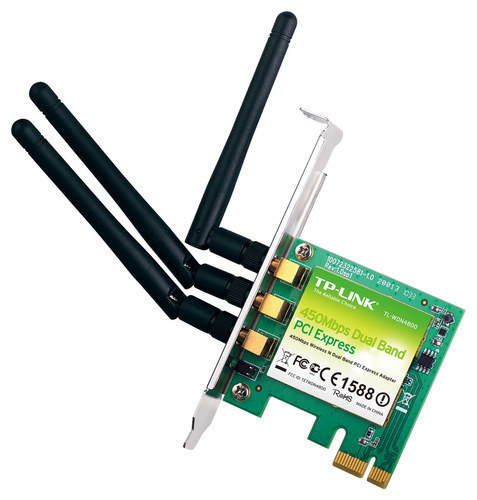
- Model:
- TL-WDN4800
- |
- SKU:
- 2080127
Customer reviews
Rating 4.6 out of 5 stars with 92 reviews
(92 customer reviews)to a friend
Customers are saying
Customers are positive about the easy installation, strong signal strength, and improved performance of the Wireless N900 Dual-Band PCI Express Adapter. They appreciate how it has enhanced their wireless experience, making it easier to connect to their networks from various locations within their homes. However, some customers have expressed concerns regarding driver issues, particularly with Windows 10, resulting in occasional signal loss or connection problems.
This summary was generated by AI based on customer reviews.
Rated 4 out of 5 stars
Good Card, easy install
||Posted .This reviewer received promo considerations or sweepstakes entry for writing a review.Good enough for your average computer, not good enough for gaming
I would recommend this to a friendRated 4 out of 5 stars
Dual Band wireless
||Posted .This reviewer received promo considerations or sweepstakes entry for writing a review.I have to admit it is as fast as expecting when I using 5GH
I would recommend this to a friendRated 1 out of 5 stars
No help at all
||Posted .This reviewer received promo considerations or sweepstakes entry for writing a review.When you call up tech support and all they tell you is "Have you tried reinstalling the drivers?" three different times, you know you have a bad product.
No, I would not recommend this to a friendBrand response from TPLinkSupport
Posted .Dear Steve,
We thank you for your interest in our product and apologize about the frustration due to lack of performance and/or support. Our support team would certainly like to troubleshoot this matter further if you would allow, and hopefully we would be able to gather a little more information on this matter. Steve, which Windows OS is this PC running and what symptoms are you experiencing with this wireless card?
If by chance you are running Windows 8/8.1, we may have a more efficient driver for this card, based on the Atheros chipset that it utilizes. Hopefully you will give our support team another chance at diagnosing this issue and possibly resolving it.
TP-LINK Support Team 24/7
frank.islas@tp-link.com
(866) 225-8139
http://www.tp-link.com/us/support
Rated 4 out of 5 stars
Plug and play!
Posted .This reviewer received promo considerations or sweepstakes entry for writing a review.I currently have a custom built PC that always kept dropping signal while using a netgear USB WiFi adapter. I recently received this product in the mail and was stoked to see if it worked as intended. I was kind of skeptical due to the fact that some people who are running windows 10 had issues with drivers and the computer detecting it. I'm obviously running windows 10, i simply plugged it in and it worked immediately! No running the CD or finding drivers online. Downloads are doubled what they use to be when i was using my USB WiFi adapter. Only reason i give 4/5 is because the amount of time I had to wait for shipping. It took 9 days to get to my house (I'm located in southern California). I've never had to wait that long while using other online retailers. Otherwise, great product!
I would recommend this to a friend- Pros mentioned:Easy installationCons mentioned:Driver issues
Rated 2 out of 5 stars
Strong signal, getting kicked off internet ALOT
Posted .This reviewer received promo considerations or sweepstakes entry for writing a review.Pros: Easy installation, fit perfectly, amazing signal speed Cons: Getting kicked off about every 5 minutes, have to restart the card to get it working again. Has ups and downs for how well it works From a gaming perspective, I can't really play games that require no packet loss, (League of Legends) But for games like World of Warcraft, its good. From basic use, office work, school work, this card works like a charm.
No, I would not recommend this to a friendBrand response from TPLinkSupport
Posted .Dear customer,
Thank you for your interest in our product yet its unfortuante the card did not perform as intended and most of all, meet your expectations. Our support team would truly love to gather a little more insight to this matter such as which OS are you running, are you utilizing our wireless utility or simply Windows' own WLAN config.
Please reach out to our support team at the number and/or email listed below so any of our available technicians will be able to assist in gathering some additional information.
TP-LINK Support Team 24/7
Support.usa@tp-link.com
(866) 225-8139
http://www.tp-link.com/us/support
- Pros mentioned:Easy installation
Rated 5 out of 5 stars
Great router!
Posted .This reviewer received promo considerations or sweepstakes entry for writing a review.Perfect quality and value for money. Easy installation, working smoothly, fast shipping!
I would recommend this to a friend - Pros mentioned:Easy installation
Rated 5 out of 5 stars
works great
Posted .This reviewer received promo considerations or sweepstakes entry for writing a review.Easy install, also a very small card. Does not block the airflow to the other components.
I would recommend this to a friend - Pros mentioned:SpeedCons mentioned:Driver issues
Rated 1 out of 5 stars
Didn't work
Posted .This reviewer received promo considerations or sweepstakes entry for writing a review.It had great reviews but I could not get this thing to work at all. It would randomly kick me off and I would become frustrated. The reason I bought this was because I thought my desktop didn't have a wifi card but it did and it never kicked me off, so it wasn't the signal strength. I really liked it too, it was way faster than the one inside my desktop. I tried really hard to get the drivers to work on this, but in the end I gave up.
No, I would not recommend this to a friendBrand response from TPLinkSupport
Posted .Dear Mascot09s,
Thank you for taking the time to evaluate our product.
We are sorry to hear that you experienced difficulty with installing your WDN4800 and wish our support team had the opportunity to assist you while
For future reference, you may contact our 24/7 technical support team directly at the number and/or email provided for you below and an available support agent will be happy to follow up with you for assistance.
We hope this experience will not discourage you from trying more of our great networking products in the future.
Best Regards!
TP-LINK Support Team
866) 225-8139
ussupportteam@tp-link.com
Rated 4 out of 5 stars
Good wireless card
Posted .This reviewer received promo considerations or sweepstakes entry for writing a review.This is a pretty decent wireless card. It runs fine with my window 10. I'm still getting a 3 to 4 bar, but mostly 3 bar.
I would recommend this to a friend- Cons mentioned:Drops signal every 2 minutes
Rated 1 out of 5 stars
Cannot hold a signal
Posted .This reviewer received promo considerations or sweepstakes entry for writing a review.Drops signal every 2 minutes. Thought I had a defective card, the replacement did the same thing. DO NOT BUY THIS CARD!!!
No, I would not recommend this to a friendBrand response from TPLinkSupport
Posted .Dear Olives,
Thank you for choosing our product, however we do apologize about the inconvenience and frustration caused by this network card. This matter is a little concerning as this is the second card displaying the same symptoms.
We certainly would like to gather a little more information on this matter if you wouldn't mind, such as what version of windows the PC is running and also when connecting wirelessly are you utilizing the TP-Link client utility or the built in windows wireless configuration utility. Also, another important question is if possible, were you able to test another PCI e slot on your motherboard, unless you know for certain that PCI e slot used with our card is functioning properly.
We understand if you have already returned the network card, but if you still have this product in your possession, our support team would love the opportunity to gather a little more insight or troubleshoot this issue just a bit further if you would allow.
Please contact our 24/7 technical support team at the number provided below, we hope to hear from you soon.
Best Regards!
TP-LINK Support Team
(866) 225-8139
http://www.tp-link.com/us/support
Rated 4 out of 5 stars
luv it
Posted .This reviewer received promo considerations or sweepstakes entry for writing a review.works great and easy hook up, just what the job needed
I would recommend this to a friend- Cons mentioned:Driver issues
Rated 1 out of 5 stars
Worthless
Posted .This reviewer received promo considerations or sweepstakes entry for writing a review.Dont even try using this on windows 10. TP-Link still hasn't updated drivers for an operating system that's now 5 years old. On windows 10 with the most recently updated drivers I get BELOW 1 Megabit per second.
No, I would not recommend this to a friendBrand response from TPLinkSupport
Posted .Hello Jonah,
Thank you for your review and feedback.
Our Support Team is always happy to help; we'd appreciate the opportunity to address your concerns and assist you with your adapter and Windows 10.
At your earliest convenience, please send an e-mail including your contact details and a copy of your review to our Support Team at the address below so we may have a Support Agent follow up with you for assistance.
We thank you again for your feedback and hope you will continue to consider TP-Link for your future network needs.
Best Regards,
TP-Link Customer Support
(866) 225-8139
USSupportTeam@TP-Link.com