Customer Ratings & Reviews





- Model:
- TBM-2101-05
- SKU:
- 6579301
to a friend
Customers are saying
Customers praise the Burst II Air mouse for its lightweight design and long-lasting battery life. Users appreciate the inclusion of grip tape and the quality of the sensor and skates. The mouse's connectivity, adjustable DPI, flexible cable, comfortable shape, and accuracy are also well-received, though some may find the button placement a bit cramped.
This summary was generated by AI based on customer reviews.
- Pros mentioned:Grip tape, Sensor, Weight
Great rival to the current competition.
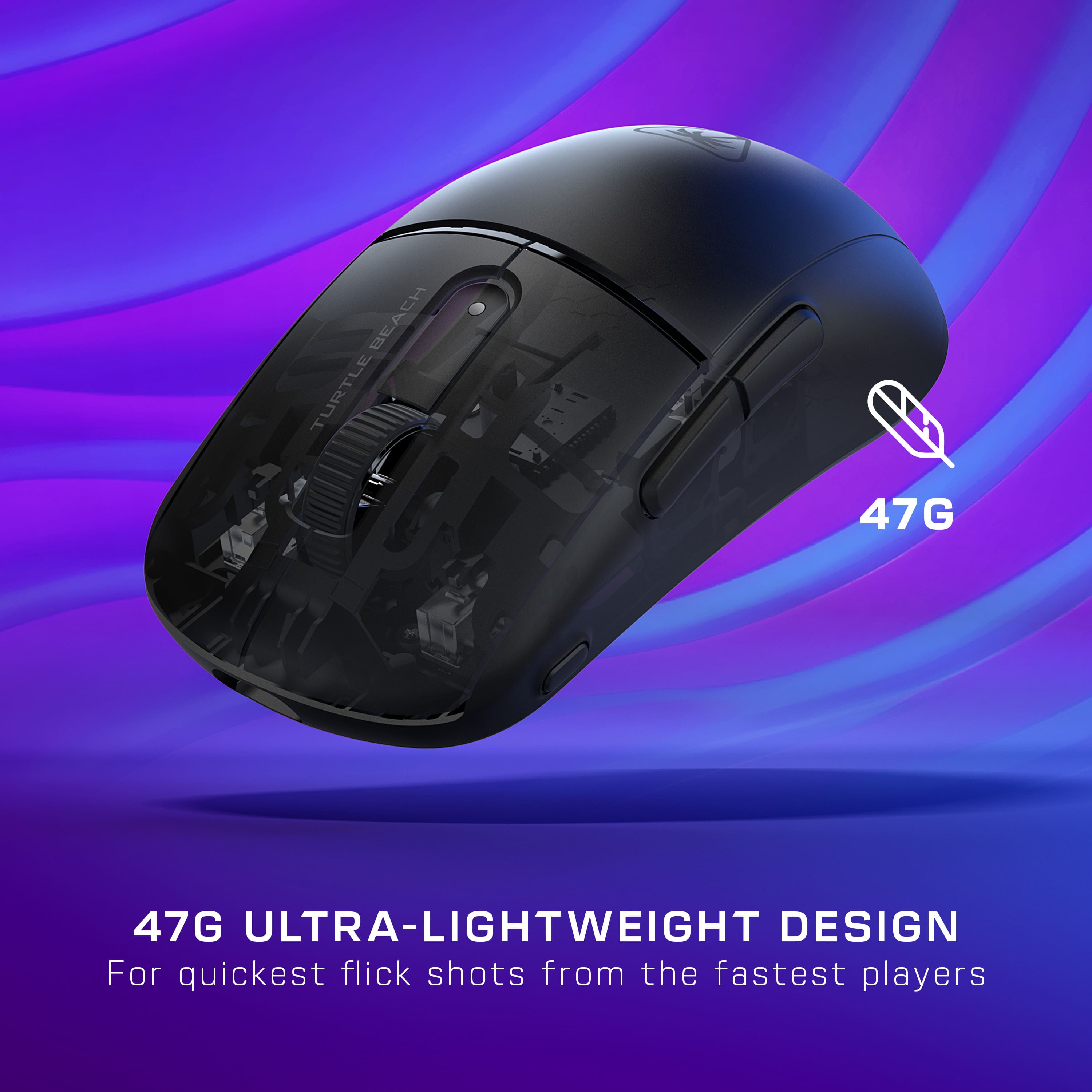
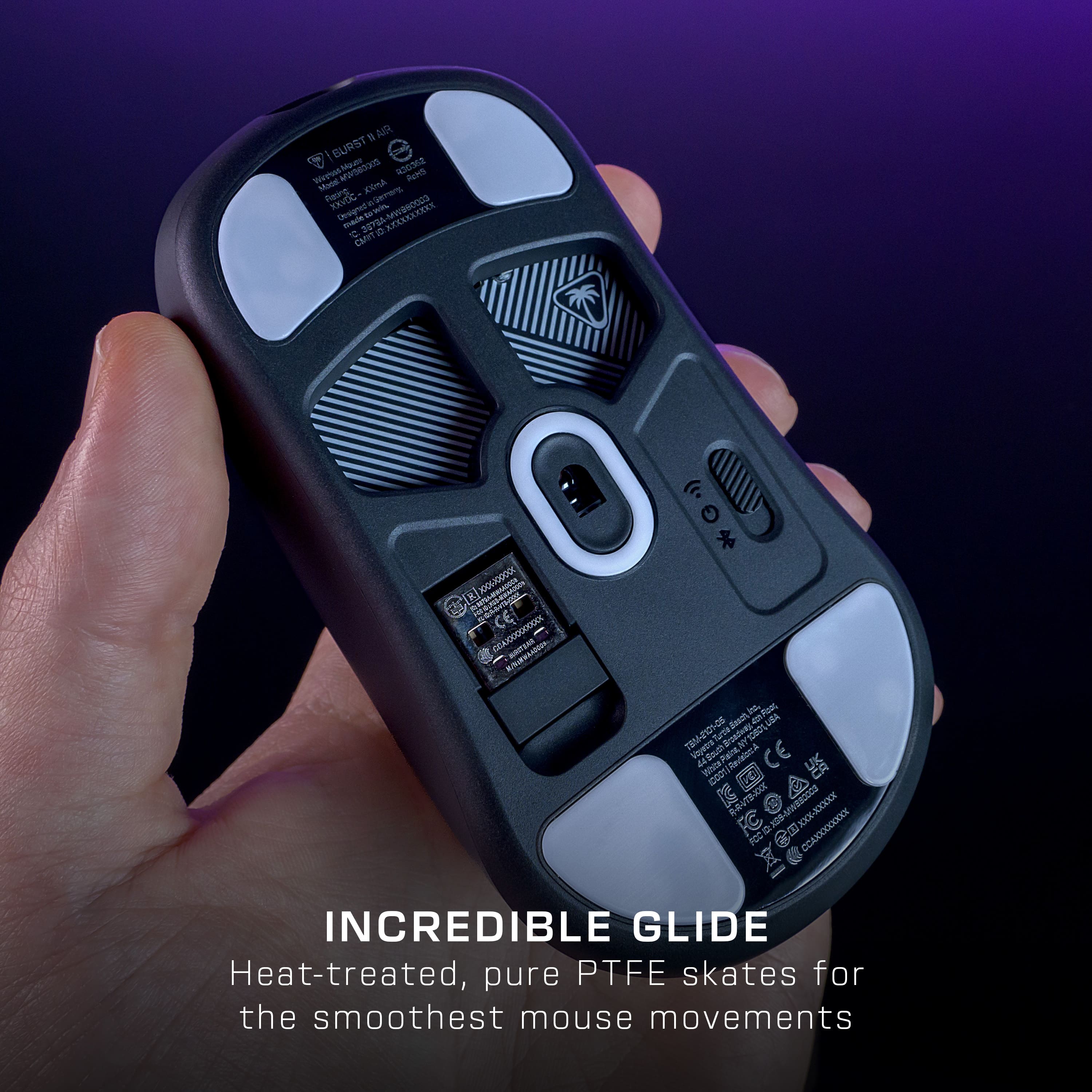
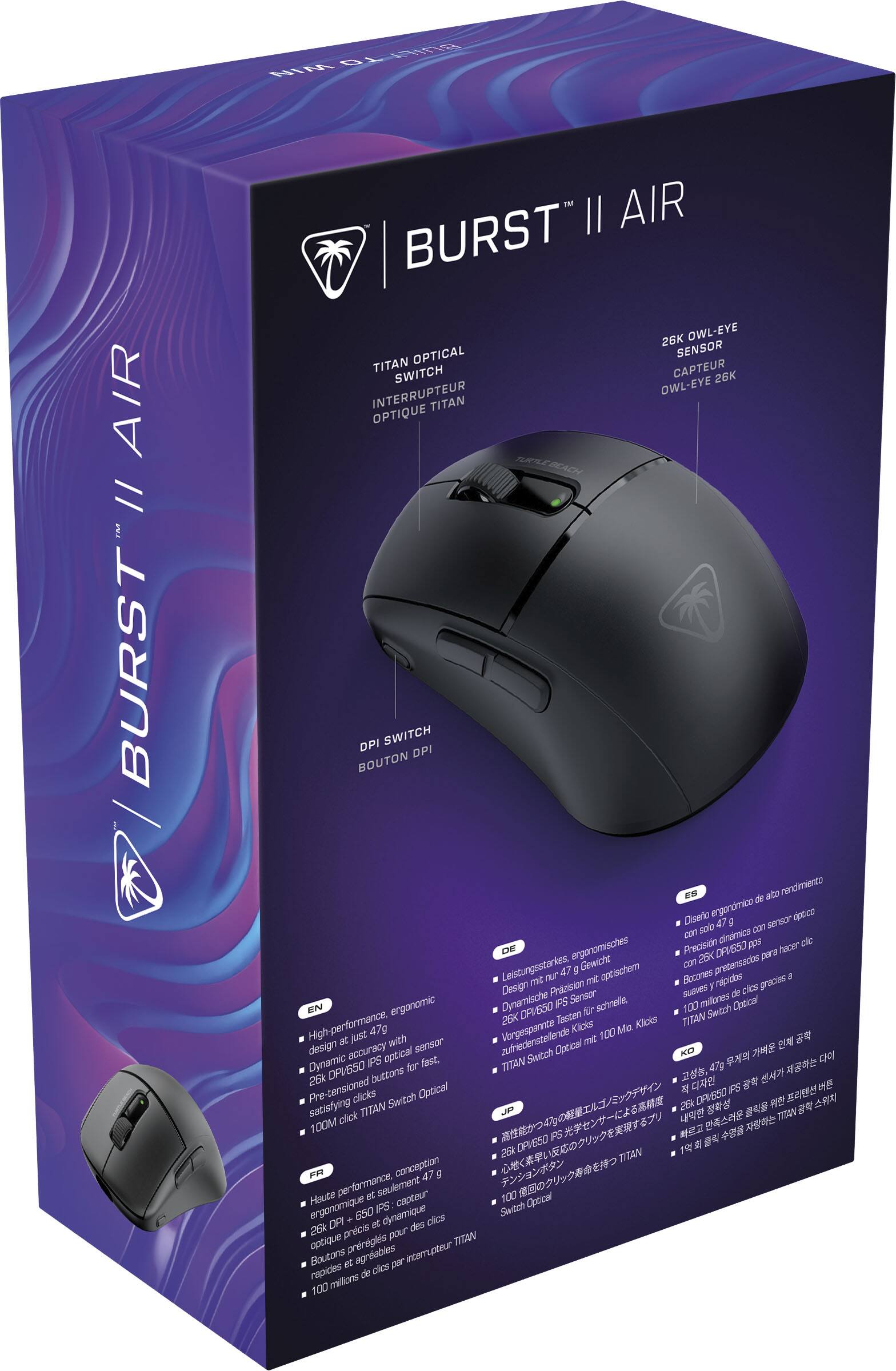
Posted .This reviewer received promo considerations or sweepstakes entry for writing a review.The Turtle Beach Burst II Air Ultra is a major improvment over the previous Burst gaming mice. The original Burst and Burst Pro Air were pretty great mice, they were highly regarded for their shape and also their build quality, but they had some short comings which included the outdated specs and also the switches. This mouse is a major improvment and improves upon everything that was good and bad about the previous mice. The shape of the mouse has a more prevelent rear hump which makes great for a claw or a relaxed claw grip although palm and fingertip grip can also work depending on the size of your hand. I have a 17x9cm hand and use predominantly a relaxed claw grip and this mouse feels great. It feels similar to an the xm1 mouse and feels faurly similar in hand to the lamzu atlantis. The build quality of this mouse is also great, at just 47g the mouse is not only very lightweight but also is built very well, there is no creaking or flexing and no rattling on the mouse eveb when death gripping it. The coating is pretty decent as well and feels rubbery which makes it good for sweaty hands. Now the switches that Turtle beach is using are the same ones from the previous Burst mice, but thankfully they not only feel better but have also been changed. They have introduced a new tensioning system and most likley also changed the internals of the switches. They are very snappy and spammable but feel a little heavier than other switches which is not a problem. the side buttons feel good although there is some pre travel which isnt very noticable during gaming so it is not a major issue. Scroll wheel is nice and smooth and has a nice tactile feel. The sensor is well implemented and I had no issues with, it didnt stutter or lag and there was no issues with dpi deviation. The cable included is nice and very flexible not as much as a paracord but still good and the grip tape included is also surprisingly good aswell and the mouse feet felt good as well they were smooth and didnt feel cheap. Overall compared to the competition like the g pro superlight and viper v3 this is a seriously good mouse and for 100 dollars you simply cant go wrong with it the shape is great and the switches feel great and overall using this mouse felt great and very enjoyable. Get this mouse you wont regret it!
I would recommend this to a friend - Pros mentioned:Battery life, Grip tape, WeightCons mentioned:Click

Good mouse that’s very lightweight
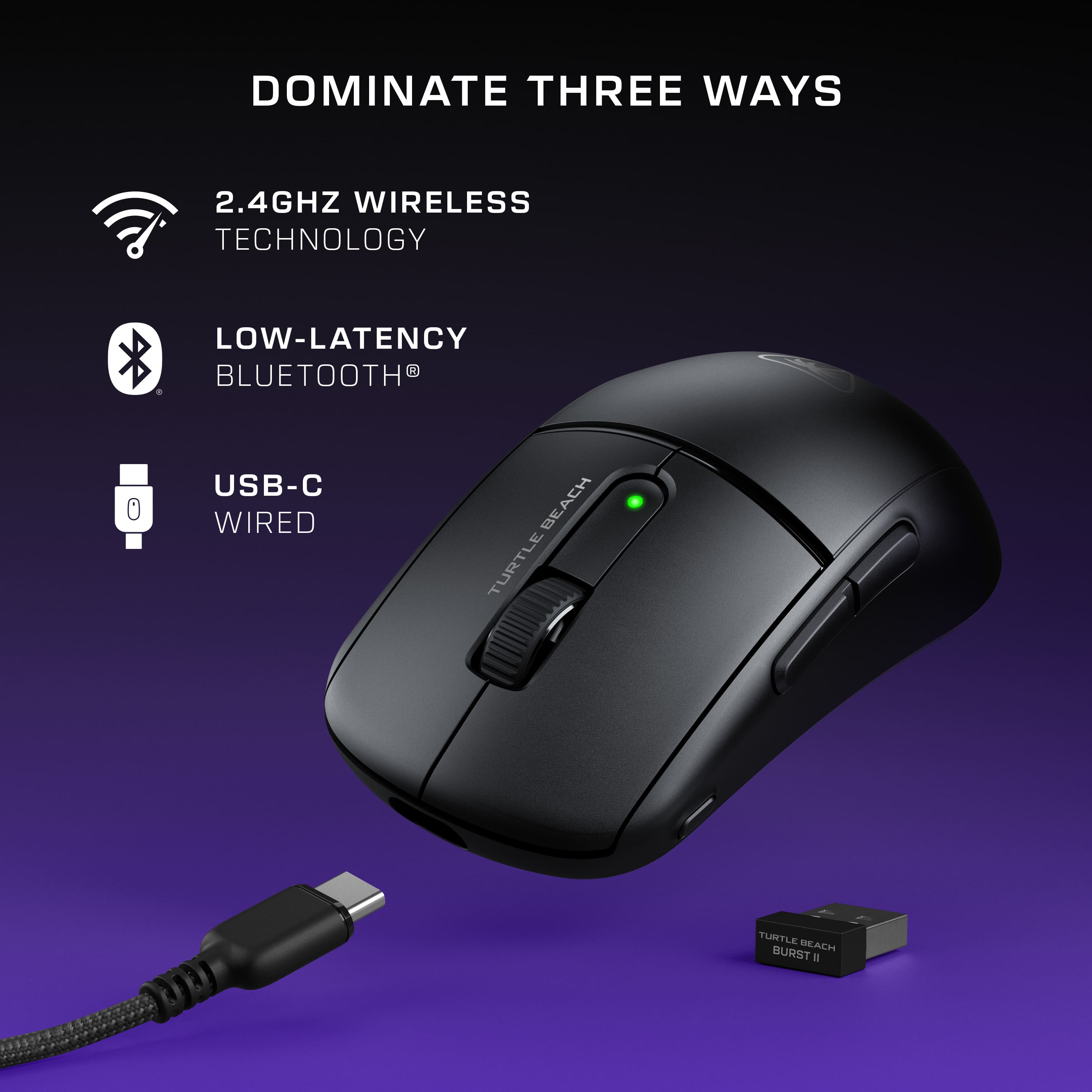
|Posted .This reviewer received promo considerations or sweepstakes entry for writing a review.The Turtle Beach - Burst II Air Ultra Lightweight Wireless Symmetrical Gaming Mouse is a good mouse with Bluetooth & 120-hour battery life. When they say Ultra Lightweight it is definitely that. I’ve never used a mouse this lightweight before. It feels like a battery operated mouse when you take the batteries out of it. If you place this in your travel backpack it will not add any weight. While using it, I would somewhat prefer a little bit of some weight. The mouse comes with stickers with a rubbery texture that you can place on each side of the mouse as well as the left and right mouse click buttons. I placed them on each side of the mouse to give it more grip since it is so light. The mouse can be used in Bluetooth mode or with an included 2.4 GHz dongle. They include a very long USB to USB-C braided cable. The cable can be used to charge the mouse and you can also use it with the dongle adapter. The dongle can be plugged into the dongle adapter using the USB A input, which can then be connected to the USB-C end of the cable. This will allow you to then plug the cable into your computer with the USB A side. This setup will allow you to plug it into the back of your desktop computer and have the dongle lay on your computer desk or even taped to the desk by removing the self adhesive side of the dongle. There is a DPI button on the mouse which allows you to change the speed of the mouse cursor. There’s also a browser forward and reverse button on the left side of the mouse. I did notice that the left and right click buttons on the mouse work well, but I wish they could be a bit quieter. Overall, this is a good mouse for my gaming and everyday needs.
I would recommend this to a friend - Pros mentioned:Battery life, Connectivity, Grip tape
5 Star impressive lightweight mouse for on the go
|Posted .This reviewer received promo considerations or sweepstakes entry for writing a review.I’ve had the chance to test out the Turtle Beach Burst II Air Ultra Lightweight Wireless Symmetrical Gaming Mouse, and I have to say, I’m extremely impressed and satisfied with its performance and design. As someone who spends a lot of time gaming and constantly on the move, I’m always on the lookout for gear that combines functionality, comfort, and portability. This mouse nails it on all fronts. First off, let’s talk about the ergonomics. The Burst II Air is designed to fit comfortably in your hand, regardless of whether you're right or left-handed, thanks to its symmetrical design. The grip feels natural and secure, which is essential during long gaming sessions. There are added grip tape for both the left and right buttons and sides of the mouse to help improve the grip. They also add a flair to the smooth design. Despite being ultra-lightweight, it doesn’t feel cheap or flimsy. Instead, it’s sturdy and well-built, making it a joy to use for both casual pc use and intense gaming. The lightweight design makes it virtually weightless as a feather. Weighing next to nothing, this mouse is incredibly easy to maneuver. It glides effortlessly across any surface, allowing for quick and precise movements which are crucial in fast-paced games. The reduced weight also means less strain on my wrist, which is a huge plus for those extended gaming marathons. Connectivity options are another strong suit of the Burst II Air. It supports both Bluetooth and a 2.4GHz USB dongle, offering flexibility based on your needs. Setting up via Bluetooth was straightforward, and the connection remained stable throughout my use. For a more traditional wireless experience, the 2.4GHz dongle is a perfect alternative, providing a lag-free and reliable connection. Switching between these modes is seamless, and I didn’t notice any performance drop-off in either. Portability is one of the biggest advantages of this mouse. It’s compact enough to easily fit into my laptop bag, making it perfect for on-the-go gaming or work. Despite its small size, it’s still comfortable to use for extended periods, striking a great balance between portability and comfort. This makes it an ideal companion for traveling or gaming sessions away from home. Battery life is often a concern with wireless devices, but the Burst II Air excels here too. With Bluetooth connectivity, the battery life is an astonishing 120 hours. This means I can go for days or even weeks without needing to recharge, even with heavy use. This long battery life is incredibly convenient and removes the hassle of frequent charging. Overall, the Turtle Beach Burst II Air Ultra Lightweight Wireless Symmetrical Gaming Mouse is a fantastic addition to my gaming setup. Its excellent ergonomics, super lightweight design, easy and versatile connectivity options, and impressive battery life make it a standout choice for any gamer. Whether you’re gaming at home or on the move, this mouse offers top-notch performance and convenience. If you’re looking for a new gaming mouse that combines quality, comfort, and portability, I highly recommend giving the Burst II Air a try. It won’t disappoint.
I would recommend this to a friend - Pros mentioned:Battery life, Sensor, Weight
It revolutionized my gaming experience
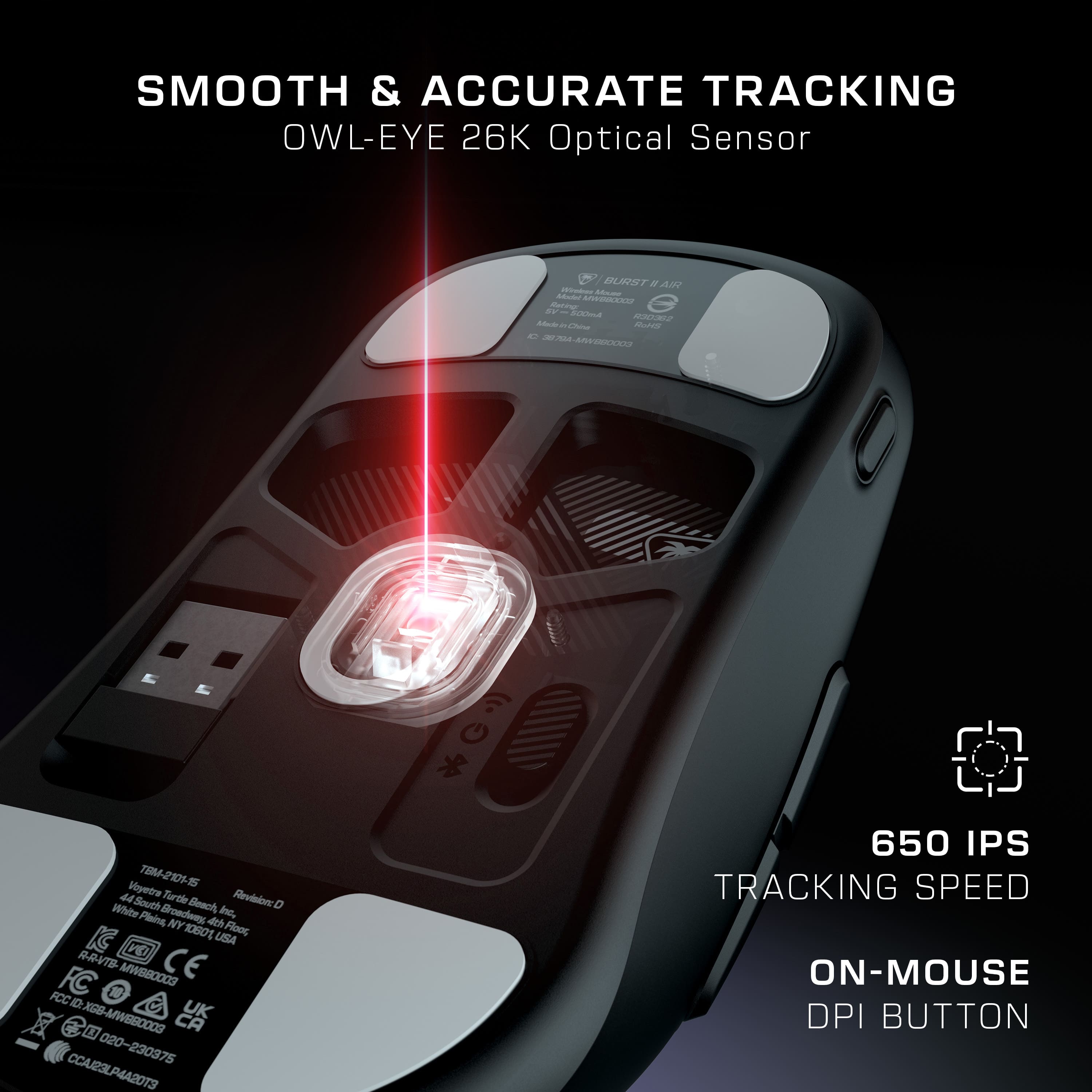
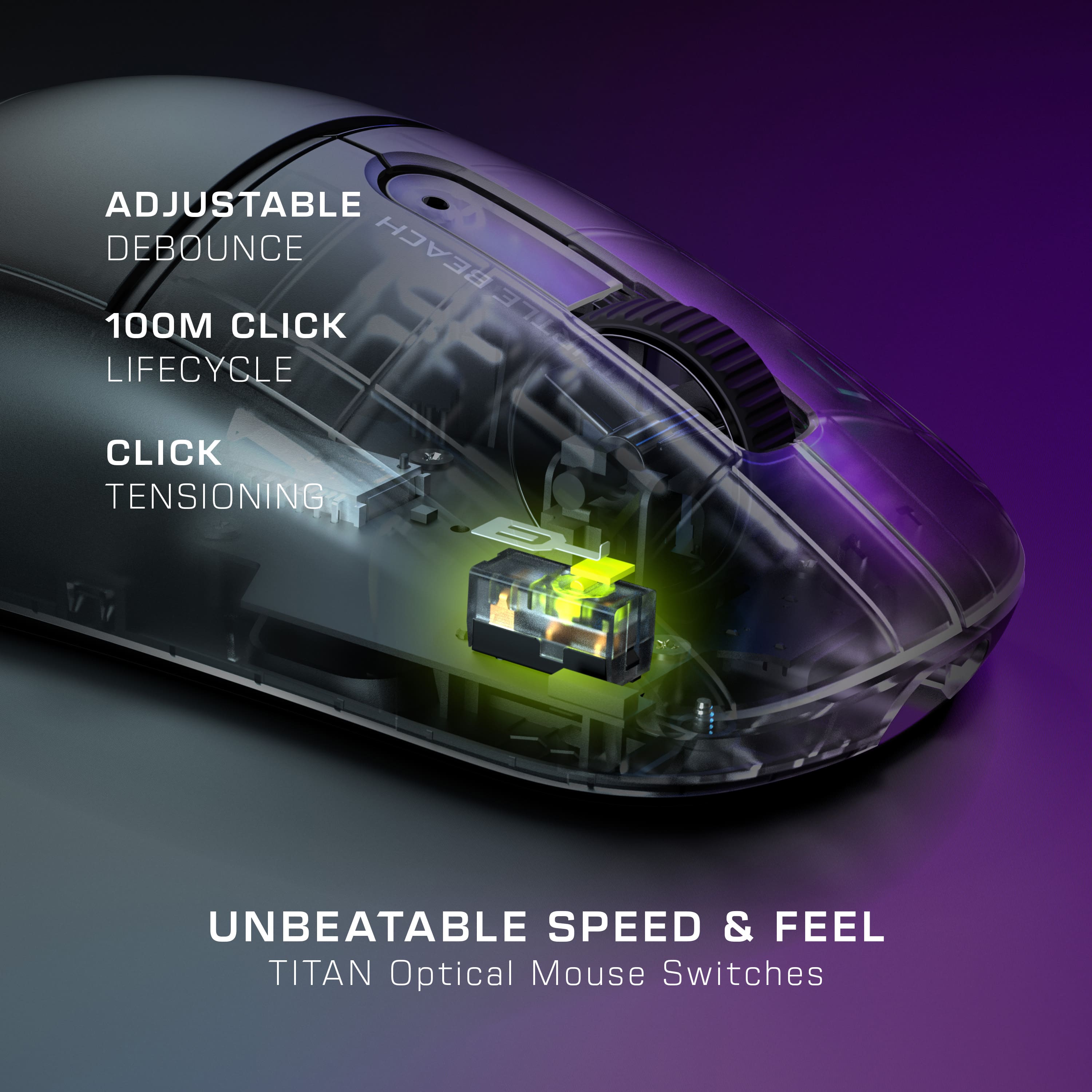
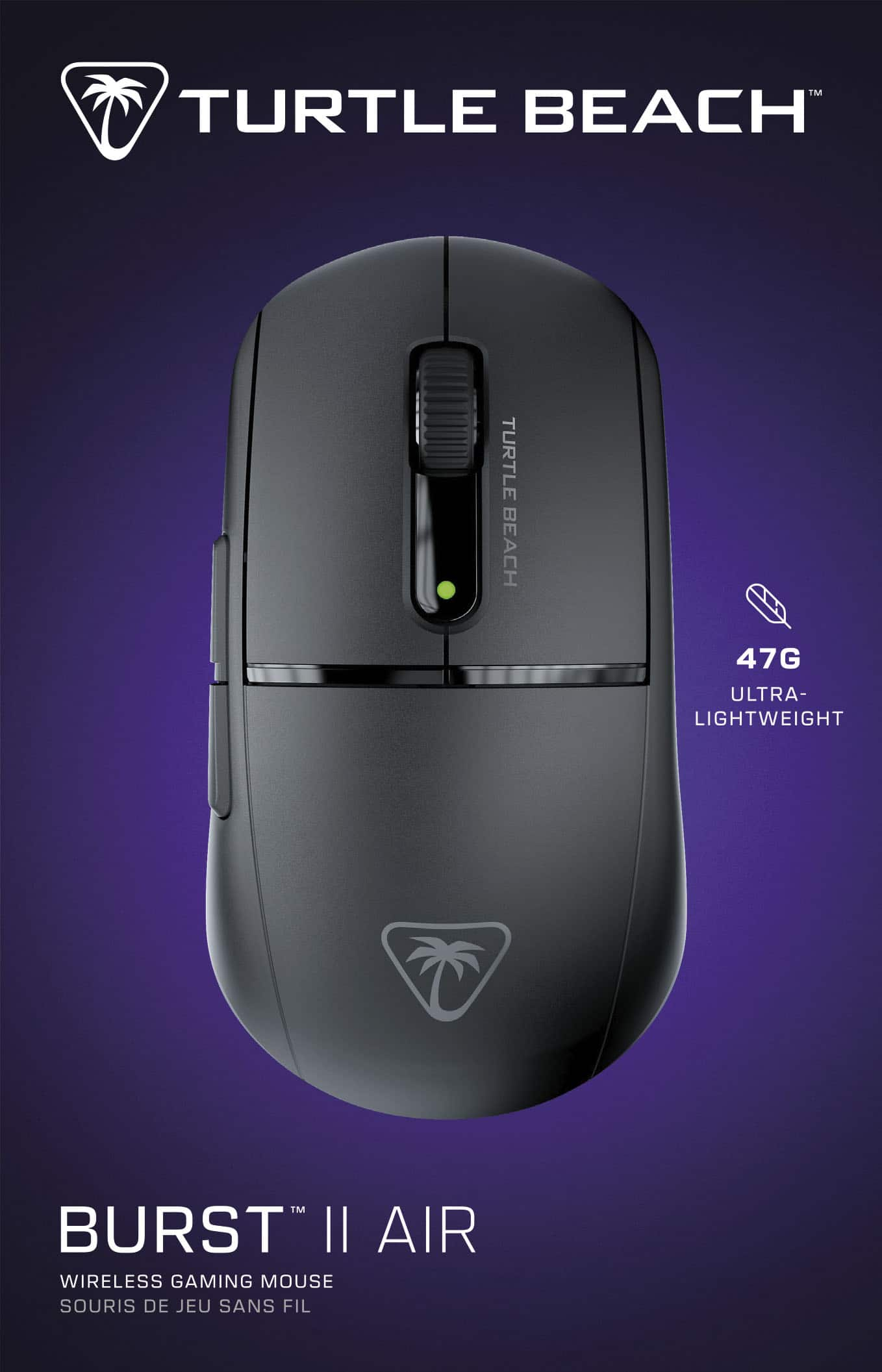
|Posted .This reviewer received promo considerations or sweepstakes entry for writing a review.I recently upgraded my gaming setup with the Turtle Beach Burst II Air Ultra Lightweight Wireless Symmetrical Gaming Mouse, and it has exceeded all my expectations. From its impressive specs to its sleek design, this mouse truly deserves a 5-star rating. First off, the weight of this mouse is a game-changer. At just 47g, it feels like a feather in your hand, which makes those quick flick shots and smooth sweeps incredibly effortless. The symmetrical shape is comfortable for extended gaming sessions, and the right-handed ergonomic design fits perfectly. The dual wireless system is a fantastic feature. Whether I'm in the heat of an intense gaming session using the 2.4GHz wireless (which offers a solid 40 hours of use) or switching to Bluetooth for general use with an astounding 120-hour battery life, the performance remains top-notch. The included PhantomFlex USB-C to USB-A cable is also a nice touch, providing flexibility and virtually disappearing during use. One of the standout features is the Owl-Eye optical sensor. With up to 26K DPI and a 650 IPS tracking speed, the precision is unmatched. The side-positioned DPI button is super convenient for quick adjustments without needing extra software. The TITAN Optical Switches with adjustable debounce and the click tensioning system have redefined my clicking experience—each click is crisp, responsive, and satisfying. Plus, the 100 million click life cycle ensures this mouse will last a long time. Lastly, the hybrid skate design offers smooth gliding across surfaces, and the extra skates and grip tape included are a thoughtful addition. Overall, the Turtle Beach Burst II Air has revolutionized my gaming experience with its lightweight design, impressive battery life, and precise performance. Highly recommended!
I would recommend this to a friend - Pros mentioned:Battery life, Grip tape, Weight
Good wireless gaming mouse
|Posted .This reviewer received promo considerations or sweepstakes entry for writing a review.The Turtle Beach Burst II Air is an extremely lightweight gaming mouse that is packed with functionality but was a little too light for my taste. In the box, I removed the mouse, the wireless USB-A transmitter, the USB-C to USB-A charging cable, USB-A to USB-C transmitter adapter, extra skates and grip tape, and the instructions. When I pulled the mouse out of the box, I couldn't believe how light it felt. It weighs only 47g, which is extremely light. It is symmetrical for both right and left-handed users, and it fit pretty well in my right hand. The arch felt good in my palm, and the size of the mouse felt comfortable in my hand. I do have larger than average hand size, for what that is worth. The mouse can connect via wireless dongle or via Bluetooth. I chose to connect via wireless dongle, and I quickly downloaded the Swarm II software which allows for a ton of customization for every gaming aspect of the mouse a user could imagine. There is no RGB, which is especially nice if the user would like to use the mouse for something other than gaming. Mine came fully charged, and has stayed charged for a week, but the packaging does state that the Turtle Beach Burst II Air has 120 hours of use in a charge. I was quickly able to use the mouse in a few FPS games. It performed well, and I liked the feel of the Titan optical switches under the main buttons. I also liked the turn of the mouse wheel and the tension when clicking the mouse wheel down. I initially used the Turtle Beach Burst II Air just as it came out of the box but I found it to be a bit slick without any place to grip along the sides. So I used the included grip tape along the side, and there was no more issue with slipping. The mouse performed flawlessly, and I was able to use the Swarm II software to nail down the settings that I prefer for FPS games. One aspect of the Turtle Beach Burst II Air that I didn't like is the location of the DPI switch button. Most gaming mice will have that button either on the top or bottom of the mouse, but this mouse has it just above the thumb buttons on the left side. It was an awkward position for me to switch the DPI on the fly. The other aspect I ran into is that the mouse is so light that it doesn't offer much resistance to thumb button pushes. I often have one of the thumb buttons mapped to being the melee attack for FPS games so when I would push the thumb button in a game the entire mouse would easily slide right and affect my aim. It wasn't ridiculous and I got used to applying more pressure from the right to counter thumb button pushes on the left. The nice part about the mouse being so light is that it slid very well on a couple different surfaces and was effortless to move even after long sessions. Overall, despite some personal preferences, I found the Turtle Beach Burst II Air to be a very good mouse for gaming. It is extremely light but shaped well, and has all the features that anyone could want in a gaming mouse. I would recommend the Turtle Beach Burst II Air for any user, as the aspects I had different preferences for may not apply to most users.
I would recommend this to a friend - Pros mentioned:Battery life, Grip tape, Weight
Lightweight and functional
|Posted .This reviewer received promo considerations or sweepstakes entry for writing a review.They weren't kidding when they said this is lightweight! At about an ounce and a half, it doesn't add any noticeable weight to my laptop backpack when I'm traveling. Despite the lightweight, the mouse still feels solidly built. I didn't notice any squeaks or uneven seams. It works great out of the box, but I did download the software to be able to tweak the colors to match my laptop keyboard. The mouse was very responsive. I didn't notice any lag. I generally prefer a wired mouse for gaming because of the tendency for some wireless devices to have a bit of lag (usually at the worst possible time!), but I didn't notice any at all with the Burst II Air. It slides easily across my desk and even a somewhat suspect table in the airport. There was no sticking or stuttering. There's a dedicated dongle storage compartment in the unit, which I appreciate. It also comes with grip tape, which is a nice inclusion, but it's not something I use. I charged it fully before the first use, and after using it for a week (about 10 hours of gaming), it's still showing 80% of battery life. For home use, I'm still going to stick with a wired mouse, but for travel, this will be my new go-to.
I would recommend this to a friend - Pros mentioned:Battery life, Weight
Turtle Beach makes mice?
|Posted .This reviewer received promo considerations or sweepstakes entry for writing a review.You learn something new every day. I learned that Turtle Beach, the company who's tropical name evokes the idea of Gaming Focused Headsets with varying levels of quality and features, has also been expanding their selection to also include gaming mice. This one is a fairly basic offering, but it's major claim to fame is it's 120 Hour battery life and 47g weight. I'm personally still not entirely sold on Ultralight Mice, but they are starting to grow on me. That said I'll leave my personal preference out of this and speak on its major merits and any flaws I've come across. In the box you get your Burst Air II mouse, a USB A to C charging cable, a replacement set of skates with a wide footprint rather than the smaller footprint of the preinstalled skates. and some rubberized grip tape shaped for the left and right buttons as well as the sides of the mouse. And finally a Wireless Dongle with a female USB C to Female USB A adapter. The cable is a soft cloth wrapped cable that is light and incredibly flexible, I think this will show wear fairly quick because of how soft the cloth wrap is, but using the mouse with this cable while charging is a breeze and it doesn't hinder use in any meaningful way. The Dongle and Adapter are a major plus, the mouse has a cutout on the bottom for the dongle for storage, and the adapter has a strip of tape on it so you can stick it where you want, and plug in your dongle when using it wirelessly or unplug the cable from the other side to plugin and charge the mouse without the dongle getting lost due to a curious cat etc. The default skates are good and glide nicely on the tcg playmat I use as a deskpad. Well enough that I personally saw no need to swap to the included spare, The grip tape is a nice add, but not really my thing personally. Overall the only Negative I really get from this is it's Turtle Beach, I know they make headphones, It was a surprise to me that they make mice too. There's a lot of competition in the space, and Their name isn't the one that comes to mind when I think of getting a new gaming mouse. I am however impressed by the responsive and clean feel of this mouse. It's a solid option for someone looking for an ultralight mouse that doesn't sacrifice quality of life like on mouse dongle storage for travel, and bluetooth connectivity for easy use on tablets etc.
I would recommend this to a friend - Pros mentioned:Battery life, Grip tape, Weight
Lightweight Comfortable Gaming Mouse
|Posted .This reviewer received promo considerations or sweepstakes entry for writing a review.This mouse comes with a USB wireless transmitter. It also comes with a USB adapter which works with the 6 foot PhantomFlex charging cable, so you can have an extra long range from your computer to your mouse and extra skates and grip tape for added texture for the mouse. I like the grip tape as it lets you hold onto the mouse better. This mouse is very lightweight coming in at around 46 grams. This is lighter than the majority of gaming mice out there. This size is comfortable for my larger hand, yet also comfortable for my daughter, whose hands are smaller size. You can use this mouse via the braided USB cable, the dongle or by Bluetooth. All of these connections seem to work with no issue. If you like to take your mouse with you, there is a spot under the mouse to hold the dongle, although, if you do not press it in well, it can fall out. Using the Swarm app, you can customize the seven different buttons, check the batter status, view the connection type and many other things. This is an easy app to use. The battery seems hard to drain. I have used this mouse for a few days and left it on when not in use and have only brought the battery life down to 85%. Turtle Bay states that the batter life should last 120 hours on a full charge and this seems correct. In all, this is a lightweight, comfortable mouse that seems ready for gaming on any level. I would highly recommend this mouse for someone looking to buy one in this price range.
I would recommend this to a friend Delay
||Posted .This reviewer received promo considerations or sweepstakes entry for writing a review.Mouse has a delay issue with most copies be carefull buying.
No, I would not recommend this to a friendBrand response from Turtle Beach Support
Posted .Hello Xavier! We are sorry to hear about the experience you've had with your Turtle Beach Product. Our products are each sold with a manufacturer's warranty, and we have a dedicated Support Team available to provide assistance as needed. Please reach out directly to our dedicated Support Team so they can lend a hand. They’re always happy to help and can be reached right from the support section of the Turtle Beach website. Thank you and have a great day!

- Pros mentioned:Battery life, Weight
Fantastic Gaming Mouse and Beyond
|Posted .This reviewer received promo considerations or sweepstakes entry for writing a review.For the first time I found a wireless mouse that is responsive enough for serious gaming, but what really surprised me is that it is so lightweight and yet works beyond my wild expectations. Usually, wireless and responsiveness are not words that come together in a mouse, and when you add lightweight you can expect terrible lags that make competitive gaming close to impossible. But Turtle Beach amazingly got it all together and it works really well. I must admit that I still feel a bit insecure when using it for gaming, but it has not let me down yet. A gaming mouse would not be complete without programmable buttons, and it comes with SIX of them. A don’t like dongles but since I don’t trust Bluetooth as it is prone to interference which makes competitive gaming unreliable, I am happy that it comes with a compartment to store it when not in use. But despite my complaint about Bluetooth, I like that it supports it which I’ve paired with a laptop I use it fine photo editing. Of course, this would not be a good test as it is focused on gaming, but it proves that it is good for any job. In addition, battery seems to last a very long time – I have it used 3 days in a row, two of which was over 6 hours and the third for about 4 and a half hours, and it’s still going. Cons? It disappointedly doesn’t come with RGB lighting and some of the buttons are a bit hard to reach. Other than that, this is a fantastic gaming mouse.
- Pros mentioned:Battery life
Mighty Mouse!!!
|Posted .This reviewer received promo considerations or sweepstakes entry for writing a review.I have always been a huge Turtle Beach fan. I have owned so many different headsets from them over the years and I have always been impressed by them. This gaming mouse is no exception. I love this thing. It has a very simple yet extremely functional design and feature set. The buttons all click smoothly but also feel strong. The feel of the mouse is nice. It stays pretty cool to the touch, especially when compared to other gaming mice I have used in the past, which is good because after a few hours of gaming my hands start to get sweaty but that was minimal with this mouse. Now, for gaming. I have played two different first person shooters with this mouse so far and I am so impressed with how well it performs. I haven't noticed any kind of lag and all my movements and shots were instant. The dpi adjustment is a cool feature but for me, I didn't really feel I needed to use that. I love that this can switch between bluetooth and 2.4ghsz wireless connectivity. I personally use the bluetooth for my needs and it performs very well but I did test the 2.4ghz connectivity as well and it performs pretty well and is definitely solid. Finally, charging is pretty simple and the cable it come comes with seems to be pretty durable. The battery is also great. I have used it about 50 or so hours and it is still plenty charged. Very happy with this mouse!
I would recommend this to a friend - Pros mentioned:Battery life, Weight
Awesome gaming mouse
|Posted .This reviewer received promo considerations or sweepstakes entry for writing a review.This is a very lightweight mouse that was very easy to connect via bluetooth or usb. For some reason though, it seems to work faster when connected via bluetooth vs usb for any gamers out there looking for a mouse. There are also lights in the middle of the mouse that lights up when you're playing video games and can change colors which my son finds to be very cool. The grip on the mouse is perfect when playing video games. It moves around fast and is very lightweight. Even though it is lightweight it feels durable. You can glide the mouse very easily on a variety of surfaces so you don't need to get a mouse pad if you don't already have one. One less item to carry for anyone traveling with their laptop for gaming. The battery life is awesome because it lasted for a whole week before I had to charge it again. So keep in mind it is rechargeable and that is a big bonus if you don't want to spend money on batteries. It also charges pretty quickly (about an hour-two). Overall I would say this is a pretty great mouse for gaming that is lightweight and easy to use with cool lights.
I would recommend this to a friend - Pros mentioned:Battery life
Comfortable for a lefty
|Posted .This reviewer received promo considerations or sweepstakes entry for writing a review.Im a righty and after trying out this mouse I had a friend who is a lefty use it for a few days. This review will be ambidextrous. Righty- This mouse was easy to use right out of the box. While it doesn’t have the curvature that a lot of mice(mouses?) have it was still very comfortable to use for hours on end. I used it for some gaming a lot of internet browsing for research. My hand never cramped and the buttons were easily accessible. Crisp clicks and accurate movement, no lagging in any use. The battery life was as expected- after about 1 week of use between me and my lefty friend we still didn’t need to charge the mouse. Lefty- It’s hard to find a mouse that doesn’t hurt my hand but I found this one to be very comfortable. I like that it isn’t specifically a lefty mouse. I feel less self conscious if someone uses my computer with this mouse. I used it for hours while web browsing and also some online games. It was easy to use and comfortable in my hand. Never felt any cramping in my hand which I usually do if I’m using a regular computer mouse.
I would recommend this to a friend - Pros mentioned:Weight
Buy buy buy. Excellent mouse
|Posted .This reviewer received promo considerations or sweepstakes entry for writing a review.Incredibly fantastic mouse! This mouse has an excellent combination of build quality and lightness. I was nervous when I first received this mouse about how incredibly light it was and how fragile it could be because of its weight. I was very wrong about my initial impression. The build quality of this mouse is very solid I believe this mouse will last quite some time. I use this mouse with a handful of first person shooters and appears to be very accurate. The extra buttons on the side of the mouse are good, if you are left-handed like myself, You will find that those buttons, even though they are on the left side, still work well with your ring and pinky fingers. The lightness of the mouse is incredible. I have no way to describe the feeling other than it is almost like you were holding nothing in your hand in terms of weight, I would recommend this mouse to anyone who is in the market for a gaming mouse or a high-performance mouse or does not have the ability to move a normal mouse due to weight resistance
I would recommend this to a friend - Pros mentioned:Connectivity
Light and balanced with good precision.
|Posted .This reviewer received promo considerations or sweepstakes entry for writing a review.Allow me to be almost stupid blunt about The Burst II Air Ultra Lightweight mouse. It is, well, lightweight. It had me surprised and its lack of heft in the hand that it almost felt hollow on the inside. I've written with mechanical pens that had more heft than this mouse and that's a good thing when it comes to precision and minute movements. And especially welcome for long gaming sessions. The mouse had a good weight distribution/balance. It's evenly centered so it doesn't tire the fingertips nor the wrist. Presses register just as well on the edges and outside of the buttons as they do on the center of the keys, making it versatile with any hold without sacrificing control. I probably would love it if the side thumb keys were just a bit lower on the sidewall. Maybe it's just my hand shape, but my thumb had to do a bit of muscle memory training to fire off the side keys with speed. A slightly lower placement would feel a more natural place where my thumb would land. But I found slightly turning into the curve of the mouse helped. Out of the box it has a nice sweet spot when it comes to sensitivity. I can get edge to edge of the screen with just about a 30-degree wrist sweep. Connectivity as fast and battery life is long. The hybrid skate underneath the mouse makes it glide buttery smooth. A nice comfortable mouse that feels like an extension of your hand.
I would recommend this to a friend