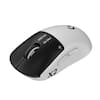
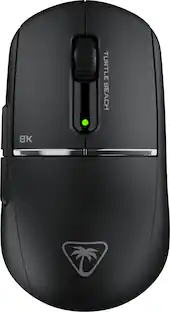
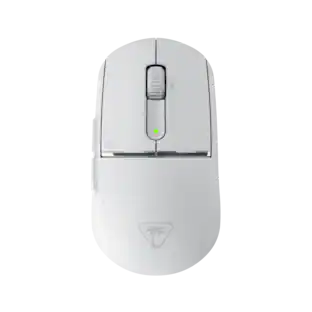
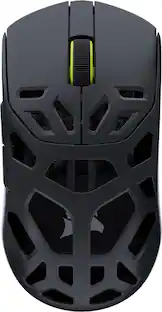
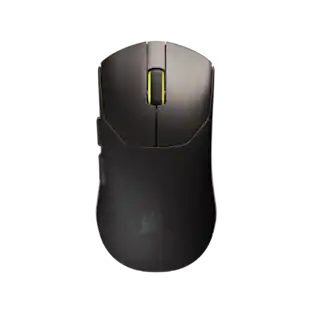
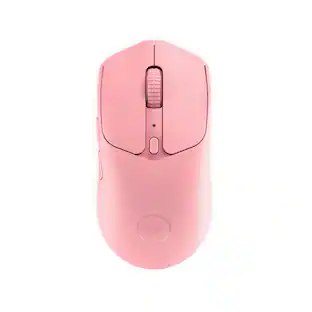
Satisfy The Need For Speed. The Turtle Beach Burst II Air ultra-lightweight 2.4GHz wireless gaming mouse satisfies your need for speed at an incredible, best-in-class 47g. Designed for quick flick shots and the fastest players with a smooth yet precise Owl-Eye 26K DPI sensor with 650 IPS (16.5m/s) tracking speed, and blazing TITAN Optical Switches with adjustable debounce provides a long-lasting 100 million click life cycle, click tensioning and speed-of-light actuation for unprecedented speed and precision. The dual wireless system features 2.4GHz wireless for gaming (up to 40 hours of continuous use) and convenient Bluetooth versatility (up to 120 hours) all in a right-handed symmetrical, solid top shell design.
Q: What is the battery life when using the 2.4GHz wireless connection?
A: The battery life is up to 40 hours of continuous use when using the 2.4GHz wireless connection for gaming.
Q: What is the weight and dimensions of the mouse?
A: The product weight is 47 grams with product dimensions of 4.81 inches in length, 1.55 inches in height, and 2.65 inches in width.
Q: What is the maximum DPI setting for the mouse?
A: The Turtle Beach Burst II Air gaming mouse features an Owl-Eye 26K DPI sensor.
Q: Can the mouse be used wired?
A: The Burst II Air Mouse can be used wired with the included PhantomFlex USB-C to USB-A charging cable.
Q: What type of skates are included with the mouse?
A: The mouse comes with a hybrid skate system that includes the option of four small skates or two large skates.

Satisfy The Need For Speed. The Turtle Beach Burst II Air ultra-lightweight 2.4GHz wireless gaming mouse satisfies your need for speed at an incredible, best-in-class 47g. Designed for quick flick shots and the fastest players with a smooth yet precise Owl-Eye 26K DPI sensor with 650 IPS (16.5m/s) tracking speed, and blazing TITAN Optical Switches with adjustable debounce provides a long-lasting 100 million click life cycle, click tensioning and speed-of-light actuation for unprecedented speed and precision. The dual wireless system features 2.4GHz wireless for gaming (up to 40 hours of continuous use) and convenient Bluetooth versatility (up to 120 hours) all in a right-handed symmetrical, solid top shell design.

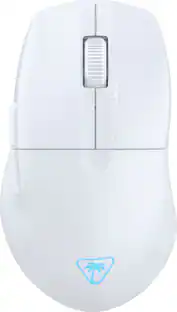
The Turtle Beach Burst II Pro delivers esports-level wireless performance with true 8K polling and ultra-low latency for the most competitive players. Designed with a performance-optimized symmetrical shape for medium hands and claw grip styles, the Burst II Pro features an upgraded Owl-Eye 30K DPI sensor with 750 IPS tracking and 70g acceleration optimized for 99.8% resolution accuracy on all surfaces including glass. True 8K wireless performance delivers 0.125ms latency—8x faster than standard gaming mice—for faster reaction time and precise aim. With a blazing-fast Titan Optical Switch rated for 100 million clicks and pre-tensioned main buttons, every press is crisp, tactile, and instant. Even at maximum performance, you’ll enjoy up to 40 hours of continuous play with 8 kHz polling—or up to 150 hours at standard 1 kHz. Weighing only 57g, this mouse combines a solid top shell, massive battery, and pro features in an ultra-lightweight design. Bundled with grip tape, three sets of skates including pure PTFE and ultra-high molecular PE skates for glass mouse pads, and a shielded PhantomFlex 8K USB-C charging cable that also attaches to the included USB adapter placing the wireless transmitter near your mouse for peak performance, the Burst II Pro offers maximum customization and true 8K support. A side-positioned DPI button gives you quick access to sensitivity changes among 8 programmable inputs, Swarm II desktop software offers mouse angle tuning and other tweaks while onboard memory stores up to 5 profiles for seamless switching. Upgrade to maximum performance with zero compromise.

Rise to the top of your guild with the Razer Naga V2 HyperSpeed—a best-in-slot wireless ergonomic MMO mouse. Optimize skill rotations with an arsenal of 19 buttons and a dual mode scroll wheel. Power through raid progression with HyperSpeed Wireless, backed by up to 250 hours of battery life.

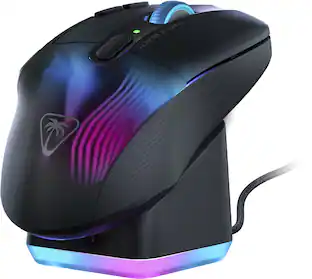
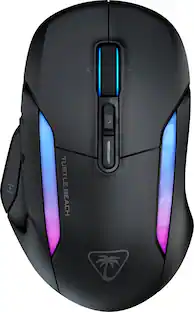
Experience unparalleled gaming freedom with the Turtle Beach Kone II Air wireless ergonomic gaming mouse. Its exceptional battery life lets you play for weeks uninterrupted, lasting up to 350 hours via low-latency Bluetooth or up to 130 hours using high-performance 2.4GHz wireless. Designed with ergonomic precision, it fits comfortably in medium to larger hands, accommodating various grip styles such as claw, palm, or fingertip plus additional grip tape is included for enhanced control. Take command of your gameplay with Easy-Shift [+] duplicator technology, expanding its 7 buttons and 4D scroll wheel into 21 customizable functions. Glide seamlessly through content with the multi-function 4D scroll wheel, offering both free-spinning and tactile scrolling options, along with fully customizable tilt controls. Engineered for speed and durability, its TITAN Optical Switches ensure precise and reliable clicks over a 100 million click life cycle. Equipped with the advanced Owl-Eye 26K optical sensor, enjoy superb tracking performance from 50 DPI up to 26K DPI with 650 IPS (16.5m/s), complemented by pure, heat-treated PTFE glides for smooth mouse movements. Customize your gaming experience with dual-zone RGB illumination and charge effortlessly with the ultra-flexible PhantomFlex charging cable and USB-C-to-A adapter. NVIDIA Reflex compatibility further enhances your gaming prowess, delivering sub-25ms response times for lightning-fast reactions and enhanced aim precision.
| Pros for Turtle Beach - Burst II Air Ultra-Lightweight Wireless Optical Gaming Mouse with Bluetooth & 120-hour battery - Wireless - Black | |||
|---|---|---|---|
| Cons for Turtle Beach - Burst II Air Ultra-Lightweight Wireless Optical Gaming Mouse with Bluetooth & 120-hour battery - Wireless - Black | |||
| There were no cons for this product— |
Customers praise the Burst II Air Ultra Lightweight Wireless Symmetrical Gaming Mouse's incredibly lightweight design and exceptional battery life, often exceeding expectations. Positive feedback also highlights the mouse's accurate sensor, smooth skates, and included grip tape for enhanced control. Many appreciate the multiple connectivity options and the high-quality build.
The vast majority of our reviews come from verified purchases. Reviews from customers may include My Best Buy members, employees, and Tech Insider Network members (as tagged). Select reviewers may receive discounted products, promotional considerations or entries into drawings for honest, helpful reviews.

I knew ROCCAT made great peripherals, but i wasnt sure about this after turlte beach bought them. I dont own any turtle beach items but this actually blew me away. Ive used plenty of mice, including the razer viper v3 pro. I prefer this over any mouse right now because of the 47g weight, which literally feels like a feather. It makes playing games like LoL and Counter Strike so much easier because there is no fatigue and micro movements are outstanding. It uses a pixart 3395 if anyone is wondering and its an amazing sensor. You can actually adjust debounce delay too. The swarm II software is also not bloated unlike other softwares. Highly recommend.
Posted by pheNOM1011
The Turtle Beach Burst II Air is the lightest gaming mouse I’ve owned so far, perhaps even the lightest one among all full-size mice I’ve ever owned. As advertised, it is in fact ultra lightweight, can easily connect through various modes (Bluetooth, wireless receiver or just the cable), and can be easily customized to suit whatever needs you’d have. This is the first Turtle Beach product I used and so far, I am delighted with it. It doesn’t have all the bells and whistles as other gaming mice, such as more buttons and decorative lights, but for the weight and ease of use, I’d highly recommend it. - Pros: Ultra-light, accurate, customizable. - Cons: N/A. >> Setup It just works out of the box; however, you’d want to download the software to configure/customize it. Following the Quick Start Guide the first thing to do is to navigate to http://www.turtlebeach.com/swarm2, it will be redirected to the support page for downloading updates/software. I just selected the Burst II Air mouse product, downloaded the Swarm II software and proceeded to install it. When I first connected the mouse with the cable provided, and launched the Swarm II software, there was a notice for an update available, which I downloaded and installed (it was a little strange having to click once for download and another click to do the actual install, just one click should have sufficed, minor detail/feedback). After that initial update, I was greeted with another a mandatory update for the device. When applying that update, it forced me to plug in the receiver which means that both the mouse and the receiver got some updates. No issues at all with the initial setup, very easy. >> Profiles As with other similar gaming devices, you can set up different profiles that hold specific parameters that are suited to whatever tasks you are undertaking. Launching the Swarm II app, there are 5 default profiles that you can select from and customize even more. In my case, I’ve only been using two, one for editing pictures and another for gaming (this last one also for general use). One useful thing to note is that the front-left side small button is preconfigured to cycle through DPIs when pressed, which I find very handy. For example, when playing games, sometimes you’d want to move faster, and other times you’d want to be as accurate as possible minimizing the mouse movement so that you can accurately aim at the at the target when playing FPS games, for example. You can change the preconfigured use of this button to instead of cycling through the DPIs, to go up or down in DPI, and you can even assign the button a different function altogether. >> Battery It is nice that the Burst II Air comes with its own internal rechargeable battery, which, by the way, doesn’t seem to add much weight to the device. The battery charges fast and seems to last for days (didn’t take an exact measure because I’d recharge before battery went to zero). >> Ease of use It is taking me some time to adjust to how light this mouse is as I’ve always favored a little heavier than usual mice for gaming, due to my thought that heavier mice were more suited for gaming, for example, to be more accurate at shooting in FPS games. So far, this device has proven me wrong and I see using it more frequently than other gaming mice I own, especially when traveling somewhere (in which saving as much carry-on luggage weight as possible is desired) . It comes with extra skates and grip tape. I haven’t yet attached the grip tape to the Burst II Air mouse, but I might do it. So far, the mouse doesn’t seem to slip easily under my fingers, but I haven’t been gaming heavily lately. For the replacement skates, the mouse is so light that I wonder if I’d need to change them before the mouse’s left button dies and the mouse being rendered useless (as I’ve seen being the case in gaming mice).
Posted by Goncho
I really like gaming mice, so I’ve tried all of the top gaming mice on the market right now. Also, tried a ton of other ones. I went in with low expectations. As I didn’t know Turtle Beach made gaming mice. But supposedly they bought out Roccat. So wasn’t sure how it would perform, but was pleasantly surprised by how much they got right. WEIGHT: The biggest and best thing this guy has going for it is the weight at 47 grams which is very lightweight. While being very well balanced which is just as critically important. This WILL make you better at aiming if you are using a heavy mouse. Especially, 70 – 80 grams or more. Also, the rest of the specs are upper end (not top of the line but nearly). To get that weight if you squeeze hard there is some flex. But I didn’t notice that while gaming. CONNECTIVITY: It does come with grips, you can store the dongle inside the mouse, and connect via USB-C, 2.4 GHz wireless, or Bluetooth. SHAPE: It’s got a comfortable shape, made for those who either A. Like smaller mice, or B. have small hands. Good for claw/fingertip, but if hand is small enough palm. But I’d say for most a claw/fingertip grip. Honestly, reminds me a lot of a smaller GPX. COATING: The coating is similar to the GPX where it feels a bit like matte rubber. SCROLL WHEEL: Scroll wheel has defined steps and isn’t very loud. Light to medium amount of force required to scroll. Middle click is light, snappy, and easy to spam. CLICKS: Side and primary clicks are not my favorite and hit middle of the pack in the sense of feel compared to others. But are still relatively snappy. They are optical which is greatly appreciated. As that means no double clicks and faster latency. There is no side to side play. They say they are pre-tensioned but I’m still getting moderate pre and post travel (which I think is the main contributor on why they don’t feel great). But are consistent on left/right click. And during games I don’t really notice. Side buttons are more of the same. DPI BUTTON: Uniquely there is a DPI button the front left side of the mouse. Which I think is a cool spot for it. Out of the way enough you can use it during game but easy enough to access if you want to change your DPI on the fly. Which is also remappable in their software. Such as for play/pause or muting your microphone. PERFORMANCE: Sensor, firmware, software, are all upper end. I performed excellently across all my games with this mouse. Didn’t have to acclimate at all to it. As the shape, size, weight, latency are all excellent. As mentioned above the only thing that took me out of game a bit is the clicks/side buttons/scroll wheel while solid/very good are not up there with my favorite mice. It also lacks higher polling rate which I like. But is not everyones cup of tea and the trades are seldom worth it for people. BATTERY LIFE AND PERFORMANCE CONTINUED: It doesn’t have any RGB. The sensor is upper end, and battery life is very good. PTFE feet are solid without any complaints. The wireless is good, I didn’t notice any drop outs or issues. Didn’t feel as responsive as my Razer mice. But they are top dog right now so something that is a lot cheaper I wouldn’t expect it too. However, this still competes extremely well against them. The included cable is very flexible and high quality. Much better than most of the competition. Firmware is solid as well. Not the best I’ve tried but again, up there competing well with the best. CONCLUSION: Overall, this is a highly competitive mouse that does nearly everything right and is an easy recommendation for me.
Posted by SirGalahad