Customer Ratings & Reviews





- Model:
- E43U-D2
- SKU:
- 4988400
to a friend
Customers are saying
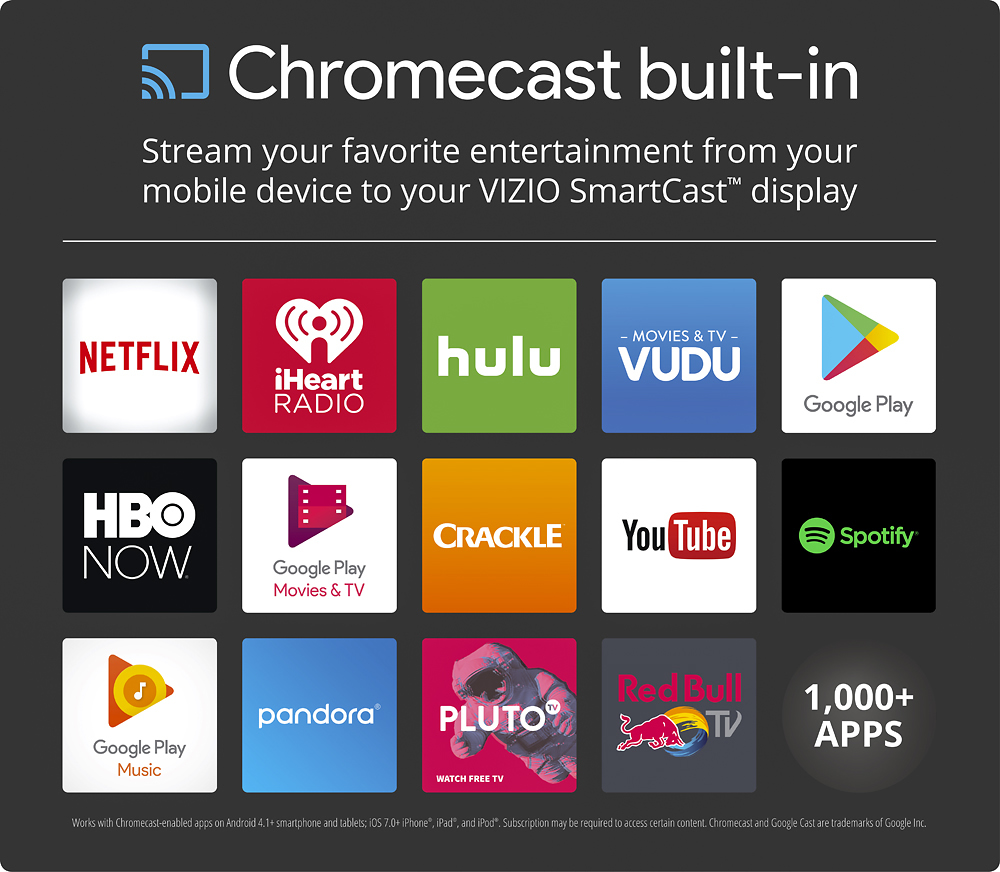
Customers appreciate the excellent picture quality and ease of use of this 43" 4K Ultra HD TV, frequently praising the Chromecast built-in and the affordability. However, some users have noted issues with the remote control and the accompanying app. A few also mentioned the lack of a built-in tuner as a drawback.
This summary was generated by AI based on customer reviews.
Not worth the additional money
||Posted .This reviewer received promo considerations or sweepstakes entry for writing a review.I am a gamer and the tv is not that big a step above just the normal 1040
No, I would not recommend this to a friendLots of extras, but picture could be better
||Posted .This reviewer received promo considerations or sweepstakes entry for writing a review.The tv came with tons of extras, but the basic tv picture was lacking.
No, I would not recommend this to a friendBrand response from VIZIOEntertainmentExpert
Posted .The VIZIO SmartCast Displays come wtih Chromecast Built-in and have work with the SmartCast App available in the iOS App Store or Google Play Store. Several factors can affect picture quality including ambient light in the room and content being displayed. The SmartCast app allows our customers access to adjust and fine tune settings to personnel preference.

Good for gaming
||Posted .This reviewer received promo considerations or sweepstakes entry for writing a review.Don't like that you have to change settings for the tv on a app.
I would recommend this to a friendBrand response from VIZIOEntertainmentExpert
Posted .Thank you for your feedback. Based on feedback provided by customers like you, we’ve recently released an update for VIZIO SmartCast Home Theater Displays that adds onscreen access to all of the settings. This new software update is rolling out to most VIZIO SmartCast displays and will be downloaded automatically. To navigate the new onscreen setting menu, use any VIZIO television remote with a menu button. If you don’t have one, please contact our Support team to see if you’re eligible. We’re available Monday through Friday from 7am until 11pm (CST) by calling 877-698-4946 or through chat or email by visiting support.vizio.com.
Not so "Smart" TV.
||Posted .This reviewer received promo considerations or sweepstakes entry for writing a review.Under the impression this was a "smart tv", sadly mistaken. This 4K Ultra HD TV only has Chromecast inside of the TV. Other than that no apps can be dowloaded into the TV, movies can only be viewed via phone. Exceptions are cable, and HDMI connected devices. I'm planning on returning it.
No, I would not recommend this to a friendok
||Posted .This reviewer received promo considerations or sweepstakes entry for writing a review.Not what I really expected on the smart tv side...but it is ok.
No, I would not recommend this to a friendNot as good as others at this price
||Posted . Owned for more than 2 years when reviewed.This reviewer received promo considerations or sweepstakes entry for writing a review.Bought this for my Son. It's not as good of quality as comparable devices in the same price range. Build in Chromecast means you don't get pre-install apps. Netflix, Amazon, etc must be cast from a computer, unlike other smart TV's.
No, I would not recommend this to a friendDecent
||Posted .This reviewer received promo considerations or sweepstakes entry for writing a review.Good looking TV for the price we paid for it that day.
I would recommend this to a friendPretty good TV
||Posted .This reviewer received promo considerations or sweepstakes entry for writing a review.It's a ok television not all that, could be better
I would recommend this to a friendBrand response from VIZIOEntertainmentExpert
Posted .We appreciate the feedback. Please feel free to contact us at 844-254-8088 as we would be happy to answer any questions you might have. Thanks -Randal
- Pros mentioned:Picture quality, Price
Excellent Monitor for PC, Movies, and Gaming
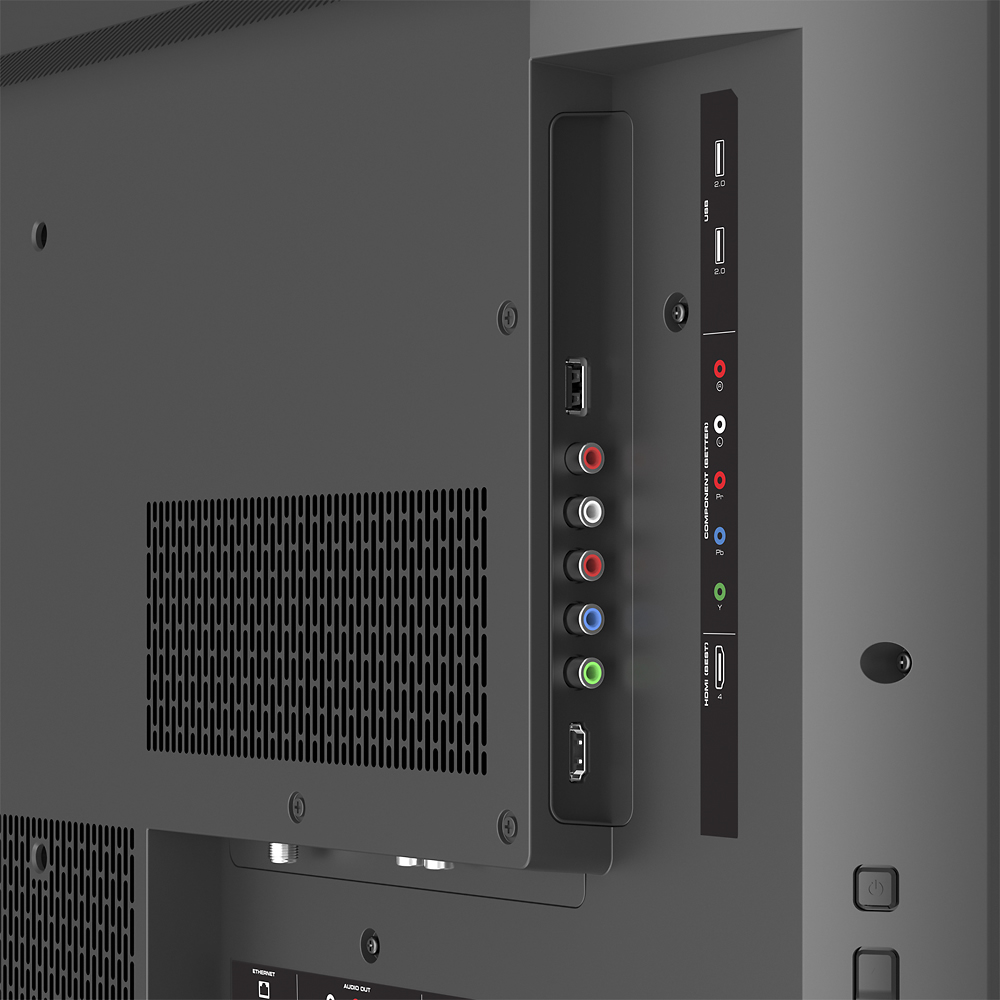
Posted .This reviewer received promo considerations or sweepstakes entry for writing a review.I purchased this monitor at Best Buy for use as an inexpensive 4K PC display. But also wanted to play the occasional game and watch some movies. Let's see how the brand new Vizio 42.5" E43u-D2 fares. PROS: + Excellent picture quality + Deep black levels + Good viewing angles + No noticeable input lag + Relatively inexpensive for what you get + Great image uniformity + Native Casting Support + Phone app for TV controls/adjustments + Good port selection + Supports HDMI 2.0 for 2160p, 4:4:4 color format, 8-bit color depth* CONS: - 2160p only supports 4:4:4 at 30Hz - No built-in on-screen menu for config - No DisplayPort Input OUT OF THE BOX & SETUP Since this is going on my desk, basic assembly was required for the feet. But that's about it. Then it's off to the phone app to actually configure the TV itself. You can connect to WiFi or use the built-in LAN port. The phone app is the only way you can adjust the display controls, settings, etc. If you're using the remote, you can change inputs, volume, channel, enter app pairing mode, etc. Not a whole lot else. Once you get used to it, I found it to be fairly intuitive. All of the usual settings are there, preset modes for Computer use, Movies, vivid, etc. Plus more in-depth color options and such. Do note that there is no traditional coax TV tuner. Which as noted above, works perfectly for me. For anybody else, do make sure you have some kind of set-top-box, streaming media device, or phone/tablet to use the app which can stream lots of stuff. I haven't played with the streaming too much, but the app seems to cover the basics, such as Hulu, ChromeCast, etc. DESKTOP It's important to ensure your PC supports HDMI 2.0. And use HDMI 1 (ARC) on the TV. This is the latest standard. If it's an older version, you'll likely be limited to 4K @ 30Hz. While it's technically usable, it's not going to be a great experience. There will be lag and maybe even ghosting as you move the mouse, drag windows, etc. I've used this display with a GTX 980 Ti and a Dell XPS 15 (9550) with a USB-C to HDMI 2.0 converter. The built-in port on the notebook does not support HDMI 2.0. The experience on both was about the same. I had to go into the advanced display settings to force the monitor to go to 60Hz instead of 30Hz. However, the Vizio website and spec site is somewhat misleading. It says HDMI port 1 supports "2160p@60fps, 4:4:4, 8-bit." In reality, it does, but not all together. In other words, if you want 4:4:4/RGB, you can only go up to 2160p@30Hz. Once you bump up to 60Hz, you still get 8-bit, but only 4:2:0. One interesting note is that the included cable isn't even HDMI 2.0. It didn't work well at all. Fortunately I wasn't even expecting a cable, so already purchased a HDMI 2.0 spec cable. Now I thought 4:2:0 would be unacceptable in desktop mode, but that's simply not the case. If I used the included cable, yes. Small text was blurry. But with a good cable, I'm running Win10 at 125% scaling and small text is nice, crisp, and clear. If I drop down to 100% is still clear, but a bit too small for my use. I also ran through Windows "ClearType" wizard to fine tune things a bit. I then did some test workflows with Outlook, IE, Chrome, Firefox, and several other Office 2013 apps. At my normal sitting distance, about 3-4 feet away, they all look and function great. I can basically have 4 1080p sized windows on one display. Awesome. I should note I did view a chroma subsampling 4:4:4 text image; and yes, the last 2 lines aren't super crisp at 4:2:0. But honestly it's still readable and haven't found an issue in any of my personal use case scenarios. But felt I should note that because you could run into a situation where that is a problem in your use-case where certain text may not look clear or a bit "odd" due to the fact that pixels are sharing colors. Google it. :) MOVIES & VIDEOS I started by playing several 4K sample videos and trailers on YouTube. I simply couldn't find anything to complain about. Tried different viewing angles, looking for pixelation, stuttering, stuck pixels, flickering, etc. Nothing. One thing to keep in mind is that 4:2:0 is basically where virtually all movies and videos run at. So given I'm stuck at that color depth anyways, this type of playback is right at home. I've been watching Transformers: Age of Extinction (Amazon Prime) at 4K for awhile now and it's quite impressive. Black levels are some of the best I've ever seen on a mainstream television. Black is black. No light bleed. No obvious dark/white splotches. It's nice. GAMING I do like to play the occasional Starcraft 2, GTA V, Civ5, and other similar titles. It's like I'm playing them all for the first time on this display. Completely changes the experience with the immersion and new details you never noticed before. Only complaints I have is more game developer related. Civilization doesn't scale well at higher resolutions. In that menus and text are super tiny. Fortunately, most games I've played don't have that issue. On the phone app there is setting to change that reduces input lag. And so far, I've yet to notice any. However, it's very important to double-check in both Windows AND in your game display settings that you're at 60Hz. Sometimes they'll default to 30Hz and you will absolutely perceive that as lag. More important, you may just be seeing lag since you're killing your GPU by trying to run at 2160p. Even the GTX 980 Ti FTW can't run everything at native without lowering details down to at least medium in most cases. Just depends on the game, and was expected. Some more particular FPS gamers might find some lag that I'm missing out on; but for me, it's just fine. CONCLUSION So is this a perfect monitor? Nope. Few things are. If your work/play requires something this budget oriented monitor can't deliver on, such as 2160p with 4:4:4 @ 60Hz, you'll need to keep looking elsewhere. And likely spend a bit more. With a good HDMI 2.0 cable, quick calibration of display settings, as well as OS/App/Game graphic setting adjustments, I'm quite happy with it. If you're looking for an inexpensive large all-in-one monitor for desktop use, watching video content, or even playing games, I consider it highly recommended.
I would recommend this to a friendBrand response from VIZIOEntertainmentExpert
Posted .We’re glad to hear you are happy with your purchase of the E43U-D2. VIZIO SmartCast™ products are controlled using an application instead of a traditional remote. This means that the menu is built into the app and that any VIZIO SmartCast™ device can be controlled using most smartphones and tablets. Although there is no DisplayPort, we do include an HDMI cable to provide HD and UHD resolutions from devices connected to the Home Theater Display. VIZIO SmartCast™ the best streaming experience and easiest way to control your display from anywhere in your home. If you have any questions or concerns, we encourage you to reach out to our Support team at 844.254.8088. – Jesse
Very disappointed
||Posted .This reviewer received promo considerations or sweepstakes entry for writing a review.I ordered this product thinking it was a smart TV as a Christmas gift for my sister. However after reading the reviews it appears this is not a smart T.V. What a disappointment as i was so excited to give this to my sister for Christmas. Now it appears I have to return this. This is the first time I purchased a Vizio product and it will be the last. I'm partially to blame for this as well for not doing my due diligence in researching this product, but I was under the impression it was a smart TV. Should have stuck with getting a Samsung smart tv
No, I would not recommend this to a friendDon't buy it
||Posted .This reviewer received promo considerations or sweepstakes entry for writing a review.If you just want to watch TV: don't buy it. To watch free TV from the air you need to additionally purchase a tuner (Best Buy doesn't sell it only directly from Vizio purchase is needed to be made) and the antenn. Even if you don't want to watch TV only project movies from you loptop....very bad idea as well. First it was very hard to set it up and figure out how it works. Than once everything was connected it did not work properly. Voice and vision were disappearing. Very disturbing. Also it took a while to turn it on. After few weeks of fighting with it I decided to return it and buy a better TV.
No, I would not recommend this to a friendPass on it
||Posted .This reviewer received promo considerations or sweepstakes entry for writing a review.The quality was great but the built in Chromecast was a nightmare. I kept having issues with the tv not pairing or disconnecting during use. It would also shut off randomly. I ended up returning.
No, I would not recommend this to a friendworst tv ever
||Posted .This reviewer received promo considerations or sweepstakes entry for writing a review.My husband decided on this TV without reading any reviews on it. The biggest mistake he has made in a long time! We tried 4 different devices to cast the TV to Direct TV, Roku, any app that would work. The only thing we could get were YouTube videos. No apps downloaded. We called Vizio 2 different times, were told we were doing everything correctly. We called DirectTV, they told us we were doing everything correctly and the TV should be cast to them. Still nothing and no one from the company knew what to do. We packed the TV back up and returned it.
No, I would not recommend this to a friendnot what was told
||Posted .This reviewer received promo considerations or sweepstakes entry for writing a review.was told it is 120 hz refresh will not do with my graphics card got for pc monitor you have to download an app to even adjust your tv brightness contrast ect so in all disappointing.
No, I would not recommend this to a friendBrand response from VIZIOEntertainmentExpert
Posted .Thanks for your purchase and feedback. This model has an effective refresh rate of 120Hz. VIZIO SmartCast™ products are controlled using an application instead of a traditional remote. This means that any VIZIO SmartCast™ device can be controlled using most smartphones and tablets. If you have any questions or concerns, we encourage you to reach out to our Support team at 844.254.8088. -Randal
Disappointed
||Posted .This reviewer received promo considerations or sweepstakes entry for writing a review.I bought this just for the smart tv functions to put in the kids room. Not very kid friendly I returned it for a Samsung. It was so much simpler. The 4K quality was subpar also.
No, I would not recommend this to a friendVery Disappointed with Vizio
||Posted .This reviewer received promo considerations or sweepstakes entry for writing a review.I purchased this TV as a replacement of a smallerHD Wide Screen model. When I got it home I found out it was little more than a fancy computer monitor. There was no way to change the settings on the TV, and it had to be setup to be used with a smartphone or a tablet to stream content to it. I immediately repacked it and returned it to BestBuy.
No, I would not recommend this to a friendBrand response from VIZIOEntertainmentExpert
Posted .Thanks for your purchase and feedback on the all-new VIZIO SmartCast™ E43u-D2. Because VIZIO SmartCast™ puts control of the display into your mobile device, we’re now able to make updates much faster and more frequently, right to your VIZIO SmartCast™ app. We realize this is brand new technology and it takes some time to get used to it. That’s why we’re committed to continuous improvement which is going to make VIZIO SmartCast™ the best streaming experience and easiest way to control your display from anywhere in your home. If you have any questions or concerns, we encourage you to reach out to our Support team at 844.254.8088. – Collin
You get what you pay for
||Posted .This reviewer received promo considerations or sweepstakes entry for writing a review.This tv was rated very well and had a great price. Well, you get what you pay for. Sure it had a lot of features, but the main feature, the picture itself, was horrible!! The color was washed out and not vibrant at all and you had to be sitting directly in front of the tv for any decent picture whatsoever! I returned it in short order.
No, I would not recommend this to a friendBrand response from VIZIOEntertainmentExpert
Posted .Thanks for your purchase and feedback on the all-new VIZIO SmartCast™ E43u-D2.
There are many picture adjustments that can be made in the Menu, accessed from your paired smartphone or tablet with the VIZIO SmartCast™ app, to affect this. We recommend adjusting these to best fit your personal preference.
If you have any additional questions please feel free to contact us at 844-254-8088. Thanks! –Collin
Faulty TV stand
||Posted .This reviewer received promo considerations or sweepstakes entry for writing a review.Purchased this product in store, started to set of the tv when I noticed it had a faulty stand. I returned the tv the same date and purchased another brand.
No, I would not recommend this to a friendDon't purchase
||Posted .This reviewer received promo considerations or sweepstakes entry for writing a review.After a month long repair drill allowed to get a new unit . Took that home and none of the hdmi ports.worked.. returned to Store and purchased.another brand.
No, I would not recommend this to a friendBrand response from VIZIOEntertainmentExpert
Posted .We appreciate you taking the time to provide this feedback for the SmartCast™ E43u-D2, and we're very sorry to hear this! If you need future assistance, please contact our support team at VIZIO at 844.254.8088 so we can help. -Collin
It's okay
||Posted .This reviewer received promo considerations or sweepstakes entry for writing a review.You are required to download an app on your mobile device in order to get the benefit of having a Smart TV. All I want to say is that you get what you pay for.
No, I would not recommend this to a friendBrand response from VIZIOEntertainmentExpert
Posted .Thanks for your purchase and feedback on the all-new VIZIO SmartCast™ E43U-D2. We’re happy to share that we recently made changes to the product setup experience in order to make it easier and more intuitive. We realize this is brand new technology and it takes some time to get used to it. That’s why we’re committed to continuous improvement which is going to make VIZIO SmartCast™ the best streaming experience and easiest way to control your display from anywhere in your home. If you have any questions or concerns, we encourage you to reach out to our Support team at 844.254.8088.