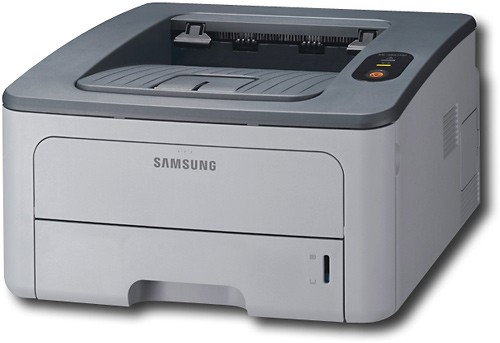
Samsung - Network-Ready Black-and-White Laser Printer
This item is no longer available in new condition.
See similar items below.
Description
Features
From our expanded online assortment; not available in all Best Buy stores
Prints up to 30 ppm*
For quick completion of large print jobs.
Up 1200 x 1200 dpi resolution
Creates documents that look sharp.
32MB built-in memory
For great performance when printing complex documents.
Ethernet 10/100Base-TX connectivity
Lets you network your printer to other computers quickly and easily.
Handles 3" x 5" to 8.5" x 14" media sizes
To accommodate a variety of projects.
Prints envelopes, labels, transparencies, card stock and postcards
For versatile document creation.
Up to 250 sheets input capacity
So you don't have to stand by the printer and keep loading paper.
USB connection
Lets you easily connect to your computer.
*Print speeds vary with use. See manufacturer for info on print speeds.
What's Included
Samsung Network-Ready Black-and-White Laser Printer
Owner's manual
Other
- Energy Star CompatibleYes
- <a href="javascript:winopengld('1087340571468','pcmcat38200050027','cat12080')">Print Speed (B&W)</a>Up to 30 ppm (Print speeds vary with use. See manufacturer for info on print speeds.)
- <a href="javascript:winopengld('1087340571577','pcmcat38200050027','cat12080')">Black Printer Resolution</a>Up to 1200 x 1200 dpi
- <a href="javascript:winopengld('1087340571658','pcmcat38200050027','cat12080')">Media Types</a>Transparencies, labels, postcards, envelopes, card stock
- <a href="javascript:winopengld('1087340571708','pcmcat38200050027','cat12080')">Media Sizes</a>3" x 5" - 8.5" x 14"
- <a href="javascript:winopengld('1087340571743','pcmcat38200050027','cat12080')">Input Paper Capacity</a>Up to 250 sheets
- <a href="javascript:winopengld('1087340571817','pcmcat38200050027','cat12080')">Memory</a>32MB
- <a href="javascript:winopengld('1087340571851','pcmcat38200050027','cat12080')">Type of Interface</a>USB 2.0
- <a href="javascript:winopengld('1087340572115','pcmcat38200050027','cat12080')">Total Ink Tanks/Cartridge</a>1 black (not included)
- <a href="javascript:winopengld('1087340572271','pcmcat38200050027','cat12080')">Print Quality</a>For documents
- PC-Free PrintingNo
- <a href="javascript:winopengld('1087340809469','pcmcat38200050027','cat12080')">Duty Cycle</a>Up to 30,000 pages/mo.
- <a href="javascript:winopengld('1087340809515','pcmcat38200050027','cat12080')">Networking Capabilities</a>Ethernet 10/100Base-TX
- Minimum System Requirements400MHz processor; Windows NT 4.0, 2000, 32-/64-bit XP or Netware 5.x, 6.x; Mac: OS 8.6-9.2/10.1-10.4; Linux: Red Hat 8.0-9.0, Mandrake 9.2-10.1, SuSE 8.2-9.2 or Fedora Core 1-4
- Wireless NetworkingNo
- UPC635753623222
Customer reviews
Rating 2.7 out of 5 stars with 3 reviews
(3 customer reviews)to a friend
Rated 2 out of 5 stars
NOT Network Ready!
Posted .This reviewer received promo considerations or sweepstakes entry for writing a review.I wanted a small laser printer for my home so my wife and I could share without needing my PC turned on. This was a HUGE mistake. The network configuration is out of the dark ages, even though the printer claims DHCP, it does not configure itself. I had to download a utility from Samsung, then using USB configure for static IP addres, then manually set the IP address. 3 hours later I have my "network ready" printer running. If I was not a totally network savy user it would have gone back. Lastly Samaung's tech support was a joke, my cat knows more about networking than they do. I would only recommend this product to an enemy.
No, I would not recommend this to a friendRated 5 out of 5 stars
Good printer with easy network setup
Posted .This reviewer received promo considerations or sweepstakes entry for writing a review.I bought this printer to replace an aging HP 5M network printer and after setting it up I wish I had not waited so long. Network setup was as simple as logging into my router and determining what IP address DHCP had assigned to the device and then putting that address into the address bar of IE. The configuration was displayed for every imaginable set up. The setup software disc may have done this for me, but I didn't try it. The print speed is impressive and the text quality is very good. I haven't tried the duplex feature yet and I have another printer for graphics, so I haven't printed any pictures either. Overall, I'm very satisfied for the cost.
I would recommend this to a friendRated 1 out of 5 stars
Look at Lexmark or Brother
Posted .This reviewer received promo considerations or sweepstakes entry for writing a review.Originally purchased 12-2008. First, the toner cartridge that came with the printer was defective. The copies were smeared and awful. I spent hours trying to clean the cartridge and ran all the utilities over and over - very frustrating. I thought I was going to have to return the printer. After speaking at length with support - and against my better judgment - I purchased a new cartridge and the smearing problem was solved. But if it hadn't been, I would have been out $65.00. Samsung, "Get with it and pack a decent cartridge with your printers. You'll save everyone a lot of headaches and $ - yourself included." The second problem is with paper handling. I regularly get 2 pages slipping through together when only one should and each has a partial print. This is a problem for me because, in my business, I am constantly changing between forms and only put in the number of forms needed in any given circumstance. I have wasted a lot of expensive form stock. This printer replaced a workhorse Lexmark that had been in daily use for 12 years. It is smaller and quieter and was easy to install but, I have to say not as trustworthy. 03-21-2010 The fuser has blew out. This is the worst B&W laser printer I have ever used. Save yourself time and headaches; get a Lexmark or Brother. Sorry Samsung - love your monitors and TVs but this printer -> PU.
No, I would not recommend this to a friend
Be the first to ask a question.
We’ll try to get your question answered within 24 hours by a Best Buy customer or brand representative.
Ask a Question