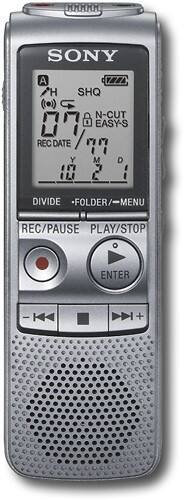

Sony - Digital Voice Recorder
This item is no longer available in new condition.
See similar items below.
Description
Features
Voice-operated recording
Activates the recorder only when audible sound is present, conserving tape and eliminating soundless passages. Also features stereo recording.
2GB internal flash memory
To store dozens of lectures or notes.
Up to 500 hours of recording time in LP mode
For reliable recording time.
4 recording modes
Including Super High Quality mode allow you to customize recording to fit your needs. Also features digital pitch control. Additional modes include overwrite, add and divide.
5 folders
With file protection function allow you to organize and store messages.
A-B repeat function
Replays a specific section of the recording over and over again, so you can make notes from a lecture or use for learning languages.
Add function
For adding additional comments without affecting the original recording.
Digital pitch control
Allows you to speed up or slow down recordings during playback.
Built-in microphone
With selectable sensitivity and noise cut function for clear audio.
Large built-in speaker
With digital pitch control for brilliant audio.
Alarm function
For convenience.
Full-function display
With 12- or 24-hour clock and date display.
Headphone jack
For private listening.
Slim, lightweight design
Offers easy portability in a purse, briefcase or backpack.
Up to 26 hours recording or up to 30 hours playback
With 2 AAA batteries (included).
What's Included
Sony Digital Voice Recorder
2 AAA batteries
Digital voice editing software
Owner's manual
Other
- FormatDigital
- Maximum Recording TimeUp to 500 hours
- Voice-to-Print SoftwareNo
- Removable MemoryNo
- <a href="javascript:winopengld('1087340511721','pcmcat38200050027','cat12080')">Voice Activated</a>Yes
- UPC027242780880
Customer reviews
Rating 4.1 out of 5 stars with 8 reviews
(8 customer reviews)to a friend
Customers are saying
Customers appreciate the ease of use, citing features such as pausing, backing up, editing, saving, and adjusting playback speed as particularly helpful. The product's user-friendly interface is frequently praised.
This summary was generated by AI based on customer reviews.
- Pros mentioned:Ease of use
Rated 4 out of 5 stars
Great voice recorder (especially for class)
Posted .This reviewer received promo considerations or sweepstakes entry for writing a review.I started to fall behind in my classes. So my mom bought this voice recorder for me last week or two. So far it serve me well, and I'll be caught up in no time. Thanks to this So far its easy to use, you can record over 21 hours of recordings using the highest quality. With this voice recorder, you can record using the built in microphone (which is good) or you can connect an external microphone or sources (TV computer, radio, etc). Also there is a headphone jack, so you can plug in a head phone, or external speakers if you wanted to. I like this voice recorder, but the only downside is that it doesn't have USB connectivity, so if you want to transfer your recordings, then you have to do the old fashioned way. Oh and one more thing, it came with 2 AAA batteries, and it with 2 AAA batteries, it give you 20+ hours of battery.
I would recommend this to a friend Rated 4 out of 5 stars
Worth the Hassle
Posted .This reviewer received promo considerations or sweepstakes entry for writing a review.Setting the device up was relatively easy (although I missed the 24 vs 12 on the clock) and getting and retreiving messages fine. I haven't found a use for 5 folders but they are easy to ignore. The only problem I have with the device is its sensitivity; when it is in my pocket on sleep mode the slightest touch on any key wakes it up and I get the last message repeated back to me! Pain in the butt!
I would recommend this to a friend- Pros mentioned:Ease of use
Rated 5 out of 5 stars
Great Recorder
Posted .This reviewer received promo considerations or sweepstakes entry for writing a review.Atfer shopping for a recorder found out many differences. This recorder lets you pause, back up, edit, save. Lots of other don't preform like that. Plenty of storage room. Primary use for this recorder is to record college classes and lectures. And it works great for its intended purpose.
I would recommend this to a friend Rated 4 out of 5 stars
Convenient Conference Recorder
Posted .This reviewer received promo considerations or sweepstakes entry for writing a review.I use this item to record conferences and meetings. I am a computer applications programmer and must have meetings with my clients regarding applications being produced. I find it much more efficient to have an audio record of these meetings. I do not have to make notes, therefore I can concentrate on what is being discussed, but still have a record of everything that was discussed. This item certainly works for me to accomplish the above.
I would recommend this to a friendRated 5 out of 5 stars
great investment
Posted .This reviewer received promo considerations or sweepstakes entry for writing a review.bought it before a weekend business conference and recorded friday night, all day saturday and all day sunday. Good recording quality when hooked up to car stereo on the way home and in headphones. If I want to back up conference to computer I'll have to "play" it into the computer in real time vs. a removable card or usb interface. But good value for the price.
I would recommend this to a friend- Pros mentioned:Ease of use
Rated 5 out of 5 stars
Easy to use
Posted .This reviewer received promo considerations or sweepstakes entry for writing a review.The recorder is great. I like being about to slow the speed down. I am using it to transcribe.
I would recommend this to a friend Rated 5 out of 5 stars
Works great.
Posted .This reviewer received promo considerations or sweepstakes entry for writing a review.I use this to record lectures and sermons. Picks up both very well.
I would recommend this to a friendRated 1 out of 5 stars
Problem when changed battery
Posted .This reviewer received promo considerations or sweepstakes entry for writing a review.Seemed good for the money, but data lost on battery change. I will be returning the item.
No, I would not recommend this to a friend
Q: QuestionDoes the unit have a USB port? If not, how can the recorded data be transferred to separate storage?
Asked by Anonymous.
- A:Answer There isn’t a way to connect the ICDBX800 Digital Voice Recorder to a computer or another storage device.
Answered by SonyListens

Q: Questionis there an audible noise comming from the device while it is recording? Can anyone hear it recording?
Asked by Anonymous.
- A:Answer With the ICD-BX800 you have Voice operated recording (VOR) that will start and stop recording automatically. This Device is Digital, therefore there are no moving parts such as a tape to make noise when recording.
Answered by SonyListens
Q: QuestionHow quiet is it?Can you hear the device turning on or off? Can you hear the device while it is recording?
Asked by sullly.
- A:Answer the ICDBX800 Digital Voice Recorder has a "Voice-operated recording" feature that activates the recorder only when audible sound is present, conserving tape and eliminating soundless passages. Also features stereo recording.
Answered by SonyListens
Q: QuestionVoice-operated recordingHow do you set the SONY digital voice recorder model ICD_BX800 for Voice-operated recording?
Asked by Knobby.
- A:Answer Press and hold FOLDER/MENU to enter the menu mode. The menu mode window will be displayed. Press L/R arrow to select to select VOR setting, then press play button to enter. Press L/R arrow to select ON, then press play button to enter. Press stop button to exit menu mode.
Answered by SonyListens
Q: QuestionYour specifications on recording time are conflicting. It lists the following:*Up to 500 hours of recording time in LP mode For reliable recording time. *Up to 26 hours recording or up to 30 hours playback
Asked by bad.bob.
- A:Answer its up to 500 total that can be stored on it at once. the 26 hours is on one battery charge and the same with the 30. the 500 will take tons of batteries.
Answered by wes
Q: QuestionDoes this recording device allow you to download what you have recorded to your computer?
Asked by Anonymous.
- A:Answer The ICDBX800 cannot be connected to a computer.
Answered by SonyListens