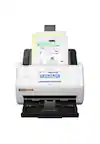
Plustek - High Speed Document Scanner with Automatic Document Feeder - Black
Plustek - High Speed Document Scanner with Automatic Document Feeder - Black
Related Item

Specifications
- Scan MethodFlatbed
- Key Specs
- Scan Method: Flatbed
- General
- Brand: Plustek
- Model Number: PS186
- Product Name: High Speed Document Scanner with Automatic Document Feeder
- Color: Black
- Connectivity
- Scanner Connectivity: USB
- Dimensions
- Product Height: 7 inches (The out of box height of the item. Height is measured as the vertical distance from the bottom of the item to the top as it would be primarily used or placed.)
- Product Width: 9 inches (The out of box width of the item. Width is measured as the horizontal distance from one side of the item to the other as it would be primarily used or placed.)
- Product Weight: 7 pounds (The out of box weight of the item.)
- Features
- Automatic Document Feeder Capacity: 100 sheets
- Automatic Document Feeder Included: true
- Scanner Type: Document
- Certifications Listings & Approvals
- ENERGY STAR Certified: true (Devices carrying the ENERGY STAR service mark, such as computer products and peripherals, kitchen appliances, and other products, generally use 20% to 30% less energy than required by federal standards.)
- Warranty
- Warranty - Parts: 1 year limited
- Warranty - Labor: 1 year limited
- Other
- UPC: 783064708111
The Plustek SmartOffice PS186 is a 25 page per minute scanner with 50 page feeder and includes all the software you need. With compact design and attractive price point, the PS186 is the perfect tool for business and home office use.
- Major selling features: Duplex document scanner with automatic document feeder.
- Scan speed/control: Scans at 25 pages per minute, 50 images per minute.
- Major selling features: Stack up to 50 pages in the feeder.
- Scan speed/control: 1500 page per day duty cycle.
- Major selling features: Single touch buttons automate up to 9 scanning tasks and make scanning easy and efficient.
- Major selling features: Up to 23 scanning tasks/jobs accessible via DocAction II and MacAction II scanning software.
- Major selling features: Barcode file naming and document separation enables batch scanning.
- Major selling features: PC and Mac compatible.
- Image scaling/enlargement: Built in image automatic processing ensures excellent quality images, small file sizes and accurate OCR.
- Major selling features: Includes TWAN and WIA drivers, DocAction II/MacAction II scanning software, OCR software
- Major selling features: Scan to: PDF, Searchable PDF, JPG, TIFF.
- Major selling features: Duplex document scanner with automatic document feeder.
- Scan speed/control: Scans at 25 pages per minute, 50 images per minute.
- Major selling features: Stack up to 50 pages in the feeder.
- Scan speed/control: 1500 page per day duty cycle.
- Major selling features: Single touch buttons automate up to 9 scanning tasks and make scanning easy and efficient.
- Major selling features: Up to 23 scanning tasks/jobs accessible via DocAction II and MacAction II scanning software.
- Major selling features: Barcode file naming and document separation enables batch scanning.
- Major selling features: PC and Mac compatible.
- Image scaling/enlargement: Built in image automatic processing ensures excellent quality images, small file sizes and accurate OCR.
- Major selling features: Includes TWAN and WIA drivers, DocAction II/MacAction II scanning software, OCR software
- Major selling features: Scan to: PDF, Searchable PDF, JPG, TIFF.
Whats Included
- High Speed Document Scanner with Automatic Document Feeder
- High Speed Document Scanner with Automatic Document Feeder
Q: Does the Plustek document scanner have an automatic document feeder?
A: Yes, the Plustek SmartOffice PS186 document scanner has an automatic document feeder.
Q: How is the Plustek scanner connected?
A: This scanner is connected via USB.
Q: Is the Plustek SmartOffice PS186 scanner energy efficient?
A: Yes, the scanner is ENERGY STAR Certified.
Q: What is the automatic document feeder capacity of the Plustek scanner?
A: The automatic document feeder capacity is 100 sheets.
Q: Does the Plustek scanner have a built-in image processing feature?
A: Yes, it has built-in image automatic processing that ensures excellent quality images, small file sizes, and accurate OCR.
Q: What is the scanning speed of the Plustek scanner?
A: This scanner has a speed of 25 pages per minute or 50 images per minute.
Q: How many pages per minute does this scan?
A: As shown on the product image, you will see 25 ppm. the ppm stands for 25 pages per minute.
A: This scanner doesn't scan books. See our OpticBook line of book scanners if you need to scan books or bound materials.
Compare similar products
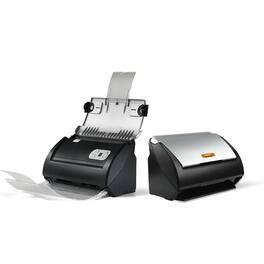
The Plustek SmartOffice PS186 is a 25 page per minute scanner with 50 page feeder and includes all the software you need. With compact design and attractive price point, the PS186 is the perfect tool for business and home office use.
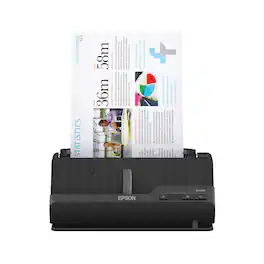
A compact modern wonder, the WorkForce ES-C220 keeps things simple with its intuitive design and exceptional flexibility. With the ES-C220, you can organize stacks of documents and make keeping piles of paperwork for your records a thing of the past. Ideal for the home or office, this easy-to-use scanner is the definition of innovation, saving 60% of desk space and scanning two sides at once as fast as 30 ppm/60 ipm. Offering a robust solution to managing your workflow, the included Epson ScanSmart software allows you to preview, email and upload your scans. In addition, help save valuable time with automatic file name suggestion for streamlined file management. The scanner features a 20-page Auto Document Feeder that makes it easy to scan in batches. In addition, the versatile ES-C220 scans papers of varying sizes up to 8.5" x 120". Maintain amazing quality with intelligent image adjustments such as cropping, paper skew correction and dirt detection. The ES-C220 proves bigger isn’t always better.
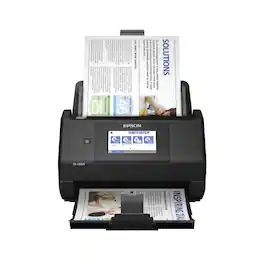
Get organized — quickly and easily — with the WorkForce ES-580W wireless duplex desktop document scanner. This reliable performer makes it easy to scan to your smartphone, tablet or online storage account1 from your desktop or your mobile device. You can even scan directly to a USB memory drive without using a computer. A 4.3" touchscreen enables quick, effortless navigation, while a 100-sheet Auto Document Feeder allows you to breeze through stacks of documents. Scan pages at up to 35 ppm/70 ipm2, capturing both sides in one pass. Intuitive Epson ScanSmart Software1 means you can easily preview, email and upload your scans. The included TWAIN driver ensures compatibility with most document management software. Wirelessly scan to cloud storage accounts1, create searchable PDFs, and get remarkable image quality with Epson Image Processing Technology.
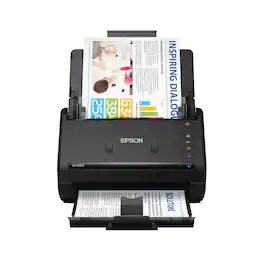
Get organized fast with the WorkForce ES-400 II duplex desktop document scanner. This reliable, easy-to-use performer speeds through scans up to 35 ppm/70 ipm1, capturing both sides of each sheet in one pass. Its 50-sheet Auto Document Feeder allows you to breeze through stacks of documents of varying sizes. Intuitive Epson ScanSmart Software2 means you can easily preview, email and upload your scans. The included TWAIN driver ensures compatibility with most document management software. Scan to cloud storage accounts2 or searchable PDFs. Color and image adjustment features such as auto crop, dirt detection, staple protection and paper-skew correction help ensure remarkable image quality, whatever the scan.
| Pros for Plustek - High Speed Document Scanner with Automatic Document Feeder - Black | |||
|---|---|---|---|
| There were no pros for this product— | Ease of use, Size, Scanning Speed, Image Quality, Software | Ease of use, Overall Performance, Size, Scan Speed, Touchscreen | Ease of use, Size, Overall Performance, Speed, Scan Quality |
| Cons for Plustek - High Speed Document Scanner with Automatic Document Feeder - Black | |||
| There were no cons for this product— | WiFi | Paper Handling, Price, Jamming | Paper Handling, Wireless |
Specs
Reviews
Customer Images
The vast majority of our reviews come from verified purchases. Reviews from customers may include My Best Buy members, employees, and Tech Insider Network members (as tagged). Select reviewers may receive discounted products, promotional considerations or entries into drawings for honest, helpful reviews.
- Rated 5 out of 5 stars
Great scanner; easy to use
Great scanner! I had a Scan Snap scanner earlier, so I had some familiarity with how to use a sheet fed scanner. The plustek scanner works beautifully, scanning docs both sides easily and quickly; then saves it a pop-up document where I can select the folder for saving, just as any other document I want to save on my Mac. If I hadn't had the Scan Snap, I might have been a little confused about what the "set up" options were. I selected .pdf (overwriting the default .tiff)because that's what I wanted. I also checked the box to eliminate blank pages, and checked the box for "continuous scanning." I haven't figured out all the button settings yet; you can figure them as you want them. Instead, I just double-clicked the "scan" icon on the left side of the master screen, and away it went. I will use this scanner to scan loads of books I've been carrying around, onto my computer. Yippee! It's also quite a bit cheaper than scan snap. The only problem I had, was with the disk that arrived in the box. My computer wouldn't read it, so I went to their website and downloaded the software directly (the website was referenced on the disk). I found the online quick-start guide helpful. Also, I discovered I needed to turn on the scanner (duh) from the back before it would work. I thought it was ON, because lights were displaying, but it wasn't.
This review is from Plustek - High Speed Document Scanner with Automatic Document Feeder - Black
CBarry Posted
- Rated 5 out of 5 stars
Nice printer for a nice price
I needed a new printer to help keep up with my business and receipts. Not only can i print documents but i can scan my receipts which has cleared the clutter of all these receipts.
This review is from Plustek - High Speed Document Scanner with Automatic Document Feeder - Black
Beats Posted
- Rated 5 out of 5 stars
Compact & easy to use
Compact, light weight, easy to set up and use. Only issue is with 2-sided docs; you have to load each side & it treats each page as a new doc.
This review is from Plustek - High Speed Document Scanner with Automatic Document Feeder - Black
Tardisgal Posted