Logitech - Wave Keys Ergonomic Wireless Membrane Keyboard for Windows/Mac with Integrated Palm-rest - Rose
Logitech - Wave Keys Ergonomic Wireless Membrane Keyboard for Windows/Mac with Integrated Palm-rest - Rose
- Logitech - Lift Vertical Wireless Optical Ergonomic Mouse with 4 Customizable Buttons - Wireless - Rose$69.99The price was $79.99



More Buying Options
Related Item

Specifications
- Lighting TypeNoneForm FactorErgonomic, Full-size, Compact (60%)Keyboard TechnologyMembraneConnection TypeWireless
- Key Specs
- Lighting Type: None
- Form Factor: Ergonomic, Full-size, Compact (60%) (The size, arrangement, and physical configuration of the product.)
- Keyboard Technology: Membrane (Type of technology that detects a key press.)
- Connection Type: Wireless
- General
- Brand: Logitech
- Model Number: 920-012276
- Product Name: Wave Keys Ergonomic Wireless Membrane Keyboard for Windows/Mac with Integrated Palm-rest
- Color: Rose
- Features
- Lighting Type: None
- Numeric Keypad: true
- Touchpad: false
- Palm Rest: true
- Spill Resistant: false (Designed to resist some degree of accidental liquid spill. The level of spill-resistance is indicated by the product manufacturer, but the degree of protection may not be guaranteed after normal wear of the product.)
- Keyboard Features: Wavy keyframe for natural, feel-good typing; Cushioned palm rest for more wrist support; 3-year battery life; Made with recycled plastic
- Keycap Material: Plastic
- Functions
- Form Factor: Ergonomic, Full-size, Compact (60%) (The size, arrangement, and physical configuration of the product.)
- Keyboard Technology: Membrane (Type of technology that detects a key press.)
- Adjustable Tilt Function: true
- Multimedia Keys: true
- Connectivity
- Connection Type: Wireless
- Wireless Connectivity: Bluetooth, Radio Frequency (RF) (The manner in which a device sends data to another device over a short distance without the use of wires or cables.)
- Maximum Wireless Range: 33 feet
- Number of Devices Connectable Simultaneously: 3
- Compatibility
- Operating System Compatibility: Windows, Mac, Chrome, Linux, Apple iPadOS, Android
- Plug and Play Operation: true
- System Requirements: Via Logi Bolt USB receiver, required: available USB Port, Windows 10, 11 or later, macOS 11 or later, Linux. Via Bluetooth Low Energy, required: Windows 10, 11 or later, macOS 11 or later, iPadOS 14 or later, Chrome OS, Linux, Android 9 or later (The software that a product must have for it to be able to integrate with another product.)
- Power
- Rechargeable Battery: false
- Battery Size: AAA (The battery size required for operation.)
- Number of Batteries Required: 2
- Battery Chemistry: Alkaline
- Batteries Included: true (Indicates whether the product comes with the required batteries for its operation.)
- On/Off Switch: true
- Dimensions
- Product Height: 1.2 inches (The out of box height of the item. Height is measured as the vertical distance from the bottom of the item to the top as it would be primarily used or placed.)
- Product Width: 14.8 inches (The out of box width of the item. Width is measured as the horizontal distance from one side of the item to the other as it would be primarily used or placed.)
- Product Depth: 8.6 inches (The out of box depth of the item. Depth is measured as the distance from the front of the item to the back as it would be primarily used or placed.)
- Product Weight: 26.46 ounces (The out of box weight of the item.)
- Mouse
- Mouse Included: false
- Warranty
- Warranty - Parts: 1 year
- Warranty - Labor: None
- Other
- UPC: 097855191403
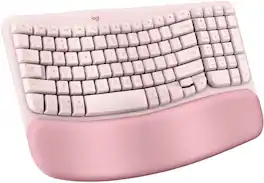
For workdays that go easy on you, Feel the Wave. Wave Keys wireless ergonomic keyboard is shaped to feel instantly familiar and keep you typing all day in a natural position. A cushioned palm rest with memory foam gives your wrists more support throughout the day.
- Feel the wave: Get comfier with Wave Keys, the ergonomic wireless keyboard shaped to help workdays go easier on you.
- Type in comfort all day long: The wavy design of this compact keyboard places your hands, wrists and forearms in a natural typing position.
- More palm support, less pressure: A cushioned palm rest with memory foam supports you all day long and gives you more wrist support.
- Smoother days, your way: Personalize your Wave Keys experience using the Logi Options+ App, where you can choose shortcuts that save time and keep your work flowing.¹
- Ergo-certified: The Wave Keys Ergonomic Keyboard has been designed and tested according to criteria set out by leading ergonomists and is approved by United States Ergonomics.
- Connect with Bluetooth or the Logi Bolt receiver: Use Easy-Switch to switch between laptop, tablet and phone (compatible with Windows/macOS/iPadOS/ChromeOS); up to 3 years battery life.²
- When the desk life gets you down, lift yourself up: For the full comfy experience, match your Wave Keys Ergonomic Keyboard with the Lift Vertical Ergonomic Mouse (mouse sold seperately.)
- More sustainable: Plastic parts in Wave Keys include certified post-consumer recycled plastic (Rose keyboard: 49%).³
Whats Included
- Ergonomic keyboard (Wave Keys)
- 2x AAA batteries (keyboard)
- Logi Bolt USB Receiver
- Quick Start Guide
Q: Can I adjust the tilt of this keyboard?
A: Yes, the keyboard has an adjustable tilt function.
Q: What type of keys does this keyboard use?
A: This keyboard uses membrane keys.
Q: As an engineer, I use the keyboard a lot. What is special about this keyboard?
A: This keyboard has a wavy design that places your hands, wrists and forearms in a natural typing position for all day comfort.
Q: Is this keyboard spill-resistant?
A: No, the keyboard is not spill-resistant.
Q: Does this keyboard have a number pad?
A: Yes, this is a full-size keyboard and has a numeric keypad.
Q: How long does the battery last on the Logitech keyboard?
A: The battery life is up to 3 years.
Q: What is the maximum wireless range of this keyboard?
A: The maximum wireless range is 33 feet.
Q: Are there any backlights? If not is there a similar model and color that does?
A: Hey! No, Wave Keys Ergonomic Wireless Keyboard doesn't come with backlight. However, we recommend you to check out Logitech MX Mechanical Wireless Illuminated Performance Keyboard which has has white backlighting that turns on automatically when hands approach and adjusts to suit your lighting conditions.
Compare similar products
For workdays that go easy on you, Feel the Wave. Wave Keys wireless ergonomic keyboard is shaped to feel instantly familiar and keep you typing all day in a natural position. A cushioned palm rest with memory foam gives your wrists more support throughout the day.

A duo designed for comfier days. Waves Keys for Mac and Lift for Mac are optimized for macOS, and work with iPad. Enjoy familiar, natural typing with a wavy keyframe design and raise your hand into a natural handshake position with Lift for Mac. Relax into focus with quiet typing and clicks, and personalize your experience using the Logi Options+ App.

Introducing the JLab Flow Keyboard & Mouse Bundle, where ergonomic design meets innovative technology. The Flow Keyboard's "flowing design" and the ambidextrous full-size mouse provide ultimate comfort for any workspace. Featuring a dedicated AI Button for configurable access to AI apps, customizable profiles via the JLab Work app, and versatile connectivity options, this bundle seamlessly meets your needs. With its Smart Media Knob and long-lasting battery life, the Flow Bundle offers the perfect blend of style, comfort, and functionality for work or play.

Type more naturally with ERGO K860 – an advanced ergonomic keyboard that promotes a more relaxed typing posture – reducing wrist bending and offering wrist support. A curved keyframe helps reduce wrist strain, while a pillowed wrist rest keeps your forearms elevated to help prevent excessive bending. This Logitech ERGO keyboard features Perfect Stroke keys for quiet performance and responsiveness, and the 2-year battery life offers long-lasting use.
| Pros for Logitech - Wave Keys Ergonomic Wireless Membrane Keyboard for Windows/Mac with Integrated Palm-rest - Rose | |||
|---|---|---|---|
| Ergonomics, Color, Palm Rest, Connectivity, Overall Performance | Ergonomics | Comfort, Design | Ergonomics, Wrist Rest, Ease of use, Bluetooth, Key Feel |
| Cons for Logitech - Wave Keys Ergonomic Wireless Membrane Keyboard for Windows/Mac with Integrated Palm-rest - Rose | |||
| Size, Wrist Pain | There were no cons for this product— | Connectivity | Size, Price |
Specs
Reviews
Customers are saying
Customers are pleased with the Wave Keys keyboard's ergonomics, which many find helpful in reducing typing strain, and also appreciate the built-in palm rest. The keyboard's color and overall performance receive positive feedback as well. However, some customers find the keyboard too small, and a few have reported that it did not alleviate their wrist pain as expected.
Customer Images
The vast majority of our reviews come from verified purchases. Reviews from customers may include My Best Buy members, employees, and Tech Insider Network members (as tagged). Select reviewers may receive discounted products, promotional considerations or entries into drawings for honest, helpful reviews.
- Rated 5 out of 5 stars
Ergonomics meets femininity!
I love and *need* the ergonomic features of this keyboard; I will say, though, if you’ve never used one, like me, it takes a little getting used to. I appreciate the wireless feature as well, because who in this world needs more cords or wires?! I *especially* also appreciate the “feet” to give my wrists a bit of an angle while I work, AND that it fits under my laptop stand (I really didn’t think it would)!
StephanieW Posted
- Rated 3 out of 5 stars
Too small, but I love the color.
I love the fact that this is an ergonomic keyboard; however, it is small. I am used to a larger Microsoft ergonomic keyboard (many years old, but with a cord), and this keyboard is just too small for me. I have arthritis in my hands, and typing on this small keyboard doesn't allow me the space I need. It exacerbates my arthritis pain in my hand. It is probably great for kids or petite people. However, I just purchased the Logitech ERGO K860 Ergomic Fullsize Wireless Keyboard for Windows and Mac with Palm Rest. (I wish Logitech made the ERGO K860 in this same pink color.)
BlueRidgeGirl Posted
- Rated 5 out of 5 stars
Great Keyboard
Very fun and ergonomic. Love color and the softness of the wrist rest.
good Posted