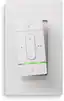
Nanoleaf - Sense+ Smart Wireless Switch with Built-in Motion & Daylight Sensors (1PK) - White
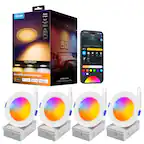
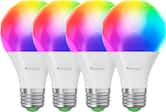
- Nanoleaf - Matter A19 Smart LED Light Bulb - WiFi & Matter-Enabled (4 Pack) - Multicolor$49.99
About This Item
- Key Specs
- Indoor or Outdoor Use: Indoor
- Locator Light: false
- Installation Type: Surface
- General
- Brand: Nanoleaf
- Model Number: N4400C03-1BUT
- Product Name: Nanoleaf Sense+ Smart Wireless Switch with Built-in Motion & Daylight Sensors (1PK)
- Color: White
- Power
- Switch Type: Push button
- Voltage: 0 volts (Amount of power needed to support an electrical current.)
- Number Of Switches: 1
- Features
- Indoor or Outdoor Use: Indoor
- Motion Sensing: true
- Locator Light: false
- Wall Plate Included: true
- Certifications Listings & Approvals
- Product Safety Certifications and Standard(s): UL Listed (Lists the applicable certifications and/or standards, as stated by the manufacturer, in which the product has met the requirements for the assurance of quality and safety.)
- Compatibility
- Wireless Connectivity: Bluetooth, Matter, Thread, Infrared (The manner in which a device sends data to another device over a short distance without the use of wires or cables.)
- Installation Type: Surface
- Dimensions
- Product Height: 2.6 inches (The out of box height of the item. Height is measured as the vertical distance from the bottom of the item to the top as it would be primarily used or placed.)
- Product Width: 1.26 inches (The out of box width of the item. Width is measured as the horizontal distance from one side of the item to the other as it would be primarily used or placed.)
- Product Length: 4.5 inches (The out of box length of the item. Length is measured as the longest dimension of the item.)
- Product Weight: 0.07 pounds (The out of box weight of the item.)
- Warranty
- Warranty - Parts: 2 years
- Warranty - Labor: None
- Other
- UPC: 4895263601066
Control your lights your way with Nanoleaf’s innovative Sense+ Smart Wireless “Anywhere” Switch. Our exclusive Litewave technology allows you to control your Nanoleaf lights instantaneously without any hardwiring needed! Put these smart wireless switches EVERYWHERE you want—like by your bedside or desk, in the kitchen, living room, hallway or bathroom for an extra point of control for your smart lights in addition to the Nanoleaf app, or your smart home ecosystem.
- Wireless Switch: Use as a portable remote you can move around your home, or mount onto the wall to act like a more traditional light switch. No cutting, drilling, or wiring required.
- Motion Sensors: Have your lights turn ON/OFF automatically based on motion detected in the room.
- Daylight Sensors: Have your lights turn on automatically as it gets dark, or stay off when there's enough daylight in the room.
- Configurable Buttons: Set up to 6 custom actions for quick one-touch access to change the colors or color temperatures of your lights, or trigger your smart home Scenes. Configure via the Nanoleaf App or use your desired smart home ecosystem through Matter* to also control other smart devices. *Matter Early Access is available on Apple Home and SmartThings.
- Control Multiple Lights & Devices: Group multiple Nanoleaf lights together to be controlled by one switch for the smartest control of your home.
- Control Your Way: Customizable wireless switches that add an extra point of control for your smart lights in addition to the Nanoleaf app, or your smart home ecosystem.
- Matter Early Access: Connect to Apple Home and SmartThings via Matter early access to control other smart devices via the configurable buttons on the Sense+ Wireless Switch.
- Wireless Switch: Use as a portable remote you can move around your home, or mount onto the wall to act like a more traditional light switch. No cutting, drilling, or wiring required.
- Motion Sensors: Have your lights turn ON/OFF automatically based on motion detected in the room.
- Daylight Sensors: Have your lights turn on automatically as it gets dark, or stay off when there's enough daylight in the room.
- Configurable Buttons: Set up to 6 custom actions for quick one-touch access to change the colors or color temperatures of your lights, or trigger your smart home Scenes. Configure via the Nanoleaf App or use your desired smart home ecosystem through Matter* to also control other smart devices. *Matter Early Access is available on Apple Home and SmartThings.
- Control Multiple Lights & Devices: Group multiple Nanoleaf lights together to be controlled by one switch for the smartest control of your home.
- Control Your Way: Customizable wireless switches that add an extra point of control for your smart lights in addition to the Nanoleaf app, or your smart home ecosystem.
- Matter Early Access: Connect to Apple Home and SmartThings via Matter early access to control other smart devices via the configurable buttons on the Sense+ Wireless Switch.
Whats Included
- Sense+ Smart Wireless Switch
- Mounting Plate
- Mounting Tape
- Sense+ Smart Wireless Switch
- Mounting Plate
- Mounting Tape
Q: Does the switch come with a wall plate?
A: Yes, a wall plate is included with the switch.
Q: Can I connect this switch to Apple Home?
A: Yes, you can connect to Apple Home via Matter early access.
Q: Does this switch have motion sensing capability?
A: Yes, this switch has motion sensing capability.
Q: Are the buttons on the switch configurable?
A: Yes, the buttons are configurable through the Nanoleaf App.
Q: Does this switch require any wiring for installation?
A: No, this smart wireless switch does not require any hardwiring.
Q: Can I use this switch indoors?
A: Yes, this switch is designed for indoor use.
Q: Does this switch have daylight sensors?
A: Yes, this switch has built-in daylight sensors.
A: Hi there, thanks for your question. For the Nanoleaf Sense+ Smart Wireless Switch, the included mounting plate has a depth of about 6 mm and is designed to be mounted directly onto the wall using either the included adhesive or screws, with the switch magnetically attaching to the plate afterward. Because of this thickness, the mounting plate is generally not intended to sit behind another device’s wall plate. If you are using a 2 gang screwless faceplate that also houses another switch, the additional depth from the mounting plate may prevent the faceplate from sitting fully flush, since screwless plates typically snap over a subplate and have very tight spacing. In most cases, the recommended setup is to mount the Sense+ plate directly on the wall beside the existing switch plate or slightly above or below it for a clean installation. If you would like us to review your specific setup, you can also share a photo with our support team so we can provide more precise guidance. Please feel free to submit a request here and we will be happy to assist further: https://support.nanoleaf.me/hc/en-us/requests/new
Reviews
Customer Images
The vast majority of our reviews come from verified purchases. Reviews from customers may include My Best Buy members, employees, and Tech Insider Network members (as tagged). Select reviewers may receive discounted products, promotional considerations or entries into drawings for honest, helpful reviews.
Compare similar products

Control your lights your way with Nanoleaf’s innovative Sense+ Smart Wireless “Anywhere” Switch. Our exclusive Litewave technology allows you to control your Nanoleaf lights instantaneously without any hardwiring needed! Put these smart wireless switches EVERYWHERE you want—like by your bedside or desk, in the kitchen, living room, hallway or bathroom for an extra point of control for your smart lights in addition to the Nanoleaf app, or your smart home ecosystem.

This Philips Hue Dimmer switch makes it easy for anyone in the home to control Hue smart lights with a touch of a button, whether or not they have the Hue app or a voice device handy. The dimmer switch adds more convenient ways to control your Hue lights whether for guests, kids, or even yourself. The dimmer switch lets you turn lights on or off, dim or brighten, or toggle between four of your favorite light scenes. You can also get the best light based on the time of the day, perfect for tuning light to your circadian rhythmn. Three clearly marked buttons make the dimmer switch simple to use. With it's battery-powered design and the included adhesive, the dimmer switch can be placed anywhere. The long-lasting battery has a minimum lifetime of 3 years. It's magnetic backing even lets you attach it to the refrigerator or other metal surfaces. A Hue Bridge and Hue lights (sold separately) are required to connect the dimmer switch to your Hue set-up. The Bridge unlocks the full power of Hue smart home lighting by unlocking features like multiple room control, out-of-home control, automations and more.

Upgrade or replace your current switches with TP-Link Tapo Matter-Certified Smart Switches. Works in most homes with a neutral (white colored) wire for simple installation. TS15 offers a seamless way to control your home ambience across all major smart home platforms. With easy installation, voice control capabilities, and remote monitoring, it provides convenience and flexibility in managing your lighting preferences.

Upgrade or replace your current switches with TP-Link Tapo Matter-Certified Dimmer Switches. Works in most homes with a neutral (white colored) wire for simple installation. TS25 offers a seamless way to control your home ambience across all major smart home platforms. With easy installation, voice control capabilities, and remote monitoring, it provides convenience and flexibility in managing your lighting preferences.
| Pros for Nanoleaf - Sense+ Smart Wireless Switch with Built-in Motion & Daylight Sensors (1PK) - White | |||
|---|---|---|---|
| There were no pros for this product— | Ease of use, Overall Performance, Compatibility, Setup, Design | Ease of use, Installation, Compatibility, Connectivity, Quality | Ease of use, Overall Performance, Installation, Connectivity, Compatibility |
| Cons for Nanoleaf - Sense+ Smart Wireless Switch with Built-in Motion & Daylight Sensors (1PK) - White | |||
| There were no cons for this product— | Size, Price, Magnet Strength | There were no cons for this product— | Size |
Specs
Control, Comfort, Convenience Sponsored
- $699.99The price was $819.99
- $1,229.99The price was $1,529.99