Logitech - M310 Wireless Optical Ambidextrous Mouse - Wireless - Black
Logitech - M310 Wireless Optical Ambidextrous Mouse - Wireless - Black
Color
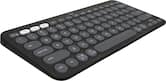
Black- Logitech - Pebble Keys 2 Slim TKL Wireless Scissor Keyboard for Windows, macOS, iPadOS, Chrome - GraphiteTech Fest Deal$33.99The price was $39.99
More Buying Options
Specifications
- Lighting TypeNoneMaximum Sensitivity1000 dots per inchNumber of Buttons (Total)3Connection TypeWireless
- Key Specs
- Lighting Type: None
- Maximum Sensitivity: 1000 dots per inch (Mouse sensitivity is measured in dots per inch (DPI). The higher the DPI, the more sensitive the mouse is and may be more useful for high-density pixel screens. Lower DPI typically means more precision and accuracy in mouse movement.)
- Number of Buttons (Total): 3
- Connection Type: Wireless
- General
- Brand: Logitech
- Model Number: 910-004277
- Product Name: M310 Wireless Optical Ambidextrous Mouse
- Color: Black
- System Requirements: Required: available USB port, Windows 7, 8, 10 or later, Mac OS 10.5 or later, Chrome OS, Linux Kernel 2.6+ (The software that a product must have for it to be able to integrate with another product.)
- Features
- Mouse Type: Standard
- Lighting Type: None
- Performance
- Mouse Operation: Button(s), Scroll wheel
- Mouse Grip Style: Standard (In comparison to many palm and claw grips, ergonomic grip mice are designed for a specific handedness and put the hand and wrist in a position to promote comfort. Customizable grips feature buttons/keys that can be configured to perform specific actions and may also have customizable calibration and sensitivity settings.)
- Handedness: Ambidextrous
- Tracking Method: Optical (There are several types of computer mice, optical and laser being among the most common. Optical mice detect less detail and provide more precise and accurate movement. Laser mice detect more detail and can be used on a wider variety of surfaces, but are more sensitive to small movements.)
- Maximum Sensitivity: 1000 dots per inch (Mouse sensitivity is measured in dots per inch (DPI). The higher the DPI, the more sensitive the mouse is and may be more useful for high-density pixel screens. Lower DPI typically means more precision and accuracy in mouse movement.)
- Minimum Sensitivity: 1000 dots per inch (Mouse sensitivity is measured in dots per inch (DPI). The higher the DPI, the more sensitive the mouse is. Lower DPI typically means more precision and accuracy in mouse movement, but higher DPI may be useful for high-density pixel screens.)
- Number of Buttons (Total): 3
- Number of Thumb Buttons: 0
- Number of Programmable Buttons: 3
- Adjustable Weight: false
- Connectivity
- Connection Type: Wireless
- Wireless Connectivity: Radio Frequency (RF) (The manner in which a device sends data to another device over a short distance without the use of wires or cables.)
- Maximum Wireless Range: 32.8 feet
- Operating System Compatibility: Chrome, Windows, Mac, Linux
- Plug and Play Operation: true
- Number of Devices Connectable Simultaneously: 1
- Power
- Mouse Power Source: Battery-powered
- On/Off Switch: true
- Rechargeable Battery (Mouse): false
- Battery Size: AA (The battery size required for operation.)
- Number of Batteries Required: 1
- Batteries Included: true (Indicates whether the product comes with the required batteries for its operation.)
- Included
- Mouse Pad Included: false
- Dimensions
- Product Height: 1.5 inches (The out of box height of the item. Height is measured as the vertical distance from the bottom of the item to the top as it would be primarily used or placed.)
- Product Length: 4.4 inches (The out of box length of the item. Length is measured as the longest dimension of the item.)
- Product Width: 2.4 inches (The out of box width of the item. Width is measured as the horizontal distance from one side of the item to the other as it would be primarily used or placed.)
- Product Weight: 99 grams (The out of box weight of the item.)
- Warranty
- Warranty - Parts: 3 years
- Warranty - Labor: None
- Other
- UPC: 097855107084
Logitech M310 Wireless Mouse is an easy-to-use, full-size mouse that feels just right. Feel comfortable for hours on end - in your right or left hand - thanks to its contoured, ambidextrous design with soft rubber side grips. M310 comes with a plug-and-forget nano USB receiver that is small enough to stay in your USB port so you won't lose it no matter where you take your laptop. Navigating on your PC or Macbook is simple, with smooth, responsive tracking and Logitech Advanced 2.4 GHz wireless connectivity. For hassle-free use and extreme reliability and durability, choose M310 wireless mouse.
- Full-size, Comfortable Design: Logitech M310 feels good in either your left or right hand even after long hours of use thanks to its contoured, ambidextrous design with soft rubber side grips.
- Smooth Optical Tracking: Get work done with this wireless mouse and enjoy smooth, responsive cursor control, easy text selection and effortless scrolling that touchpads can’t compete with.
- Long-lasting Battery: Get up to 18 months of battery life from one AA battery, with an On/Off switch to help conserve power, smart sleep mode, and an indicator light to avoid surprises.*
- Plug-and-Forget Nano Receiver: The wireless receiver is so small and unobtrusive that you can plug it into any USB port and forget about it, on Windows, Chrome OS, macOS or Linux.
- Advanced 2.4 GHz Wireless Connectivity: You get the reliability of a wired mouse with wireless convenience and freedom, for fast data transmission and virtually no delays or dropouts.
- Works with Chromebook: This mouse is tested and certified as Works With Chromebook, which means it meets Google’s compatibility standards and works seamlessly with your Chromebook.²
- Made with recycled plastic: Plastic parts in M310 include certified post-consumer recycled plastic (77% for Black and Dark Grey, 64% to Peacock Blue and Flame Red Gloss).³
- Product carbon footprint: The carbon footprint of this product is 4.42 kg CO2e.
Whats Included
- M310 Wireless Mouse
- 1 AA battery (pre-installed)
- USB Receiver
- User Documentation
Disclaimers
- ¹Battery life may vary based on user and computing conditions.
- ²This product has been certified to meet Google's compatibility standards. Google is not responsible for the operation of this product or its compliance with safety requirements. Chromebook and the "Works With Chromebook" badge are trademarks of Google LLC.
- ³Excludes plastic in printed wiring assembly, receiver, and packaging.
A: Mine was inside the battery cover. There is a storage next to the battery for when you are not using it. Hope this helps.
A: I just tested it with my keyboard and the answer for me is no.
Q: Does the Logitech M310 have any safeguard against the battery dying if one forgets to turn it off.
A: Yes & Yes... 1. The M310's feature a sleep mode, after a period of non-use (bout 10~15mins or so) the mouse literally goes to sleep, similar in concept to laptop's. 2. There's an off / on switch on the bottom of the mouse so you can manually turn it off if you don't plan on using your computer for a while - going on vacation for example. 3. I'm using a M310 mouse with my laptop on a daily basis, never turn either one of them off. Got the mouse Aug~Sept 2016, after a year & half it's only on battery #2. The M310's support Logitech's Unifying technology (but come with dumb receivers). Let's say you buy a Logitech wireless keyboard at a later date, if it comes with a unifying receiver you use it for both the mouse & keyboard. I'm running a Logitech K360 keyboard with the M310 mouse off one unifying receiver on my laptop. 6-months and no probs. So happy with Logitech, picked up the MK530 keyboard / mouse set for a new tower build + another M310 mouse couple days ago.
A: Hi Confused, the actual dimensions of the M310 is 4.4 in (111 mm) height, 2.4 in (62 mm) width,1.5 in (39 mm) depth.
Q: What is the difference among the following logitech mouse or mice?
A: Between the 310 and 325, the two have slightly different shapes, so your hand may be more comfortable in one than the other. You might consider going to the store and putting your hand on the demo models. The 325 scroll wheel is just slightly smoother and comes in more designs and colors, but for the price, i recommend the 310. There is really negligible difference in the scroll wheel, and I think ergonomically the 310 is more comfortable on the hand. The M185 also has a slightly different shape, the scroll wheel is decent but I didn't feel it was as smooth as the 310 and 325. Lastly, the included battery is only guaranteed for 12 mos versus 18 mos compared to the 310 and 325. Hope that helps.
Q: Which mouse will work best at about 12 feet away from the computer?
A: Just tested, works up to 15 feet away from mine.
Q: Will this work with my iPad?
A: No. Mice are only supported on Android, linux, mac, windows, and chrome os devices.
Q: Will this M310 Work with a unifying receiver?
A: Yes - I use my M310 with Logitech's unifying receiver.
Compare similar products
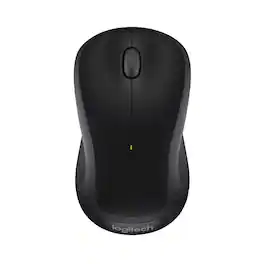
Logitech M310 Wireless Mouse is an easy-to-use, full-size mouse that feels just right. Feel comfortable for hours on end - in your right or left hand - thanks to its contoured, ambidextrous design with soft rubber side grips. M310 comes with a plug-and-forget nano USB receiver that is small enough to stay in your USB port so you won't lose it no matter where you take your laptop. Navigating on your PC or Macbook is simple, with smooth, responsive tracking and Logitech Advanced 2.4 GHz wireless connectivity. For hassle-free use and extreme reliability and durability, choose M310 wireless mouse.

Upgrade to smarter scrolling, better comfort, and more productivity with the Signature M550 – featuring SmartWheel scrolling that delivers precision and speed in an instant. A choice of sizes for smaller or larger hands means there's a perfect fit for anyone. Seamless wireless connectivity, silent clicks, and a comfort shape keep you comfortable and productive hour after hour.

The Logitech M325s offers a great blend of comfort and control, with micro-precise scrolling designed for web use. Its contoured shape and textured grips keep your hand comfortable, even during long sessions. With up to 18 months of battery life, it's a reliable, hassle-free companion for everyday productivity.

Defy Boring with Pebble Mouse 2 M350s wireless mouse made with recycled plastic. Its minimalist round shape and compact mouse design make it as iconic as you and super portable. Hop across 3 devices with the Easy-Switch button on the Bluetooth mouse. With Logi Options+ app, you can assign shortcuts to the mouse’s middle button for your favorite apps, like WhatsApp or Spotify. Work, browse, and chat with Silent Touch Technology that removes 90% of click noise. Pebble Mouse 2 M350s Bluetooth mouse comes with a 24-month battery and auto-sleep power-saving mode, to keep you going for longer, worry-free.
| Pros for Logitech - M310 Wireless Optical Ambidextrous Mouse - Wireless - Black | |||
|---|---|---|---|
| Size, Ease of use, Price, Wireless, Battery Life | Overall Performance, Ease of Use, Connectivity, Ergonomics, Size | Overall Performance, Ease of Use, Size, Ergonomics, Color | Size, Connectivity, Portability, Weight, Design |
| Cons for Logitech - M310 Wireless Optical Ambidextrous Mouse - Wireless - Black | |||
| Scroll Wheel, Lag, Click Noise, Connection, Gaming | Scroll Wheel | Surface Compatibility, Button Layout, Noise Level | Scroll Wheel, Click Sound, USB Connector |
Specs
Reviews
Customer Images
The vast majority of our reviews come from verified purchases. Reviews from customers may include My Best Buy members, employees, and Tech Insider Network members (as tagged). Select reviewers may receive discounted products, promotional considerations or entries into drawings for honest, helpful reviews.