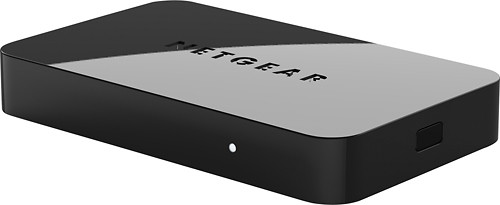
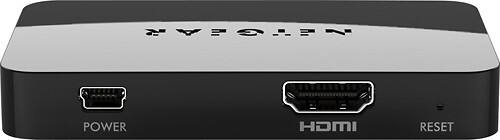
NETGEAR - Push2TV Wireless Display Adapter
This item is no longer available in new condition.
See similar items below.
Description
Features
Compact design
Simplifies placement where space is limited and eases carrying.
Built-in, dual-band 2.4GHz and 5.0GHz Wi-Fi (802.11 b/g/n)
With up to 300 Mbps data transfer rate for quick and easy connection of an Intel® WiDi or Miracast wireless display-capable laptop, tablet or mobile phone.
Wirelessly streams visuals to an HDMI-equipped HDTV
So you can enjoy your favorite media on the big screen.
1080p resolution support
Lets you experience visuals in stunning high-definition.
USB power capability
Simplifies powering the adapter via your TV's USB port (USB cable included). Power adapter helps keep the unit energized and ready for use.
What's Included
NETGEAR Push2TV Wireless Display Adapter
Owner's manual
Other
- Energy Star CompatibleNo
- <a href="javascript:winopengld('1087340810700','pcmcat38200050027','cat12080')">Speed</a>Up to 300 Mbps
- System RequirementsIntel® WiDi or Miracast wireless display capability
- Wireless StandardWireless N
- Wireless N+Yes
- UPC606449085617
Customer reviews
Rating 3.3 out of 5 stars with 220 reviews
(220 customer reviews)Rating by feature
- Ease of Use3.1
Rating 3.1 out of 5 stars
Customers are saying
Customers are enthusiastic about the ease of use, picture quality, and setup of the product, with many praising its compact size and ability to stream content. However, some users experienced connectivity issues and compatibility problems, while others found the firmware update process challenging and reported performance lags. The HDMI functionality was frequently mentioned in positive reviews. Despite some negative feedback regarding connectivity and performance, many users found the device to be a valuable tool for displaying content from various devices on their TVs.
This summary was generated by AI based on customer reviews.
Rated 4 out of 5 stars
A beautiful piece of electronic technology for any
||Posted .This reviewer received promo considerations or sweepstakes entry for writing a review.Compact design consise and legible instructions for use Great connectivity and fuction of the push2tv adapter Could be considered similiar to the Apple Tv adapter but the netgear is made for pc notebooks or pc compatible motherboards.
I would recommend this to a friend- Pros mentioned:Ease of use, Picture qualityCons mentioned:Firmware update
Rated 4 out of 5 stars
Great product
||Posted .This reviewer received promo considerations or sweepstakes entry for writing a review.The device is relatively simple to use and works great. It allows me to use my big screen TV as a duplicate, extended, or 2nd screen to my mobile laptop. Works great with get togethers at my home to show videos, pictures, etc. My only complaint is that I had to do an immediate firmware update right out of the box. Other than that, I've been very happy with this product.
I would recommend this to a friend - Pros mentioned:Display
Rated 4 out of 5 stars
Works. A few bumps now and then.
||Posted .This reviewer received promo considerations or sweepstakes entry for writing a review.This thing does work well, although every once in a while the TV doesn't seem to know it exists. $50 is a little high on the price, though. Great if you want to be able to display ANYTHING from your computer on your TV. Fills in a gap in Chromecast service.
I would recommend this to a friend - Pros mentioned:DisplayCons mentioned:Firmware update
Rated 4 out of 5 stars
Works great but with limitations
||Posted .This reviewer received promo considerations or sweepstakes entry for writing a review.I had low expectations when I bought this but overall I turned out to be pleased. You do have to update the firmware which is a bit of a chore. After that it connected to the tablet right away and I could see the home screen. I have used it to display pictures I took and web pages and it works fine for that. I also would have liked to view purchased movies from the tablet to the tv but the device says the content cannot be displayed because the connection is not secure.
I would recommend this to a friend - Cons mentioned:Compatibility, Connectivity
Rated 2 out of 5 stars
Unstable and difficult to install
||Posted .This reviewer received promo considerations or sweepstakes entry for writing a review.I don't know if the fault of Intel, Microsoft, or this particular device, but this technology is not ready for prime time. In my case, getting it to work at all on Windows 8 was a very involved and frustrating process. Then when I upgraded to Windows 8.1, I had to start all over again. Eventually I got it to work -- some of the time, anyway -- but there were issues even when it was "working." It would often disconnect and refuse to connect until I went through an involved process. Moreover, when playing .mp3's through my stereo system -- which is one of the main things I wanted to be able to do wirelessly -- there was all sort of stuttering, etc. I gave up and returned the device after discovering that.
No, I would not recommend this to a friend - Pros mentioned:Picture quality, SetupCons mentioned:Lag
Rated 5 out of 5 stars
better than the original model
||Posted .This reviewer received promo considerations or sweepstakes entry for writing a review.Had the device installed from day one, very easy to set up, even with just an android device (I used an HTC One). Within minutes, I was projecting my mobile display to the TV, playing flappy bird. There was lag between phone screen response and the TV, but that should be expected. Playing movies or music, showing pictures, or, on a business level, giving mobile app demos are all great ways to utilize the PTV3000.
I would recommend this to a friend Rated 4 out of 5 stars
Took a second to get everything going, works great
||Posted .This reviewer received promo considerations or sweepstakes entry for writing a review.Firstly, do not plug this in until you've completely updated your WiDi Application on your computer... save yourself the headache. It's not the hardware that needs new firmware. Secondly, do NOT buy this if you're looking for a dual monitor setup with your computer. There's about a 60ms lag time on the screen and with the computer. I've used this both at work and at home. It makes watching online TV a breeze, and the cost is comparable to a WiFi Blu-Ray player. I' have a WiFi blu-ray player and this thing knocks the socks off of it. Since it is using my laptop for connecting to the internet it loads things much quicker, a BIG bonus. In the office there's no comparison to doing code review across 10 employees and not having to switch wires, or switch seats every 15 minutes. Range is best at about 5-10feet, works well as far as 15ft, and can connect to my laptop as far as 25ft.
I would recommend this to a friend- Pros mentioned:Hdmi
Rated 3 out of 5 stars
should cost less
||Posted .This reviewer received promo considerations or sweepstakes entry for writing a review.the product is great but it does not include a hdmi cable and it should be smaller in size like a dongle which eliminates the the need for cables. The product is too expensive especially now that most products have better browsers. it's better to use a USB connector to hdmi and download a computer mirroring/ remote app
No, I would not recommend this to a friend
Q: QuestionCan I use Netgear Push2TV to connect my HDTV to my Toshiba All in One computer as a second monitorI have a Toshiba All in One computer that has HDMI in but no out. The TV has an HDMI port (I just purchased both). I am told I can't use the HDMI connection to make the TV a second monitor because I don't have HDMI out. My computer has Intel WiDi and I am wondering if I use the Netgear Push2TV if it will make my TV the second monitor I want. Also, can I use the Windows 8.1 extended screen mode or will I only be able to duplicate the screen? Thank you, I appreciate your time.
Asked by Millie.
- A:Answer Does your Toshiba All In One have WiDi? Even if it does, from my test, Push2TV only mirrors your screen. You will not be able to "extend" your desktop by using this device.
Answered by westslope
Q: QuestionHow do u connect ur iPad to the push2tv ?
Asked by Kris.
- A:Answer Typically Apple products do not support WiDi or Miracast which are required for Push2TV. If your device does support these then follow the simple instructions on the Netgear website. If your device does not support Widi or Miracast then Apple TV is your solution.
Answered by westslope
Q: QuestionIhave a Samsung Galaxie Note 10.1 tablet. Is it compatible and will it works perfectly with Netgear?
Asked by Christopher.
- A:Answer Yes, your Samsung Galaxy Note 10.1 will be able to connect wirelessly to this Netgear device.
Answered by CommunityAnswer
Q: QuestionHow do I get my 1080p resolution even after the firmwere update?I took some figuring out how to install the firmwere update and then I could finally veiw the stream from amazon prime but the picture is not in 1080p?
Asked by Anonymous.
- A:Answer It's possible your device doesn't stream in 1080p. All Maracas devices don't output to full HD (1080p). My suggestion would be to refer to the device specifications.
Answered by TheTruQ
Q: Questionwhich is the best reliable miracast dongle i shall buy compatable with my TV Grundig model LENARO ?which is the best reliable miracast dongle i shall buy compatable with my TV Grundig model LENARO ?
Asked by KIKKI.
- A:Answer As long as your TV has an HDMI input, Netgear's Push2TV will work.
Answered by westslope
Q: QuestionDoes this Push2TV WiDi Adapter work with Windows 8.1?
Asked by Anonymous.
- A:Answer It does. But I had to return mine because it won't stay connected. :(
Answered by ls2009
Most viewed
- $799.00Your price for this item is $799.00$999.00The comparable value for this item is $999.00
- $249.99Your price for this item is $249.99
- $299.00Your price for this item is $299.00$349.00The comparable value for this item is $349.00
- $159.97Your price for this item is $159.97$249.00The comparable value for this item is $249.00
- $160.99Your price for this item is $160.99
- $399.99Your price for this item is $399.99$499.99The comparable value for this item is $499.99
- $1,234.99Your price for this item is $1,234.99$1,869.99The comparable value for this item is $1,869.99
- $799.00Your price for this item is $799.00
- $44.99Your price for this item is $44.99
- $549.99Your price for this item is $549.99
- $499.00Your price for this item is $499.00$579.99The comparable value for this item is $579.99
- $499.99Your price for this item is $499.99
- $649.99Your price for this item is $649.99$1,049.99The comparable value for this item is $1,049.99
- $29.99Your price for this item is $29.99
- $79.99Your price for this item is $79.99$99.99The comparable value for this item is $99.99
- $1,129.99Your price for this item is $1,129.99
- $329.99Your price for this item is $329.99$469.99The comparable value for this item is $469.99
- $315.99Your price for this item is $315.99$499.99The comparable value for this item is $499.99
- $499.99Your price for this item is $499.99$949.99The comparable value for this item is $949.99