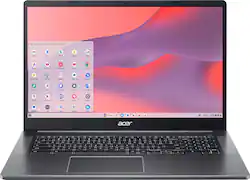
The Acer Chromebook 317 (CB317-1HT-P5PF) is a 17” touch screen enabled notebook that is pretty easy to live with. This is not to be confused with the first model of the 317 series, which featured half the RAM and no touchscreen. This isn’t my first Chromebook experience, or my first Acer notebook, so I had some prior experience going into using the 317. I have been using the 317 for a few days now, and even had my kids using it to provide some feedback. They are the real Chrome OS pros in my house since they are the main users of my other Chromebook and they have Chromebooks for school.
Specs
CPU – Intel Pentium Silver N6000 Quad Core 1.10 GHz w/ turbo boost up to 3.3 GHz
Graphics - Intel UHD (Jasper Lake 32 EU) graphics
Memory – 8GB LPDDR4X
Screen – 17.3” 1920 x 1080p HD IPS
Storage – 64GB eMMC Flash memory – microSD card port available for additional expansion - other Acer Chromebooks have been able to read 128GB cards in prior generations
Ports – 2X USB 3.2 type-C / 2X USB 3.2 type-A / microSD Slot / TRRS 3.5mm Jack (headphone and mic support)
Audio – dual speakers
Webcam – 1080p with dual microphone
Dimensions – 15.8 x 10.5 x 0.89”; 4.85lb
Design
The design of the Acer 317 is pretty basic. The entire chassis is made out of darker gray ABS plastic. The surface textures are all soft touch and lightly textured. I am actually fairly accustom to this design due to the Chromebooks that my kids had for virtual learning. If you have kids with a school Chromebook, then you have likely seen an Acer model that is a pint sized version of this one.
The ABS chassis material does not prevent the 317 from feeling well built. Picking it up you can feel a little bit of the weight and sturdiness of the construction. Opening the screen is satisfying in a way because there is decent resistance in the hinge. The screen bezel doesn’t flex or distort the image on the screen when opening or adjust the angle. You can actually open it from the corner (albeit with some effort) without it torquing/twisting the display frame.
The screen can open to 180°. The 317 also comes with a full size keyboard and decent sized trackpad. The laptop is passively cooled (no fans), and there are no vents through which heat can escape. Acer appears to be relying on the chassis to conduct away some of the heat. This leads to the chassis getting decently warm under the left side of the keyboard, and on the bottom of the chassis, also on the left. You absolutely feel it heat up if you have the 317 resting on bare skin or even thin clothes. It doesn’t become uncomfortably warm, but it is noticeable.
The ports are evenly distributed on the body. Both sides get a USB C and A port. The USB ports can both be used to charge the 317. The left side gets the headset port and the microSD slot. I like this sort of layout because itt sucks being stuck to one side to charge.
Performance
The Silver N6000 is surprisingly quick given it’s lower 1.1GHz core clock speed. The quad core setup gives it a little extra headroom when multitasking. Things like multiple Chrome tabs, Netflix stream, and Play store app installs were all handled well when attempted simultaneously. I never really felt the 317 bog down during what I would consider normal use. However, when I let the kids play games they reported some less than stellar framerates. I would say this would be expected based on the types of games they play - there just isn’t much graphical horsepower here to play anything graphically intensive. Games like Candy Crush or 2048 would play just fine though and have no issue running on the 317. The 8GB of RAM really comes into play here and it keeps everything feeling quick. The 64GB eMMC works well, and it handles loading times fast enough. Application launch time is quick - I would liken it to SATA based SSD launch times from a few years ago. This is honestly plenty quick - I don’t know of anything on a Chromebook that really needs NVMe load times. The overall capacity is fairly limiting though, since 64BGB doesn’t take a huge amount of time to fill up. I couldn’t find any spec that says what you can expand the storage to via the microSD slot. Prior Acer Chromebooks had a stated compatibility of 64GB cards, but users were reporting that cards up to (and maybe over) 128GB worked fine as well. If you plan to expand the storage then go for the fastest available cards out there.
Display
The 17.3” 1920 X 1080p FHD IPS touchscreen display looks great. The screen finish is a high gloss and akin to your phone touchscreens. The large real estate of the 17.3” screen is a gift and a curse in some ways. The larger size gives more usability to the touch interface with bigger icons or text, and the overall screen size is just nicer to my eyes. The downside of this size screen is trying to transport or even balance such a large screened device on your lap while using it. Another knock against the larger size is you start to drop too low in pixel density compared to other smaller FHD screens. The screen is bright, and it has good contrast so that really helps with the text sharpness. I took the time to watch some Netflix. From what I could tell the screen handled dark areas fairly well. Backlight bleed and edge bleed were nonexistent as well. I did notice some haloing/glow on bright objects in darker scenes, but it wasn’t any worse than most screens I have looked at.
The multipoint touchscreen is highly responsive. I’m not really used to touchscreen outside of my phone, so being able to pinpoint click locations was a plus for me. The screen does show fingerprints quite well, so be prepared to wipe it off often. I let my kids play a couple of touchscreen games. Watching the screen keep up with their crazed inputs was nice to see.
Keyboard and Trackpad
The keyboard is a full key design with a number pad and everything. I love having a number pad on my keyboard. I have a 17.3 gaming laptop that doesn’t have the numberpad and that irks me a bit, so I was really happy to see it on the 317. The keys themselves are nice to type on. The keys are soft with a standard laptop keyboard feel to them. The keys match the body color, but have backlit white lettering. Even the secondary key functions are lit up, and the backlight gives a nice outline to each key as well. The backlight really comes in handy when typing in the dark. have a white backlight that comes in handy for typing in the dark. I don’t see a way to adjust the brightness of the backlight. The keys have a relatively short throw with a full travel length of 0.04” and low to mid force requirement. The keys are also silent to use.
The trackpad is easy to use as well. It a clickable pad. Multipoint touch is accurate as well. The surface of the trackpad matches the body color, but comes with a smooth texture.
Battery Life
The advertised battery life is 10hrs. During light use - browsing the internet and writing this review I can see it getting close to that mark as long as the screen brightness is kept down. Under load though that battery time gets cut down quite a bit. After watching a movie on Netflix (1.5hours) i dropped around 30% of the battery. However, I did have the brightness up a bit (75%), which didn’t help things. So realistically I can get 5-6 hours of streaming video out of a single battery charge. Nothing spectacular here, and in my experience this is on the lower end compared to the other Chromebooks I have used. However, none of them had a 17.3” screen so its not a direct comparison. Charging time was decent as well. I think it took about 1.5-2 hours to bring it from sub-10% to a full charge.
Sound
The sound from the speakers is decent. There’s no bass to really speak of, but the speakers aren’t super tinny sounding either. Volume is plenty loud enough as well and I can here it across my house. For casually listening to music or watching a movie/show I would say these are more than acceptable sounding. I don’t have any complaints here.
Webcam
In my experience Chromebook webcams tend to leave a little bit to be desired. I have found this camera to be a little better than I expected. The 1080p camera produces a good picture in a well lit room. In lower light it starts to get a little grainy and noisy. The image processing is just OK as well. Colors are kind of muted and a little dark. Overall I think it works just fine for most peoples use cases. The microphones do a good job picking up my voice, and are decent at filtering out some ambient noise. The calls I have made on Skype went through clearly. My mom said that the image was a little better than my other Chromebook.
Overall,
I am impressed with the Acer 317 Chromebook. It certainly looks basic, and completely not flashy. It looks like a giant version of the little Chromebooks that my kids got from their school. However, this is decently more powerful and easier to live with than those little notebooks. The 17.3” screen is fantastic. I have been mainly living with 15.6” screens on my other laptops, so jumping up to 17.3 is just wonderful. The touchscreen works great, and the larger screen makes it even easier to be precise. The keyboard is actually better than I expected, and nice to type on (I wrote this whole review on it). Having the numberpad is one of my favorite things - I really hate not having a numberpad on my smaller machines, so having it on this one has been great. Beyond just my uses I have found that my kids, and my partner’s kids love the upgraded form factor of the 317. They are all Chromebook power users compared to me, and they immediately preferred this larger size over their 11.6” machines. It was faster, more responsive, and overall easier for them to use. The only downsides to the size is portability - 15.6” is the best balance of portability and usability. The other downside is the diminished battery life. Bigger screens suck more power unfortunately.