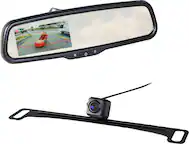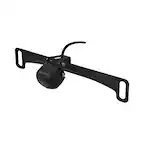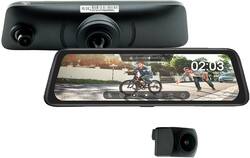
EchoMaster - 9.3” Full Screen Rear-View Mirror Replacement Monitor with DVR and Back-Up Camera Kit - Black
- Key Specs
- Field of View: 150 degrees
- G-Sensor: true
- Recording Resolution: 1080p (Refers to the number of pixels, both horizontally and vertically, used to capture video. The higher the resolution the finer the video detail that can be seen.)
- Compatibility: Universal
- Camera Mounting Location: License plate
- Vehicle Camera Type: Back-up
- Professional Installation Recommended: false
- General
- Brand: EchoMaster
- Model Number: MRC-HDDVR
- Product Name: 9.3” Full Screen Rear-View Mirror Replacement Monitor with DVR and Back-Up Camera Kit
- Color: Black
- Vehicle Camera Type: Back-up
- Professional Installation Recommended: false
- Recording & Playback
- Field of View: 150 degrees
- G-Sensor: true
- Recording Resolution: 1080p (Refers to the number of pixels, both horizontally and vertically, used to capture video. The higher the resolution the finer the video detail that can be seen.)
- Loop-Cycle Recording: TRUE
- GPS Enabled: true
- Camera Power Source: Vehicle battery
- Expandable Memory Compatibility: microSD
- Recording Feature: true
- Compatibility
- Compatibility: Universal
- Features
- Integrated Microphone: true
- Display
- Screen Included: true
- Screen Size: 9.3 inches (Size of the screen, measured diagonally from corner to corner.)
- Screen Resolution: 1080 (Screens come in a range of resolutions (measured in pixels, horizontal x vertical). The higher the resolution, the greater the picture quality.)
- Mounting
- Camera Mounting Location: License plate
- Mount Included: true
- Mount Type: Screws
- Screen Mounting Location: Rearview mirror
- Input
- Number Of Auxiliary Inputs: 0
- Number of USB Port(s): 0
- Dimensions
- Product Height: 4 inches (The out of box height of the item. Height is measured as the vertical distance from the bottom of the item to the top as it would be primarily used or placed.)
- Product Width: 10.5 inches (The out of box width of the item. Width is measured as the horizontal distance from one side of the item to the other as it would be primarily used or placed.)
- Product Depth: 3 inches (The out of box depth of the item. Depth is measured as the distance from the front of the item to the back as it would be primarily used or placed.)
- Product Weight: 1.5 pounds (The out of box weight of the item.)
- Warranty
- Warranty - Parts: 1 year
- Warranty - Labor: None
- Other
- UPC: 609098833028
Start seeing into your vehicle’s blind spots and record both front and rear views with this 9.3” Full Screen Rear-View Mirror Replacement Monitor with DVR and Back-Up Camera Kit by EchoMaster. The MRC-HDDVR features a 9.3” HD touchscreen rear-view mirror monitor with a built-in 1080p front camera and a 1080p AHD back-up camera plus front and rear DVR. This dual camera and monitor kit is equipped with enhanced safety features such as emergency recording, parking monitoring, GPS tracking, and park assist to provide a safer and more informed driving experience. Also included are additional mirror monitor adapters to cover a wide range of vehicles and a 64 GB memory card to save your footage and images.
- Compatible with most vehicle makes and models: Versatile design allows for easy replacement of your current mirror. Includes additional mirror monitor adapters for a customized fit.
- 9.3” touchscreen rear-view mirror monitor with 1080p resolution: Displays high-definition images from the front and rear cameras.
- 1080p built-in front camera resolution and recording at 30fps: Features 145° diagonal and 120° horizontal wide viewing angles.
- Universal license plate mount design: Allows you to add a back-up camera to any vehicle.
- 1080p AHD rear camera resolution and recording at 25fps: Features 150° diagonal and 120° horizontal wide viewing angles.
- IP67-rated water-resistant and debris-proof rear camera: Provides trouble-free operations in all weather conditions.
- 1/3" image sensor with reverse image: Ensures crisp, clear images and flexible operation.
- Loop-cycle recording: Save your front and rear DVR footage with the included 64 GB memory card and continue recording even when the memory card is full. Record for one, three, or five minute loops.
- Split-screen viewing: Allows you to view front and rear cameras simultaneously.
- Driving mode: View your current driving speed and direction.
- Optional audio recording: Capture audio in and outside your vehicle.
- Selectable parking guidelines: Display automatically when the vehicle is placed in reverse or select manually by swiping left on the touchscreen mirror before reversing. Tap and move grid lines on-screen to adjust positioning and rear viewing angle.
- Compatible with most vehicle makes and models: Versatile design allows for easy replacement of your current mirror. Includes additional mirror monitor adapters for a customized fit.
- 9.3” touchscreen rear-view mirror monitor with 1080p resolution: Displays high-definition images from the front and rear cameras.
- 1080p built-in front camera resolution and recording at 30fps: Features 145° diagonal and 120° horizontal wide viewing angles.
- Universal license plate mount design: Allows you to add a back-up camera to any vehicle.
- 1080p AHD rear camera resolution and recording at 25fps: Features 150° diagonal and 120° horizontal wide viewing angles.
- IP67-rated water-resistant and debris-proof rear camera: Provides trouble-free operations in all weather conditions.
- 1/3" image sensor with reverse image: Ensures crisp, clear images and flexible operation.
- Loop-cycle recording: Save your front and rear DVR footage with the included 64 GB memory card and continue recording even when the memory card is full. Record for one, three, or five minute loops.
- Split-screen viewing: Allows you to view front and rear cameras simultaneously.
- Driving mode: View your current driving speed and direction.
- Optional audio recording: Capture audio in and outside your vehicle.
- Selectable parking guidelines: Display automatically when the vehicle is placed in reverse or select manually by swiping left on the touchscreen mirror before reversing. Tap and move grid lines on-screen to adjust positioning and rear viewing angle.
Whats Included
- EchoMaster 9.3” Full Screen Rear-View Mirror Replacement Monitor with DVR and Back-Up Camera Kit
- Application guide
- GPS antenna
- Installation cables
- Installation hardware
- Universal and vehicle-specific mounting adapter brackets
- 64 GB memory card
- User manual
- EchoMaster 9.3” Full Screen Rear-View Mirror Replacement Monitor with DVR and Back-Up Camera Kit
- Application guide
- GPS antenna
- Installation cables
- Installation hardware
- Universal and vehicle-specific mounting adapter brackets
- 64 GB memory card
- User manual
A: When the camera is dormant/standby it draws approximately .03A, and with the ignition on and camera on it is right around 1A
A: If you have the camera on in the mirror continuously, the lights from the cars behind you will be bright and interfere with the quality of the camera. If you have the mirror set up to turn off the video in the mirror after 30 seconds (but the camera still records), then you will have the same ability to see behind you as a regular mirror without a camera.
A: Yes, that is the intended use of this full screen mirror.
Q: What is the GPS antenna for?
A: The GPS antenna allows accurate location information in the event an incident occurs.
A: The unit will record automatically when the internal g-force sensor detects a collision, as well as having the ability to manually start or stop a recording. Parking mode can be turn on/off and the sensitivity that triggers it to start recording while parking mode is active can be adjusted. To view the videos, you would simply remove the micro SD card from the unit and use Echomaster GPS Player on a PC to view the recordings.
Q: Is this going to drain my battery when my cars off ?
A: The mirror will draw minimal current when the vehicle is off and parking monitoring is used for detecting impacts, so that it can capture video if your vehicle is hit when off. This can be toggled on/off in the menu once installed.
A: Yes, if the power to the camera was connected to accessory power instead of the reverse lamps, the monitor would be on the reverse screen all the time, seeing the signal always present
A: The screen can be manually dimmed or or set to automatically dim in the settings menu on the mirror