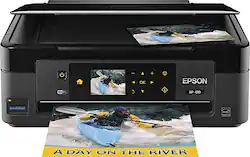
Epson - Expression Home XP-410 Small-in-One Wireless All-In-One Printer - Black
- Key Specs
- Networking: Wireless
- Printer Type: All In One
- ISO Color Print Speed: 4.5 pages per minute (The number of color pages able to be printed per minute in the device's default single-side mode, as tested by the International Standards Organization (ISO).)
- ISO Mono Print Speed: 8.7 pages per minute (The number of black ink (grayscale) pages able to be printed per minute in the device's default single-side mode, as tested by the International Standards Organization (ISO).)
- General
- Product Name: Expression Home XP-410 Small-in-One Wireless All-In-One Printer
- Brand: Epson
- Model Number: XP-410 - C11CC87201
- Dimensions
- Product Height: 11 inches (The out of box height of the item. Height is measured as the vertical distance from the bottom of the item to the top as it would be primarily used or placed.)
- Product Width: 15.4 inches (The out of box width of the item. Width is measured as the horizontal distance from one side of the item to the other as it would be primarily used or placed.)
- Product Weight: 9 pounds (The out of box weight of the item.)
- Certifications Listings & Approvals
- EPEAT Qualified: false (The Electronic Product Environmental Assessment Tool (EPEAT) was designed to provide an environmental assessment tool for purchasers. In order to qualify for EPEAT, a product must meet all 23 required criteria.)
- Features
- Tray Capacity: 100
- Duty Cycle: Light (The maximum number of pages per month that the device can produce without failing, as specified by the manufacturer.)
- Scanner Info
- Scanner Type: Flatbed
- Scanner Resolution: Up to 1200 (Refers to the number of pixels/dots, both horizontally and vertically, of the image produced by the scanner. Generally, the higher the resolution, the sharper and cleaner the produced image.)
- Fax Info
- Integrated Fax: false
- Ink
- Compatible Cartridges: 200; 200XL
- Ink Subscription Service Available: false (The printer monitors ink usage and alerts the subscription provider when levels are low. A purchased subscription provides refills of ink based on usage.)
- Memory
- Memory Card Slot: false
- Paper Info
- Automatic Document Feeder Capacity: 100 sheets
- Maximum Document Length: 14 inches
- Maximum Document Width: 8.5 inches
- Supported Paper Sizes: 4" x 6", 5" x 7", 8" x 10", 8.5" x 11", 8.5" x 14", 16:9 wide, half letter, A4, A6, #10 envelopes
- Paper Handling: Up to 100 sheets
- Copier Info
- Maximum Number Of Copies: 99
- Copier Resolution (Black): Up to 360 x 360 (Refers to the number of pixels/dots, both horizontally and vertically, of the image produced by the copier in black ink. Generally, the higher the resolution, the sharper and cleaner the produced image.)
- Copier Resolution (Color): Up to 360 x 360 (Refers to the number of pixels/dots, both horizontally and vertically, of the image produced by the copier in colored ink. Generally, the higher the resolution, the sharper and cleaner the produced image.)
- Performance
- Printer Resolution (Black): Up to 5760 x 1440 (Refers to the number of pixels/dots, both horizontally and vertically, of the image produced by the printer in black ink. Generally, the higher the resolution, the sharper and cleaner the produced image.)
- Printer Resolution (Color): Up to 5760 x 1440 (Refers to the number of pixels/dots, both horizontally and vertically, of the image produced by the printer in colored ink. Generally, the higher the resolution, the sharper and cleaner the produced image.)
- Connectivity
- Minimum System Requirements: PC: Windows XP Professional x64, XP (32-bit with SP3 or higher), Vista (32- or 64-bit), 7 (32- or 64-bit) or 8 (32- or 64-bit); Mac: OS X 10.5.8, 10.6.x, 10.7.x or 10.8.x; Internet access
- Other
- UPC: 010343907676
Epson Expression Home XP-410 Small-in-One Printer: You can either print from your computer or from a smartphone, tablet or other mobile device with this printer, which features Epson Connect, Google Cloud Print and Apple® AirPrint for direct printing options. Plus, copy and scan documents and create borderless prints. The 2.5" touch screen provides an intuitive interface with color display.
- Inkjet printers are best for home or small business use: They offer excellent print quality for photos and documents and accept a variety of paper types and sizes.
- Wireless and mobile printing capability: Connect this printer to your computer easily with built-in Wi-Fi with Wi-Fi Direct. Plus, print from your mobile devices with Epson Connect, Google Cloud Print or Apple AirPrint.
- Up to 5760 x 1440 optimized dpi (dots per inch) resolution: High resolution for producing incredible quality and detail in documents and photos.
- 4 individual print cartridges are economical: Only replace ink cartridges (black, cyan, magenta and yellow) when a color runs out. Features MicroPiezo inkjet technology with 4-color drop-on-demand.
- Standard paper handling: 100-sheet input tray.
- 2.5" color LCD touch screen: Makes operation easy.
- 1 USB port for simple connectivity: 1 high-speed USB 2.0 port offers a standard connection to your computer.
- More print, copy and scan solutions: PC-free scanning and copying make your life easy.
Q: can the colored ink be turned off and just print in black
A: If you go into your printer preferences you can choose to print with black cartridge only.
A: I have printed from a laptop, android and iPhone with no problems.
Q: Does it do 2 sided printing?
A: Sort of, but it is a fairly manual process. You can specify you want 2-sided printing (on the print properties page) and it will pause after it prints the odd numbered page(s) then give you a pop-up message telling you to turn the pages over and hit resume. So it tries to simplify it, but you will have to turn it over manually to print the back sides.
Q: does it work with samsung s 3 phone
A: Yes, it connects to Samsung products. I have a Samsung S5 and my husband has the S3 and always connects with the printer.
A: Yes. i just tried mine. The SD reader is at the front left. When you insert the card, it will scan the card immediately and read the file. will tell you how many photos in the card, in groups.
A: I honestly cannot tell you why Best Buy specs state the printer cannot print photos....I have printed photos using my printer. It makes me wonder if it is a mistake that it says no. Compared to other printers that I had to replace, this one does just as good a job at printing photos as the other. I prefer a matte photo paper rather than a glossy. I do not use the wireless at all as I prefer connecting it to my home pc or laptop.
Q: Is this printer compatible with a Mac book Pro Retina laptop?
A: Yes it does. I have a Retina Macbook and this printer works with the computer.
Q: Has anyone tried using different papers other then regular and photo?
A: I've used photo paper and card stock successfully



















