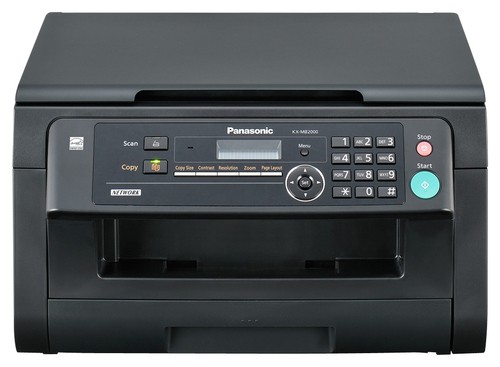
Panasonic - Network-Ready Black-and-White All-In-One Laser Printer
This item is no longer available in new condition.
See similar items below.
Description
Features
Fast print speed up to 24 ppm* in black
To generate documents quickly.
3-in-1 functionality
Prints, copies and scans via PC for convenience.
Network-ready with built-in 10Base-T/100Base-TX Ethernet interface
For simple connection to your home or office network.
Up to 600 x 600 dpi resolution
For crisp images.
Prints in legal, letter, A4, 16K, 8-1/2" x 13" and 8-1/2" x 13-1/2" sizes
For multiple printing options.
Copies up to 24 cpm* in black
To generate copies quickly.
Copy resolution up to 600 x 600 dpi in black
For clear, clean copies.
Flatbed scanner
With up to 600 x 1200 dpi optical scan resolution (up to 9600 x 9600 interpolated) to reproduce exact colors.
Panasonic Multifunction Station and Readiris OCR software
For quality document and photo reproduction.
USB 2.0 connectivity
For simple connection to your computer.
*Print speeds vary with use. See manufacturer for info on print speeds.
What's Included
Panasonic Network-Ready Black-and-White All-In-One Laser Printer
Toner cartridge, drum cartridge
Power cord
Owner's manual
Other
- Assembly RequiredNo
- Energy Star CompatibleNo
- <a href="javascript:winopengld('1087340571468','pcmcat38200050027','cat12080')">Print Speed (B&W)</a>Up to 24 ppm (Print speeds vary with use. See manufacturer for info on print speeds.)
- <a href="javascript:winopengld('1087340571541','pcmcat38200050027','cat12080')">Print Speed (Color)</a>Black-and-white only
- <a href="javascript:winopengld('1087340571577','pcmcat38200050027','cat12080')">Black Printer Resolution</a>Up to 600 x 600 dpi
- <a href="javascript:winopengld('1087340571658','pcmcat38200050027','cat12080')">Media Types</a>Plain paper, thin paper, labels
- <a href="javascript:winopengld('1087340571708','pcmcat38200050027','cat12080')">Media Sizes</a>A4, letter, legal, B5(JIS), B5(ISO), 16K, 8-1/2" x 13", 8-1/2" x 13-1/2"
- <a href="javascript:winopengld('1087340571743','pcmcat38200050027','cat12080')">Input Paper Capacity</a>Up to 250 sheets
- <a href="javascript:winopengld('1087340571817','pcmcat38200050027','cat12080')">Memory</a>32MB
- <a href="javascript:winopengld('1087340571851','pcmcat38200050027','cat12080')">Type of Interface</a>USB 2.0
- <a href="javascript:winopengld('1087340572115','pcmcat38200050027','cat12080')">Total Ink Tanks/Cartridge</a>1 black cartridge (included)
- <a href="javascript:winopengld('1087340572271','pcmcat38200050027','cat12080')">Print Quality</a>For photos and documents
- PC-Free PrintingYes
- <a href="javascript:winopengld('1087340809392','pcmcat38200050027','cat12080')">Total Print Heads</a>1
- Paper FeederBottom loader
- <a href="javascript:winopengld('1087340809515','pcmcat38200050027','cat12080')">Networking Capabilities</a>10Base-T/100Base-TX Ethernet
- <a href="javascript:winopengld('1087340809619','pcmcat38200050027','cat12080')">Scanner Resolution (dpi)</a>Up to 600 x 1200 dpi optical; up to 9600 x 9600 dpi interpolated
- Scanner TypeFlatbed
- <a href="javascript:winopengld('1087340809696','pcmcat38200050027','cat12080')">Scan Method</a>Flatbed
- <a href="javascript:winopengld('1087340809730','pcmcat38200050027','cat12080')">Copier Resolution (dpi)</a>Up to 600 x 600 dpi
- <a href="javascript:winopengld('1087340809772','pcmcat38200050027','cat12080')">Copier Speed (B&W)</a>Up to 24 cpm (Copier speeds vary with use. See manufacturer for info on copier speeds.)
- <a href="javascript:winopengld('1087340809806','pcmcat38200050027','cat12080')">Copier Speed (Color)</a>Black-and-white only
- <a href="javascript:winopengld('1087340809851','pcmcat38200050027','cat12080')">Multiple Copies</a>Up to 99
- <a href="javascript:winopengld('1087340809918','pcmcat38200050027','cat12080')">Reduction/ Enlargement</a>25-400%
- <a href="javascript:winopengld('1087340809999','pcmcat38200050027','cat12080')">Automatic Document Feeder</a>No
- Minimum System RequirementsIntel® Pentium® P, Q or 4 processor or higher; Windows 2000, XP or Vista; 128MB RAM or more; up to 200MB hard drive space; USB port; LAN interface; CD-ROM; Internet Explorer 5.0 or higher
- Wireless NetworkingNo
- UPC885170017344
Customer reviews
Rating 3.8 out of 5 stars with 4 reviews
(4 customer reviews)to a friend
Customers are saying
Customers love the print speed of this product. Reviewers mention that the printer is fast and beats smaller color printers in speed, making it suitable for various uses.
This summary was generated by AI based on customer reviews.
- Pros mentioned:Print speed
Rated 5 out of 5 stars
Excellent printer for the price
Posted .This reviewer received promo considerations or sweepstakes entry for writing a review.Fast. Not as noisy as my previous Samsung. Quality of the printed document is excellent. Can not tell the difference between copied and original document.
I would recommend this to a friend - Pros mentioned:Print speed
Rated 4 out of 5 stars
Excellent Printer at a great price
Posted .This reviewer received promo considerations or sweepstakes entry for writing a review.I think this is an absolutely fantastic printer for the home office. It is plenty fast enough for our use, but probably would fail for the business minded. However, it does everything we need for a great price.
I would recommend this to a friend - Pros mentioned:Print speed
Rated 5 out of 5 stars
Great printer for personal & business use.
Posted .This reviewer received promo considerations or sweepstakes entry for writing a review.This product beats the smaller color printers in speed. It is very easy to setup and use.
I would recommend this to a friend Rated 1 out of 5 stars
Avoid this junk
Posted .This reviewer received promo considerations or sweepstakes entry for writing a review.It does not work no matter what you try, toner expesive, software outdated, Panasonic customer service worthless.
No, I would not recommend this to a friend
Q: QuestionCan this be connected via WIFI ?
Asked by user.
- A:Answer Can yes, but then it cannot be used with wired LAN or USB. Works great throughout my house. Full security setup in machine just like any other device linking to your wifi router.
Answered by TKwaz
Q: QuestionDrum & RefillDo you have to replace the drum each time or just refill the toner, also how many pages of copy do you get per refill / drum replacement ?
Asked by Anonymous.
- A:Answer i have had this for 10 months and it is not telling me my toner is low. i printed quite a bit. this is also the toner that came with it when i purchased it. i will be getting a new toner soon. roughly 1500 pages and mostly documents. minumal graphics.
Answered by tvalenti
Q: QuestionHow many pages can I scan at one time?
Asked by Anonymous.
- A:Answer Feeder can only handle up to 20 pages at a time as long as the document you are scanning is within the required document weight, for multiple sheets it should be: 60 g/m2 to 80 g/m2 (16 lb to 21 lb). I hope this information helps you.
Answered by Panasonic Team

Q: QuestionIs this unit capable of 2 sided printing?
Asked by Anonymous.
- A:Answer Hi, We are sorry but the feature you are looking for is not available on the KXMB2000, but can be found on the following models; KXMC6020, KXMC6040, & KXMB3020 Hope this helps out,
Answered by Panasonic Team
Q: Questionwhich refill cartridge for kx-mb2000
Asked by Anonymous.
- A:Answer The refill cartridge for the KXMB2000 is KF-FAT411. The Drum unit is KX-FAD412.
Answered by Panasonic Team
Q: QuestionDoes this printer scan in color?
Asked by Anonymous.
- A:Answer Hi, this will only scan and print out in black and white.
Answered by Panasonic Team
Q: QuestionDoes this printer use laser copier paper?I had a long term laserjet printer that made beautiful copies with laser paper. Would laser paper work better with this printer than regular everyday paper?
Asked by jiminirob.
- A:Answer have never used laser paper. i used the 3.99 paper and the copy and print is perfect. very clear. i don't feel a need for more expensive paper nor do i think it will improve quality of print/copy.
Answered by tvalenti
Q: QuestionIs this compatible with Macs?I have a PC, and my wife has a Mac. Can this printer work for both?
Asked by Anonymous.
- A:Answer if you plug it into your router yes. use it as a network printer. that is how i have it with all my computers in house. have linux mac and windows and all print well wirelessly.
Answered by tvalenti