/
Wireless & Bluetooth Keyboards
(145)How a Bluetooth keyboard improves your setup
When you choose a wireless Bluetooth keyboard, you can move your keyboard from your desk to your lap or to a nearby surface without dealing with a chord. In fact, you can use your keyboard with your computer from a fairly significant distance when you are taking advantage of Bluetooth technology.
This is particularly useful for anyone who wants to lean back or recline in their office chair while typing—it’s one reason wireless gaming keyboards are popular among PC gaming enthusiasts. However, the perks of using a Bluetooth computer keyboard extend to anyone who enjoys a cord-free desk. When you pair your new wireless keyboard with a wireless mouse, you can really go cordless. A wireless keyboard and mouse combo is a convenient way to fully embrace a clutter-free workspace.
Additionally, wireless keyboards aren’t just for use with desktop computers. You can also pair a wireless keyboard with your laptop computer so that you can set your laptop on a laptop stand and raise the display to eye level for better posture.
Choosing the best wireless keyboard for your computer
If you're thinking about upgrading your keyboard, it's worth considering how you use your computer day to day. While device compatibility plays a role in your keyboard choice, many keyboards are widely compatible, which makes finding the best wireless keyboard more about what kind of keyboard suits your needs and uses.
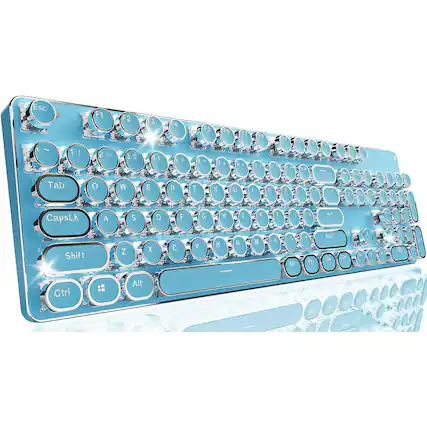
In terms of internal design, most keyboards fall into two main categories: the wireless mechanical keyboard and the membrane keyboard. Mechanical keyboards are generally more durable. The components are easier to replace, and these keyboards offer a choice of clicky, linear and tactile switch models. Meanwhile, membrane keyboards provide a softer keyboard feel. Other keyboard designs, including optical keyboards and scissor keyboards, also have specific pros and cons.
The size and layout of your keyboard will be important. Not only are there compact keyboards and full-sized keyboards, but there are also many sizes in between. If your hands or wrists get fatigued, consider choosing an ergonomic keyboard. A wireless ergonomic keyboard helps keep your wrists and hands aligned, making it easier to maintain a consistent typing rhythm throughout the day.
![Sure, here is the corrected and grouped text:
- 1 - 9 + Ts a Po Sws 7 6 - TSE - 2ES 5 RackDoace ng F1D 4 + 3 - F15 - 2 . + Debess ntt FIS ; 1 . MB 4 FB E - - I I Eetter D FB a i I + FT - & P + - 0 FE a o . S + & - FS O 7 I . A L + P U , % 6 - Y K - F3 5 De & J . F2 4 T FI . H M . a R Al a G Se 2 E N OmR F F 1 w - D Q V S C Tob A Mus x Gapsteck Z AR Win nothooi o Shih AC Fn Ctri Enter The 1 u
- Esc 1 ! 2 @ 3 # 4 $ 5 % 6 ^ 7 & 8 * 9 ( 0 ) - _ + = Backspace Tab Q W E R T Y U I O P [ { ] } Enter A S D F G H J K L ; : ' " Return Z X](https://pisces.bbystatic.com/image2/BestBuy_US/images/products/872bc41f-628d-42ca-8939-5286c29e222d.jpg;maxHeight=427;maxWidth=640?format=webp)
![Esc F1 F2 F3 F4 F5 F6 F7 F8 F9 F10 F11 F12 Del 1 2 3 4 5 6 7 8 9 0 - + = Backspace Tab Q W E R T Y U I O P [ ] \ Caps A S D F G H J K L ; ' Enter Shift Z X C V B N M , . / Shift Num : 7 8 9 4 5 6 1 2 3 0 - = Ins Tab Q W E R T Y U I O P [ ] \ Caps A S D F G H J K L ; ' Enter Shift Z X C V B N M , . / Shift Num : 7 8 9 4 5 6 1 2 3 0 - = Ins Alt Ctrl Opt Fn Ctrl](https://pisces.bbystatic.com/image2/BestBuy_US/images/products/14e58137-13e5-4a05-91a3-3420993f8354.jpg;maxHeight=427;maxWidth=640?format=webp)
![Sure, here is the corrected and grouped text:
- E Q Cap LCE A en 2 CH & wi a a 2 W $ x of 1 I 3 E D C 1 5 4 R F V P a 5 I G I PS A 4 Y IV N N F7 - F FF - . FIO e N & I I 7 1 F C U I o P 1 ! J ! - M e 3 ? / of win FIT P12 = pete acrol S Daut Jyolu lock brecr . - - back insert home page num sr LCK / : 1 I cleiote 1 mnd page 7 cimen P home a DO up enter 4 - 5 6 - . shit a i end 2 3 pO Ce Ctd - . 0 enter ins del
- esc F1 F2 F3 F4 F5 F6 F7 F8 F9 F10 F11 F12 prtsc sysrq scroll lock pause break
- tab Q W E R T Y U I O P [ ] \ caps lock A S D F G H J K L ; ' return shift Z X C V](https://pisces.bbystatic.com/image2/BestBuy_US/images/products/614ac79c-c124-4a7d-b9d1-3ce0e153edef.jpg;maxHeight=427;maxWidth=640?format=webp)
![Sure, here is the corrected and grouped text from the image:
---
**Keyboard Layout:**
- Esc
- F1 F2 F3 F4 F5 F6 F7 F8 F9 F10 F11 F12
- 1 2 3 4 5 6 7 8 9 0 - = Backspace
- Tab Q W E R T Y U I O P [ ] \
- Caps Lock A S D F G H J K L ; ' Enter
- Shift Z X C V B N M , . / Shift
- Ctrl WIN Alt Spacebar Alt Fn Ctrl
- Insert Home Page Up Num Lock
- Delete End Page Down
- Num Lock 7 8 9 + 4 5 6 - 1 2 3 0 . Enter
**Additional Text:**
- SC
- P2 - 14 - Hd Pa 1
- P * FI0 1
- 11 - Fomia Se
- P / - - - 1 + 2 a 3 S A % e A S &
- i & 9 - a - - Beckspace V - "gUs Sum Lock I - Tab Q W E R T Y U 1 0 P A 1 I I I I - tu S 1 - S - 9 F + Caps Lock A S D F G H ! K. L - - - . Iote A E 8 - m Z x C V B N M C - > 1 I DHR A 7 - 1 1 3 - cn WIN AR AN in cen 4 e 4 0 - -
---
This text appears to be a mix of keyboard layout and some additional characters or codes.](https://pisces.bbystatic.com/image2/BestBuy_US/images/products/cf071870-93bc-4d68-9982-e4ea2c088d7b.jpg;maxHeight=427;maxWidth=640?format=webp)

![F2 F3 F4 F5 F6 F7 F8 F9 F10 F11 F12 Esc F1 F2 F3 F4 F5 F6 F7 F8 F9 F10 F11 F12 Del
Tab Q W E R T Y U I O P [ ] \ Backspace
CapsLk A S D F G H J K L ; ' Return
Shift Z X C V B N M , . / Shift
Ctrl Win Alt command option control
PrtSc SysRq ScrLk Pause
End Home PgUp PgDn
Insert Delete
Fn
TKESS](https://pisces.bbystatic.com/image2/BestBuy_US/images/products/d49192d9-ce0d-4aca-a162-29190cfe2356.jpg;maxHeight=427;maxWidth=640?format=webp)
