A:AnswerHi Billyradio,
No, it only supports Jpeg, and one good option for you is using a Chromecast. If you have any questions or concerns, please use the link below to reach us and also you can contact this phone number 877-467-4289 for further assistance.
Insignia Products
Nikki
https://insigniaproducts.com
A:AnswerHello Hobanm45. You may use the thumb drive and make it a large digital picture frame. It also has a slideshow ability.
Mary II Insignia Products Customer Support II https://www.insigniaproducts.com/
A:AnswerHi Patsy,
No, you do not need a cable box to use this TV. You can either use an antenna to watch local channels or connect to wifi to stream.
Insignia Support
Lea
https://www.insigniaproducts.com/
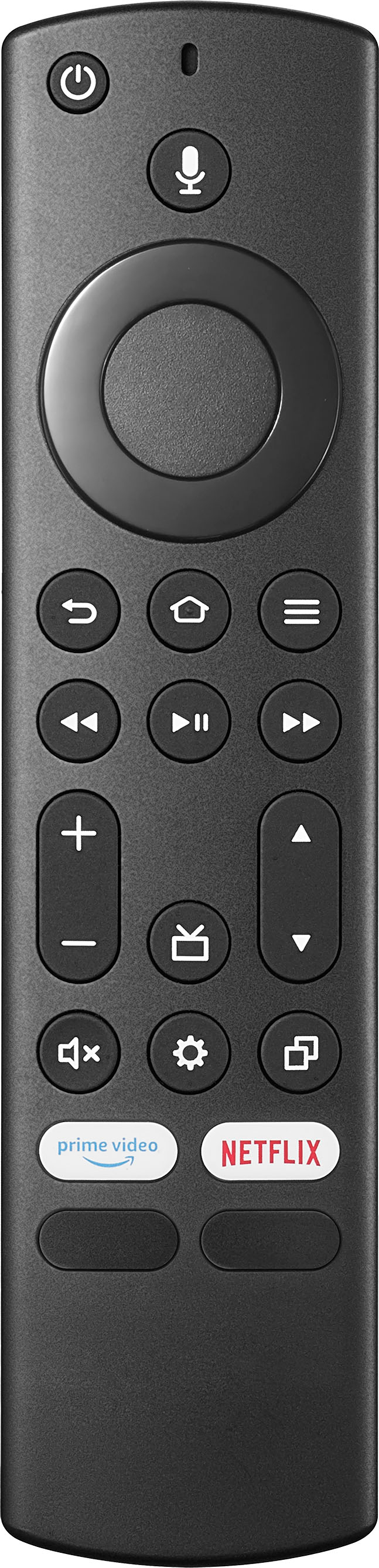
A:AnswerIt comes with a smart remote that handles everything from menu setting and volume and channel controls! Also some buttons that take you straight to the streaming apps. (Also my puppy got a hold of the remote so ignore the scratches on the remote lol)
A:AnswerClosed captioning seems to be static at the bottom of the screen on this model everything i have watched. Closed captioning may in some cases be app dependent.
A:Answer25MPS download speed should be good enough for 4K, so if your WIFI can download at this rate or better, you should have the capability without an ethernet cord. I think some streaming services require upgraded service to allow you to watch 4k. You might try a 4K you tube video and see if that plays at 4k - here is a random example:
https://www.youtube.com/watch?v=_-WWwNt8AzU
This should play at 4K on your TV. If it does not, you may wish to contact service.