“We purchased the 55" Insignia TV. I can't figure out how to select channels with the NS-RCFNA-19 remote?”
Answer This Question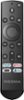
1-2 of 2 Answers
click on the little tv on the left then push on the middle of the circle on the remote and it should bring up a channel guide. also if you are going to the streaming channels use the outside of the circle to scan up and down on your screen and push the middle of the circle to select. also if you have Alexa set up with your remote you can ask Alexa to take you where you need to be, you do need to program the remote with the Alexa app. hope this helps you out.
Sorry, there was a problem. Please try again later.There are a couple of ways to select a channel. With voice command, simply press the mic button at top center and say: "Channel six point one" or what ever channel you desire. The other way, assuming you are already watching a channel, is to press the button just to the left of the manual volume control button that has a little TV icon. Pressing that button will display your channel line up on the screen. Then use the navigation key, up or down, until you find the channel you're looking for, then press the select button.
Sorry, there was a problem. Please try again later.
