“Is there an online manual or guide for programming the Insignia remote controller? I need the programming procedure and codes. Wanting to program it for Direct tv, Panasonic DVD, Sony Home theater. Model# ns-rmtsam17”
Answer This Question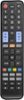
1-3 of 3 Answers
The options are fairly easy for this... if you're setting it up for the first time it'll ask you what you're trying to set up. It will give a list for TV DVD AVR etc, you select that, then the brand, and it will give you few options whichever one turns on/off your device you save that. when you're in the main screen. If you click the top bar there will be a Plus symbol on the top right.. giving you the option you saw before which device you're trying to pair. You again follow what you did when you were first setting it up. Select the Device, Select the Brand, Select which code works, and the repeat. Also, when you're in the remote screen- if you just press the PLUS button it gives you options to add/remove/change the buttons you will want or don't want for each device.
Sorry, there was a problem. Please try again later.Yes. No problem.
Sorry, there was a problem. Please try again later.you dont need to know the codes. you setup the remote through the app. answer the questions logitch app asks during setup and it does everything for you.
Sorry, there was a problem. Please try again later.
