“I plugged in the adapter thingy and the mouse does not work, I have tried every surface and Bluetooth. help!!!!!”
Answer This Question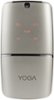
1-2 of 2 Answers
tech support does not answer. No option to choose help with a mouse. Lenovo's support is horrible. Bought this mouse and Yoga laptop. Mouse not working no matter what I did, followed all steps suggested. Wish I bought through best buy and not direct from Lenovo. At least best buy would allow return / exchange.
Sorry, there was a problem. Please try again later.First be sure the mouse is fully charged. Although the mouse is charged at the factory, the battery may drain by the time you bring it home. Charge the mouse for about 1-hour before you try to use it. Then be sure you have the mouse power button turned on. Move the power switch to the icon showing the USB receiver. The mouse should work with any Windows computer. Here is a link to the User Manual for the Lenovo YOGA Wireless Mouse: https://download.lenovo.com/consumer/options/lenovo_yoga_mouse_qsg_v2.0_201701.pdf. If the issue continues, we recommend you call Lenovo Tech Support at: 877-453-6686.
Sorry, there was a problem. Please try again later.