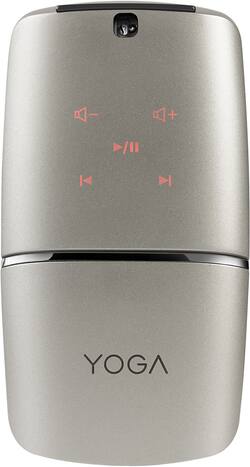
Lenovo - YOGA Wireless Optical Mouse - Silver
- Key Specs
- Maximum Sensitivity: 1600 dots per inch (Mouse sensitivity is measured in dots per inch (DPI). The higher the DPI, the more sensitive the mouse is and may be more useful for high-density pixel screens. Lower DPI typically means more precision and accuracy in mouse movement.)
- Number of Buttons (Total): 4
- General
- Product Name: YOGA Wireless Optical Mouse
- Brand: Lenovo
- Model Number: YOGA MOUSE-SILVER - GX30K69568
- Features
- Mouse Type: Standard
- Performance
- Mouse Operation: Button(s)
- Tracking Method: Optical (There are several types of computer mice, optical and laser being among the most common. Optical mice detect less detail and provide more precise and accurate movement. Laser mice detect more detail and can be used on a wider variety of surfaces, but are more sensitive to small movements.)
- Maximum Sensitivity: 1600 dots per inch (Mouse sensitivity is measured in dots per inch (DPI). The higher the DPI, the more sensitive the mouse is and may be more useful for high-density pixel screens. Lower DPI typically means more precision and accuracy in mouse movement.)
- Number of Buttons (Total): 4
- Connectivity
- Wireless Connectivity: Radio Frequency (RF) (The manner in which a device sends data to another device over a short distance without the use of wires or cables.)
- Operating System Compatibility: Windows
- Power
- Mouse Power Source: Battery-powered
- Rechargeable Battery (Mouse): true
- Charging Interface(s): Micro-USB (The connection for transmitting power to charge the device.)
- Batteries Included: true (Indicates whether the product comes with the required batteries for its operation.)
- Dimensions
- Product Height: 1.19 inches (The out of box height of the item. Height is measured as the vertical distance from the bottom of the item to the top as it would be primarily used or placed.)
- Product Length: 4.33 inches (The out of box length of the item. Length is measured as the longest dimension of the item.)
- Product Width: 2.36 inches (The out of box width of the item. Width is measured as the horizontal distance from one side of the item to the other as it would be primarily used or placed.)
- Product Weight: 2.4 ounces (The out of box weight of the item.)
- Warranty
- Manufacturer's Warranty - Parts: 1 year
- Manufacturer's Warranty - Labor: 1 year
- Other
- UPC: 889955592965
Navigate different interfaces with this Lenovo YOGA mouse. This wireless device provides versatile compatibility with its Bluetooth 4.0 and 2.4GHz Wi-Fi connectivity. Rotate the hinge of this Lenovo YOGA mouse to set it on flat mode and to activate its multilayer adaptive touch pad for controlling projector presentations or A/V playback.
- Optical technology: LED lights scan the surface beneath the mouse to detect movement with a fair amount of accuracy, suitable for everyday computing and browsing.
- Wirelessly connects to your computer: This mouse connects to your computer without using wires via Bluetooth or using a wireless 2.4GHz USB receiver and works up to 10 feet away.
- 4-button design includes Windows button: The Windows button on the mouse can be swiped to navigate apps or browser windows, and it can be clicked to activate the Start menu.
- Adaptive touch display: You can use your mouse as normal and then sit back and control a slideshow or a movie download from a distance.
- Compatible with most versions of Windows: Works with most PCs.
Whats Included
- Dongle
- Lenovo YOGA Wireless Optical Mouse
- Owner's Manual
- Plastic holder to cover Mouse
- USB Charge Cable
A: Yes, you can connect it without using the dongle using Bluetooth. You may need to use the dongle first to install the drivers for the mouse, though. After that, you should be all set.
A: I had the same problem... towards the front of the cover itself there is a small plastic clip that gets bent over. I didn't see it right away because it looked like a small triangle when it was bent down. Pull on this small piece lightly and it will go back on. Just don't bend it too far out or it won't click into place again.
Q: will this mouse work with my hp laptop
A: Yes. This wireless mouse will work with any Windows or Chrome Operating System computer.
A: I had this problem with my Lenovo Yoga mouse. Solution - I returned it and got my money back
A: Just had a geek help with the thumb scan and I'm up to 3 fingers now.
A: undefined
A: Yes. This mouse is capable of working wirelessly with the USB receiver or Bluetooth.
















