A:AnswerGood question! Lively offers a friendly 30-Day Return policy on all products purchased directly through Lively, with a $10.00 restocking fee. If your phone was purchased through Best Buy, please review the Returns & Exchanges section listed at the bottom of the website; https://www.bestbuy.com/site/help-topics/return-exchange-policy.
A:AnswerGreat question! The Jitterbug Flip 2 phone is unlocked per nationwide standards, but we cannot control which carriers choose to accept or activate our phones. Lively phones were specifically designed to work on the Lively network which is powered by the nation’s largest and most dependable wireless network. To enjoy exclusive features that are only available on the Lively network, activate with Lively by phone or on the Lively website. Lively has a variety of plans with data so you can choose the one that works best for you.
A:AnswerThank you for your question! The missed call can be cleared in the main menu under missed calls. Once you tap on the missed call it will allow you the option to clear it. The instructions can also be found in the user guide.
A:AnswerGreat question! Lively phones were specifically designed to work on the Lively network which is powered by the nation’s largest and most reliable wireless network. To enjoy exclusive features that are only available on the Lively network, activate with Lively by phone or on the Lively website. Lively offers a variety of plans so you can choose the one that works best for you.
A:AnswerHello Mabel, the Lively Flip are unlocked, but we cannot control which carriers choose to accept or activate our phones. The Lively Flip was designed to work on the Lively network which is powered by the nation's largest and most dependable wireless network.
A:AnswerHello, thank you for your interest in our Lively Flip phone. Yes, the Lively Flip supports GPS when used in conjunction with our Urgent Response service. For more details on the Lively Flip, please visit the Product Support page of our website.
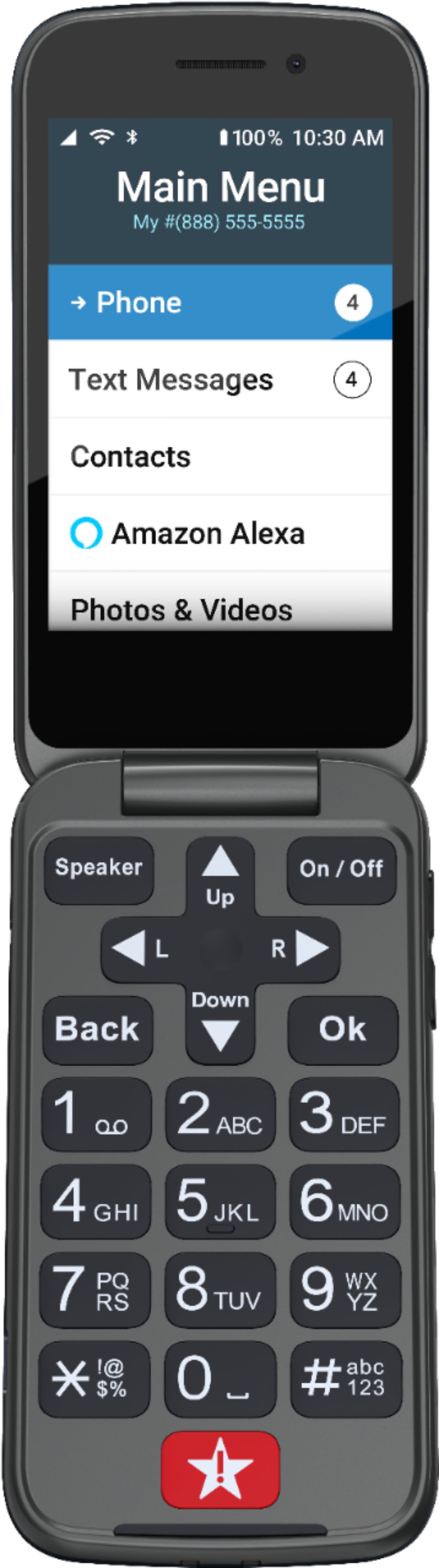
A:AnswerThe Lively Flip phone utilizes the Triple tap method of text messaging or with the Alexa feature fully set-up, you can voice to text. You can find the instructions for text messaging on page 53 and Alexa set-up on page 75 of the user guide.
A:AnswerHi, thank you for your interest in our GreatCall products. All Jitterbug cell phones are unlocked per nationwide standards, but we cannot control which carriers choose to accept or activate our phones, nor do we guarantee our phones are compatible with other networks. Jitterbug phones were specifically designed to work on the GreatCall network which is powered by the nation’s largest and most dependable wireless network. GreatCall’s award winning U.S. based support and 5Star emergency response service is only available on the GreatCall network. GreatCall offers a variety of affordable plans and can be viewed on our website, www.greatcall.com.
A:AnswerHello Bob, We appreciate your feedback. Jitterbug phones were specifically designed to work on the GreatCall network which is powered by the nation’s largest and most dependable wireless network. (Verizon Wireless) Service is based on the coverage in your area.
A:AnswerYes, the Lively Flip comes equipped with Amazon Alexa for voice command ability. We offer a personal operator, that can connect you to any contact on the Lively Flip for a fee of $0.99 per call. You can view details about the Lively Flip on the Product Support page of our website. For any further assistance please contact our Direct Sales Department at 1-866-819-3174, between 6 a.m. and 6 p.m. Pacific Standard Time, seven days a week.
A:AnswerThank you for your interest in our GreatCall products. All Jitterbug cell phones are unlocked per nationwide standards, but we cannot control which carriers choose to accept or activate our phones, nor do we guarantee our phones are compatible with other networks. Jitterbug phones were specifically designed to work on the GreatCall network which is powered by the nation’s largest and most dependable wireless network. GreatCall’s award winning U.S. based support and 5Star emergency response service is only available on the GreatCall network. GreatCall offers a variety of affordable plans for as low as $14.99/month, for the Lively Flip, and can be viewed on our website, www.greatcall.com.
A:AnswerHello, thank you for your interest in our Jitterbug Flip2 phone. The Jitterbug Flip2 supports GPS when used in conjunction with our Urgent Response service. For more details on the Lively Flip, please visit the Product Support page of our website.
A:AnswerYeah, I know about hitting the Back button repeatedly. I was looking for something better. I don't think Lively thought about this when designing the software.
A:AnswerHi bubba, great question! Lively phones were specifically designed to work on the Lively network which is powered by the nation’s largest and most reliable wireless network. Your Lively Flip will come with a charger and all of the components needed to get started with service. To enjoy exclusive features that are only available on the Lively network, activate with Lively by phone or on the Lively website. Lively has a variety of plans so you can choose the one that works best for you.
A:AnswerGreat question! The Lively Flip Phone runs off 4G LTE only. Lively phones were specifically designed to work on the Lively network which is powered by the nation’s most reliable wireless network. To enjoy exclusive features that are only available on the Lively network, activate with Lively by phone or on the Lively website. Lively has a variety of plans so you can choose the one that works best for you.